Online appointment booking software
Online Appointment Booking Software
Your clients book themselves, from a link, at whatever hour they happen to think of it. You see the appointment in the diary the moment it lands — no call to answer, no message to reply to, no slot written down twice.
- A booking page that is open at 11pm and on a Sunday
- Only real gaps are offered, so nothing is double booked
- A deposit on the card before the time is held
- Confirmations and reminders sent without you writing them
Free for 7 daysNo credit card todayThen US$49.99/month, cancel anytime






Owners who stopped taking appointments between clients. Read what changed for them
24/7bookings, with
nobody at the desk
nobody at the desk
Live Kevonia walkthrough
Booking page liveTaking appointments right now
Hair salons Barbershops Beauty salons Nail salons Day spas Tattoo studios Estheticians Massage therapists Lash and brow studios Barber chairs and suites Mobile professionals Wellness clinics Studios of one
NOT A SCREENSHOT
Try before you buy — no signup required.
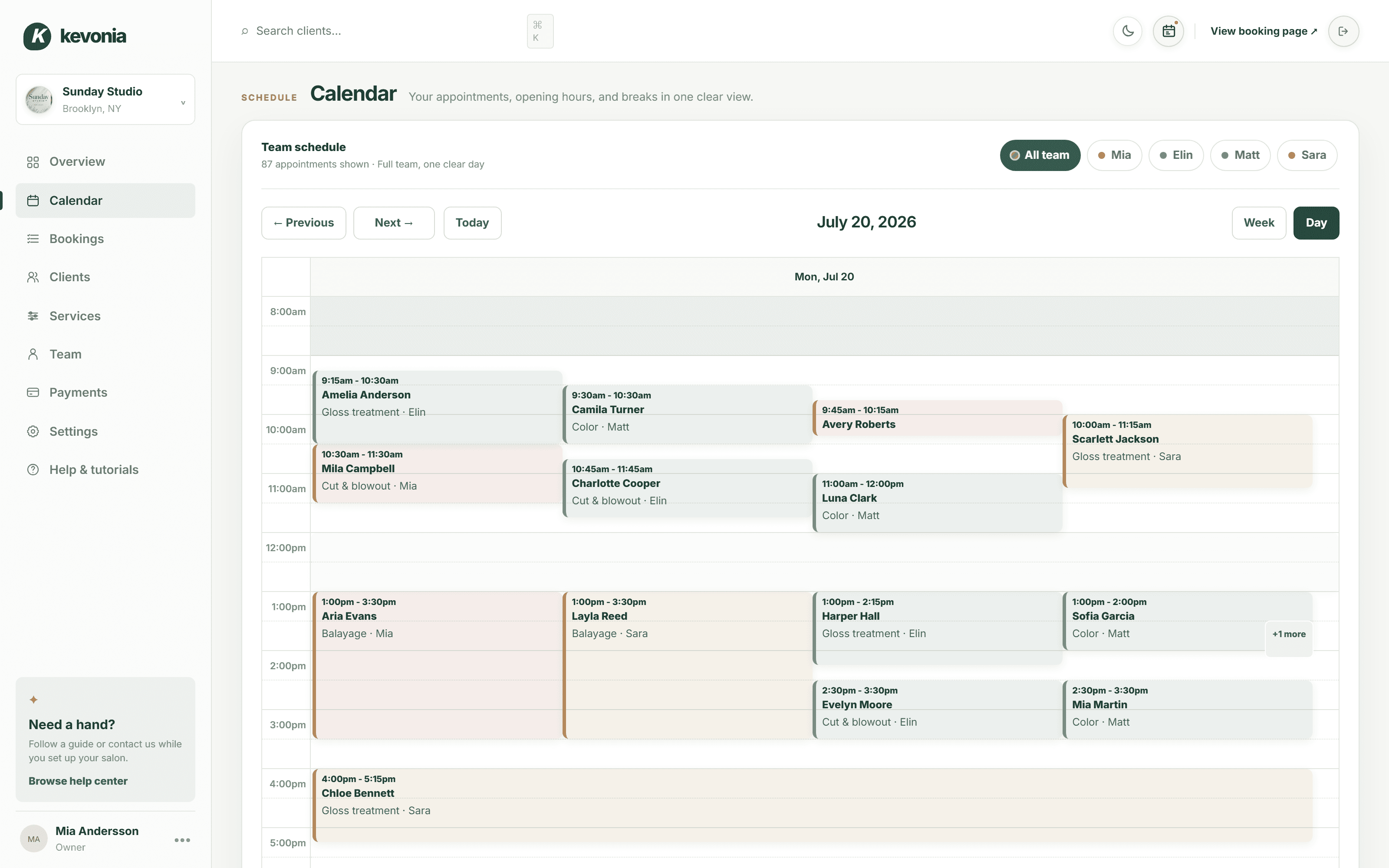
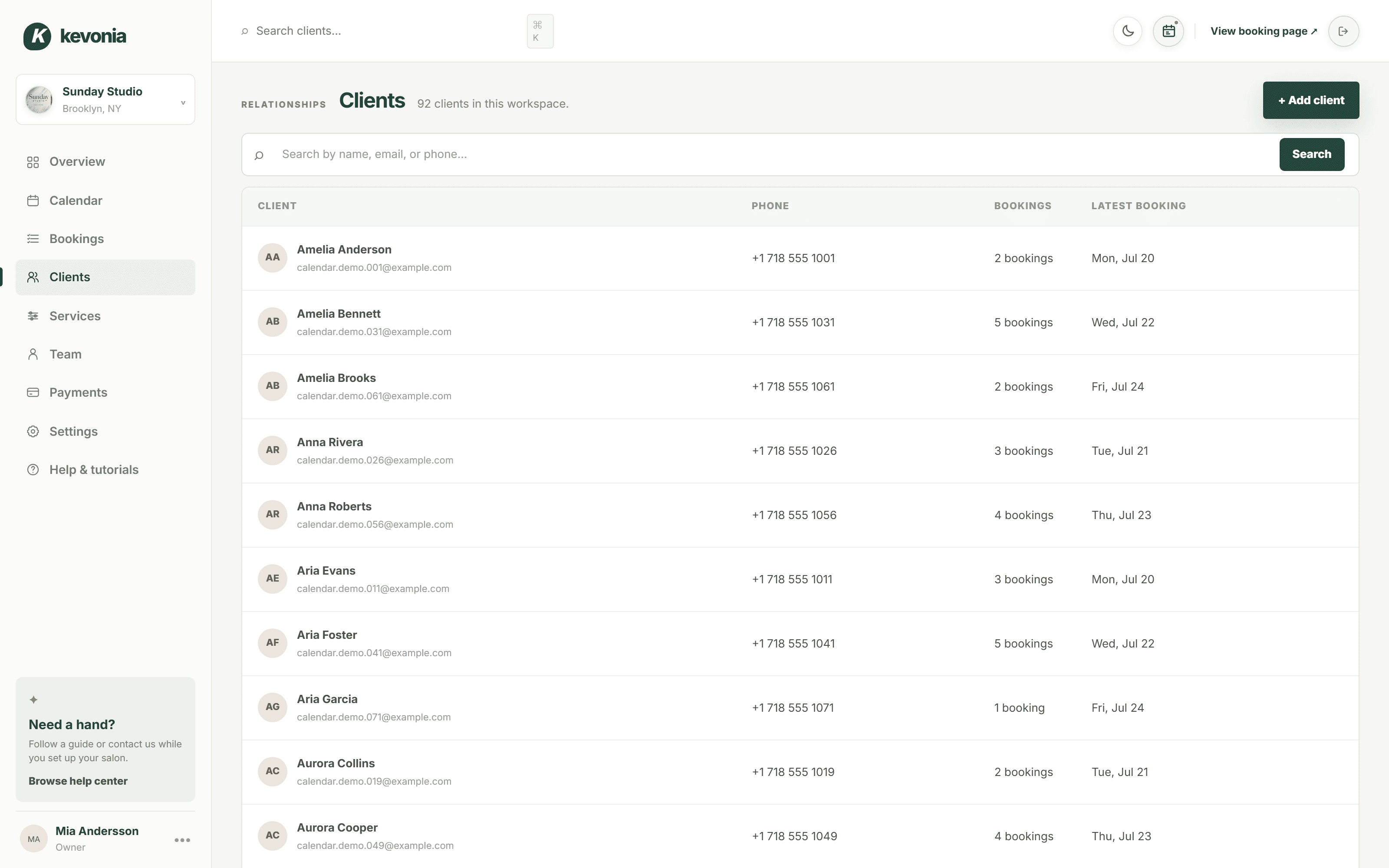
The calendar, the client list, the service menu, the payouts — the same screens a salon owner opens every morning, filled with Sunday Studio's day. On a computer, the menu switches between them.
Open the full demo workspace →kevonia.com/dashboardCLICK THE MENU TO EXPLORELIVE PREVIEW
K kevonia

Sunday StudioBrooklyn, NY
✦Need help?
Follow a guide or contact us while you set up your salon.
Browse help centerMA
Mia AnderssonOwner
•••Sunday Studio demo · Explore every section with protected example data.Create your own workspace →
MONDAY, JULY 20
Good afternoon, Sunday Studio
Here's what's happening at your salon today.kevonia.com/sunday-studioShare booking URL+ New booking
Today's revenue
↗Appointments
▣Total clients
♟No-shows
◷Revenue, last 30 days$31,670 collected across 25 trading days
BEST DAY
$2,070Jul 3- Jun 24 · $496.80
- Jun 25 · $1076.40
- Jun 26 · $621.00
- Jun 27 · $1614.60
- Jun 28 · $1159.20
- Jun 30 · $1179.90
- Jul 1 · $372.60
- Jul 2 · $1097.10
- Jul 3 · $683.10
- Jul 4 · $1138.50
- Jul 6 · $1283.40
- Jul 7 · $558.90
- Jul 8 · $910.80
- Jul 9 · $641.70
- Jul 10 · $1573.20
- Jul 11 · $1200.60
- Jul 13 · $1242.00
- Jul 14 · $538.20
- Jul 15 · $1055.70
- Jul 16 · $434.70
- Jul 17 · $1697.40
- Jul 18 · $1635.30
- Jul 19 · $931.50
- Jul 20 · $331.20
Today's schedule14 appointments · 4 team members
- AAAmelia AndersonGloss treatment · 75 min
WITHElin
Confirmed••• - CTCamila TurnerColor · 60 min
WITHMatt
Confirmed••• - ARAvery RobertsColor consultation · 30 min
WITHMia
Confirmed••• - SJScarlett JacksonGloss treatment · 75 min
WITHSara
Confirmed••• - MCMila CampbellCut & blowout · 60 min
WITHMia
Confirmed•••
Team todayLive schedule
- Mia3 appointments
- Elin4 appointments
- Matt4 appointments
- Sara3 appointments




PAYMENTSPayments are activeClient payments are ready.
THE SAME SALON, FROM THE OTHER SIDE
And this is what your clients see.
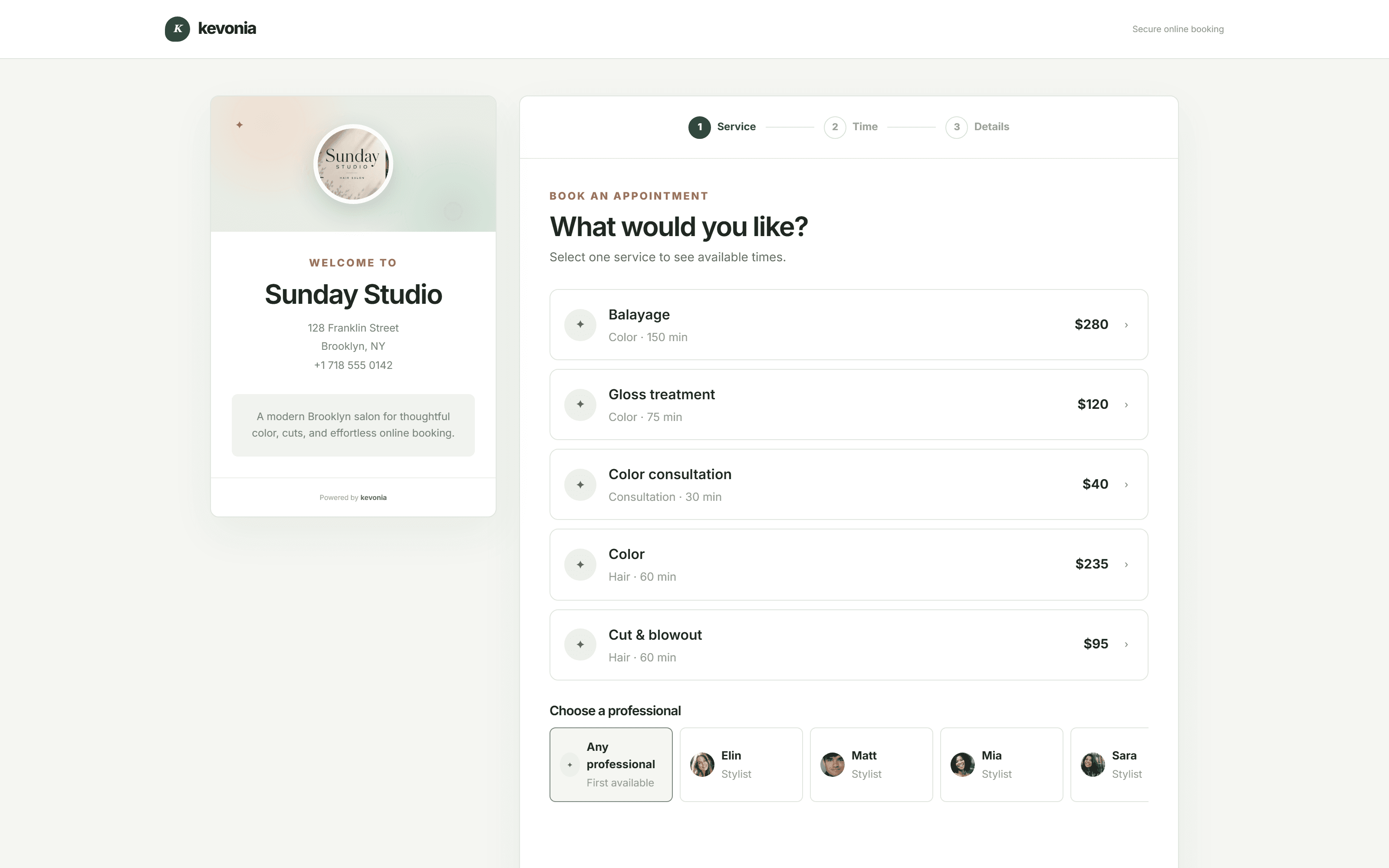
The page Sunday Studio shares from its Instagram bio, live on this one. Every salon gets the same one at kevonia.com/your-salon, with its own name, photo, service menu and team — and clients book from it without an account.
Open the booking page →This is your own salon, fifteen minutes from now.Free for 7 days. No credit card, and no commission on your bookings.
Start free for 7 days →THE APPOINTMENT NOBODY HAD TO TAKE.
Most appointments are decided at an hour when nobody is there to write them down.
A client remembers on the bus home, or after the children are in bed, or halfway through a Sunday. If the only way to book is a phone that rings out or a message you answer tomorrow, a few of those clients book somewhere else instead. Online appointment booking software is a way of being open at that moment: a link that shows the times you actually have free, takes the booking, holds it with a deposit if you want one, and writes it into the same diary your team is working from.
ONE BOOKING, START TO FINISH
Watch one arrive without anybody answering a phone.
Under thirty seconds: a client choosing a service on their phone, the deposit going through, and the appointment appearing in the diary while the desk is busy with somebody else.
Try the booking page yourself →A client booking online, and the appointment arriving28 SEC
OPEN 24 HOURS
01
THE LINK · 10 SEC
They tap the link
From your Instagram bio, your Google listing or a text message.
02
THE TIMES · 11 SEC
They see real gaps
Only times that are genuinely free, for the person they chose.
03
THE DEPOSIT · 09 SEC
They pay to hold it
Card details taken by Stripe before the slot is theirs.
04
THE DIARY · 11 SEC
It is simply there
In the diary, on every screen, with the client record attached.
Want a booking link of your own by tonight?Seven days, everything working, no card taken.
Put your own link out there →BOTH SIDES OF ONE BOOKING
What the client uses, and what you get.
The booking page, the diary it writes into, the menu the times are built from and the money it collects.
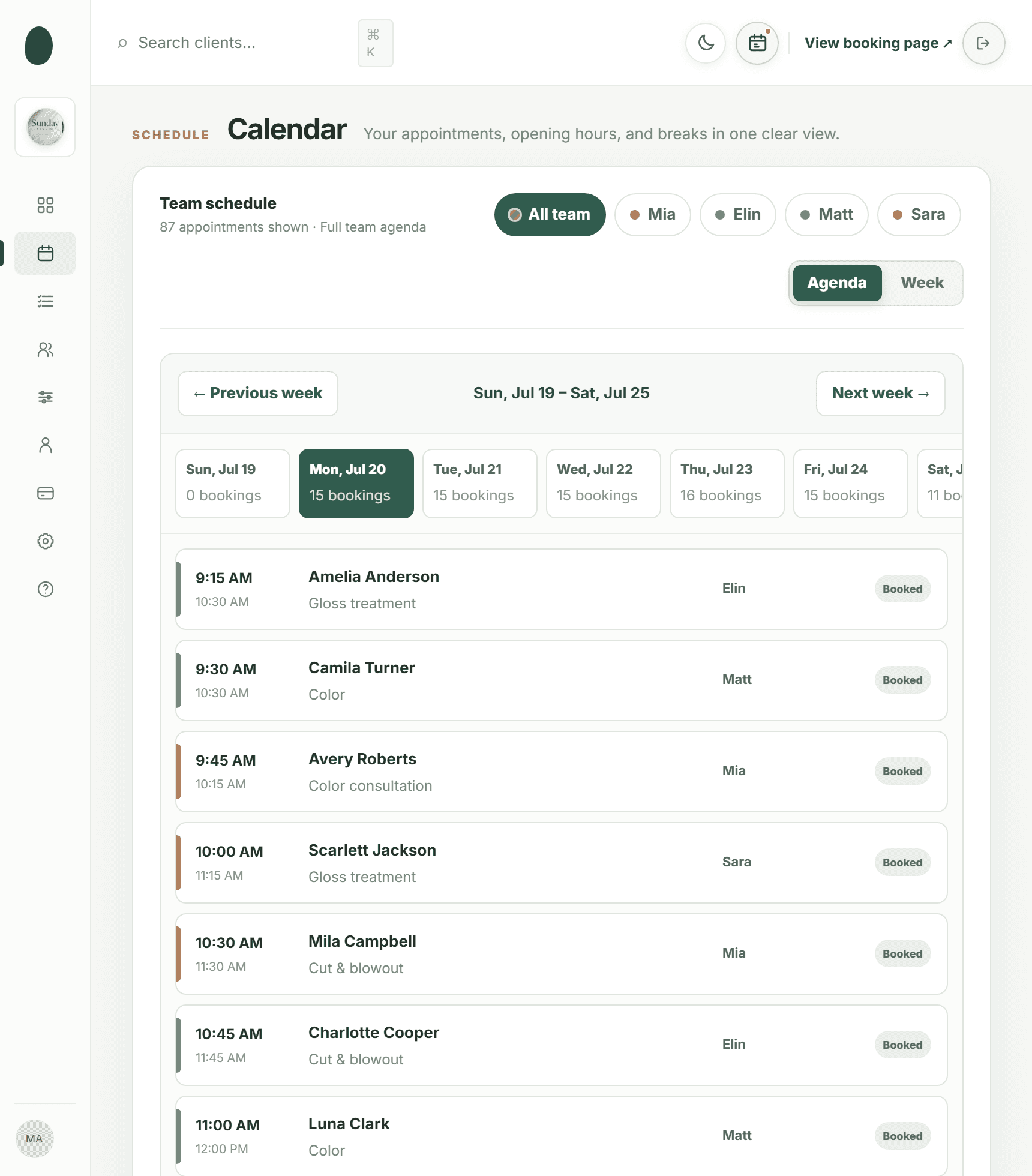
01 · Where it lands
Calendar
Online bookings drop straight into the team diary.
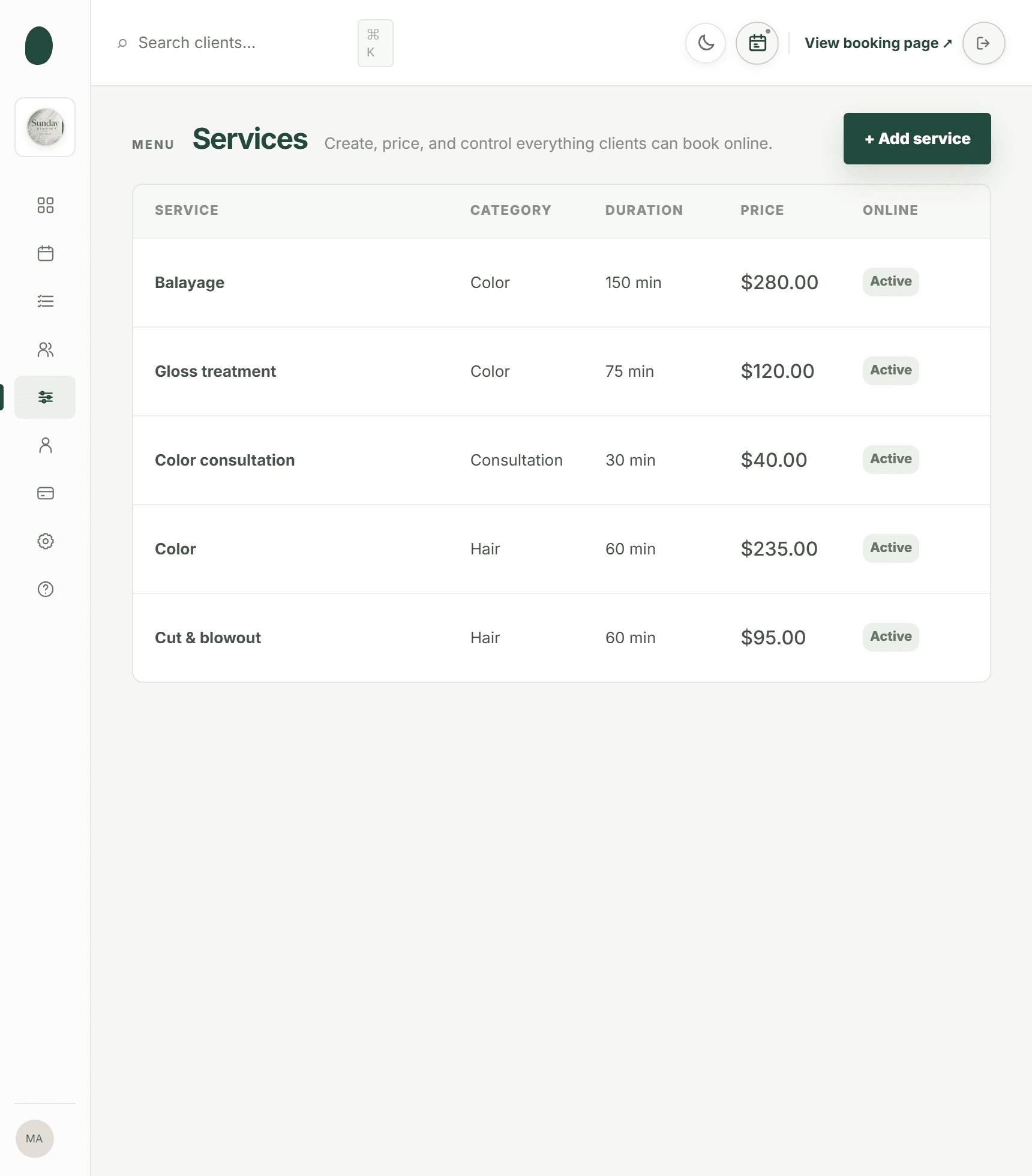
02 · What they choose
Services
Your menu, with the durations the times are built on.
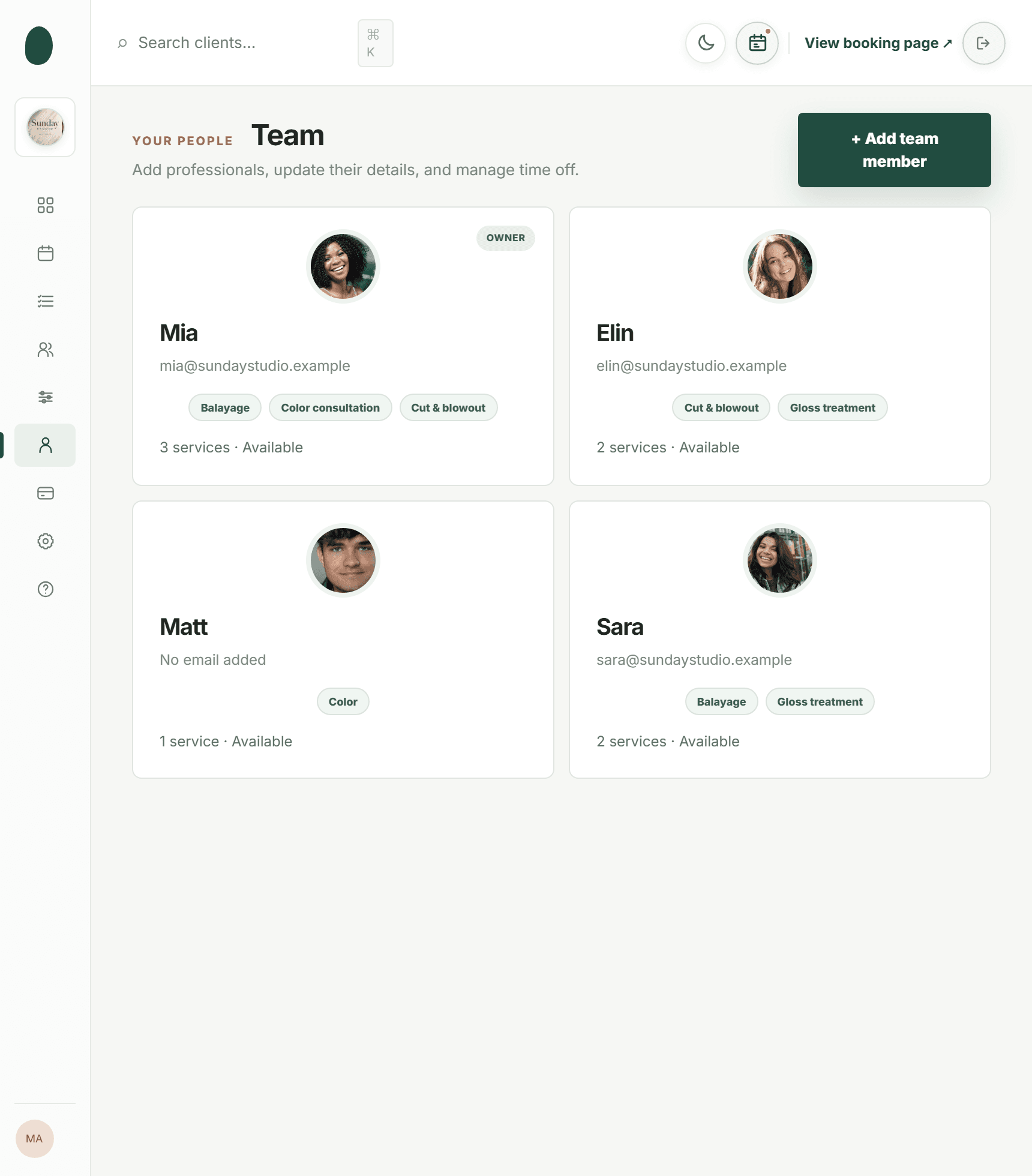
03 · Who they pick
Team
Hours and services per person, so the gaps are true.
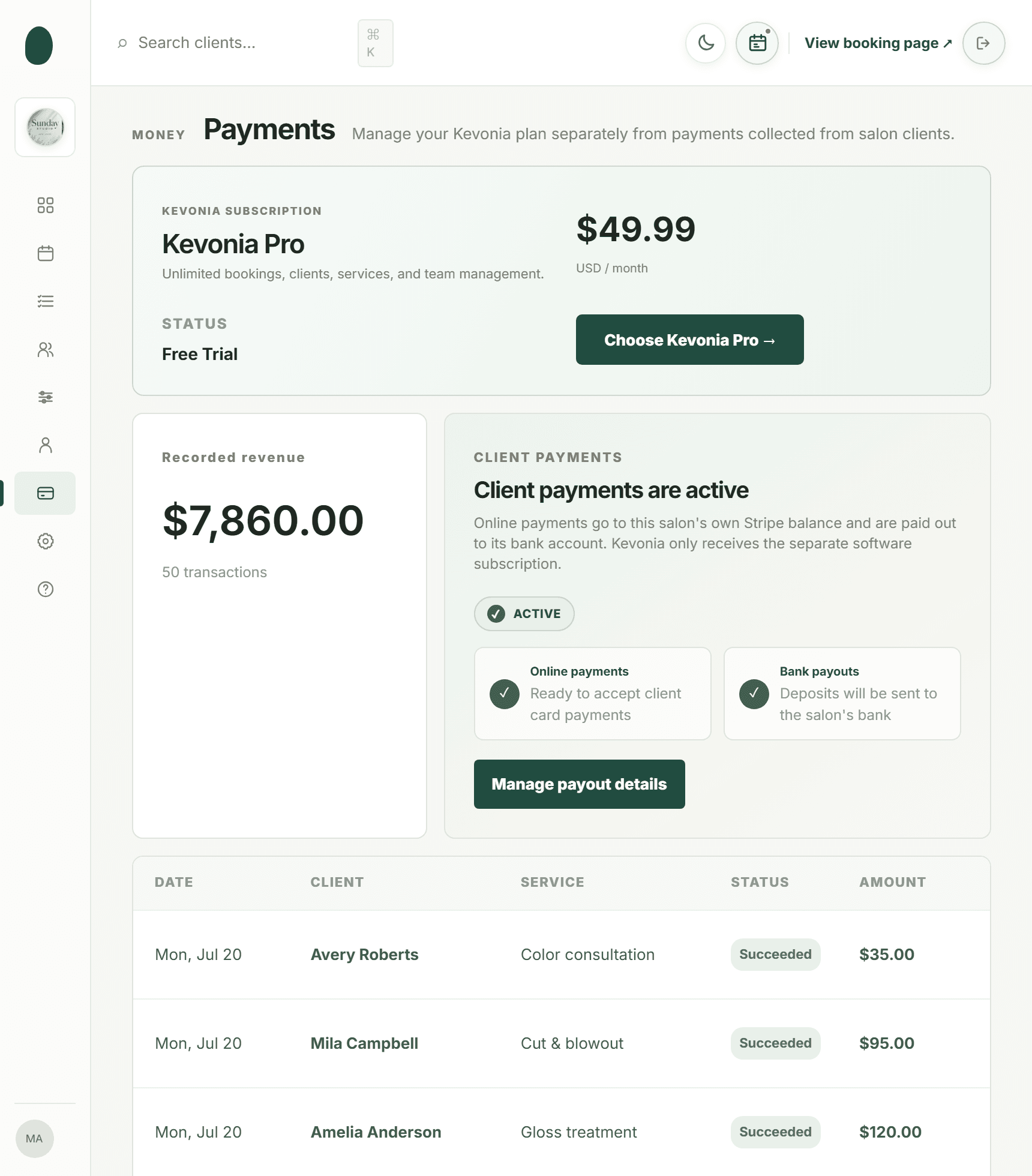
04 · What it collects
Payments
Deposits and payments, paid out to your own account.
01 · OPEN WHEN YOU ARE NOT
A link that takes appointments at two in the morning.
Put it in your Instagram bio, on your Google Business Profile, in your website menu and at the bottom of your texts. It is the same page everywhere, and it works the same at midnight as it does at midday.
- One address to share: kevonia.com/your-salon
- Built for a phone screen before a desktop
- Switch it off for a week without deleting anything
app.kevonia.com
02 · REAL TIMES ONLY
It offers the gaps you have, not the gaps you might have.
Every time on the page is worked out from the live diary: who is in that day, how long the service takes, the cleanup after it, the break at two, and the appointment somebody booked ninety seconds ago. A slot disappears the moment it is taken.
- Working hours, breaks and time off all respected
- Cleanup time added after the service, not guessed
- Two clients cannot take the same slot
app.kevonia.com
03 · AFTER THEY BOOK
The confirming, reminding and rescheduling happen without you.
A confirmation goes out immediately and a reminder the day before. If something changes, the client moves or cancels the appointment from their own email, inside the notice period you set — and you are told the moment they do.
- Confirmation and 24-hour reminder sent automatically
- Clients reschedule themselves without messaging you
- A cancellation frees the slot for somebody else at once
app.kevonia.com
WHAT MAKES IT WORK
Everything the booking link needs behind it.
A page that takes appointments is only as good as the diary, the menu and the rules underneath it — so all of that is included rather than sold as a module.
Your own booking address
A page on your business name that you can hand out anywhere: bio link, Google listing, website button, text message, printed card.
Availability from the real diary
Times are calculated from working hours, breaks, holidays, service length and what is already booked — not from a fixed template of the week.
Deposits taken up front
Ask for a deposit on the services where a no-show costs you most. Stripe handles the card; the money is paid out in your own name.
Confirmations and reminders
Sent the moment a booking is made and again the day before, so nobody arrives on the wrong day and fewer people forget entirely.
A client list that builds itself
Every online booking leaves a record: contact details, visit history, and private notes only your team can see.
Rules you decide
How far ahead clients may book, how much notice a cancellation needs, what interval the times run on, and which services are bookable online at all.
No double bookings
Bookings are written one at a time against a single diary, so two clients booking in the same minute cannot both end up in the same chair.
ONE FEE, THE WHOLE THING
What Kevonia Business gives you.
No booking-page add-on, no charge per appointment, no upgrade to take payments. Everything listed works from the first minute of the trial.
The booking page
The part your clients see.
- kevonia.com/your-salon as your own address
- Your image, description, address and hours
- Service, then person, then date, then time
- Only genuinely free times offered
- Designed for a phone screen first
- Turn online booking off whenever you like
The diary behind it
Where every booking lands.
- One view for the week, one for the day
- Narrow it to a single person
- A colour for each member of the team
- Enter, revise, move or release it in the grid
- Clashes refused before they save
- Notes kept on the booking itself
The service menu
What the times are built from.
- As many services as your list actually has
- Duration plus cleanup time after each one
- A price each, and a deposit where you want one
- Assigned to the people who perform them
- Hide a service from online booking
- The description a client reads before choosing
People and hours
So the gaps are honest.
- Unlimited team members on the same fee
- Working hours set per weekday, per person
- Named breaks inside a shift
- Time off, holidays and whole closures
- A service list per person
- A photo, a colour, an email, a phone number
Payments and deposits
Collected as they book.
- Cards handled by Stripe, never by us
- Deposits on the services you choose
- Payment status shown on every booking
- A full history of transactions
- Paid out to a bank account in your name
- Refunds issued from the booking itself
Client emails
Written and sent for you.
- Confirmation the moment they book
- A reminder twenty-four hours before
- They reschedule from their own email
- They cancel inside the window you set
- You are told the second either happens
- Refund confirmations sent automatically
Client records
Built by the bookings themselves.
- No limit on how many you keep
- Search by part of a name, an email or a number
- Visit count and last visit date
- Private notes only your team sees
- Still fast when the list gets long
- Details carried onto every booking
Booking rules
Set once, applied to everyone.
- How far forward the page will take bookings
- How much notice a cancellation needs
- The interval the offered times run on
- Region, currency and the business profile
- Cancelled bookings archived, not erased
- A bright theme and a dark one
Setup and help
Nothing technical at any point.
- A checklist that starts on first sign-in
- Searchable help articles and walkthroughs
- Google or email, with no separate account system
- A ready-made demo business to open first
- Nothing gated for the length of the trial
- No setup fee and no contract
PHONE AND MESSAGES VERSUS A LINK
What taking bookings by hand actually costs.
Rarely the software you did not buy. Usually the call that came while your hands were in somebody's hair, the message answered too late, and the slot that stayed empty because nobody could reach you.
The momentBy phone and messageWith Kevonia
A client decides at 11pmThey leave a message, or they do notThey book, and the slot is theirs
The phone rings mid-appointmentSomebody stops what they are doingThere is no call to take
Finding a time that suitsThree messages back and forthThey read the real gaps themselves
Two people want the same slotWritten down twice, sorted out laterThe second one never sees it free
A no-showAn empty hour and nothing to show for itA deposit already taken on the card
Reminding peopleA text somebody has to remember to sendSent automatically the day before
A client needs to moveThey ring during your busiest hourThey reschedule from their own email
WHAT IT COSTS TO RUN
US$49.99 a month, whatever the diary does.
There is no commission on an appointment, no fee for the booking page, and no extra charge when a busy month puts twice as many bookings through it. One flat price — and the deposits are paid to your account rather than ours.
IF YOU WORK BY APPOINTMENT
The trade changes. The booking problem does not.
A cut, a facial, a massage, a tattoo sitting or a consultation — each one is somebody choosing a person, a service and an hour. Set your own services, durations, prices, deposits and opening hours, and the same booking page fits whatever you happen to do.
Set it up your way01Hair salons↗02Barbershops↗03Beauty salons↗04Nail salons↗05Day spas↗06Tattoo studios↗07Estheticians↗08Massage therapists↗09Lash and brow studios↗10Barber chairs and suites↗11Mobile professionals↗12Wellness clinics↗13Studios of one↗
THREE STEPS TO A LIVE LINK
From signing up to your first online booking, this afternoon.
Nothing to install, nobody technical needed, and nothing to undo if you decide against it.
Sign in
With Google or an email address. No card is asked for and nothing is downloaded.
Put your salon in
Services and durations, your people, and the hours everyone actually works — that is what the free times are built from.
Share the link
Instagram bio, Google Business Profile, website button, text signature. The first booking often arrives the same evening.
BUSINESSES TAKING BOOKINGS ONLINE
The change most owners notice first is the quiet.
The phone stops interrupting the appointment in the chair, because the appointments are arriving on their own.
We've been using Kevonia for several months and it has completely changed how we manage appointments. Our clients love how easy it is to book online, and we save hours every single week.
Emily Carter
By far the best salon booking software we've used. It saves us time every day, and the online booking process has increased the number of appointments we get.
David Thompson
The automatic reminders have significantly reduced our no-shows, and scheduling has never been easier. It's simple, reliable, and our clients constantly compliment the booking experience.
Ashley Brooks
I was surprised by how easy it was to get started. Within a single day our entire salon was set up and running smoothly. The interface is clean, modern and genuinely easy to use.
Jessica Miller
Managing multiple stylists used to be a challenge, but this keeps everyone's schedule organised. It helps us stay more efficient while giving our clients a better experience.
Michael Johnson
Excellent software with outstanding support. Our clients appreciate being able to book anytime, and we appreciate having everything in one place. I'd recommend it to any salon owner.
James Wilson
Start your free weekNo credit card today · US$49.99/month after · Cancel anytime
ONE PLAN. NO COMMISSION.
A week free, then one price however busy you get.
Everything works for seven days and no card is taken to start. After that it is a flat monthly fee — never a percentage of what your clients pay you.
- No card required to begin
- No commission on any booking
- Your client list is yours and can be taken with you
KEVONIA BUSINESSUS$49.99/month
7 DAYS FREE- A booking page on your own link
- Unlimited online bookings, no fee each
- Availability drawn from the live diary
- Deposits and card payments via Stripe
- Automatic confirmations and reminders
- Clients reschedule and cancel themselves
- Unlimited team members, clients and services
- Breaks, time off and whole closures
- Booking horizon and cancellation notice rules
- Searchable help, walkthroughs and a dark theme
No credit card today. Cancel before your trial ends and you are never charged.
Live the same afternoon
Services, people and hours are the whole of setup, and none of it needs anybody technical. Most owners hand out their booking link before the day is over.
The money comes to you
Deposits and payments go through Stripe into an account in your own name. We never hold your takings and never take a cut of them.
Nothing to lose by trying
Seven days, no card, nothing installed. If it is not for you, stop signing in — your client list can be taken with you either way.
THE SAME THING, OTHER WORDS
Looking for it under a different name?
Some owners go looking for a reservation system, some for a booking program, some for scheduling software. These pages cover the same workspace from those angles.
Or go straight to the demoCOMMON QUESTIONS
What owners ask before putting a booking link out.
Rather see it than read about it? Open the live demo workspace and book an appointment in it yourself.
What is online appointment booking software?+
It is software that gives your business a page clients can book on themselves, and a diary behind that page for you to work from. The page offers only the times you genuinely have free, takes the appointment, and writes it into the diary your whole team is looking at.
Do I need a website for it?+
No. The booking page is your own address on kevonia.com and works on its own, so an Instagram bio or a Google Business Profile is enough. If you do have a website, it is one link to add to the menu.
How does it know when I am free?+
From the diary. It uses each person's working hours, their breaks and time off, how long the chosen service takes, the cleanup after it, and every appointment already booked. A slot vanishes as soon as somebody takes it.
Can two clients book the same slot?+
No. Bookings are written one at a time against a single diary, so the second person is told the time has gone rather than being handed the same slot.
Can I take a deposit when they book?+
Yes, on whichever services you choose. Card details are handled by Stripe, and the money is paid out to a bank account in your own name.
What stops people forgetting?+
A confirmation email goes out the moment they book and a reminder twenty-four hours before the appointment. Both are written and sent for you.
Can clients change or cancel their own appointment?+
Yes, from the email they were sent, as long as they are inside the notice period you set. You are told immediately, and the freed time goes straight back onto the booking page.
Do I still control what gets booked?+
Entirely. You decide which services appear online, how far ahead people can book, how much notice a cancellation needs, and you can switch online booking off altogether at any point.
Is there a fee per booking?+
No. One flat price covers unlimited bookings, clients, services and team members, so a busy month costs the same as a quiet one.
Can I still add bookings myself?+
Yes. Anything taken at the desk, over the phone or in a message goes into the same diary, and the booking page updates around it immediately.
What happens at the end of the trial?+
Nothing is charged during the seven days and no card is needed to start. Afterwards it is US$49.99 a month, cancellable from your billing settings at any point.
From the blog
Running a salon, written down

Comparison
DaySmart Salon Alternative: Compare Cost, Control, and Fit
DaySmart Salon is capable, but its tiered pricing and broad feature set are not right for every salon. Compare the practical trade-offs before switching.
·12 min read

Comparison
PocketSuite Alternative: The Better Fit for Salon Teams
Looking for a PocketSuite alternative? Compare PocketSuite and Kevonia on pricing, payment fees, salon workflows, team scheduling, and booking limits.
·11 min read

Comparison
Using Google Calendar for Salon Bookings: Where It Works and Where It Breaks
Google Calendar can handle simple appointment scheduling, but salons often outgrow it when they need services, staff rules, deposits, reminders, and client records in one place.
·12 min read

Comparison
Schedulicity Alternative: A Better Fit for Growing Salons
Looking for a Schedulicity alternative? Compare the two systems by pricing clarity, booking control, team calendars, payments, client records, and switching risk.
·12 min read
YOUR LINK IS WAITING.
Share one link.
Stop taking calls.
Seven days of the complete workspace and a live booking page, every feature working, no card taken and nothing to install.
No charge today · US$49.99/month after your trial · Cancel anytime