Using Google Calendar for Salon Bookings: Where It Works and Where It Breaks
Google Calendar can handle simple appointment scheduling, but salons often outgrow it when they need services, staff rules, deposits, reminders, and client records in one place.

Key takeaways
- Google Calendar is a reasonable starting point for one provider with a small, simple service menu.
- Appointment Schedules—not the retired appointment-slots feature—are the correct Google workflow in 2026.
- The difficult part is not creating a booking link; it is managing staff availability, buffers, deposits, cancellations, and client history without extra work.
- Kevonia combines a branded booking page with salon-specific calendars, availability rules, client records, payments, reminders, and unlimited team members for US$49.99/month.
- Test the complete client journey before switching: service selection, professional selection, notice periods, deposits, rescheduling, cancellations, and no-shows.
| Tool | Starting price | Commission or booking fees | Standout features |
|---|---|---|---|
| Google Calendar | No-cost personal account or eligible Workspace account; premium features depend on subscription | Google does not state a separate booking commission in the cited appointment documentation; Stripe-connected payments are available on eligible plans | Appointment Schedules, shareable booking page, availability windows, buffers, custom questions, and calendar conflict checking |
| Kevonia | US$49.99/month; 14-day free trial | 0% booking commission; no per-seat charge | Branded salon booking page, team calendar, service and availability rules, client records, Stripe payments, reminders, and booking statuses |
Is Google Calendar enough for salon bookings?
If you searched for using google calendar for salon bookings, you probably want a practical answer rather than another explanation of calendar basics: can clients choose a service, pick a professional, pay a deposit, receive reminders, and book without creating chaos for the front desk?
The short answer is that Google Calendar can work for a solo stylist, barber, massage therapist, or other provider with a small number of appointment types. It becomes a weaker fit when your salon has several professionals, different service durations, cleanup time, deposits, staff breaks, client notes, or a need to see booking performance. In that situation, a salon booking system usually removes more manual work than a general calendar does.
What Google Calendar actually gives you
Google Calendar’s current customer-booking workflow is called Appointment Schedules. Google retired the creation of new appointment slots in August 2024, so older instructions that tell you to use appointment slots are no longer the right setup for a new salon booking page. Appointment Schedules lets you define a duration, weekly availability, a scheduling window, minimum lead time, buffer time, maximum bookings per day, custom questions, and a shareable booking page.
A personal Google Account or Google Workspace Business Starter account can create one booking page. Google’s premium comparison explains that eligible paid subscriptions add capabilities such as multiple appointment schedules, automatic email reminders, checking availability across multiple calendars, payment collection, and email verification for booking requests. The exact capabilities depend on the Google subscription, so do not assume that a feature shown in a tutorial is included with the account you already have.
- A shareable booking page for one appointment type on eligible basic accounts.
- Custom appointment duration and recurring availability.
- A minimum lead time and maximum advance-booking window.
- Buffer time between appointments and a daily booking limit.
- Custom questions on the booking form.
- Conflict checking against selected calendars.
- Payment collection through Stripe on eligible plans.
- Automatic email reminders and email verification on eligible plans.
That is enough for a straightforward example: one independent nail technician offers 60-minute manicures, works Tuesday through Saturday, takes a 30-minute lunch break, and wants clients to request available times. Google Calendar can publish that availability and place accepted bookings on the calendar. It is a useful low-complexity arrangement, especially if the provider already lives in Gmail and Calendar.
Where Google Calendar starts to strain a real salon
The main limitation is not that Google Calendar cannot show availability. It is that a salon appointment is usually more than a block of time. A 90-minute balayage may require a particular stylist, a consultation note, a processing interval, a cleanup buffer, a deposit, and a client record. If those details are managed in separate documents, messages, or calendar-event descriptions, the booking process can still be technically functional while becoming operationally fragile.
Google’s own setup instructions describe appointment schedules around the person whose calendar is being booked. Co-host calendars can be included, but Google notes that co-host availability is not automatically checked unless the relevant calendars are selected. That matters in a salon: adding a second professional to a booking setup is not the same as giving clients a service menu from which they can choose the right professional and have every staff member’s working rules applied consistently.
- Multiple professionals with different hours, breaks, holidays, and time off.
- Services that need different durations, cleanup periods, prices, or deposits.
- Clients who need to choose service first and then see suitable professionals.
- A shared front-desk view with clear statuses such as booked, checked in, completed, or no-show.
- Private client notes and visit history that should not be buried in calendar descriptions.
- A reliable workflow for refunds, cancellation history, blocked clients, and repeat no-shows.
- Owner reporting that separates today’s revenue, client growth, appointment volume, and no-show trends.
This is the edge case many simple setup articles skip: a booking page can prevent two people from choosing the same visible slot while still failing to protect the appointment operationally. For example, if one stylist needs 15 minutes of cleanup after a color service, another stylist has a different break pattern, and the salon closes early next Friday, the booking rules must account for all three facts. Otherwise, staff still have to repair the calendar manually after clients book. We cover this in more depth in prevent the appointment operationally.
Google Calendar versus salon booking software
A general calendar is strongest when the appointment itself is simple. Salon software is stronger when the business needs a controlled path from service selection to payment, staff assignment, reminders, attendance, and reporting. The right choice depends less on whether you can create a booking page and more on how many exceptions your team handles every week.
For a solo provider, Google Calendar may be sufficient if the menu is short, clients do not need to choose among several professionals, and payments are handled elsewhere. For a growing salon, a google calendar booking system salon owners can operate every day needs more than availability: it needs service-level rules, staff-level rules, and a shared record of what happened before and after each appointment.
Google Calendar’s advantage is familiarity. Clients can receive a standard booking page, appointments appear in Calendar, and the owner may not need to learn an unfamiliar calendar interface. Its trade-off is that the salon must decide how to represent services, staff, buffers, deposits, notes, and statuses within a tool primarily designed for general scheduling.
A dedicated system also makes the client-facing path more specific. Instead of presenting a generic time-booking page, it can guide a customer through the salon’s actual choices: service, professional, date, and time. That distinction reduces the chance that a client books a convenient slot that is unavailable for the selected service or unsuitable for the professional they intended to see.
- Choose Google Calendar when you are a solo provider or very small team with simple, repeatable appointments.
- Choose salon software when staff availability differs, services need buffers, or deposits are part of normal booking.
- Choose salon software when client history and private notes need to be available at the appointment.
- Choose salon software when the owner wants booking statuses, no-show handling, refunds, and operating reports in one workspace.
Google Calendar booking costs and fees compared
Google does not present Appointment Schedules as a separate salon product with one universal monthly price. A personal Google Account or Workspace Business Starter account can provide one booking page, while premium appointment features depend on an eligible Google Workspace or Google One subscription. Google also documents Stripe-connected payment collection for eligible plans, but its appointment documentation does not state a separate Google booking commission. Treat the subscription and any payment-provider terms as separate questions when calculating your real cost.
Kevonia takes a simpler software-pricing approach: one plan at US$49.99 per month, with unlimited team members, bookings, clients, and services. There is no per-booking commission and no per-seat charge. The trial is free for 14 days, no credit card is required to start, and canceling before the trial ends means you are never charged.
The comparison is therefore not simply free versus paid. It is general scheduling versus a salon workspace. Google Calendar may cost little if your requirements are basic and you already have the necessary account. Kevonia has a predictable monthly price if you want the booking page, team calendar, client records, service menu, availability rules, and Stripe payments designed around salon operations.
- Google Calendar: basic booking-page access may be available through a personal account or Business Starter; premium capabilities depend on the subscription.
- Google Calendar payments: Stripe connection is available for eligible plans; Google’s cited documentation does not state a separate booking commission.
- Kevonia: US$49.99/month for one plan, with 0% booking commission and no per-seat pricing.
- Kevonia trial: 14 days free, no credit card required to start, and no charge if canceled before the trial ends.
For a small salon, compare the hidden cost as well as the subscription. Count the time spent answering “which stylist should I choose?”, correcting appointments with the wrong duration, checking whether a break was included, collecting deposits manually, locating a client’s previous notes, and following up after a no-show. Those tasks may make a basic calendar less inexpensive than it first appears.
Where Kevonia fits for salon and spa teams
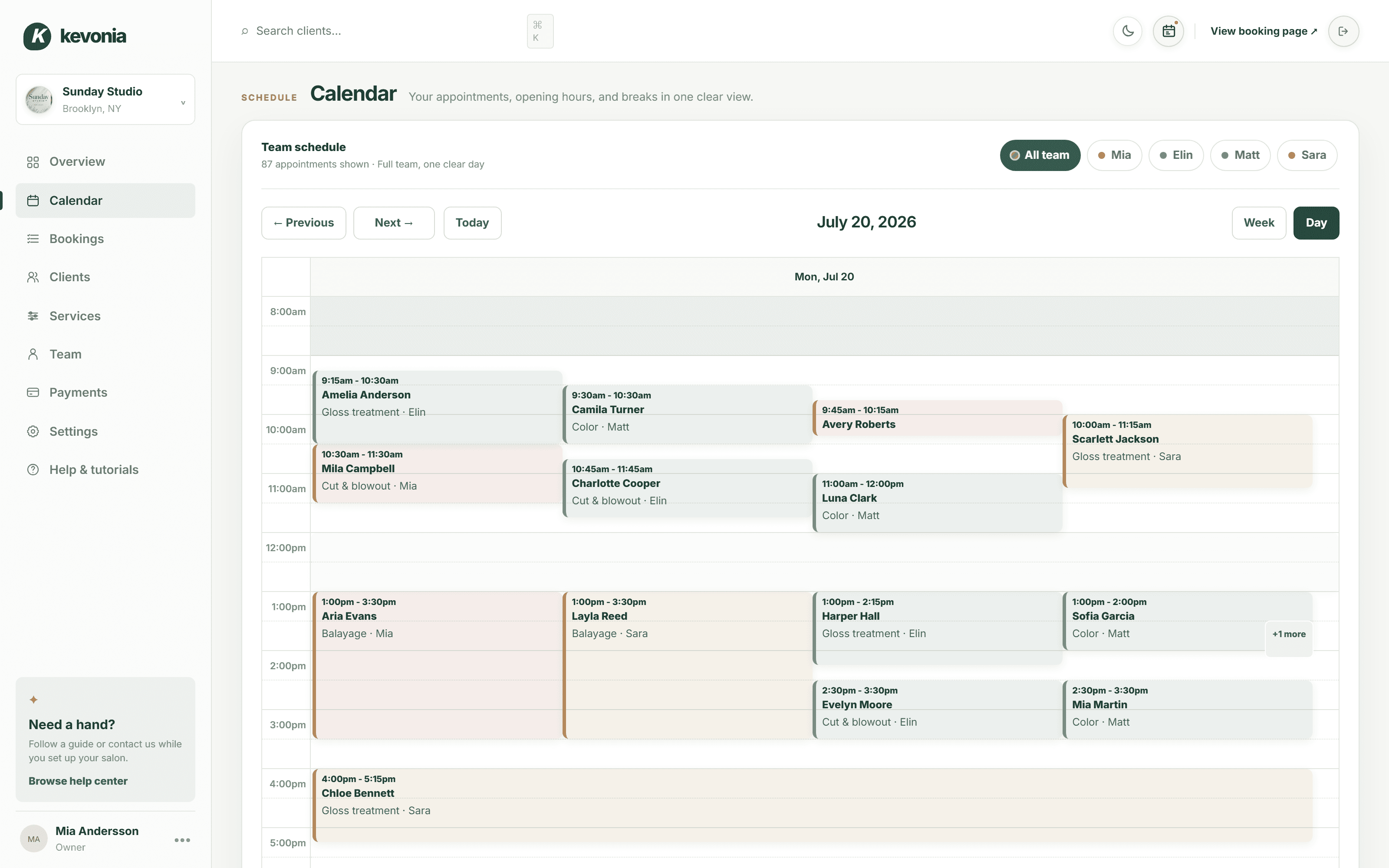
Kevonia fits owners who want a branded online booking page without assembling a general calendar, forms, payment links, and client spreadsheets into one process. Clients can book from a page at kevonia.com/your-salon by choosing a service, professional, date, and time. The workspace includes a week and day team calendar, per-professional filters, color coding, client records, a service menu, availability rules, and Stripe payments.
The practical difference is in the rules around the appointment. Kevonia checks for double-booking against hours, breaks, time off, and existing bookings. The service menu supports duration, cleanup or buffer time, price, optional deposit, and professional assignment. Availability rules can include weekday opening hours, multiple breaks, time off, salon closures, booking windows, minimum notice, and time-slot intervals.
For the front desk, Kevonia keeps client records searchable by name, email, or phone, with private notes and visit history. The salon can set booking statuses such as needs confirmation, awaiting payment, booked, checked in, completed, no-show, or canceled. It can also restore cancellation history, block a client from booking online with a reason, and see the client’s no-show history on the record.
Kevonia also handles the follow-through that a calendar event does not automatically organize for a salon. Clients receive an automatic email reminder the day before an appointment and can reschedule or cancel from that email within the salon’s notice window. Online payments can be refunded from the booking, with the Stripe processing fee on the refund shown so the real cost is visible, and the client is emailed automatically.
The owner overview shows today’s revenue against the same day last week, appointments, bookings made in the last 30 days, total and new clients, the no-show percentage for the last 30 days of bookings, and a 30-day revenue chart marking the best day. Revenue figures can be hidden for front-desk use. Kevonia does not currently offer multi-location management from one account, retail or inventory POS, marketing or SMS campaigns beyond the booking reminder email, or a native mobile app, so those requirements should be checked before choosing it.
How to test either option before you commit
Do not test only the owner’s setup screen. Test the booking journey as if you were a new client, then test the staff workflow after the appointment changes. This exposes problems that are invisible when you only confirm that a link opens.
- Create your real service menu, including different durations, prices, buffers, and deposits.
- Add every professional’s actual hours, breaks, time off, and recurring days off.
- Try booking the same professional during a break, before minimum notice, after the booking window, and during a salon closure.
- Book two services that overlap or require incompatible timing and confirm that the system blocks the conflict.
- Complete a booking from a phone-sized browser without relying on the owner’s login.
- Test a client who needs to cancel, reschedule, or pay a deposit.
- Mark an appointment as no-show, locate the client record, and check what information the owner can see later.
- Ask a second team member to use the calendar and confirm that permissions, filters, statuses, and notes make sense.
The most important test is a realistic busy day. Build a schedule with a color service, a haircut, a lash appointment, two breaks, one staff absence, and one client who reschedules. If the system cannot represent that day without a parallel spreadsheet or a series of explanatory messages, it is not yet solving the salon’s scheduling problem.
Common mistakes when using Google Calendar for salon bookings
Using google calendar for salon bookings often fails because the owner treats the calendar as the complete system instead of one part of the workflow. The booking page may be live, but the business rules remain undocumented or split across text messages, notes, and memory.
- Publishing one generic appointment type when services have different durations or prices.
- Allowing every professional to appear available during breaks, training, processing time, or cleanup.
- Assuming a co-host arrangement automatically checks every staff member’s availability.
- Taking deposits through a separate payment link without a reliable way to match the payment to the booking.
- Writing sensitive client information in a shared calendar description instead of a controlled client record.
- Failing to define the cancellation and rescheduling notice window before sharing the booking link.
- Testing only a normal weekday and not testing holidays, time off, early closures, or a staff absence.
- Keeping old appointment-slot instructions bookmarked after Google moved new bookings to Appointment Schedules.
A better google calendar appointment scheduling salon workflow starts with a written service and availability matrix. For each service, record duration, buffer, price, eligible professionals, deposit requirement, and minimum notice. For each professional, record working hours, breaks, time off, and the services they perform. If reproducing that matrix inside Google Calendar is awkward, that is useful evidence that your business has moved beyond a general calendar.
The decision for your salon
Choose Google Calendar when the business is essentially one person selling a few fixed-length appointments and the main need is to let clients see open times. It can be a sensible starting point, particularly when the owner already uses Google tools and is comfortable handling payments, client information, and follow-up separately.
Choose Kevonia when the booking process itself is becoming part of the salon’s operations. It is built for hair salons, barbershops, tattoo studios, nail salons, day spas, med spas, esthetician and lash studios, beauty clinics, wellness and yoga studios, and massage therapists. The strongest fit is a team that needs one branded booking page, one operational calendar, service and availability rules, client records, Stripe payments, reminders, and no per-seat or per-booking charges.
The honest answer to using google calendar for salon bookings is not that Google Calendar is bad. It is that a calendar solves visibility, while a salon booking system solves the chain of decisions surrounding an appointment. Start with Google if your operation is genuinely simple. Move to a salon-specific workspace when manual exceptions, staff coordination, deposits, client history, or no-show handling become regular work rather than occasional problems.
Sources
- Google Calendar Help: Learn about changes to appointment slots
- Google Calendar Help: Compare premium features for appointment schedules
- Google Calendar Help: Create an appointment schedule
- Google Workspace: Online appointment scheduling with Google Calendar
- Kevonia
- Kevonia salon booking program
- Kevonia nail salon booking software
- Kevonia salon reservation software
- Kevonia beauty salon booking software
- Kevonia spa booking software
- Kevonia hair salon booking software
- Kevonia: How to Prevent Salon Overbooking and Double Bookings
- Kevonia: How to Set Staff Availability for a Salon Calendar
Frequently asked questions
Can I use Google Calendar as a booking system for a salon?+
Yes, if your setup is simple. Appointment Schedules can publish a booking page with durations, availability, scheduling limits, buffers, custom questions, and calendar conflict checking. It is a better fit for a solo provider or small team than for a salon with many professionals, service-specific rules, deposits, client records, and detailed no-show workflows.
Is Google Calendar free for salon bookings?+
A personal Google Account or Google Workspace Business Starter account can provide one booking page, according to Google’s current appointment documentation. More advanced capabilities—such as multiple schedules, automatic reminders, payment collection, and email verification—depend on an eligible Google Workspace or Google One subscription. Google’s documentation does not establish one universal salon-booking price or a separate Google booking commission.
What replaced Google Calendar appointment slots?+
Appointment Schedules replaced the old appointment-slots workflow for new bookings. Google stopped allowing new appointment slots in August 2024. If you are following an older tutorial, look for Create, then Appointment schedule, rather than trying to create a new appointment-slot page.
Can Google Calendar handle multiple salon employees?+
It can coordinate calendars, but the setup needs careful testing. Google says co-host availability is not automatically checked unless the relevant calendars are selected. That is different from a salon-specific workflow where each professional can have their own hours, breaks, time off, services, and assignment rules. For a multi-provider salon, check whether the exact service-to-professional booking process works before committing.
Does Kevonia charge per booking or per team member?+
No. Kevonia has one plan at US$49.99 per month, with unlimited team members, bookings, clients, and services. It has 0% booking commission and no per-seat charge. The trial is free for 14 days, requires no credit card to start, and does not charge you if you cancel before the trial ends.
When should a salon move from Google Calendar to salon software?+
Move when manual work becomes routine: correcting service durations, checking staff breaks, collecting deposits, finding client history, handling reschedules, recording no-shows, or reconciling payments. If clients need to choose a service and professional before seeing suitable times, or if the owner needs shared statuses and booking reports, a salon-specific system is usually the more direct fit.
More from the blog

How to Write a Salon Booking Confirmation Email in 2026
A salon booking confirmation email should remove uncertainty, not create more work. Use this practical guide to write clear confirmations that clients can trust and act on.

How Much Rent Can a Salon Afford in 2026?
There is no single rent number that works for every salon. Use your realistic revenue, total occupancy cost, staffing model, and break-even point to set a safe monthly limit.

How to Set Staff Availability for a Salon Calendar
A practical guide to setting recurring hours, breaks, time off, service availability, and booking rules so clients see only appointments your salon can actually fulfill.