Salon booking program
Salon Booking Program
No download, no licence key, no computer in the back office holding the only copy of your diary. Open a browser on anything, sign in, and the salon is exactly where you left it.
- Works on Windows, Mac, tablet and phone alike
- The desk, the back room and your own phone show the same diary
- Updates arrive on their own — there is no version to chase
- No server to buy, no backups to remember, nothing to reinstall
Free for 7 daysNo credit card todayThen US$49.99/month, cancel anytime






Salon owners who have already left installed software behind. Read what they found
Onediary, live on
every device at once
every device at once
Live Kevonia walkthrough
Running in a browserNo installation anywhere
Hair salons Barbershops Beauty salons Nail salons Day spas Tattoo studios Multi-room salons Two-site businesses Salon suites Home studios Mobile professionals Training academies Clinic reception desks
NOT A SCREENSHOT
Try before you buy — no signup required.
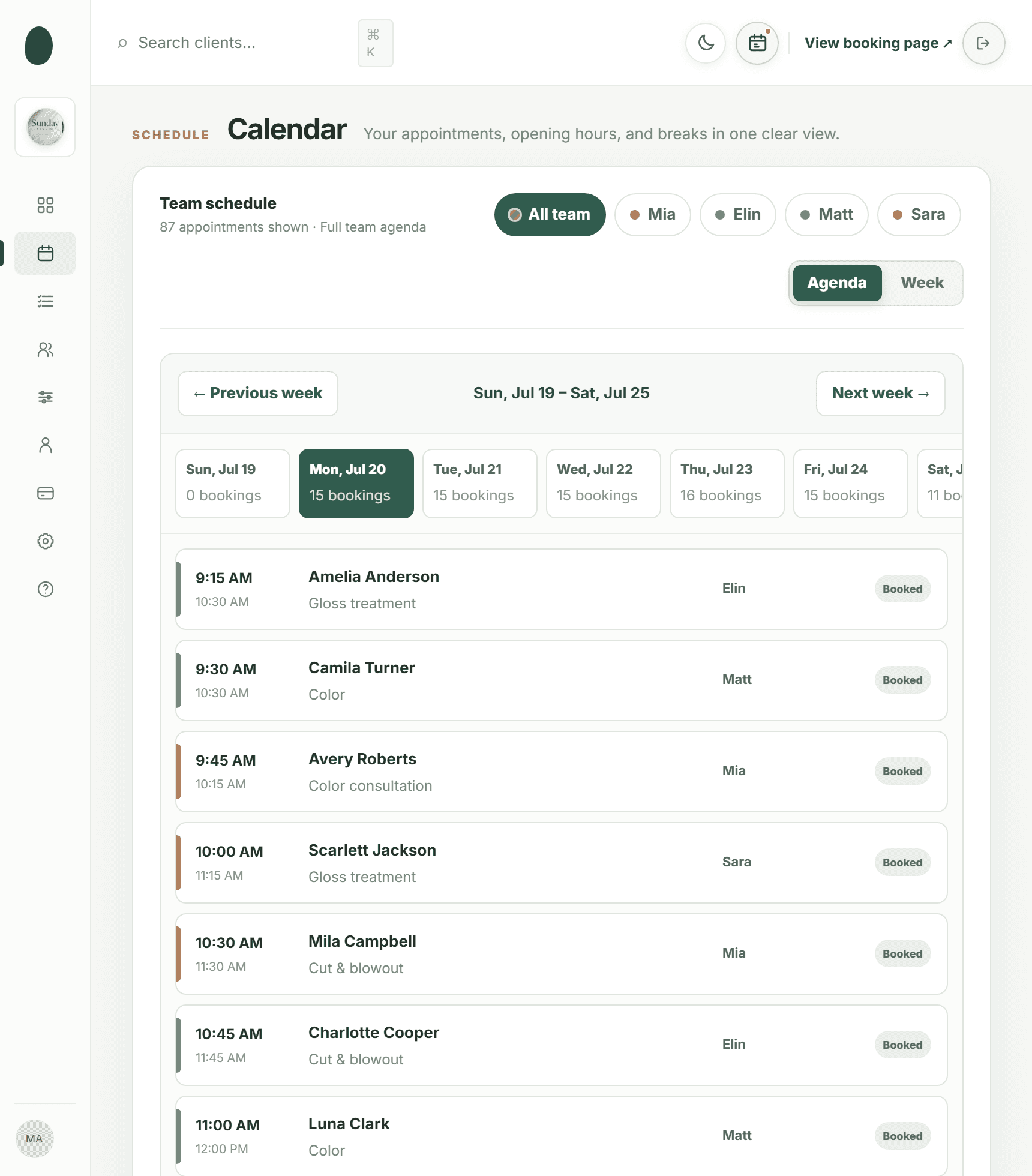
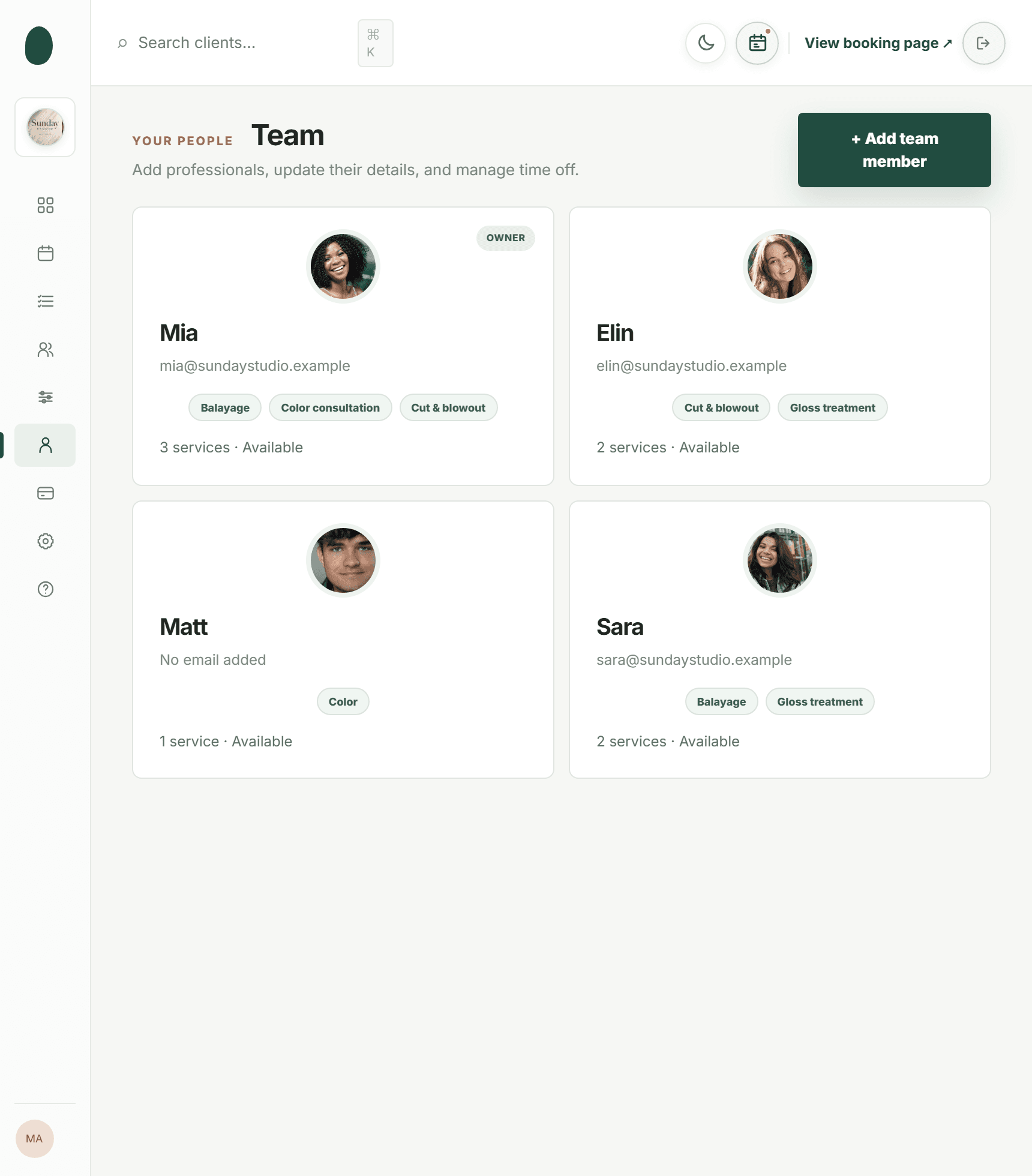
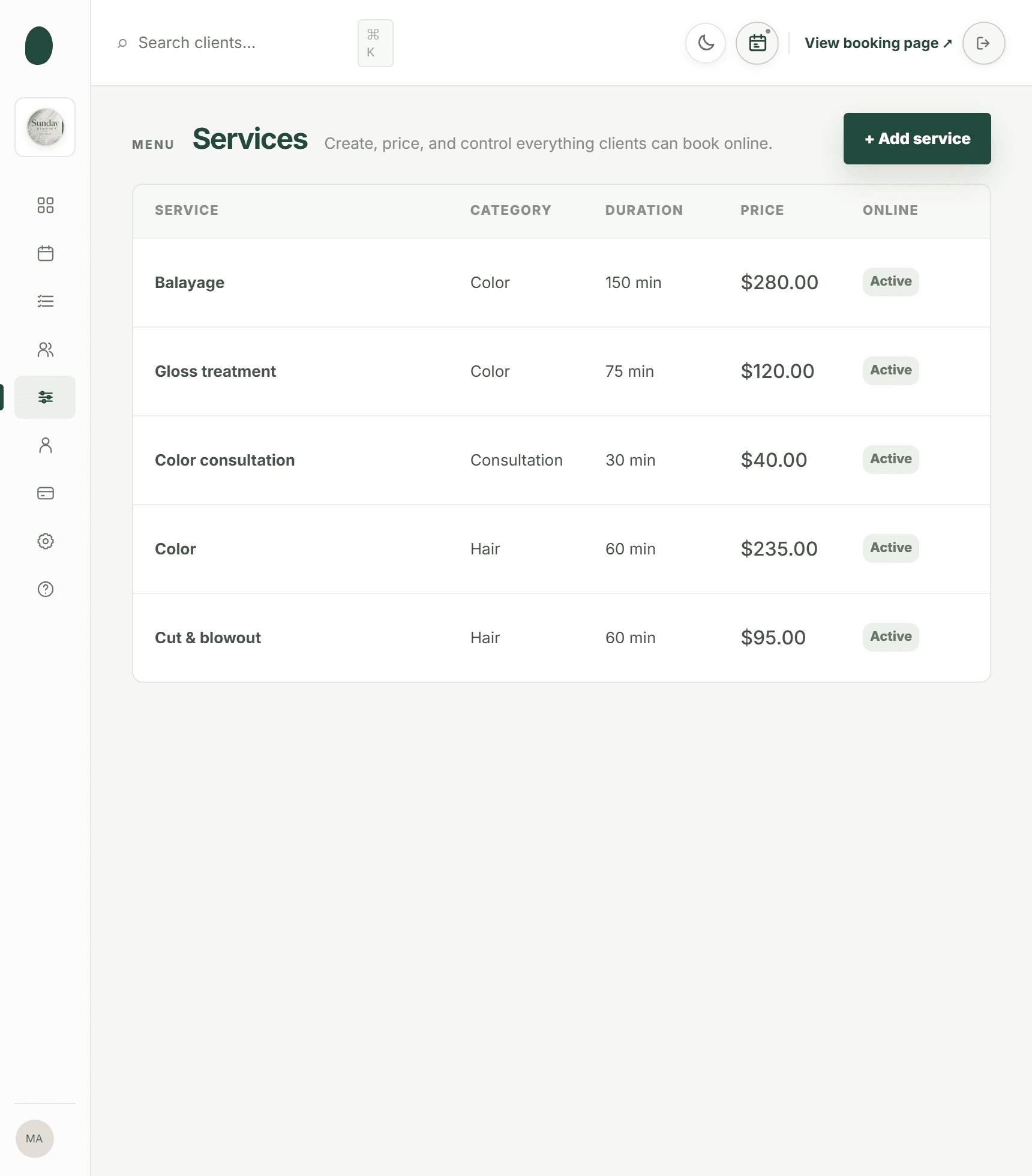
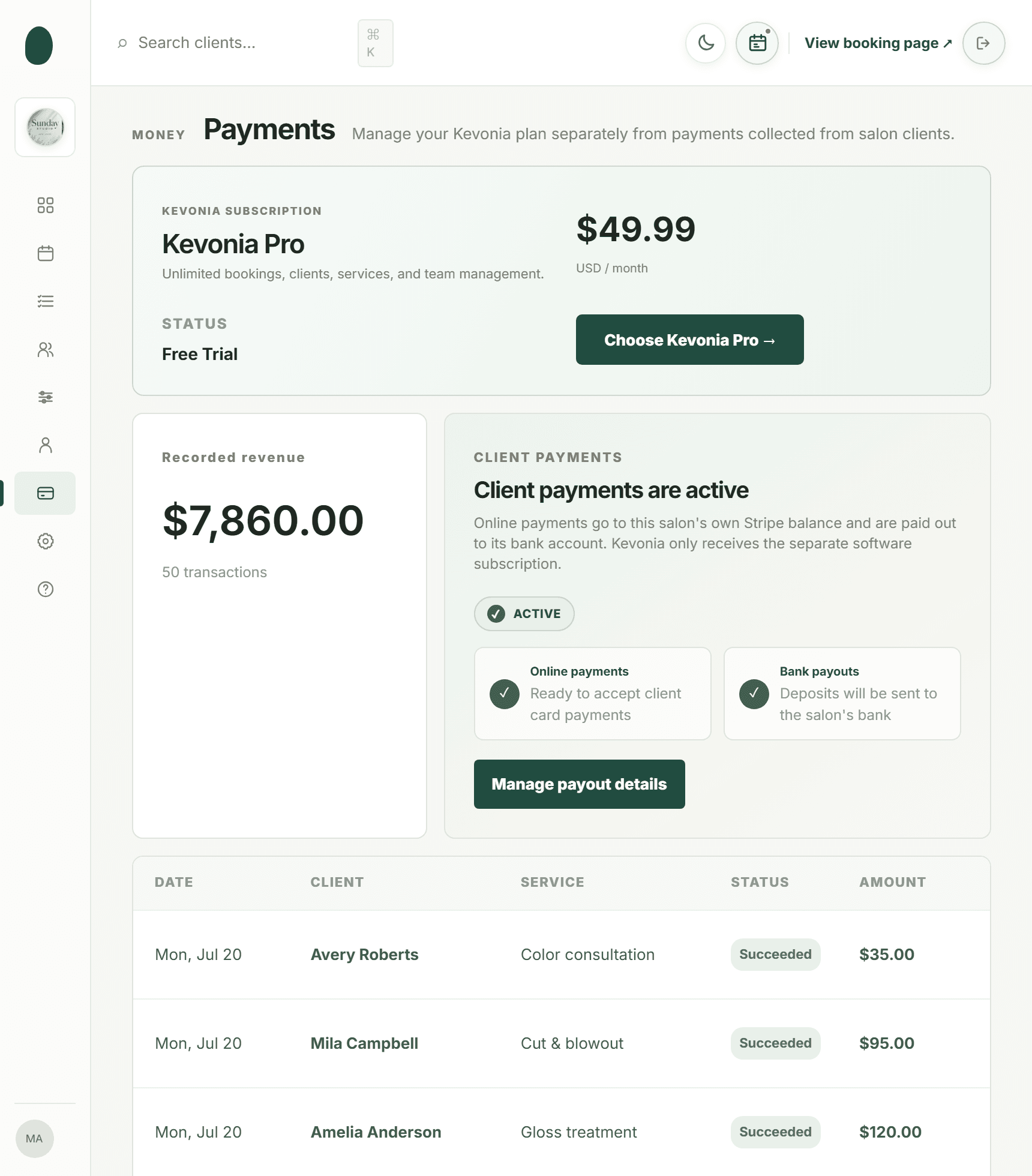
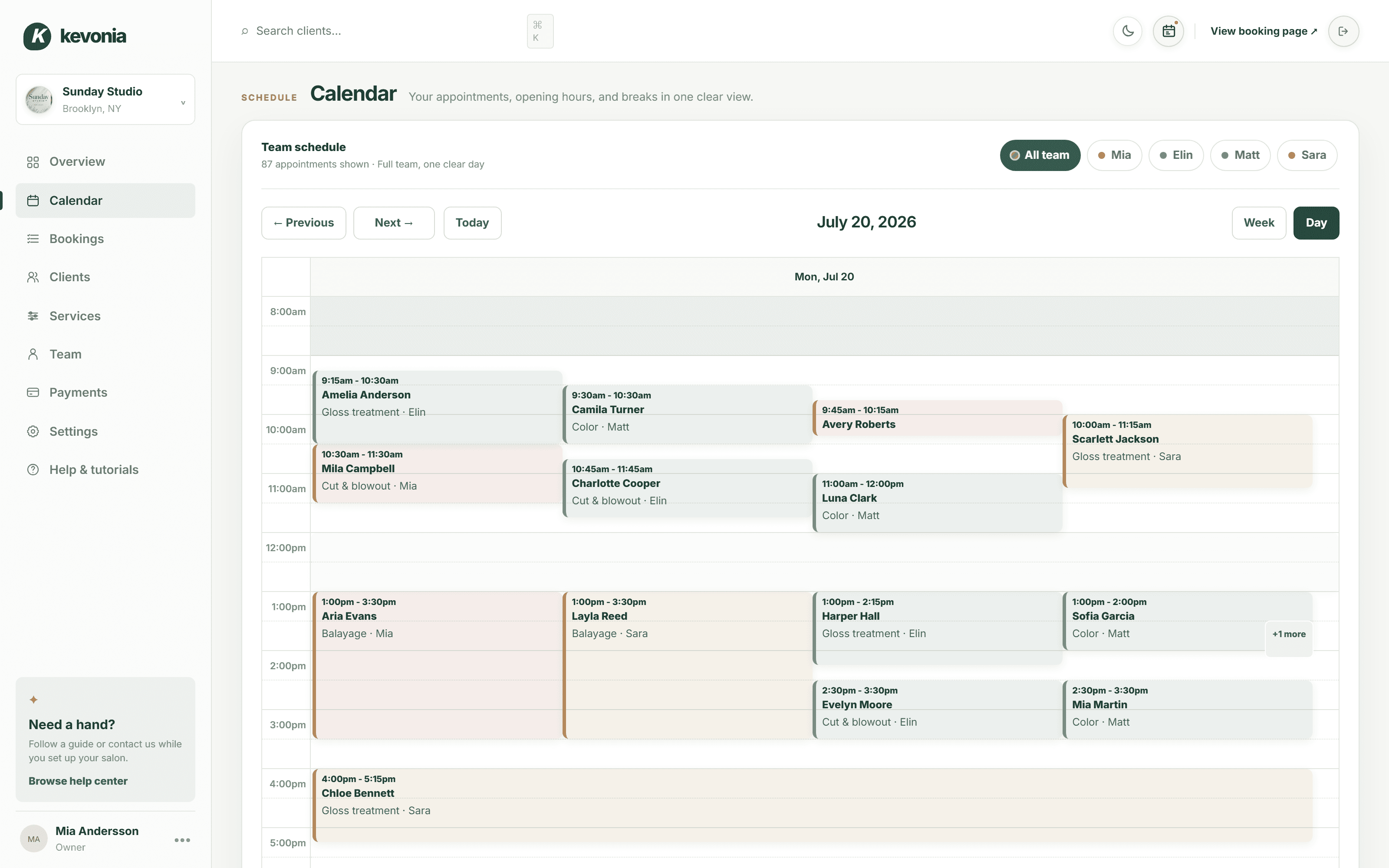
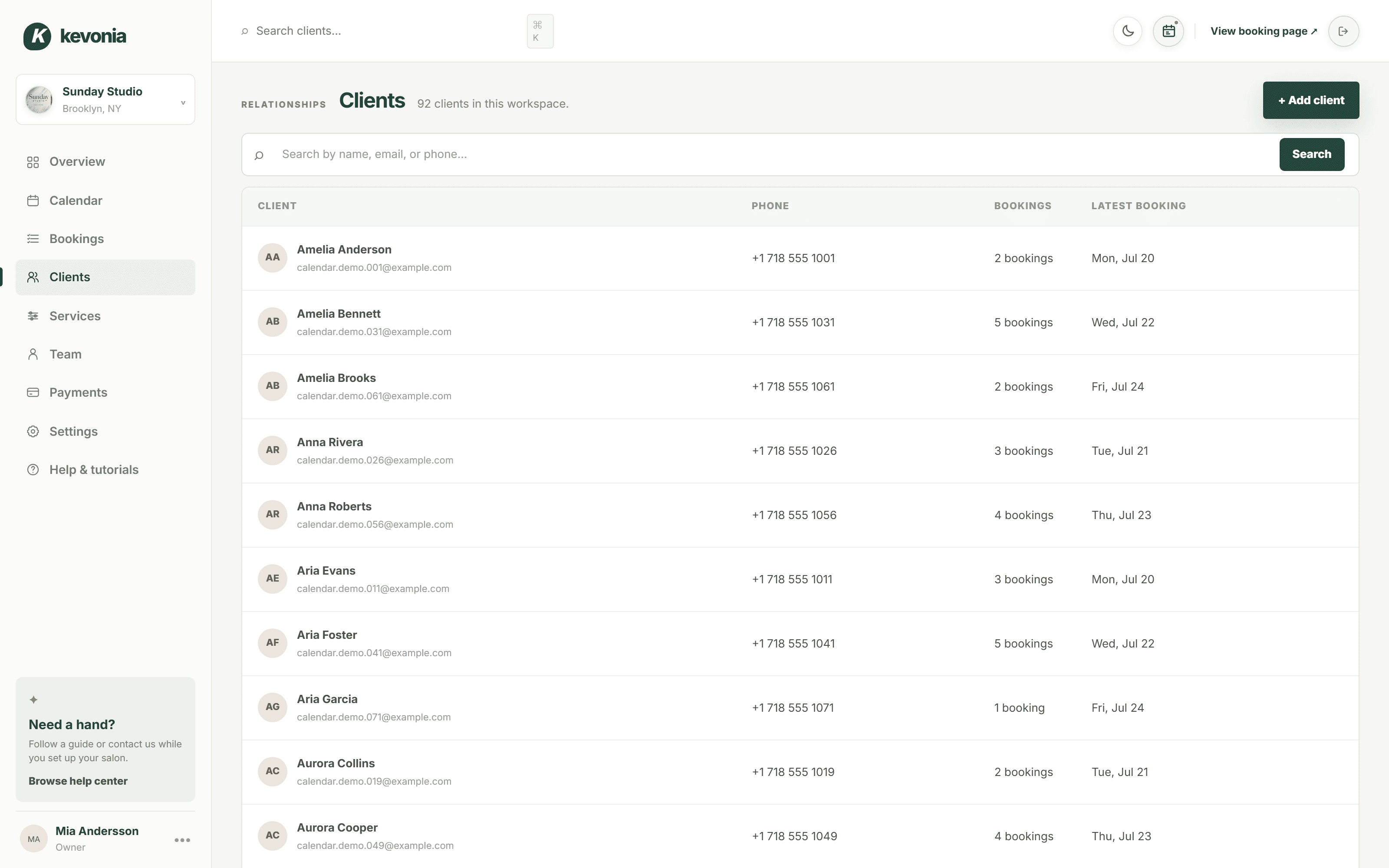
The calendar, the client list, the service menu, the payouts — the same screens a salon owner opens every morning, filled with Sunday Studio's day. On a computer, the menu switches between them.
Open the full demo workspace →kevonia.com/dashboardCLICK THE MENU TO EXPLORELIVE PREVIEW
K kevonia

Sunday StudioBrooklyn, NY
✦Need help?
Follow a guide or contact us while you set up your salon.
Browse help centerMA
Mia AnderssonOwner
•••Sunday Studio demo · Explore every section with protected example data.Create your own workspace →
MONDAY, JULY 20
Good afternoon, Sunday Studio
Here's what's happening at your salon today.kevonia.com/sunday-studioShare booking URL+ New booking
Today's revenue
↗Appointments
▣Total clients
♟No-shows
◷Revenue, last 30 days$31,670 collected across 25 trading days
BEST DAY
$2,070Jul 3- Jun 24 · $496.80
- Jun 25 · $1076.40
- Jun 26 · $621.00
- Jun 27 · $1614.60
- Jun 28 · $1159.20
- Jun 30 · $1179.90
- Jul 1 · $372.60
- Jul 2 · $1097.10
- Jul 3 · $683.10
- Jul 4 · $1138.50
- Jul 6 · $1283.40
- Jul 7 · $558.90
- Jul 8 · $910.80
- Jul 9 · $641.70
- Jul 10 · $1573.20
- Jul 11 · $1200.60
- Jul 13 · $1242.00
- Jul 14 · $538.20
- Jul 15 · $1055.70
- Jul 16 · $434.70
- Jul 17 · $1697.40
- Jul 18 · $1635.30
- Jul 19 · $931.50
- Jul 20 · $331.20
Today's schedule14 appointments · 4 team members
- AAAmelia AndersonGloss treatment · 75 min
WITHElin
Confirmed••• - CTCamila TurnerColor · 60 min
WITHMatt
Confirmed••• - ARAvery RobertsColor consultation · 30 min
WITHMia
Confirmed••• - SJScarlett JacksonGloss treatment · 75 min
WITHSara
Confirmed••• - MCMila CampbellCut & blowout · 60 min
WITHMia
Confirmed•••
Team todayLive schedule
- Mia3 appointments
- Elin4 appointments
- Matt4 appointments
- Sara3 appointments




PAYMENTSPayments are activeClient payments are ready.
THE SAME SALON, FROM THE OTHER SIDE
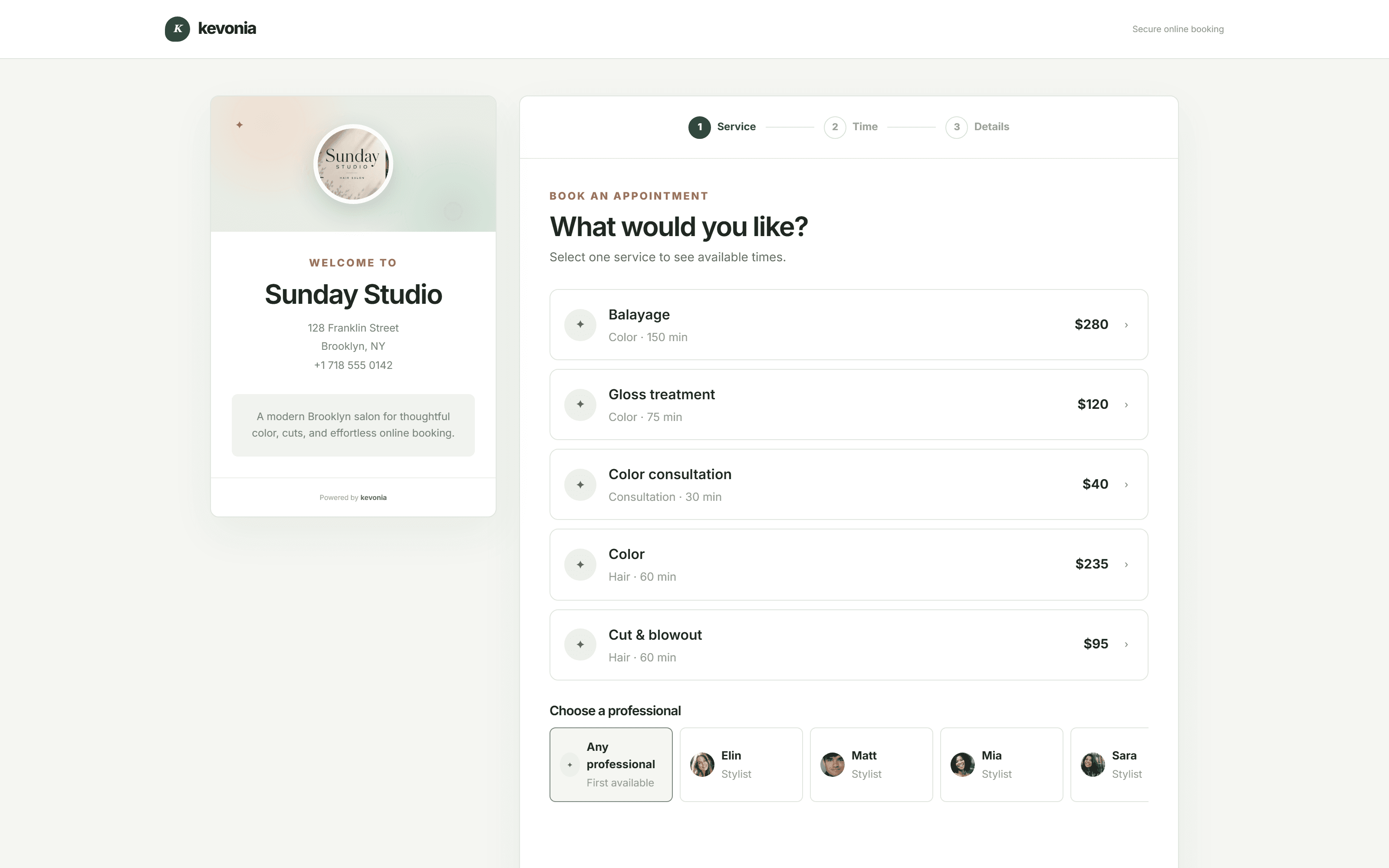
And this is what your clients see.
The page Sunday Studio shares from its Instagram bio, live on this one. Every salon gets the same one at kevonia.com/your-salon, with its own name, photo, service menu and team — and clients book from it without an account.
Open the booking page →This is your own salon, fifteen minutes from now.Free for 7 days. No credit card, and no commission on your bookings.
Start free for 7 days →SOFTWARE WITHOUT THE SOFTWARE.
A salon booking program that lives in a browser tab, not on a hard drive.
The old way was a disc, a licence key, one machine at the front desk and a sinking feeling whenever it froze on a Saturday. Kevonia is the same job done differently: your diary lives online, every device you sign in from is looking at the same live copy, and the version you are running is always the current one.
OPENED IN A BROWSER
No install, no licence key, no man in a van.
Under thirty seconds of the whole thing running in a browser tab: the day's figures, one person's week, setting somebody up, and a client booking from a phone.
Open the demo in your browser →Kevonia in a browser tab28 SEC
NO INSTALL REQUIRED
01
THE OVERVIEW · 10 SEC
Everything on one screen
Takings, bookings and who is working — the moment the tab loads.
02
THE DIARY · 11 SEC
The same diary everywhere
Front desk, back office, or a phone in the stockroom — one live view.
03
THE TEAM · 09 SEC
Add somebody in a minute
No extra licence, no second installation, no per-machine fee.
04
THE CLIENT · 11 SEC
They book from anywhere
A browser is the only thing anyone needs, yours or theirs.
Want it running in the next ten minutes?Seven days, everything working, nothing to download.
Open your salon in a tab →OPEN A TAB, SEE THE SALON
Four screens, on whatever device is nearest.
The takings, the diary, the price list and the payouts — identical whether you are at the desk or at home.
01 · NOTHING TO INSTALL
The setup is a browser and a password.
There is no installer, no licence key to type in, no compatibility list to check, and nothing that stops working when somebody buys a new laptop. Sign in on the machine you already have and everything is there.
- Windows, Mac, iPad and Android all behave the same
- A new device is a login, not an installation
- Nothing to uninstall if you decide against it
app.kevonia.com
02 · ALWAYS IN STEP
One diary, however many screens are looking at it.
A booking taken at the desk is visible on the tablet in the treatment room and on the phone in your pocket. There is no syncing to remember, no master copy, and no argument about which screen is right.
- Changes appear wherever the diary is open
- No single machine holding the only copy
- Check the day from home without going in
app.kevonia.com
03 · NOTHING TO MAINTAIN
No updates to install, no backups to forget.
Improvements simply appear. There is no version number to worry about, no upgrade fee, no support call about a machine that will not update, and no drawer of backup drives that nobody has tested in two years.
- Everyone is on the current version by definition
- Your data is held and backed up for you
- No IT visit and no annual licence renewal
app.kevonia.com
WHAT YOU ACTUALLY GET
All the salon software. None of the software problems.
The point of moving off an installed program is that the computer stops being something you have to think about.
A browser is the requirement
If the device can open a website it can run the whole salon. That includes the old laptop at the desk and the phone in your bag.
A diary everyone can reach
Week or day, whole team or one person, live on every screen that is signed in — including the one at your kitchen table.
Client records that cannot be lost
Held online rather than on a hard drive, so a dead machine or a stolen laptop costs you a device, not your client book.
A price list edited once
Change a price and it is changed everywhere at once — the desk, the booking page and every other screen.
No double bookings
Because there is one diary rather than copies, two people cannot write into the same slot from two machines.
Card payments built in
Take payments and deposits through Stripe without a separate program, a separate login or a separate reconciliation.
Support without a site visit
Nothing is installed on your machine, so nothing has to be fixed on your machine. Help centre and tutorials are inside the app.
ONE FEE, THE WHOLE PROGRAM
What Kevonia Business gives you.
No editions, no modules to buy, no charge per computer or per person. Everything listed works from the first minute of the trial.
The diary
The screen the salon runs on.
- One view for the week, one for the day
- Narrow it to one person
- Each person given their own colour
- Enter, revise, relocate or release it in the grid
- Conflicts refused before saving
- Notes written on the booking
The client booking page
Yours, on your own address.
- kevonia.com/your-salon as your web address
- An image, a description, an address, the hours
- Service, person, date, then time
- Only genuinely free times shown
- Designed for a phone screen first
- Switch online booking off any time
Client records
Online, so they survive the hardware.
- No cap on how many you keep
- Type a fragment of a name, an email or a number
- Visit count and last visit date
- Private notes only your team sees
- Fast however long the list gets
- Details follow every booking
The price list
Edited once, correct everywhere.
- However long your service list happens to be
- Length plus cleanup between clients
- One price each, and a deposit if you set one
- Assign services to the right people
- Hide something from online booking
- The text a client sees before choosing
People and hours
No licence per head, ever.
- Unlimited team on the same fee
- An image, a colour, an email, a phone number
- A service list per person
- Each weekday's working hours, set individually
- Each break in a shift, given a name
- Time off, holidays and total closures
Payments
Without a second program to run.
- Cards processed through Stripe
- Deposits on the services you choose
- Payment status on every booking
- A history of every transaction
- Paid out to an account in your own name
- Stripe linked without opening anything else
Settings and rules
Configured once, applied everywhere.
- How far forward the booking page will go
- How much warning a cancellation needs
- The interval your slots run on
- Region, currency and the business profile
- Cancelled bookings archived, not erased
- A bright theme and a dark one
Client emails
Sent for you, from the same place.
- Confirmation the moment they book
- A reminder twenty-four hours out
- They move the appointment themselves
- They cancel inside your window
- You are told the second they do
- Refunds confirmed automatically
Setup and help
No installation appointment needed.
- A checklist that starts on first sign-in
- Help articles you can search
- Google or email, with no separate account system
- A ready-made demo business to open first
- Nothing gated for the length of the trial
- No setup fee and no contract
INSTALLED VERSUS ONLINE
What an installed program quietly costs you.
Rarely the licence fee. Usually the Saturday it will not start, the laptop that held the only copy, and the fact that nobody can see the diary unless they are standing at the desk.
The jobInstalled on a machineWith Kevonia
Getting startedAn installer, a key, and an afternoonSign in and the salon is there
A second computerAnother install, sometimes another licenceLog in on it — that is the whole process
Checking the diary from homeYou cannot, unless you drive inOpen the page on your own phone
UpdatesDownloaded, installed, and hoped overAlready done, with no version to chase
BackupsA drive somebody is supposed to swapHeld and backed up for you
A machine dyingThe diary and client book go with itSign in from anything else
Clients booking themselvesA separate add-on, if it existsIncluded, on your own link
COMPARE IT PROPERLY
US$49.99 a month, with no machine underneath it.
There is no server, no licence renewal, no per-computer fee and no call-out charge when something will not start. The number on the invoice is the whole cost of running the salon's software.
IT DOES NOT CARE WHAT YOU DO
The trade changes. The program does not need to.
Set your own services, durations, prices, deposits, opening hours and rules. Whether the appointment is a cut, a facial, a massage or a tattoo, the software is the same — which is why there is nothing to configure for your industry.
Set it up your way01Hair salons↗02Barbershops↗03Beauty salons↗04Nail salons↗05Day spas↗06Tattoo studios↗07Multi-room salons↗08Two-site businesses↗09Salon suites↗10Home studios↗11Mobile professionals↗12Training academies↗13Clinic reception desks↗
THREE STEPS, NOTHING DOWNLOADED
From signing up to a working diary in an afternoon.
There is nothing to download at any point, and nothing to undo if you change your mind.
Sign in
With Google or an email address. Nothing is installed and no card is asked for.
Put your salon in
Services and prices, your people, and the hours everyone works.
Share the booking link
Website, Google Business Profile, Instagram — wherever your clients already look.
SALONS WHO MADE THE MOVE
Most owners notice the difference on the first day off.
The diary is readable from home, from the sofa, from a phone on the bus — not only from the machine at the desk.
We've been using Kevonia for several months and it has completely changed how we manage appointments. Our clients love how easy it is to book online, and we save hours every single week.
Emily Carter
By far the best salon booking software we've used. It saves us time every day, and the online booking process has increased the number of appointments we get.
David Thompson
The automatic reminders have significantly reduced our no-shows, and scheduling has never been easier. It's simple, reliable, and our clients constantly compliment the booking experience.
Ashley Brooks
I was surprised by how easy it was to get started. Within a single day our entire salon was set up and running smoothly. The interface is clean, modern and genuinely easy to use.
Jessica Miller
Managing multiple stylists used to be a challenge, but this keeps everyone's schedule organised. It helps us stay more efficient while giving our clients a better experience.
Michael Johnson
Excellent software with outstanding support. Our clients appreciate being able to book anytime, and we appreciate having everything in one place. I'd recommend it to any salon owner.
James Wilson
Open your free weekNo credit card today · US$49.99/month after · Cancel anytime
ONE PLAN. NO EDITIONS.
A week free. No licence, no lock-in.
Everything works for seven days and no card is taken to start. Nothing gets installed, so if you walk away there is nothing to remove and nothing to cancel.
- No card required to begin
- No licence to renew, no term, no notice
- Your data stays yours and can be taken with you
KEVONIA BUSINESSUS$49.99/month
7 DAYS FREE- Unlimited bookings, clients and services
- Unlimited team members
- A booking page under your own name
- Week and day team diary
- Client records with private notes
- Cards and deposits, handled by Stripe
- Breaks, time off and whole closures
- Booking horizon and notice rules
- Cancelled bookings archived, not erased
- Searchable help, walkthroughs and a dark theme
No credit card today. Cancel before your trial ends and you are never charged.
Nothing installed, nothing risked
The trial is a login. If it is not for you, stop signing in — there is nothing on any machine to remove.
Working the same afternoon
Services, people and hours are the whole of setup, and none of it needs anybody technical.
Your data is not held hostage
Client details and booking history belong to your business, and card data never touches us — Stripe handles it.
WRITTEN FOR YOUR TRADE
Want to see it described in your own language?
The same program, explained with the examples of a particular kind of business. Nothing underneath it changes from one page to the next.
Or go straight to the demoCOMMON QUESTIONS
What owners ask about moving off installed software.
Rather try it than read about it? Open the live demo workspace and use it without installing anything.
Is there anything to download?+
No. Kevonia is a salon booking program that runs entirely in a browser. There is no installer, no licence key, no app store download and nothing that needs a particular version of Windows or macOS.
What happens if the computer at the desk breaks?+
You sign in from another one. Nothing about your salon lives on that machine, so a dead computer costs you a computer — not your diary, your client book or your history.
Can several people use it at the same time?+
Yes, on as many devices as you like, with no extra fee. Everyone sees the same live diary, so a booking taken at the desk is on the tablet in the back room immediately.
Can I see the diary from home?+
Yes. It is the same page from any device with a browser, so checking tomorrow from the sofa works exactly like checking it at the desk.
How do updates work?+
They happen without you. There is no version to install, no upgrade to pay for, and no chance of two computers in the salon running different versions of the same program.
Do I need to back anything up?+
No. Your data is held and backed up for you, which is usually the single biggest thing an installed program leaves to the owner and the single most common thing to go wrong.
Does it work offline?+
It needs an internet connection, the same as your card terminal and your email. In exchange, nothing is trapped on one machine and nothing is lost when a device fails.
Is there a charge per computer or per person?+
No. One flat price covers unlimited devices, team members, bookings, clients and services.
How long does setup take?+
Usually under an hour, and none of it is technical. Salon details, service menu, team, opening hours — then share your booking link.
What happens at the end of the trial?+
Nothing is charged during the seven days and no card is needed to start. Afterwards it is US$49.99 a month, cancellable from your billing settings at any point.
Can I try it before signing up?+
Yes. The demo workspace is a fully populated salon, and it opens in your browser without an account, an install or an email address.
From the blog
Running a salon, written down

How to
Lash Fill Policy: Set Rules That Prevent Booking Disputes
A lash fill policy should do more than say “book every two to three weeks.” Set clear eligibility, pricing, timing, and exception rules before a client arrives.
·8 min read

How to
Tattoo Deposit Policy: Set Rules Clients Can Follow
A tattoo deposit policy should protect booked time without creating avoidable disputes. Use this framework to set deposits, explain exceptions, and enforce the rules consistently.
·9 min read

Comparison
The Right Spasalon Alternative for Premium Salon Operations
Premium salons need more than a polished booking page. Compare Spasalon, Vagaro, Fresha, Boulevard, and Kevonia by cost, control, team fit, and everyday reliability.
·9 min read

Comparison
Salon Ultimate Alternative: Compare Booking Control and Total Cost
Looking for a Salon Ultimate alternative? Compare the published pricing, operating model, booking controls, and trade-offs before moving your salon or spa.
·8 min read
NOTHING TO INSTALL. EVER.
Open a browser.
Run the salon.
Seven days of the complete workspace, every feature working, no card taken, and nothing on your computer to undo.
No charge today · US$49.99/month after your trial · Cancel anytime