Vagaro Alternative: Kevonia vs. Vagaro in 2026
Vagaro offers a broad salon platform, while Kevonia keeps booking and daily scheduling simpler with one $49.99 plan and no per-booking commission. Compare both before you switch.

Key takeaways
- Vagaro starts at $23.99 per month in the US, but additional employee calendars, payment processing, and premium tools can increase the total.
- Kevonia costs $49.99 per month with unlimited team members, bookings, clients, and services, with no per-booking commission or feature tiers.
- Vagaro is the broader choice for inventory, marketplace exposure, marketing, and a customer mobile app.
- Kevonia is the more focused choice for salons and spas that want branded booking, team scheduling, client records, availability controls, and Stripe payments in one plan.
| Tool | Starting price | Commission or booking fees | Standout features | Important scope notes |
|---|---|---|---|---|
| Kevonia | $49.99/month | 0% per-booking commission; Stripe payment processing applies | Branded 24/7 booking page; team calendar; client records; availability rules; deposits and card payments via Stripe | One plan; unlimited team members, bookings, clients, and services; no native mobile app or inventory POS |
| Vagaro | $23.99/month in the US, listed as a limited-time base price; one employee calendar included | No marketplace fee stated on Vagaro’s comparison page; US card processing listed from 2.6% + $0.10 per swipe, dip, or tap transaction for small merchants; additional payment terms apply | Marketplace listing; inventory tracking; memberships, packages, gift certificates; social booking; customer mobile app; reporting | Additional employee calendars and premium features can add cost; payment processing is separate from the subscription |
What are you really looking for in a Vagaro alternative?
If you searched for “vagaro alternative,” you probably are not looking for another generic list of salon software. You want to know whether another system can handle the essentials—online booking, staff calendars, client information, deposits, reminders, and payments—without adding complexity or unexpected costs.
The right choice depends on what your business needs next. Vagaro is a broad salon and spa platform with marketplace exposure, inventory tools, marketing options, reporting, payments, and a customer-facing mobile app. Kevonia takes a narrower approach: one plan focused on branded online booking and the daily scheduling work of salons, spas, barbershops, tattoo studios, wellness businesses, and independent beauty professionals.
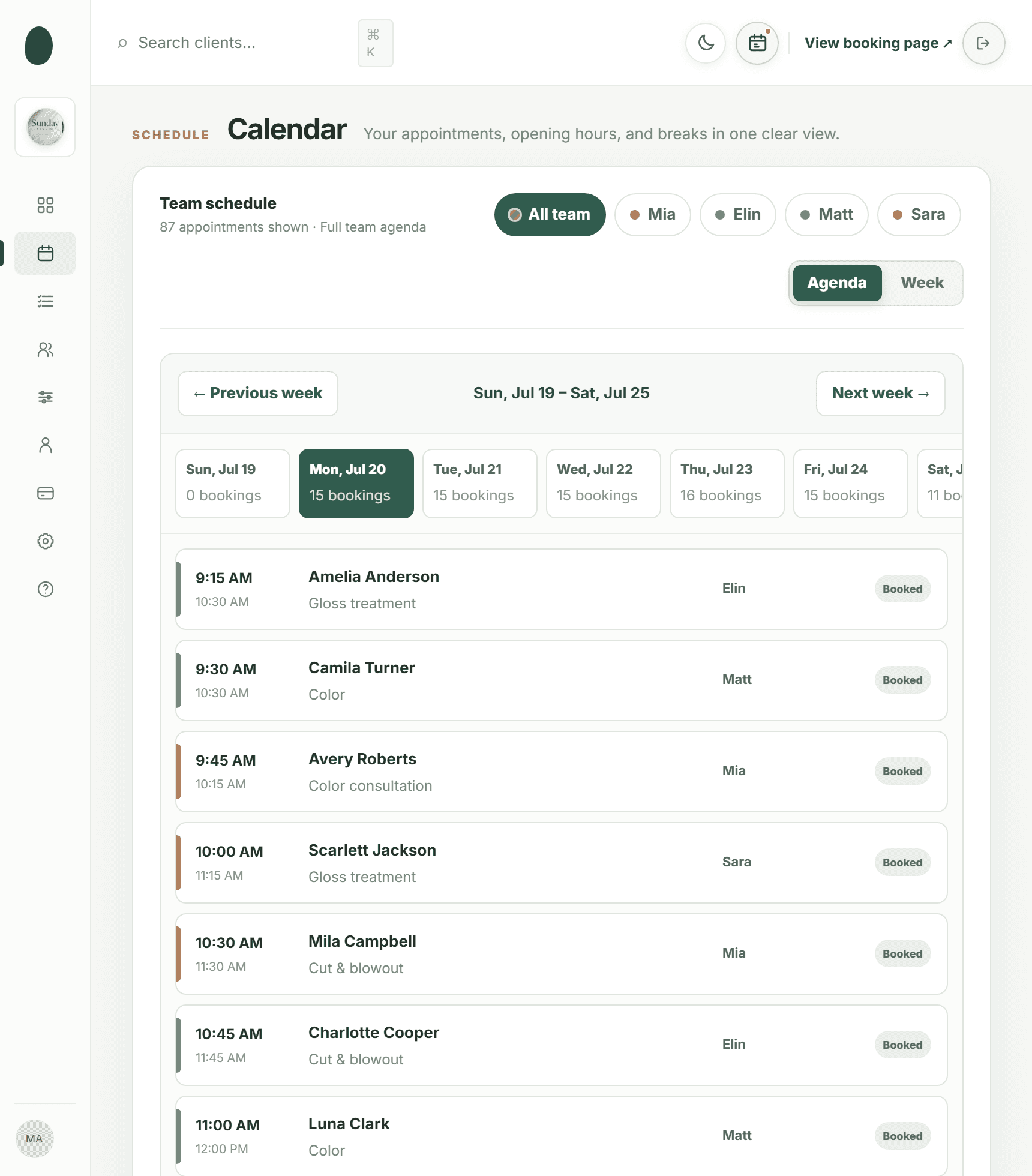
Vagaro vs. Kevonia at a glance
The table gives you the shortest useful comparison. Prices below are US prices available in 2026. Vagaro’s official support documentation lists a base subscription of $23.99 per month for a limited time, with one employee calendar included and additional employee calendars priced separately. Its payment processing is also separate from the software subscription. (support.vagaro.com)
Kevonia has one plan at $49.99 per month. The plan includes unlimited team members, bookings, clients, and services, with 0% per-booking commission. Payments and deposits are handled through Stripe, with payouts going to the salon’s bank account.
Pricing, fees, and what your monthly bill can become
Vagaro’s lower advertised starting price can be attractive for a solo professional or a very small shop. The important detail is that the base price is tied to bookable employee calendars. The official pricing page states that one calendar is included and additional calendars cost $10 per month, up to seven licenses; after seven licenses, additional employees can be added without another calendar charge. That means a team should compare the price for its actual number of bookable professionals, not only the headline starting price. (support.vagaro.com)
Vagaro also separates card processing from the software subscription. For US small merchants processing less than $4,000 per month, its support documentation lists 2.6% plus $0.10 for swipe, dip, or tap transactions, with different rates for keyed-in payments and Tap to Phone. For large merchants, the listed swipe, dip, or tap rate is 2.2% plus $0.19, with a $10 monthly subscription and additional network-related fees. These are payment-processing charges rather than a booking commission, but they still matter when you calculate the cost of collecting deposits or appointment payments. (support.vagaro.com)
Kevonia is easier to budget if you want a fixed software bill. It has a single $49.99 monthly plan, no feature tiers, no add-on pricing, no per-seat charge, and no per-booking commission. Unlimited team members and bookings are included. The 14-day trial is free, does not require a credit card to start, and you are never charged if you cancel before the trial ends.
That does not automatically make Kevonia cheaper for every business. A solo provider may pay less for Vagaro’s base subscription, especially if the limited-time starting price applies and only one calendar is needed. A growing team should compare the complete setup: employee calendars, payment processing, optional marketing tools, inventory requirements, and any premium features. Kevonia’s advantage is predictability, not the lowest possible entry price.
Where Vagaro is the stronger fit
Vagaro is built for owners who want more than appointment scheduling. Its official feature documentation describes a broad base subscription that includes calendar and booking tools, customer data, reporting, inventory tracking, memberships, packages, gift certificates, a marketplace listing, reminders, and social booking integrations. (vagaro.com)
That breadth can be valuable for a full-service salon or spa with several revenue streams. For example, a salon selling retail products may prefer inventory tracking inside the same system. A business promoting packages, memberships, gift certificates, or marketplace discovery may value those tools more than a simpler calendar. A team that wants customers to find the business through Vagaro’s marketplace or book through social channels may also prefer keeping that acquisition channel.
Vagaro also offers optional paid tools, including a branded app, check-in app, forms, APIs and webhooks, Connect AI, and marketing features. The official pricing documentation lists these as premium features with separate charges or transaction terms, so they should be included in your comparison if you need them. (support.vagaro.com)
- Choose Vagaro if inventory, retail sales, memberships, packages, gift certificates, or marketplace discovery are central to your operation.
- Choose Vagaro if you want a customer mobile app or broader marketing and communication options.
- Choose Vagaro if you prefer a large all-in-one platform and are comfortable reviewing a menu of paid features.
- Choose Vagaro if your business needs capabilities that extend beyond booking, scheduling, client records, and payments.
Where Kevonia fits—and what it does differently
Kevonia is designed for owners who want the core operating system for appointments without buying into a large collection of modules. Its branded booking page is available 24/7, and clients move through a clear sequence: service, professional, date, and time. That setup works for a hair salon, barber, nail studio, day spa, med spa, esthetician, lash studio, massage therapist, or wellness business that wants customers to book directly. For more detail, see Kevonia's salon reservation software.
The workspace includes a week and day team calendar with professional filters and color coding. Double-booking protection checks opening hours, breaks, time off, and existing appointments before a booking is accepted. For a multi-provider salon, that combination addresses the practical scheduling problems that cause the most disruption: overlapping appointments, forgotten time off, and bookings placed outside a professional’s actual availability.
Kevonia also keeps the service setup specific enough for real salon operations. You can set duration, cleanup or buffer time, price, optional deposit, and the professionals assigned to each service. Availability rules cover opening hours by weekday, multiple breaks, staff time off, closures, booking windows, minimum notice, and time-slot intervals. That gives an owner control over how booking works without needing separate workarounds for every provider.
Client records support searches by name, email, or phone, along with private notes and visit history. Card payments and deposits run through Stripe, with payouts to the salon’s bank account. Clients receive an automatic email reminder the day before an appointment and can reschedule or cancel from that email within the salon’s notice window. Cancellation history can be restored when a mistake is made.
The difference is scope. Kevonia does not currently offer multi-location management from one account, retail or inventory POS, marketing or SMS campaign tools beyond the booking reminder email, or a native mobile app. If you need those categories, Vagaro may be a better match. If you mainly need booking and scheduling to work clearly for your team, Kevonia avoids charging you for feature areas you do not use.
Comparing the booking experience for a real salon
A useful comparison is not “Which platform has more features?” It is “What happens when a client books a complicated appointment?” Consider a salon with three stylists, different working hours, lunch breaks, occasional time off, and services that need cleanup time. The booking system must show only valid times, assign the right professional, and prevent a second booking from occupying the same slot.
Kevonia handles that workflow through service settings, professional assignment, availability rules, and double-booking checks. An owner can set a haircut for one duration, a color service for another, add buffer time, and restrict particular services to selected team members. This is especially relevant when comparing vagaro booking system options: a platform can look impressive in a feature list but still be judged by whether the daily calendar reflects how the business actually operates.
Vagaro’s base feature documentation also describes calendar and booking tools, personal tasks, customer data, online booking, reminders, and booking through social integrations. Its broader ecosystem can be useful when the booking journey needs to connect to marketplace discovery, retail, memberships, or other business functions. (support.vagaro.com)
- Write down every service that can be booked online, including its duration and cleanup or buffer requirements.
- List each professional’s working hours, breaks, regular days off, and services they can perform.
- Check whether the platform can enforce minimum notice, booking windows, closures, and time off.
- Test a new booking, a reschedule, a cancellation, and an appointment that should be rejected because the time is unavailable.
- Calculate the monthly cost using your real team size and payment volume rather than the advertised entry price.
Which platform is better for different business types?
The best vagaro booking software alternative depends on the kind of business you run and what you expect the software to do beyond appointments. A solo beauty professional may prioritize a low starting price and a simple booking page. A larger salon may prioritize inventory, staff management, reporting, marketing, and customer acquisition. A small spa may care most about deposits, service duration, provider availability, and reducing last-minute cancellations.
- Solo stylist, barber, or esthetician: Compare Vagaro’s base calendar cost with Kevonia’s fixed $49.99 plan. Choose based on whether you need Vagaro’s broader business tools or Kevonia’s included unlimited usage.
- Small salon with several professionals: Kevonia is worth considering when all team members need access without per-seat charges and the main requirement is scheduling, client records, services, availability, reminders, and deposits.
- Retail-focused salon or spa: Vagaro may fit better because its documented feature set includes inventory tracking and other commerce-oriented tools.
- Independent massage therapist or wellness provider: Kevonia may be a practical fit if a branded booking page, provider availability, deposits, and reminders are the priority.
- Multi-location operator: Review Vagaro or another platform that supports your location structure. Kevonia does not currently provide multi-location management from one account.
There is no universal winner. A business that needs an inventory POS should not choose software that lacks inventory. Conversely, a business that does not sell products or run campaigns may prefer not to manage a platform built around those extra areas. Match the system to the work your staff performs every day, not to the longest feature list.
Common switching mistakes to avoid
Switching from Vagaro or another booking platform can improve operations, but only if you compare the details that affect a normal week. Owners often focus on the subscription price and overlook calendar structure, payment handling, cancellation rules, or the effort required to recreate services.
- Comparing only the first-month price: Include employee calendars, payment processing, premium features, and any tools you would actually activate.
- Assuming every calendar handles buffers the same way: Confirm that cleanup time is treated as unavailable when a service is booked.
- Importing services without checking professional assignments: A service that appears online but is assigned to the wrong provider can create avoidable scheduling problems.
- Ignoring cancellation behavior: Test the notice window, reminder email, client rescheduling, cancellation history, and deposit workflow before launch.
- Moving the booking link without updating every customer touchpoint: Replace the old link on your website, social profiles, email signature, and printed materials.
- Choosing a platform for features you will never use: Retail, marketing, and marketplace tools can be valuable, but they should not distract from the calendar and booking workflow.
Before you switch, create a short test schedule with your real services and providers. Book overlapping times, block a break, add time off, try a deposit, cancel an appointment, and restore the cancellation. A live demo workspace can also help you evaluate whether the interface makes sense to the person who will manage the calendar each day.
Our recommendation: choose based on scope, not the word “alternative”
Vagaro remains a strong option for businesses that want a broad salon platform with booking, marketplace visibility, inventory, memberships, packages, reporting, marketing options, payments, and a customer app. Its starting subscription is lower than Kevonia’s listed monthly plan, but the real cost depends on the number of calendars, payment volume, and premium tools you add. (support.vagaro.com)
Kevonia is a better fit when you want a focused system for direct booking and daily appointment management. One $49.99 plan includes unlimited team members, bookings, clients, and services, plus a branded booking page, team calendar, client records, service menu, availability rules, Stripe payments and deposits, reminders, and cancellation history. There is no per-booking commission and no feature-tier decision.
In practical terms, choose Vagaro when your salon needs a wider business platform. Choose Kevonia when your priority is a clear booking operation with predictable pricing and the core controls needed to run a team. The fastest way to decide is to test your actual services, schedules, deposits, reminders, and cancellation rules—not just compare logos or feature counts.
FAQ: choosing a Vagaro alternative
These are the questions owners usually need answered before moving their booking operation to another platform.
Is Kevonia cheaper than Vagaro?
It depends on your team size and required tools. Vagaro’s US base subscription is listed at $23.99 per month for a limited time, with one employee calendar included and additional calendars charged separately. Kevonia costs $49.99 per month with unlimited team members, bookings, clients, and services. Vagaro may have the lower starting bill for a solo provider, while Kevonia may be easier to forecast for a team that would otherwise add calendars. Payment-processing charges are separate considerations for both businesses.
Does Kevonia charge a booking commission?
No. Kevonia has 0% per-booking commission. Its plan is $49.99 per month, with no feature tiers, add-on pricing, or per-seat charges. Card payments and deposits are processed through Stripe, so normal payment-processing terms from the payment provider still apply.
Does Kevonia have the same features as Vagaro?
No, and that is the central difference. Kevonia covers branded online booking, a team calendar, client records, services, availability rules, Stripe payments and deposits, reminder emails, client rescheduling and cancellation within the notice window, and cancellation history. Vagaro covers a broader set of business functions, including documented inventory tracking, memberships, packages, gift certificates, marketplace listing, social booking integrations, and a customer mobile app. Choose based on the categories your business actually needs.
Is Kevonia suitable for a spa?
Yes. Kevonia is built for day spas, med spas, massage therapists, estheticians, lash studios, beauty clinics, and related businesses. Service duration, cleanup or buffer time, professional assignment, deposits, availability rules, reminders, and client records are useful when appointments vary by treatment and provider. It does not currently provide a retail or inventory POS, marketing or SMS campaign tools beyond the booking reminder email, or multi-location management from one account.
Does Kevonia have a mobile app?
No native mobile app is currently offered. Kevonia provides a branded online booking page and a workspace with a team calendar, client records, service menu, availability rules, and Stripe payments. If a customer-facing mobile app is a required part of your booking strategy, Vagaro’s documented feature set may be a better match.
How long does it take to test Kevonia?
Kevonia offers a free 14-day trial with no credit card required to start. You can cancel anytime before the trial ends and you are never charged. Use the trial to recreate your real services, providers, opening hours, breaks, time off, deposits, and cancellation rules before deciding whether it fits your business.
Sources
Frequently asked questions
Is Kevonia cheaper than Vagaro?+
It depends on your team size and required tools. Vagaro’s US base subscription is listed at $23.99 per month for a limited time, with one employee calendar included and additional calendars charged separately. Kevonia costs $49.99 per month with unlimited team members, bookings, clients, and services. Vagaro may have the lower starting bill for a solo provider, while Kevonia may be easier to forecast for a team that would otherwise add calendars. Payment-processing charges are separate considerations for both businesses.
Does Kevonia charge a booking commission?+
No. Kevonia has 0% per-booking commission. Its plan is $49.99 per month, with no feature tiers, add-on pricing, or per-seat charges. Card payments and deposits are processed through Stripe, so normal payment-processing terms from the payment provider still apply.
Does Kevonia have the same features as Vagaro?+
No, and that is the central difference. Kevonia covers branded online booking, a team calendar, client records, services, availability rules, Stripe payments and deposits, reminder emails, client rescheduling and cancellation within the notice window, and cancellation history. Vagaro covers a broader set of business functions, including documented inventory tracking, memberships, packages, gift certificates, marketplace listing, social booking integrations, and a customer mobile app. Choose based on the categories your business actually needs.
Is Kevonia suitable for a spa?+
Yes. Kevonia is built for day spas, med spas, massage therapists, estheticians, lash studios, beauty clinics, and related businesses. Service duration, cleanup or buffer time, professional assignment, deposits, availability rules, reminders, and client records are useful when appointments vary by treatment and provider. It does not currently provide a retail or inventory POS, marketing or SMS campaign tools beyond the booking reminder email, or multi-location management from one account.
Does Kevonia have a mobile app?+
No native mobile app is currently offered. Kevonia provides a branded online booking page and a workspace with a team calendar, client records, service menu, availability rules, and Stripe payments. If a customer-facing mobile app is a required part of your booking strategy, Vagaro’s documented feature set may be a better match.
How long does it take to test Kevonia?+
Kevonia offers a free 14-day trial with no credit card required to start. You can cancel anytime before the trial ends and you are never charged. Use the trial to recreate your real services, providers, opening hours, breaks, time off, deposits, and cancellation rules before deciding whether it fits your business.
More from the blog

PocketSuite Alternative: The Better Fit for Salon Teams
Looking for a PocketSuite alternative? Compare PocketSuite and Kevonia on pricing, payment fees, salon workflows, team scheduling, and booking limits.

Schedulicity Alternative: A Better Fit for Growing Salons
Looking for a Schedulicity alternative? Compare the two systems by pricing clarity, booking control, team calendars, payments, client records, and switching risk.

Squire Alternative: When a Leaner Booking System Fits Better
SQUIRE is built for full barbershop operations. Kevonia is a simpler flat-cost alternative when your priority is branded booking, scheduling, payments, and client records without per-seat or per-booking charges.