PocketSuite Alternative: The Better Fit for Salon Teams
Looking for a PocketSuite alternative? Compare PocketSuite and Kevonia on pricing, payment fees, salon workflows, team scheduling, and booking limits.

Key takeaways
- PocketSuite is broader business software, while Kevonia is focused specifically on salons, spas, and appointment-based beauty teams.
- PocketSuite's standard plans start at $49.99 per month for solo providers, with higher-priced Team and Facility plans.
- Kevonia costs $49.99 per month with unlimited team members, bookings, clients, and services and no per-booking commission.
- Kevonia is a stronger fit when your priority is a branded booking page, professional-level calendar controls, client records, deposits, reminders, and predictable salon software costs.
- PocketSuite may be the better choice if you need forms, contracts, two-way business texting, group scheduling, subscriptions, or broader general-service-business tools.
| Tool | Starting price | Commission or booking fees | Standout scheduling and booking features | Best fit |
|---|---|---|---|---|
| Kevonia | US$49.99/month | 0% per-booking commission; Stripe payment processing applies | Branded booking page, team calendar, professional filters, availability rules, double-booking protection, deposits, reminders, client records | Salons, spas, barbershops, beauty teams, and other appointment-based businesses |
| PocketSuite | $49.99/month Premium plan | Official FAQ lists 2.9% + $0.30 for card-present and 3.2% + $0.30 for card-not-present transactions; no separate booking commission is listed on the public pricing page | Online booking, lead forms, live chat, group scheduling, digital forms and contracts, subscriptions, messaging, payments, and integrations | Solo providers and broader service businesses that need booking plus general business-management tools |
What are you really looking for in a PocketSuite alternative?
If you searched for a pocketsuite alternative, you probably do not want another generic list of booking apps. You want to know whether there is a better fit for the way your salon actually works: several professionals sharing a calendar, services with different durations and cleanup times, clients booking online, deposits being collected, and staff trying to avoid double bookings.
The short answer is that PocketSuite is a broad business-management platform, while Kevonia is salon and spa management software built around appointment operations. PocketSuite can make sense for a solo service provider who also needs forms, contracts, messaging, invoices, subscriptions, or other general business tools. Kevonia is more focused when your main problem is running a reliable salon booking workflow without paying a commission on every booking.
What PocketSuite does well—and where the fit can break down
PocketSuite's public pricing page positions the product as all-in-one software for service businesses such as photographers, tutors, child-care providers, consultants, beauty businesses, health and wellness providers, and home-service companies. Its listed capabilities include online booking, lead forms, live chat, client profiles, session and group scheduling, payments, invoices, digital forms and contracts, packages, subscriptions, automated reminders, messaging, marketing, and integrations. That breadth is useful if your business needs more than appointments and payments.
The trade-off is that broad coverage can leave a salon owner sorting through tools designed for many different service categories. A hair salon, lash studio, tattoo studio, or day spa does not necessarily need a general-purpose lead form, video-conferencing workflow, or business-texting system. It may need a cleaner professional calendar, service buffers, staff-specific availability, cancellation history, and a booking page that follows the client's exact path from service to professional to time.
PocketSuite is also not one single price for every business. Its standard public pricing lists Premium at $49.99 per month, Team at $99.99 per month, and Facility at $149.99 per month, with Enterprise pricing available by contact. Premium is described for independent providers; Team adds unlimited team members and team operations; Facility adds room, equipment, check-in, and utilization capabilities. That structure matters because a salon owner comparing only the first listed plan can underestimate the cost of operating a team.
- PocketSuite is attractive when one person needs booking, payments, forms, contracts, messaging, subscriptions, and broader business administration in one app.
- It may feel less focused when your team mainly needs salon scheduling, client records, service configuration, availability rules, reminders, and payment collection.
- The plan you need can change when you move from solo work to a staffed salon or a facility with rooms and equipment.
- A broad feature list is not automatically a better salon workflow; the important question is whether staff can use the necessary features quickly during a busy day.
Where Kevonia fits as an alternative to PocketSuite
Kevonia fits salons, barbershops, tattoo studios, nail salons, day spas, med spas, esthetician and lash studios, beauty clinics, wellness and yoga studios, and massage therapists that want one focused workspace for booking operations. It includes a branded online booking page at kevonia.com/your-salon and a workspace with a team calendar, client records, a service menu, availability rules, and Stripe payments.
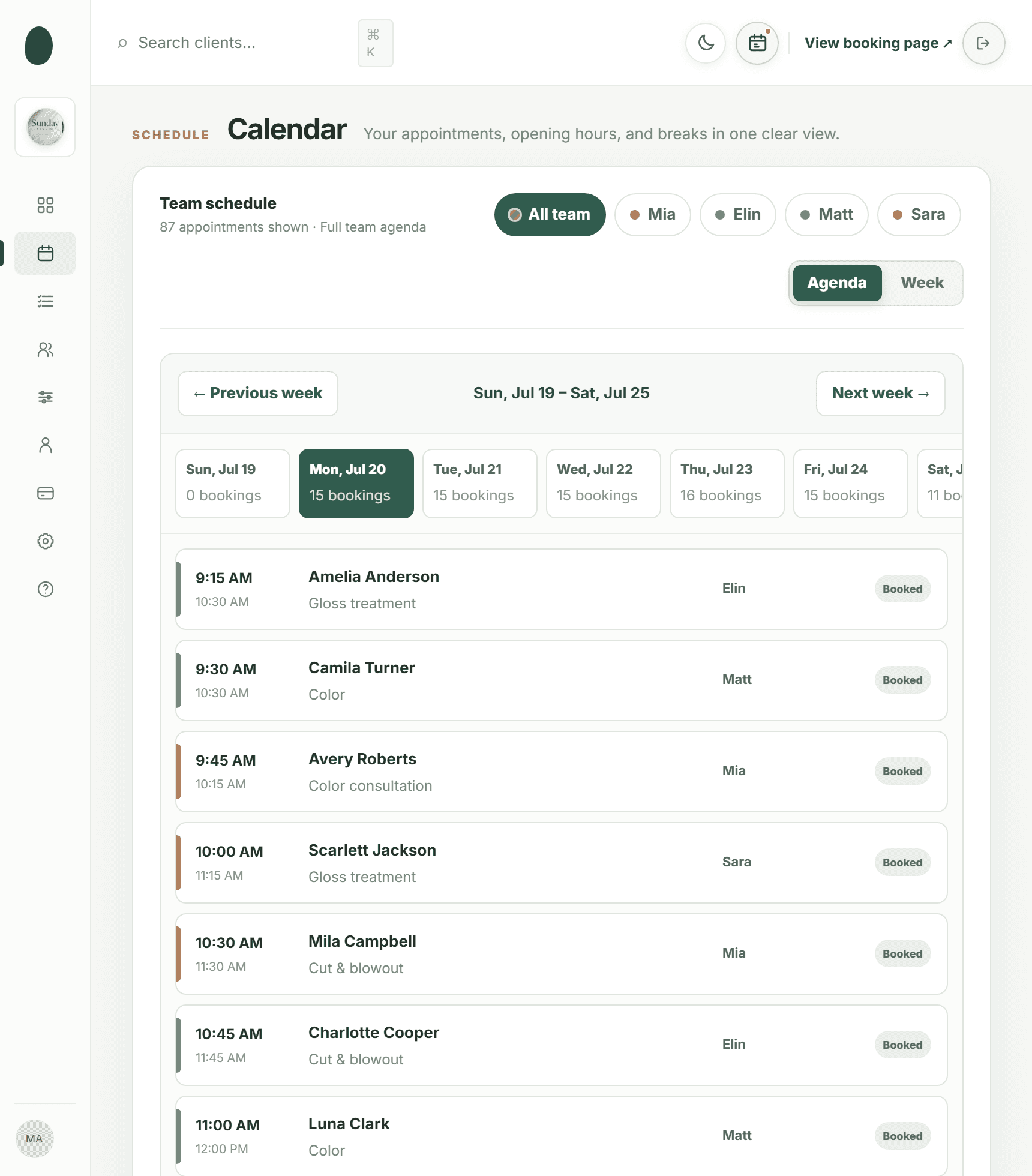
The difference is visible in the booking setup. Clients choose a service, professional, date, and time. The salon can assign services to particular professionals, set service duration and cleanup or buffer time, define opening hours and multiple breaks, block staff time off, set salon closures, control the booking window, require minimum notice, and choose the time-slot interval. Double-booking protection checks those rules against existing bookings rather than simply displaying an open-looking calendar.
For the owner, Kevonia provides a week and day team calendar with per-professional filters and color coding. Client records can be searched by name, email, or phone and include private notes and visit history. Booking statuses can be set to needs confirmation, awaiting payment, booked, checked in, completed, no-show, or cancelled. Cancellation history can be restored, and a client can be blocked from booking online with a reason and their no-show history retained on the client record.
That focus makes Kevonia a practical pocketsuite alternative for a salon where the costly problems are operational: accidental overlaps, staff availability errors, unclear appointment status, deposits that are difficult to track, or front-desk staff needing to find client history quickly. It is not intended to be a universal business operating system, and that is precisely why the comparison should be based on your daily workflow rather than the number of features in a sales page.
PocketSuite vs. Kevonia: pricing, fees, and what the first plan really means
Kevonia has one plan at US$49.99 per month. The plan includes unlimited team members, bookings, clients, and services, with no per-seat charge, no add-on pricing, and no per-booking commission. Kevonia also offers a free 14-day trial with no credit card required to start; if you cancel before the trial ends, you are never charged.
PocketSuite's standard public pricing lists a $49.99-per-month Premium plan, a $99.99-per-month Team plan, and a $149.99-per-month Facility plan. The same page lists a free 30-day trial with no credit card required. Because the plans are aimed at different operating models, a solo provider and a multi-professional salon should not treat the Premium price as a universal PocketSuite comparison point.
Payment cost is another place where buyers need to read beyond the monthly subscription. PocketSuite's official AHP FAQ states that its credit-card processing is 2.9% plus $0.30 for card-present transactions and 3.2% plus $0.30 for card-not-present transactions. Those are payment-processing fees, not a booking commission, but they still affect the amount the salon receives from online payments.
Kevonia takes card payments and deposits through Stripe, with payouts to the salon's bank account. The salon can refund an online payment from the booking itself; the Stripe processing fee on the refund is shown so the real cost is visible, and the client is emailed automatically. In practical terms, compare the monthly plan, the payment processor's charges, the number of staff members, and whether you need paid add-ons—not just the headline subscription.
Side-by-side comparison for salon owners
The table below uses PocketSuite's current public standard pricing and official payment-fee information, alongside Kevonia's stated plan and fee structure. Special association editions or negotiated arrangements can differ from standard PocketSuite pricing, so confirm the account type before signing up.
Which day-to-day salon workflow is stronger?
For a salon that manages several professionals, Kevonia's strongest advantage is the relationship between the service menu, availability rules, and calendar. A haircut can have one duration, a color service can include cleanup time, and a lash appointment can be assigned only to qualified professionals. The booking page then exposes the combinations that are actually available. This reduces the common mistake of publishing every service for every staff member and fixing the resulting conflicts manually.
Kevonia also sends an automatic email reminder the day before an appointment. Clients can reschedule or cancel from that email within the salon's notice window. That matters for a business that wants fewer back-and-forth messages but does not want clients changing appointments indefinitely. The owner still controls the notice rules rather than handing the policy entirely to the booking software.
The owner overview screen adds a useful operating check: today's revenue can be compared with the same day last week, while appointments, 30-day booking activity, total and new clients, no-shows as a percentage of the last 30 days' bookings, and a 30-day revenue chart are visible in one place. Revenue figures can be hidden when the screen is used at the front desk. These are practical details for a salon manager who needs to make a staffing or follow-up decision without opening several reports.
PocketSuite may be the stronger workflow when your business relies on digital forms and contracts, packages, subscriptions, group scheduling, two-way business texting, automated text marketing, or integrations outside the salon calendar. Its official pricing page specifically lists those broader capabilities. The right choice therefore depends on whether the business is primarily an appointment-led salon or a general service company that happens to take appointments.
The failure cases that should change your decision
The usual advice says to choose the tool with more features. That can be wrong for a salon. More features only help if the team uses them, understands the settings, and can recover when an appointment changes at the last minute. A system that requires staff to work around a generic calendar can create more admin work than it removes.
- Choose Kevonia carefully if you need a retail or inventory POS, multi-location management from one account, marketing or SMS campaigns beyond the booking reminder email, or a native mobile app. Kevonia does not currently offer those features.
- Choose PocketSuite carefully if you are comparing only the solo plan but will need team scheduling, staff permissions, payroll, or facility controls. Its public pricing separates those operating levels into higher plans.
- Do not compare only monthly subscriptions when most clients pay online. Payment-processing charges can matter more than a small difference in software price once your booking volume grows.
- Do not migrate before testing real services. Use your longest color appointment, a service with cleanup time, a staff break, time off, a same-day booking, a cancellation, and a deposit refund.
- Do not assume an association or partner edition represents the standard public product. PocketSuite publishes special editions with different terms for some professional groups.
A particularly important edge case is the salon that has one owner today but plans to add staff soon. With Kevonia, the single US$49.99 plan includes unlimited team members, bookings, clients, and services. With PocketSuite, the public standard pricing places unlimited team members and team-management features on the $99.99 Team plan. That does not automatically make either tool better, but it does change the point at which the economics should be evaluated.
Another overlooked issue is the booking channel. If clients usually book through a link shared on Instagram, Google Business Profile, email, or the salon website, a direct branded booking page may be more important than marketplace exposure. If you are replacing a patchwork of calendars, review how clients currently find the booking link and whether staff can consistently explain the new process. The best software still fails when clients are sent to the wrong page.
A practical way to choose before you switch
Do not decide from a feature checklist alone. Recreate one representative week in both systems, using the services and staff members that create the most scheduling risk. Include a new client, a returning client, a deposit, a cancellation, a reschedule, a no-show, a blocked client, a staff break, a day off, and a booking made outside normal business hours.
- Write down every service with its duration, cleanup or buffer time, price, deposit requirement, and eligible professional.
- List each professional's working hours, breaks, recurring days off, planned time off, and any service restrictions.
- Test what a client sees from the booking page on a phone and whether the available times match the real calendar.
- Create a test appointment, change its status, reschedule it, cancel it, and refund its payment.
- Check the information a front-desk employee can find without asking the owner for help.
- Calculate the monthly software cost and estimated payment-processing cost at your actual booking volume.
- Ask what you will lose if you leave: client records, appointment history, payment information, forms, contracts, subscriptions, or marketing automations.
For a salon moving from PocketSuite to Kevonia, the migration question is not simply whether services can be re-entered. Decide which client history is essential, how you will notify clients about the new booking page, when you will stop accepting bookings in the old system, and who will verify that every professional's availability is correct. Run both systems briefly if necessary, but set a firm cutover date so staff do not create duplicate appointments.
Kevonia includes a guided setup checklist, help centre, live demo workspace, light and dark mode, and sign-in with Google or email. Those details do not replace a migration plan, but they can make it easier for an owner to inspect the workflow before asking the whole team to change systems.
Verdict: is Kevonia the right PocketSuite alternative?
Kevonia is the better fit when your business is a salon, spa, barbershop, tattoo studio, beauty clinic, or similar appointment-based team and you want focused scheduling software with a predictable monthly cost. Its strongest case is a branded booking page, professional-level team calendar, rules-based availability, double-booking protection, client history, deposits and card payments through Stripe, reminders, cancellation controls, and unlimited team members on one plan.
PocketSuite remains a credible choice when you want a wider general-service toolkit: forms, contracts, two-way texting, group scheduling, subscriptions, marketing, invoices, or facility-oriented operations. It may also be preferable if your business is not primarily a salon and needs the same system to support several different types of service work.
The honest recommendation is therefore conditional. Choose Kevonia if your core problem is salon booking complexity and you want a flat US$49.99 monthly plan with 0% booking commission. Choose PocketSuite if its broader business tools are central to how you sell and deliver services. Before switching, test the failure cases—not just the happy path—because the best pocketsuite alternative is the one that prevents your most expensive scheduling mistake.
Sources
Frequently asked questions
What is the best PocketSuite alternative for a salon?+
There is no universal winner, but Kevonia is a strong fit when your priority is salon-specific booking operations: a branded booking page, professional calendars, service buffers, staff availability, deposits, reminders, client records, and double-booking protection. PocketSuite may be better when you also need forms, contracts, two-way texting, subscriptions, marketing, group scheduling, or broader service-business tools.
Is Kevonia cheaper than PocketSuite?+
Kevonia costs US$49.99 per month on one plan and includes unlimited team members, bookings, clients, and services with no per-booking commission. PocketSuite's standard public pricing starts at $49.99 per month for Premium, but its public Team plan is $99.99 per month and its Facility plan is $149.99 per month. Payment-processing charges should also be included in the comparison.
Does PocketSuite charge a booking commission?+
PocketSuite's public pricing page does not list a separate booking commission. Its official AHP FAQ lists card-processing rates of 2.9% plus $0.30 for card-present transactions and 3.2% plus $0.30 for card-not-present transactions. Confirm the terms for your specific account or edition before relying on the figure.
Does Kevonia have a mobile app?+
Kevonia does not currently offer a native mobile app. It provides a branded online booking page and a workspace with a team calendar, client records, service menu, availability rules, Stripe payments, reminders, and related salon-management controls. If a native app is essential, include that requirement in your shortlist.
Can Kevonia handle multiple salon professionals?+
Yes. Kevonia includes unlimited team members on its single plan. The calendar supports per-professional filters and color coding, while services can be assigned to specific professionals. Availability rules can include working hours, breaks, time off, salon closures, booking windows, minimum notice, and time-slot intervals.
What should I test before moving away from PocketSuite?+
Test your longest and most complicated services, professional assignments, cleanup time, breaks, time off, deposits, reminders, rescheduling, cancellations, refunds, no-shows, blocked clients, and client-history searches. Also calculate payment-processing costs and decide how you will migrate client records and notify clients about the new booking page.
More from the blog

Schedulicity Alternative: A Better Fit for Growing Salons
Looking for a Schedulicity alternative? Compare the two systems by pricing clarity, booking control, team calendars, payments, client records, and switching risk.

Mangomint Alternative: When Kevonia Is the Better Fit
Looking for a Mangomint alternative? Compare Mangomint’s per-location, per-user model with Kevonia’s flat plan and decide which platform fits your salon or spa.

Squire Alternative: When a Leaner Booking System Fits Better
SQUIRE is built for full barbershop operations. Kevonia is a simpler flat-cost alternative when your priority is branded booking, scheduling, payments, and client records without per-seat or per-booking charges.