Squire Alternative: When a Leaner Booking System Fits Better
SQUIRE is built for full barbershop operations. Kevonia is a simpler flat-cost alternative when your priority is branded booking, scheduling, payments, and client records without per-seat or per-booking charges.

Key takeaways
- SQUIRE is the stronger fit when you need barbershop-specific POS, payroll, multi-location tools, or a branded mobile app.
- Kevonia is a better fit when you want one $49.99 monthly plan, unlimited team members, and 0% booking commission.
- The most important comparison is not the feature checklist; it is whether you will use SQUIRE’s broader operational tools enough to justify the added complexity.
- Before switching, document your services, staff availability, booking rules, payment setup, and client communication process.
| Tool | Starting price | Commission or booking fees | Standout features | Best fit |
|---|---|---|---|---|
| Kevonia | US$49.99/month | 0% booking commission; Stripe payments and deposits | Branded booking page, team calendar, availability rules, client records, reminders | Salons, spas, barbershops, and service teams focused on booking operations |
| SQUIRE | $30/month for Independent; $50/month for Pro | No single universal booking-fee figure is published on the public pricing page; confirm the applicable terms | Barbershop-focused operations, no-show protection, waitlist and shop management, higher-tier marketing, inventory, multi-location support, and branded app | Solo barbers and established barbershops needing broader operational tools |
The right Squire alternative depends on what you are replacing
If you searched for a squire alternative, you probably do not need another generic list of appointment apps. You want to know whether SQUIRE is costing more than it is worth, whether your clients are encountering booking fees or extra friction, and whether another system can handle the daily work of your shop without forcing you into tools you will not use.
The short answer is straightforward: SQUIRE makes sense for a barbershop that wants an all-in-one operating system with barbershop-specific business tools. Kevonia is a stronger fit for owners who mainly need a branded booking page, team scheduling, client records, service rules, reminders, and Stripe payments at a predictable monthly cost. The better choice depends on your business model, not on which product has the longest feature list.
What the search results get right—and where they stop
Current comparison pages usually agree that SQUIRE alternatives include broader salon platforms such as Mangomint, Vagaro, and other scheduling systems. Capterra’s current alternatives page presents SQUIRE as a barbershop appointment product and compares it with tools positioned around overall value, budget, or review volume. That is useful for building a shortlist, but it does not answer the operational question: which capabilities will your staff actually use every week?
The missing step is to separate “software replacement” from “business model replacement.” A booth-rental shop, a commission barbershop, a solo barber, and a six-chair salon may all search for an alternative to squire, but they do not need the same workflow. A shop that needs payroll, retail inventory, and chair-level payouts may regret choosing a lean booking platform. A small salon that only needs appointments and deposits may regret paying for a platform designed around a full barbershop operation.
- Keep SQUIRE on the shortlist if you need barbershop-specific point of sale, payroll or payout workflows, waitlist operations, or multi-location management.
- Consider Kevonia if the daily problem is online booking, staff availability, schedule control, client history, reminders, payments, and no-show management.
- Look elsewhere if you need retail inventory, a native mobile app, advanced marketing campaigns, or centralized multi-location management from one account.
SQUIRE pricing: the subscription is only the first question
SQUIRE’s public pricing page lists an Independent plan at $30 per month, a Pro plan at $50 per month for a single-location shop, an Executive plan at $150 per month per shop, and a Titan plan at $250 per month per shop. The higher plans add capabilities such as marketing, loyalty, gift cards, inventory tracking, multi-location support, and a branded app. Because the plans are designed for different operating models, comparing only the lowest advertised price can produce the wrong conclusion for a team shop.
The same public page does not publish one universal booking-fee amount that applies to every SQUIRE customer and booking path. That means an owner should ask specifically how a client booking is charged, whether the fee depends on payment or booking source, and which payment-processing terms apply to the services you plan to use. Put those answers beside the monthly subscription before deciding that a lower starting plan is cheaper in practice.
This is one of the most important checks for a Squire alternative because a small amount attached to many prepaid appointments can matter more than a modest difference in software subscription. For example, if your shop accepts hundreds of online bookings each month, calculate the cost of the plan, payment processing, booking-related charges, add-ons, and any hardware or marketing tools you would actually activate. Do not compare a stripped-down solo plan with a fully equipped shop workflow.
- Export or estimate your last 90 days of online bookings.
- Separate appointments that were booked, prepaid, cancelled, refunded, or marked as no-shows.
- Ask each vendor for the exact customer-facing and salon-facing charges for those booking types.
- Add optional tools only if you would use them in the next six months.
- Compare the resulting monthly total, not the headline subscription alone.
Kevonia’s position: predictable software for the booking operation
Kevonia takes a narrower, more transparent approach. It offers one plan at US$49.99 per month, with unlimited team members, bookings, clients, and services. There is no per-seat charge, no per-booking commission, and no feature-tier decision for the core workspace. The free trial lasts 14 days, requires no credit card to start, and you are never charged if you cancel before the trial ends.
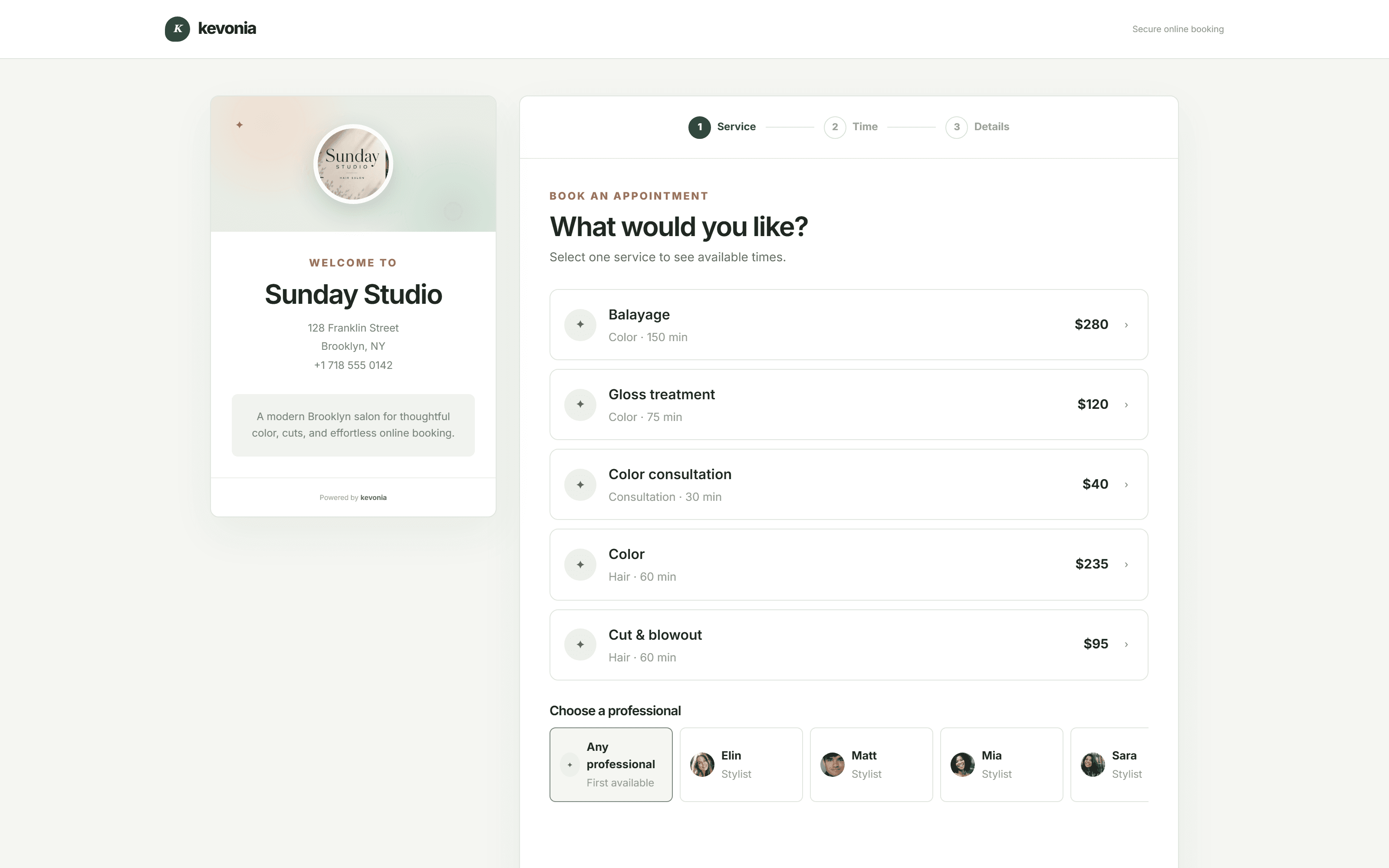
The product includes a branded online booking page at kevonia.com/your-salon, where clients choose a service, professional, date, and time. Inside the workspace, owners get a week and day team calendar, filters by professional, color coding, client records, service settings, availability rules, and Stripe card payments and deposits. That makes Kevonia a practical alternative for a salon, barbershop, tattoo studio, nail business, spa, or wellness provider that wants the booking operation organized without adopting a broader retail or marketing suite.
The difference is not that Kevonia has every feature found in a large barbershop platform. It does not currently provide multi-location management from one account, retail or inventory POS, marketing or SMS campaign tools beyond the automatic booking reminder email, or a native mobile app. That limitation is relevant: if those capabilities are central to your operation, Kevonia is probably not the complete replacement you want. If they are not, paying for them elsewhere may be unnecessary overhead.
The best alternative is the one that matches the work your team repeats every day—not the one with the longest feature checklist.
SQUIRE versus Kevonia: the practical feature divide
SQUIRE is purpose-built around barbershop operations. Its public plan descriptions include online booking, appointment management, reminders, no-show protection, multiple barber accounts, waitlist tools, gift cards, inventory-related capabilities, marketing on higher tiers, multi-location support, and a branded app on Titan. SQUIRE also describes its product as a way to manage more than scheduling, which is why it can be attractive to an established barbershop with front-desk and operational requirements.
Kevonia concentrates on the appointment lifecycle. Availability rules can include opening hours by weekday, multiple breaks, staff time off, salon closures, booking windows, minimum notice, and time-slot intervals. Double-booking protection checks hours, breaks, time off, and existing bookings. For a salon owner, those details matter because a schedule can look available while still being operationally wrong if cleanup time, lunch breaks, or staff absences are not represented.
Kevonia also keeps the client record connected to the booking workflow. Owners can search by name, email, or phone; add private notes; review visit history; block a client from online booking with a reason; and see no-show history. Booking statuses include needs confirmation, awaiting payment, booked, checked in, completed, no-show, and cancelled. These are not flashy differentiators, but they address the common failure case where a booking tool captures appointments while the owner still has to manage client context in texts, spreadsheets, or memory.
- SQUIRE is stronger when the system must extend into POS, retail, payroll or payout workflows, gift cards, loyalty, branded apps, or multiple locations.
- Kevonia is stronger when the priority is a single booking workspace with unlimited staff and bookings, detailed availability rules, client records, reminders, and payments.
- Neither product should be selected from a feature page alone: test the exact workflow for a cancellation, a staff day off, a deposit refund, and a client with a no-show history.
The workflow test most comparison articles skip
Before switching, run four realistic scenarios rather than clicking through a demo’s ideal path. The first is a service that needs cleanup or buffer time. The second is a professional who takes a break and then blocks out a full day. The third is a client who books online, pays a deposit, cancels inside the salon’s notice window, and needs a refund. The fourth is a repeat no-show who should no longer be allowed to book online. A platform that handles these cases cleanly will save more time than one that merely displays a polished calendar.
In Kevonia, the service menu supports duration, cleanup or buffer time, price, optional deposit, and professional assignment. The owner can refund an online payment from the booking itself; the Stripe processing fee on the refund is shown so the real cost is visible, and the client is emailed automatically. The salon can also restore cancellation history and block a client from booking online while keeping the reason and no-show history on the client record.
This is where the usual advice can be wrong. A broader platform is not automatically better for a small team if the owner spends most of the day correcting availability, explaining confusing booking paths, or paying for modules that never become part of the routine. On the other hand, a leaner system is not automatically cheaper if the shop later adds inventory, marketing, payroll, or multi-location requirements and has to maintain separate tools. The correct decision is the one that minimizes operational work over the next stage of growth.
- Create one test service with a deposit and cleanup time.
- Add every professional and reproduce real opening hours, breaks, time off, and closures.
- Book the service as a client, then reschedule and cancel it from the reminder email.
- Process a refund and confirm what the owner and client can see.
- Review the client record and confirm that the history is usable at the front desk.
- Repeat the test on a phone before committing to the migration.
Which tool fits your business type?
A single-chair barber who mainly needs a booking link may find SQUIRE’s Independent plan attractive, especially if the barber wants no-show protection, reminders, and a product designed around barbering. The decision changes when that barber is actually part of a team and needs shared rules, a central calendar, professional-specific services, and a client database that the owner controls. In that case, compare the team workflow rather than the solo price.
A multi-chair barbershop should first decide whether it needs SQUIRE’s broader shop infrastructure. If the business depends on barbershop-specific POS, inventory, gift cards, loyalty, multi-location support, or a branded mobile app, SQUIRE deserves serious consideration. Its own comparison material positions it as purpose-built for barbershops rather than as a general salon platform, although the owner should still verify the exact plan and payment terms before signing.
A salon, spa, esthetician studio, lash business, massage practice, or wellness provider may prefer Kevonia when the core need is structured appointment booking rather than barber-specific retail operations. The same workspace supports a service menu, professional assignments, deposits, availability rules, client history, email reminders, and payments. For teams that want a salon reservation software workflow without per-seat pricing, the flat plan is easier to forecast.
An owner planning multiple locations should be careful not to treat unlimited team members as unlimited locations. Kevonia allows unlimited team members, bookings, clients, and services, but it does not currently offer multi-location management from one account. That is a clear boundary, not a hidden workaround. If centralized location reporting and management are immediate requirements, keep SQUIRE or another multi-location product in the evaluation.
How to switch without losing control of bookings
Changing booking software is less about importing names than preserving the rules behind the calendar. Before you cancel the old system, write down each service’s duration, buffer, price, deposit requirement, assigned professionals, minimum notice, cancellation window, and booking horizon. Then record staff schedules, recurring breaks, closures, and any client restrictions. This prevents the common migration mistake of transferring client data while silently changing the availability that clients see.
Give clients one clear transition message with the new booking address, the date the old link will stop working, and what they should do if they already have an appointment. If you are moving to Kevonia, the branded page lets clients choose the service, professional, date, and time from one flow. Keep the old booking page available during the overlap period if the former vendor allows it, but monitor both calendars closely so a client cannot create conflicting appointments.
Use the first two weeks to inspect the overview screen rather than relying only on booking volume. Kevonia’s overview includes today’s revenue compared with the same day last week, appointment counts, bookings made in 30 days, total and new clients, the no-show percentage for the last 30 days, and a 30-day revenue chart that marks the best day. Owners can hide revenue figures for front-desk use. Those checks help reveal whether the migration improved the business or merely moved appointments from one screen to another.
- Keep a copy of the old client and appointment records before closing the account.
- Test every service and professional combination before announcing the new link.
- Send the transition message through the channels clients already recognize.
- Check the first week for double bookings, missing buffers, and incorrect deposits.
- Review cancellations and no-shows after 30 days, not just the first few successful bookings.
The decision: choose operational fit over software size
SQUIRE is the better choice when your barbershop needs a broad operating platform and will actively use the tools that sit beyond appointment booking. Its public plans range from a solo offering to higher tiers with shop, marketing, inventory, multi-location, loyalty, and branded-app capabilities. The tradeoff is that you need to understand which tier, add-on, payment arrangement, and booking path apply to your business before comparing the cost with a flat-fee alternative.
Kevonia is the better choice when you want the booking operation to stay understandable: one US$49.99 monthly plan, unlimited team members, unlimited bookings, unlimited clients, unlimited services, 0% booking commission, a branded page, a team calendar, client records, configurable availability, reminders, and Stripe payments. It is especially relevant for salons and spas, but it also works for barbershops that do not need retail POS, marketing campaigns, a native app, or centralized multi-location management.
So, is Kevonia the right squire alternative? Choose it when the problem is booking complexity and unpredictable software scope—not when you are specifically looking for a full barbershop back office. The honest comparison is simple: SQUIRE gives a barbershop more operational breadth; Kevonia gives a service business a focused appointment system with predictable pricing and no per-booking commission.
Sources
Frequently asked questions
What is the best Squire alternative for a small salon?+
Kevonia is a strong fit when the salon mainly needs branded online booking, a team calendar, client records, service and availability rules, reminders, deposits, and payments. It has one US$49.99 monthly plan, unlimited team members, unlimited bookings, unlimited clients, unlimited services, and 0% booking commission. It is not the right choice if you need retail inventory POS, marketing or SMS campaigns beyond the booking reminder email, a native mobile app, or centralized multi-location management.
Is Kevonia cheaper than SQUIRE?+
It depends on the workflow you need. Kevonia charges US$49.99 per month with no per-seat or per-booking commission. SQUIRE’s public pricing starts at $30 per month for Independent and lists Pro at $50 per month, with higher shop plans at $150 and $250 per month. The meaningful comparison is the total cost of the plan and the tools you would actually use, including any applicable booking, payment, hardware, or add-on charges.
Does SQUIRE charge a booking fee?+
SQUIRE’s public pricing page does not publish one universal booking-fee amount for every customer or booking path. Ask SQUIRE whether a client-facing or salon-facing fee applies to your exact setup, especially if you take prepaid online appointments. Do not assume the subscription price is the complete cost until those terms are confirmed.
Is Kevonia good for a barbershop?+
Kevonia can fit a barbershop that needs a branded booking page, professional-specific services, a shared team calendar, staff availability rules, client history, deposits, reminders, and Stripe payments. It is less suitable for a shop that requires retail or inventory POS, payroll or payout workflows, a native mobile app, or centralized management across multiple locations.
What should I test before switching from SQUIRE?+
Test a service with cleanup time, a staff break, a full-day absence, an online deposit, a cancellation and refund, a reschedule, and a client with a no-show history. Also test the client-facing booking flow on a phone. These cases reveal whether the new system will prevent real scheduling problems rather than simply display a better-looking calendar.
Can Kevonia manage multiple locations?+
Kevonia does not currently offer multi-location management from one account. It supports unlimited team members, bookings, clients, and services within its workspace, but owners who need centralized multi-location management should evaluate a product that explicitly provides that capability.
More from the blog

Mangomint Alternative: When Kevonia Is the Better Fit
Looking for a Mangomint alternative? Compare Mangomint’s per-location, per-user model with Kevonia’s flat plan and decide which platform fits your salon or spa.

Online Booking System for Salons: 2026 Setup Guide
A practical, no-fluff guide to choosing and setting up an online booking system for salons — what it should do, how to configure it, and mistakes to avoid.

Acuity Scheduling Alternative: What Salon Owners Should Compare
Looking for an Acuity Scheduling alternative? Compare Acuity with Kevonia on pricing, booking fees, salon workflows, team scheduling, payments, and switching risks.