Phorest Alternative: Compare Phorest and Kevonia in 2026
Phorest is a powerful salon platform, but its quote-based pricing and broader feature set may not suit every business. See how Kevonia compares for straightforward booking and salon management.

Key takeaways
- Phorest is built as a broad salon and medspa platform with POS, marketing, inventory, loyalty, reporting, and online booking.
- Phorest does not publish a standard US subscription price, and its official FAQ describes fees that can apply to some online bookings.
- Kevonia offers one $49.99/month plan with unlimited team members, bookings, clients, and services, plus 0% booking commission.
- Kevonia is a better fit when you primarily need reliable booking, scheduling, client records, service rules, and Stripe payments without feature tiers.
- Choose Phorest when you specifically need an all-in-one operational and marketing system, including POS, inventory, campaigns, loyalty, or a branded mobile app.
| Tool | Starting price | Commission or booking fees | Standout features |
|---|---|---|---|
| Kevonia | $49.99/month; 14-day free trial; no credit card required to start | 0% booking commission; no per-seat charge | Branded 24/7 booking page, team calendar, availability rules, client records, deposits and card payments through Stripe |
| Phorest | US pricing is quote-based; no standard starting price is published | Official FAQ describes a tiered online booking fee; its example shows $1 for an online booking total of $20–$39.99 | Appointment and POS tools, staff scheduling, online booking, SMS and email communication, marketing, stock management, loyalty, memberships, reporting, mobile tools, and branded app options |
Is Phorest the right fit for your salon?
If you searched for a phorest alternative, you probably are not asking whether Phorest has enough features. It clearly has a wide range of salon and medspa tools. The more useful question is whether you want a large, quote-based platform with marketing, POS, inventory, loyalty, reporting, and mobile tools—or a simpler system focused on getting appointments booked and managed without paying for capabilities you will not use.
This comparison looks at that decision from an owner’s point of view. It covers published pricing information, booking fees, daily workflows, growth needs, and the situations where each product makes more sense. The short version: Phorest is aimed at businesses wanting a broad operating system for a growing salon or medspa, while Kevonia is designed for businesses that want a clear monthly price and a focused booking and management workspace. For more detail, see Kevonia's salon booking software for daily scheduling.
Phorest vs. Kevonia: quick comparison
The table gives you the most important differences at a glance. Phorest’s US pricing page asks prospective customers to request a quote rather than publishing a standard subscription amount. Its plan pages describe multiple packages, with features expanding across Starter, Grow, Complete Advantage, and Elite. Kevonia uses one published plan instead of feature tiers. Supporting details are available from Phorest’s current US plan details.
- Treat the comparison as a fit check, not a claim that one product is universally better.
- Confirm payment-processing terms separately with either provider before signing, because software subscription cost and card-processing cost are different expenses.
- Ask whether the workflows you need are included in the quoted plan rather than assuming every advertised feature is available at the same level.
What Phorest does well
Phorest is a serious option for owners who want more than a calendar and online booking page. Its official US plan information lists appointment and POS functionality, staff scheduling, online booking with deposits, automated email and SMS reminders, reporting, stock management, a mobile app for staff, marketing tools, and video consultations. Higher packages add tools such as digital consultation forms, client loyalty, an online store, referrals, reputation management, memberships, two-way SMS, and a salon-branded app. Supporting details are available from Phorest’s published feature and plan information.
That breadth can be valuable when several disconnected systems are creating work. A larger salon may want appointment scheduling connected to POS, retail stock, client purchase history, marketing campaigns, staff performance reporting, and loyalty. A medspa may value consultation forms, before-and-after photos, memberships, and more advanced client records. In those cases, buying a broader platform can reduce the need to assemble separate tools.
Phorest also supports more complex booking scenarios than a basic appointment calendar. Its published feature list includes waiting lists, booking through a website and social channels, control over last-minute booking notice, service and staff eligibility, room and equipment links, deposits, prepaid courses and series, and no-show charges. Those capabilities matter when your operation has rooms, equipment, multiple service types, or a large volume of repeat bookings.
The tradeoff is that the platform is easier to justify when you will actively use those capabilities. If your business mainly needs online booking, a team calendar, service availability rules, client notes, reminders, and deposits, a feature-rich platform may introduce more configuration and a longer buying process than you need.
Where Phorest may be more than you need
The first issue is price transparency. Phorest’s US pricing page presents packages and asks the buyer to request a quote; it does not show a standard monthly starting price. That does not mean Phorest is overpriced. It means you need a sales conversation to learn what your business will pay and which capabilities are included. For an owner comparing software on a fixed budget, the lack of a public subscription figure makes an apples-to-apples comparison harder. Supporting details are available from Phorest pricing and quote process.
The second issue is the cost structure around bookings and payments. Phorest’s official online booking fee FAQ describes a tiered fee for some online bookings. The example shown in the FAQ includes a $1 fee when the online booking total is between $20 and $39.99. Because the exact treatment can depend on the booking and account setup, ask Phorest to explain how the fee applies to your services, deposits, cancellations, and no-shows before you compare totals. Supporting details are available from Phorest’s online booking fee FAQ.
A broad product can also create an adoption problem. Staff may need training across point of sale, inventory, campaigns, loyalty, consultation records, reporting, and mobile workflows. That is worthwhile if those areas are part of your operating model. It can feel unnecessary for a solo esthetician, small barbershop, independent massage therapist, or appointment-led studio that does not sell retail or run campaigns from the booking platform.
- Phorest is potentially a strong fit if you need POS and retail operations in the same system.
- It is potentially a strong fit if marketing, loyalty, memberships, reviews, or branded mobile apps are central to your growth plan.
- It may be more platform than you need if your main problems are missed bookings, calendar conflicts, unclear service availability, and manual client records.
- A quote should be evaluated as a total cost: subscription, booking fees, payment processing, optional add-ons, implementation, and staff training.
Where Kevonia fits differently
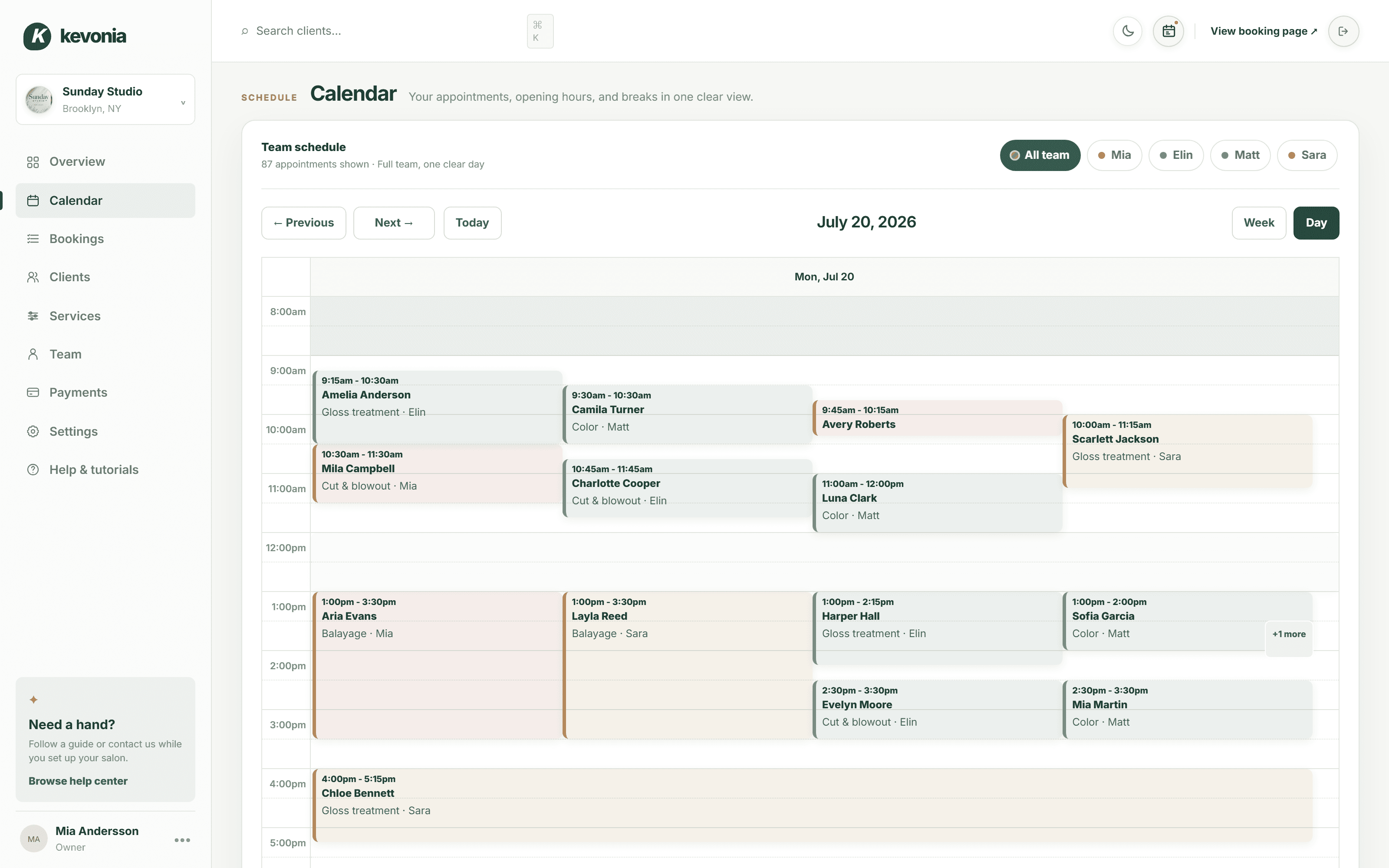
Kevonia takes a narrower and more predictable approach. It provides a branded online booking page at kevonia.com/your-salon and a workspace with a team calendar, client records, a service menu, availability rules, and Stripe payments. The price is one plan at $49.99 per month. The plan includes unlimited team members, bookings, clients, and services, with no per-booking commission and no per-seat charge. For more detail, see Kevonia's Kevonia salon management software.
That model is useful for an owner who wants to know the software bill before scheduling a demo. The booking page stays open 24/7, and clients choose a service, professional, date, and time. The calendar includes week and day views, per-professional filters, and color coding. Double-booking protection checks staff hours, breaks, time off, and existing bookings before a time is offered.
The service and availability settings are also practical for businesses with different staff schedules. You can define service duration, cleanup or buffer time, price, optional deposits, and which professionals can perform a service. Availability rules cover opening hours by weekday, multiple breaks, staff time off, salon closures, the booking window, minimum notice, and time-slot intervals. Those details address the everyday reasons an online booking calendar offers appointments that a team cannot actually fulfill.
Kevonia does not currently try to match Phorest feature-for-feature. It does not offer multi-location management from one account, retail or inventory POS, marketing or SMS campaign tools beyond the booking reminder email, or a native mobile app. That limitation is important. Kevonia is a better match when you want booking and scheduling clarity, not when you are specifically shopping for an all-in-one retail, marketing, loyalty, and POS platform.
Compare the daily workflows, not just the feature lists
Software comparisons often focus on long feature checklists. A better test is to walk through a normal busy day and several failure cases. Imagine a client wants a 90-minute color service with a cleanup buffer, only one stylist is qualified, and the stylist has a break in the middle of the afternoon. The system should show only valid times. It should not simply display every opening hour on the calendar.
In Kevonia, the service duration, buffer, professional assignment, breaks, and existing bookings work together in the availability rules. The owner can also set minimum notice and a booking window, which helps prevent same-day surprises or bookings months beyond the schedule. For a small business, this type of control may be more important than having a large marketing suite. For more detail, see Kevonia's salon reservation software for controlled availability.
Now test the client-record workflow. A returning client may call from a new phone number, ask for the same service as last time, or need a private note visible to the team. Kevonia client records can be searched by name, email, or phone and include private notes and visit history. That gives staff context without requiring the owner to search paper cards or separate notes.
Then test the payment and reminder workflow. Kevonia supports card payments and deposits through Stripe, with payouts to the salon’s bank account. It automatically emails a reminder the day before an appointment, and clients can reschedule or cancel from that email within the salon’s notice window. Cancellation history can be restored, which is useful when a client changes their mind or a team member cancels an appointment accidentally.
- Create a service with a buffer and assign it to only the professionals who can perform it.
- Add a staff break, time off, and an existing booking, then verify that unavailable times disappear.
- Book as a client and test the order of service, professional, date, and time selection.
- Apply a deposit and confirm what the client sees before finalizing the booking.
- Open the reminder email workflow and test rescheduling and cancellation inside the notice window.
- Search for a client using each available identifier and confirm that visit history and private notes are easy to find.
Which platform is better for different salon sizes?
A solo provider or small team usually benefits from predictable pricing and low administrative overhead. If the business needs a branded booking page, a calendar, client records, service setup, availability rules, reminders, deposits, and Stripe payments, Kevonia covers that operating layer at one monthly price. Unlimited team members also means the software bill does not increase simply because the salon adds another professional.
A growing salon with retail sales, a front desk, several locations, memberships, loyalty, campaigns, or formal performance management may find Phorest more suitable. Its published feature set is designed for a wider set of salon operations, including POS, stock management, reporting, marketing, client communication, loyalty, and staff tools. The right question is whether those features will be used often enough to justify the quoted cost and implementation effort.
For a spa or medspa, the decision depends on the operational model. Kevonia can support a service-led schedule with professional assignments, deposits, client records, time-off rules, and reminders. Phorest may be the better fit if the business needs consultation forms, before-and-after photos, memberships, review management, inventory, or a broader client-engagement program. A spa should list its required workflows before choosing based on brand familiarity alone.
- Choose Kevonia when your priority is a focused booking and scheduling system with one published plan.
- Choose Phorest when you need booking plus POS, inventory, marketing, loyalty, memberships, advanced reporting, or branded mobile experiences.
- Do not choose either platform solely because a feature appears on a marketing page; test the exact workflow with your staff and service menu.
- If you operate multiple locations, confirm the account structure before making Kevonia your shortlist leader, because multi-location management is not currently offered from one Kevonia account.
A practical checklist before switching from Phorest
Switching booking software is not just a subscription decision. It changes how clients find appointments, how staff manage their day, and how the business handles deposits and cancellations. Before moving away from Phorest, document the workflows you use today and separate essential requirements from features that are merely nice to have.
- Export or preserve client contact details, visit history, notes, service information, and future appointments according to your existing agreement and data-access options.
- Write down every service with duration, cleanup time, price, deposit rules, eligible professionals, and any minimum-notice requirement.
- Map each professional’s opening hours, breaks, time off, recurring closures, and booking restrictions.
- Record how deposits, cancellations, no-shows, refunds, and payment payouts are handled.
- Test the new booking page on a phone, since many clients will book outside business hours.
- Run both systems carefully during the transition so that a client cannot accidentally book the same slot in both places.
- Tell clients exactly where to book after the change and update your website, social profiles, email signatures, and printed materials.
Kevonia provides a guided setup checklist, a help centre, a live demo workspace, and a 14-day free trial with no credit card required to start. You can cancel anytime before the trial ends and never be charged. Use that time to test real services and availability rules rather than creating only a simple sample appointment.
The most useful test is a realistic week: normal appointments, overlapping staff schedules, breaks, time off, deposits, cancellations, and a client reschedule. If the system handles that week without manual workarounds, you have learned more than a long feature presentation can show.
The bottom line: which Phorest alternative should you choose?
Phorest is a broad salon and medspa management platform. It is worth serious consideration when you want booking connected with POS, stock, marketing, loyalty, memberships, reporting, consultation workflows, and mobile tools. Its public US pricing is quote-based, and its official documentation indicates that online booking fees can apply, so ask for a complete written cost breakdown before comparing it with a fixed-price product.
Kevonia is the more straightforward choice when your business needs a branded booking page and a practical management workspace rather than a full retail and marketing suite. At $49.99 per month, with unlimited team members, bookings, clients, and services, plus 0% booking commission, it gives smaller salon and spa teams a clear baseline for budgeting. It is especially relevant for hair salons, barbershops, tattoo studios, nail salons, day spas, med spas, esthetician and lash studios, beauty clinics, wellness and yoga studios, and massage therapists.
So, is Kevonia the right phorest alternative? Choose it if predictable pricing, controlled availability, client records, reminders, deposits, and a focused booking workflow solve the problem you actually have. Choose Phorest if the business case depends on POS, inventory, campaign automation, loyalty, memberships, advanced reporting, or a branded app. The better product is the one whose included workflows match your next twelve months—not the one with the longest feature list.
Sources
Frequently asked questions
Is Kevonia cheaper than Phorest?+
Kevonia publishes one plan at $49.99 per month. Phorest’s US pricing page asks businesses to request a quote, so there is no verified public subscription figure to compare directly. Phorest also documents an online booking fee structure, while Kevonia has 0% booking commission. Compare the complete written quote, including payment processing and any optional services, rather than comparing a headline subscription alone.
Does Phorest charge a fee for online bookings?+
Phorest’s official online booking fee FAQ describes a tiered fee that can apply to online bookings. The example on the FAQ shows a $1 fee when the online booking total is between $20 and $39.99. Ask Phorest to confirm how its current fee applies to your account, deposits, cancellations, no-shows, and different service totals.
What does Kevonia include that a small salon needs?+
Kevonia includes a branded 24/7 online booking page, a week and day team calendar, professional filters and color coding, double-booking protection, client records with notes and visit history, a service menu, detailed availability rules, Stripe card payments and deposits, a next-day reminder email, and client rescheduling or cancellation from that email within the salon’s notice window.
Does Kevonia have POS, retail inventory, or SMS marketing?+
No. Kevonia does not currently offer retail or inventory POS, marketing or SMS campaign tools beyond the automatic booking reminder email, a native mobile app, or multi-location management from one account. If those capabilities are essential, Phorest may be a better fit because its published plans include broader POS, stock, marketing, communication, loyalty, and mobile options.
Can I use Kevonia for a spa or medspa?+
Yes, Kevonia is built for day spas, med spas, esthetician and lash studios, beauty clinics, massage therapists, and other service-led businesses. It is best suited to appointment scheduling, professional assignments, service durations, deposits, client records, availability rules, payments, and reminders. If your medspa requires advanced consultation forms, before-and-after photography, memberships, retail, or extensive marketing automation, verify those needs separately because Kevonia does not currently offer them.
What should I test before replacing Phorest?+
Test a realistic week instead of only creating a basic appointment. Include services with buffers, professional restrictions, breaks, time off, deposits, cancellations, rescheduling, client notes, and overlapping bookings. Also confirm how client data and future appointments can be preserved, how payment payouts work, and how clients will be redirected to the new booking page after the change.
More from the blog

Acuity Scheduling Alternative: What Salon Owners Should Compare
Looking for an Acuity Scheduling alternative? Compare Acuity with Kevonia on pricing, booking fees, salon workflows, team scheduling, payments, and switching risks.

DaySmart Salon Alternative: Compare Cost, Control, and Fit
DaySmart Salon is capable, but its tiered pricing and broad feature set are not right for every salon. Compare the practical trade-offs before switching.

PocketSuite Alternative: The Better Fit for Salon Teams
Looking for a PocketSuite alternative? Compare PocketSuite and Kevonia on pricing, payment fees, salon workflows, team scheduling, and booking limits.