DaySmart Salon Alternative: Compare Cost, Control, and Fit
DaySmart Salon is capable, but its tiered pricing and broad feature set are not right for every salon. Compare the practical trade-offs before switching.

Key takeaways
- DaySmart Salon is strongest when you need broad salon operations, marketing, payroll, and reporting in one platform.
- The cheapest-looking plan is limited to one user, so multi-person teams should compare the plan they would actually need.
- Kevonia is a focused option at US$49.99 per month with unlimited team members, bookings, clients, and services and 0% booking commission.
- Before migrating, test real booking scenarios, export your client data, and confirm which features your team uses every week.
| Tool | Starting price | Commission or booking fees | Standout scheduling and booking features | Other notable capabilities |
|---|---|---|---|---|
| DaySmart Salon | US$29/month for Basic; one user | No universal booking-commission figure stated on the public pricing page; payment-processing terms should be confirmed | Online booking, appointment scheduling, reminders, social booking, walk-ins, waitlists, multi-service appointments, provider-specific rules | Higher plans add capabilities such as gift cards, loyalty, payroll, email or text marketing, reporting, commission tracking, and broader management tools |
| Kevonia | US$49.99/month single plan | 0% booking commission; Stripe processing applies to card payments | Branded 24/7 booking page, team calendar, professional filters, availability rules, buffers, deposits, double-booking protection | Unlimited team members, bookings, clients, and services; client records, reminders, cancellation history, refunds, no-show controls, and overview reporting |
What are you really looking for in a DaySmart Salon alternative?
If you searched for a daysmart salon alternative, you probably do not want a list of twenty booking apps. You want to know whether another system can handle your actual schedule, what you would give up by leaving DaySmart Salon, and whether the monthly bill becomes more predictable for your team.
The short answer is that DaySmart Salon remains a broad all-in-one choice, while a focused system can be a better fit when your priorities are online booking, staff calendars, client records, deposits, reminders, and transparent billing. The right decision depends less on the longest feature list than on the workflows your salon cannot afford to lose.
What DaySmart Salon does well—and where the comparison gets complicated
DaySmart Salon covers online booking, appointment scheduling, reminders, social booking through Instagram and Facebook, payments, deposits, reporting, and a mobile app. Its scheduling materials also describe support for walk-ins, waitlists, multi-service appointments, provider-specific rules, and processing time. That breadth explains why it remains under consideration for established hair salons, barbershops, nail salons, and skin clinics. Supporting details are available from DaySmart Salon’s official scheduling overview. Supporting details are available from DaySmart Salon product overview.
The complication is that the entry price is not the same thing as the price a growing team will pay. DaySmart’s public salon pricing lists Basic at US$29 per month for one user, Deluxe at US$69 for three users, Deluxe Growth at US$149, Premium at US$199, and Premium Growth as contact-for-pricing. The same page says additional users on several plans cost US$9 per month each, while the Premium Growth plan includes unlimited users. DaySmart also advertises a 14-day trial with no card required. Supporting details are available from DaySmart Salon pricing.
That structure matters if you have two or more professionals, need text marketing, want commission tracking, or expect to use payroll and expense tools. Basic may be enough for a solo provider, but comparing it with a flat plan that includes an entire team can produce a misleading result. You should compare the plan you would realistically operate on after six months, not the lowest number shown in a search result. Supporting details are available from DaySmart’s published plan details.
- DaySmart is a reasonable fit when you want booking, payments, marketing, payroll, and broader business operations in one vendor.
- The entry plan is designed around one user, so a team should price the appropriate multi-user tier rather than stopping at Basic.
- Some capabilities appear only on higher plans or as add-ons, which makes a feature-by-feature comparison more useful than a headline-price comparison.
- The public pricing page does not state a universal 0% booking commission; confirm payment-processing terms and any applicable rates directly before signing.
DaySmart Salon versus Kevonia: the practical differences
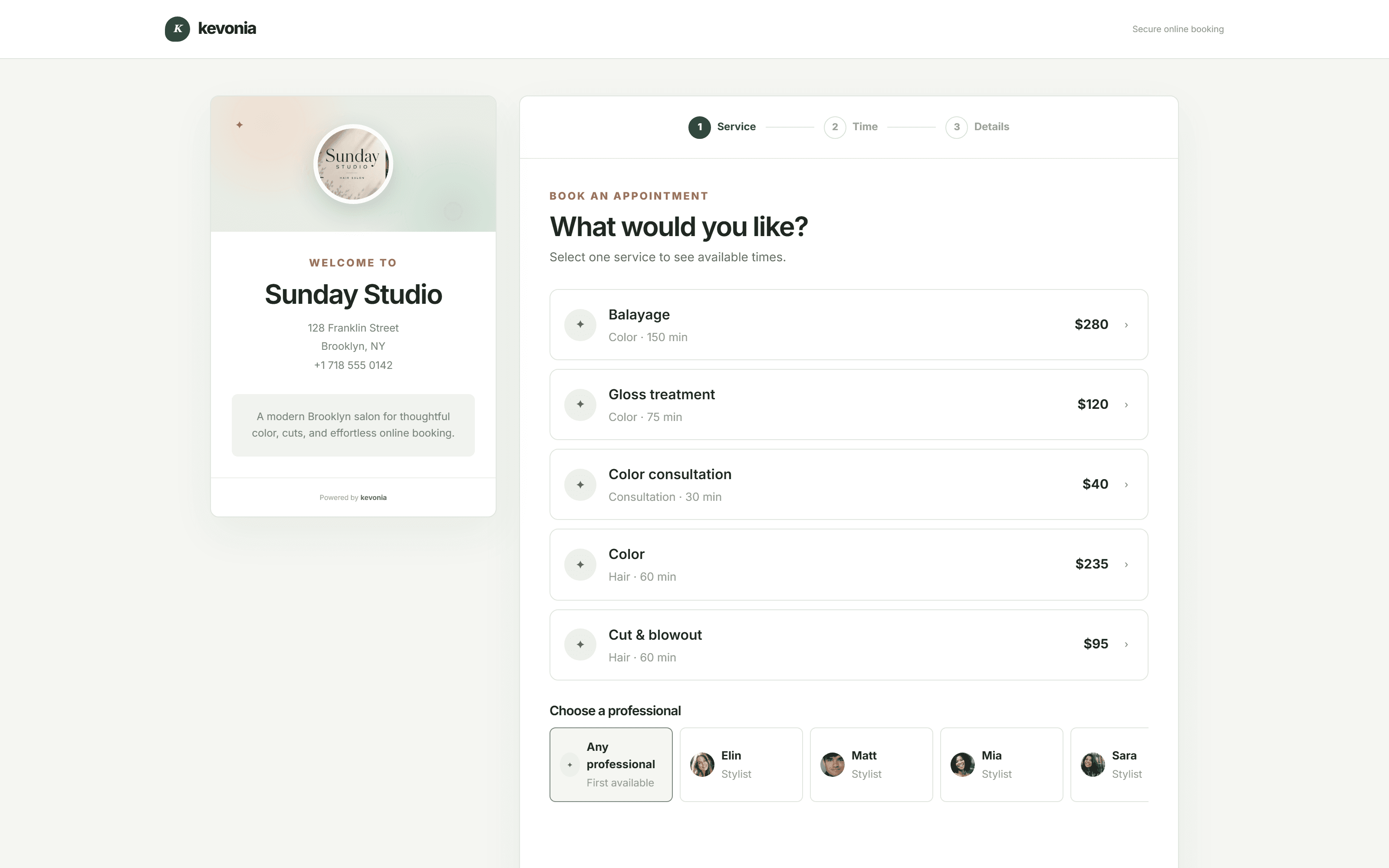
Kevonia fits owners who want a focused salon and spa management workspace rather than a large collection of operational modules. It provides a branded online booking page at kevonia.com/your-salon, a team calendar, client records, service-menu controls, availability rules, and Stripe card payments and deposits. Clients can choose a service, professional, date, and time from the booking page, which is open 24/7.
Kevonia has one plan at US$49.99 per month. That plan includes unlimited team members, bookings, clients, and services, with no per-booking commission and no feature tiers or add-on pricing. The free trial lasts 7 days, requires no credit card to start, and does not charge you if you cancel before the trial ends. For a small team, the important difference is not simply that the number is lower or higher; it is that the bill does not change when you add another professional or accept another online booking.
On scheduling, Kevonia includes week and day views, per-professional filters, color coding, and double-booking protection checked against hours, breaks, time off, and existing bookings. Its availability rules cover opening hours, multiple breaks, staff time off, closures, booking windows, minimum notice, and time-slot intervals. That is a useful distinction for salons where the failure is not a missing marketing campaign but a client booking during lunch, after a provider’s shift, or inside a required cleanup period.
Client and payment workflows are similarly direct. Staff can search records by name, email, or phone, add private notes, review visit history, and block online booking for a client with a reason and no-show history. Services can include duration, cleanup or buffer time, price, optional deposits, and professional assignments. Payments and deposits run through Stripe, with payouts going to the salon’s bank account.
- Choose Kevonia when your core requirement is controlled online booking and team scheduling with a single predictable subscription.
- Choose DaySmart when you specifically need its broader ecosystem, such as payroll, commission tracking, text marketing, gift cards, or a native mobile app.
- Do not choose either system from a pricing table alone; test your real service durations, breaks, deposits, cancellations, and staff permissions first.
A side-by-side comparison for salon owners
The table below uses DaySmart’s public salon pricing and feature information together with Kevonia’s stated product terms. DaySmart’s pricing page lists its plan prices and user limits, while its product pages describe online booking, reminders, payments, reporting, marketing, and broader management capabilities. Kevonia uses a single US$49.99 monthly plan with unlimited team members, bookings, clients, and services and 0% booking commission. Supporting details are available from DaySmart public salon pricing.
Comparison: DaySmart Salon and Kevonia
Use this as a screening tool, not as a substitute for checking the workflows that matter to your business. In particular, payment-processing rates, hardware needs, data migration, and any optional DaySmart services should be confirmed for your account before you make a final decision.
Where the usual advice can fail: test the workflow, not the brochure
Many comparison pages stop after matching features and monthly prices. That misses the most expensive switching risk: a system can appear equivalent until a real appointment exposes a gap. A color service with a 30-minute processing period, a provider who works different hours on Fridays, a deposit that must be refunded, and a client who reschedules inside the notice window are not edge cases. They are normal salon operations.
Before replacing DaySmart Salon, create a short test script and run it in every serious alternative. This step is especially important if your team has built workarounds around the existing platform. A feature that is technically present but difficult for the front desk to use can create more errors than a feature that is absent and replaced with a clear manual rule.
- Create three services: one short appointment, one long appointment, and one service with cleanup or processing time.
- Add two professionals with different working hours, breaks, and time off.
- Try an online booking, a deposit, a cancellation, a reschedule, and a refund.
- Attempt a booking during a break, outside the booking window, and inside the minimum-notice period.
- Check whether the calendar makes it obvious which professional owns each appointment.
- Search for a client by more than one identifier and verify that notes and visit history are usable at the front desk.
- Ask who can export data, what format it uses, and whether the vendor will help with migration.
The failure case to watch for is not just a missing feature. It is a hidden operational cost: staff manually checking buffers, owners fixing double bookings, or clients calling because the reminder does not provide a usable cancellation path. A leaner platform can be the better alternative when it prevents those errors with clear rules, even if it has fewer modules overall.
Which type of salon should choose which option?
A solo stylist or independent esthetician may prefer DaySmart Basic if one user and basic online booking are genuinely sufficient. DaySmart’s public plan includes online booking, appointment confirmations, payment processing, and online deposits at that entry level. However, the one-user limit becomes relevant as soon as an assistant, second provider, or front-desk employee needs access. Supporting details are available from DaySmart Basic plan.
A salon with several professionals should compare team economics and daily usability. Kevonia’s unlimited-team structure removes per-seat billing from the decision, while its calendar filters, color coding, availability rules, and double-booking protection address the scheduling problems that grow with a team. It is a good fit for hair salons, barbershops, tattoo studios, nail salons, day spas, med spas, lash studios, beauty clinics, wellness studios, and massage practices that want booking and operational scheduling without retail inventory or a full POS suite.
A larger operation that depends on commission calculations, payroll workflows, retail inventory, marketing campaigns, or multi-location management should be cautious about switching to a focused booking system. Kevonia does not currently offer multi-location management from one account, retail or inventory POS, marketing or SMS campaign tools beyond the booking reminder email, or a native mobile app. Those are not minor omissions if they are part of your daily process.
- Solo provider: compare simplicity, booking controls, payment needs, and whether one user is enough.
- Growing team: compare the real monthly cost, seat limits, staff scheduling, and protection against booking conflicts.
- Marketing-led salon: verify whether campaign, texting, loyalty, and reputation tools are essential or can remain in another system.
- Multi-location or retail-heavy business: confirm that the alternative supports those operations before exporting data or ending the current subscription.
The overlooked migration questions to answer before switching
Changing booking software is not complete when the owner creates an account. It is complete when clients can book correctly, staff can find the information they need, and the front desk knows what to do when an appointment changes. Ask the vendor how client records, appointment history, services, staff schedules, notes, and future bookings are transferred. Also ask whether you can retain a read-only copy of the old data after cancellation.
Review your client communication before launch. If the old system sends reminders through one channel and the new system uses another, tell clients what is changing. Check the sender name, reply behavior, cancellation path, and notice-window rules. Kevonia automatically emails a reminder the day before an appointment and allows clients to reschedule or cancel from that email within the salon’s notice window. It also records cancellation history, supports restore, and emails clients automatically when the salon refunds an online payment.
Run both calendars briefly if the risk of a missed appointment is high, but define one source of truth. Duplicate booking systems create their own failure mode when one staff member updates the old calendar and another accepts a booking in the new one. A written cutover date, a final export, a staff walkthrough, and a client-facing notice are more valuable than an optimistic promise that migration will be effortless.
- Export and preserve the old client and appointment data before canceling.
- Decide which system is the source of truth during the transition.
- Recreate services with accurate durations, buffers, deposits, and professional assignments.
- Test reminders, cancellation windows, refunds, and staff time off with real scenarios.
- Tell staff exactly when the old system stops accepting new bookings.
Is Kevonia the right DaySmart Salon alternative for you?
Kevonia is a strong fit when you want a branded booking page, a controlled team calendar, client records, configurable services and availability, Stripe payments and deposits, reminders, and practical no-show controls under one flat subscription. The workspace also includes booking statuses, refunds from the booking itself, client blocking, an overview screen with appointment and revenue trends, a guided setup checklist, a help center, a live demo workspace, light and dark mode, and sign-in with Google or email.
It is not the right choice merely because the monthly price looks straightforward. If your business depends on retail inventory, POS workflows, marketing or SMS campaigns, a native mobile app, or multiple locations in one account, you should keep those requirements in the comparison. Kevonia is designed for owners who would rather have the booking and scheduling foundation work cleanly than pay for a wider platform they do not use.
The practical decision is simple: list the five workflows that cause the most admin or revenue leakage today, then test those workflows in DaySmart Salon and the alternative. If DaySmart’s wider tools are central to your business, staying may be the lower-risk choice. If your team mainly needs dependable booking, scheduling, client records, deposits, reminders, and predictable pricing, Kevonia deserves a direct trial comparison.
Frequently asked questions
These are the questions salon owners usually need answered before moving from DaySmart Salon to another booking system.
Is there a cheaper alternative to DaySmart Salon?
There can be, depending on your team size and required features. DaySmart lists Basic at US$29 per month for one user, while Kevonia charges US$49.99 per month for one plan with unlimited team members, bookings, clients, and services and 0% booking commission. A solo provider may pay less with DaySmart Basic, but a multi-person team should compare the actual DaySmart tier and user costs against Kevonia’s flat plan. Supporting details are available from DaySmart pricing details.
Do not define cheaper as subscription price alone. Include per-seat charges, booking commissions, payment-processing costs, add-ons, migration work, and the staff time required to manage the system.
What is the best alternative to DaySmart Salon for a small team?
For a small team that mainly needs online booking, staff scheduling, client records, service rules, deposits, reminders, and payments, Kevonia is a focused option. Its unlimited-team policy can make the cost easier to forecast as you add professionals. If the team also needs payroll, commission tracking, text marketing, inventory, or multi-location management, compare broader platforms instead of assuming a focused booking system will cover those needs.
Which DaySmart Salon competitors should I compare first?
Start with the tools that match your operating model, not a generic ranking. Compare one broad all-in-one platform, one focused booking system, and any product that specializes in your biggest constraint, such as multi-location operations, retail, payroll, or marketing. In this comparison, DaySmart represents the broad suite and Kevonia represents the focused, flat-cost booking and scheduling approach.
Is Kevonia a salon iris alternative?
Yes, if by salon iris alternative you mean a replacement for the appointment-booking and salon-scheduling part of the workflow. Kevonia provides a branded online booking page, team calendar, client records, service menu, availability rules, Stripe payments and deposits, reminders, cancellation history, and booking controls. Before switching, verify whether you also rely on retail POS, payroll, commission tracking, SMS marketing, a native app, or multiple locations, because Kevonia does not currently provide those features.
Can I use Kevonia without charging clients a booking commission?
Yes. Kevonia’s stated plan has 0% booking commission. The subscription is US$49.99 per month, and card payments and deposits are processed through Stripe, with payouts going to the salon’s bank account. Confirm the payment-processing terms that apply through Stripe for your own account and location.
How long should I test a DaySmart Salon alternative before switching?
Test until you have completed a full operating cycle, not just a product tour. For most salons, that means creating services, opening a booking window, taking several online bookings, processing a deposit, sending a reminder, rescheduling an appointment, handling a cancellation, recording a no-show, and closing out the relevant payment workflow. Kevonia offers a free 7-day trial with no credit card required to start; cancel before the trial ends and you are never charged.
Sources
Frequently asked questions
Is there a cheaper alternative to DaySmart Salon?+
There can be, depending on team size and required features. DaySmart lists Basic at US$29 per month for one user. Kevonia is US$49.99 per month, but includes unlimited team members, bookings, clients, and services with 0% booking commission. Compare the plan you would actually use, including extra users and add-ons, rather than comparing entry prices alone.
What is the best alternative to DaySmart Salon for a small team?+
For a small team that mainly needs booking, scheduling, client records, service rules, deposits, reminders, and payments, Kevonia is a focused option with a flat monthly plan. If payroll, commission tracking, retail inventory, SMS campaigns, a native app, or multi-location management are essential, compare broader platforms as well.
Is Kevonia a Salon Iris alternative?+
Kevonia can replace the appointment-booking and salon-scheduling portion of that workflow with online booking, a team calendar, client records, services, availability rules, payments, reminders, cancellation history, and booking controls. Confirm whether you need broader tools that Kevonia does not currently offer, including retail POS, marketing campaigns, a native mobile app, or multi-location management.
Does Kevonia charge a booking commission?+
No. Kevonia’s stated plan has 0% booking commission. It costs US$49.99 per month, while card payments and deposits run through Stripe and are paid out to the salon’s bank account. Stripe processing terms still apply to the payment account.
How should I test a DaySmart Salon alternative?+
Use real scenarios: different service durations, cleanup buffers, staff breaks, time off, deposits, cancellations, rescheduling, refunds, no-shows, and minimum-notice rules. Also test client search, appointment history, staff visibility, reminders, and data export. A product tour is not enough to expose operational failures.
What should I migrate before canceling DaySmart Salon?+
Export client records, appointment history, future bookings, services, staff schedules, notes, and any reports you need to retain. Decide on a cutover date, choose one calendar as the source of truth, recreate services accurately, test client communications, and preserve a copy of the old data before ending the subscription.
More from the blog

Setmore Alternative: Compare Costs, Limits, and Salon Fit
Setmore is a capable low-cost scheduler, but salon owners often need more control over team calendars, deposits, client records, and predictable monthly costs. Here is how Kevonia compares.

Boulevard Alternative: Compare Cost, Complexity, and Fit
Boulevard is powerful, but its pricing and broader feature set may be more than a small salon needs. Compare it with Kevonia by cost, workflow, and operational fit.

Schedulicity Alternative: A Better Fit for Growing Salons
Looking for a Schedulicity alternative? Compare the two systems by pricing clarity, booking control, team calendars, payments, client records, and switching risk.