Boulevard Alternative: Compare Cost, Complexity, and Fit
Boulevard is powerful, but its pricing and broader feature set may be more than a small salon needs. Compare it with Kevonia by cost, workflow, and operational fit.

Key takeaways
- Boulevard is a strong all-in-one platform for salons and spas that need POS, marketing, messaging, memberships, forms, and advanced scheduling.
- Boulevard’s current Essentials plan is $143 per month and supports up to five bookable providers; higher plans expand provider capacity and features.
- Kevonia uses one $49.99-per-month plan with unlimited team members, bookings, clients, and services, plus 0% booking commission.
- The cheapest-looking replacement is not always the best choice: check payment processing, client migration, booking rules, and the features your team actually uses.
- Kevonia fits salons and spas that want branded booking, team scheduling, client records, availability controls, and Stripe payments without feature tiers or per-booking fees.
| Tool | Starting price | Commission or booking fees | Standout features |
|---|---|---|---|
| Boulevard | $143/month for Essentials; up to 5 bookable providers | No separate booking commission is stated on the pricing page; payment processing and payment-product costs should be confirmed in the quote | Self-booking, client profiles, Precision Scheduling, payments, reports, forms, marketing, two-way messaging, memberships, integrations, and professional app |
| Kevonia | US$49.99/month for one plan | 0% booking commission; Stripe payment processing applies | Branded 24/7 booking page, team calendar, double-booking protection, service and availability rules, client records, reminders, deposits, Stripe payments, refunds, and unlimited team members, bookings, clients, and services |
The right Boulevard alternative depends on what you are replacing
If you searched for a boulevard alternative, you probably do not need another generic appointment calendar. You need to know whether Boulevard’s broader platform is worth its cost and complexity for the way your salon actually operates. The important comparison is not simply “which software has online booking?” It is which system gives your team the booking controls, client records, payments, and day-to-day visibility you need without charging for capabilities you will never use.
Boulevard remains a serious option for established salons, spas, med spas, and multi-location businesses that want scheduling, client profiles, payments, forms, marketing, messaging, memberships, reporting, and point-of-sale capabilities in one ecosystem. Kevonia takes a narrower approach: it focuses on branded booking, team calendars, client records, service setup, availability rules, reminders, and Stripe payments at a flat monthly price. That difference matters more than a long feature checklist when you are choosing software for a small or midsize operation.
What Boulevard gives you—and what you are paying to manage
Boulevard’s current pricing page lists the Essentials plan at $143 per month. That plan includes up to five bookable providers, along with allowances for texts, email blasts, and storage. Boulevard also lists Premier at $234 per month per location on the displayed offer and Prestige at $328 per month per location on the displayed offer, with the higher plans adding provider capacity and bundled capabilities. Because the page displays promotional pricing for some tiers, confirm the amount and billing terms in your proposal before signing.
Boulevard’s value is easiest to understand if you need more than booking. Its official feature pages describe self-booking, client profiles, payments, precision scheduling, reports, forms, integrations, marketing, two-way messaging, memberships, and a professional app. That can reduce the number of separate systems an established operation maintains. It can also make the buying decision harder: you should ask which capabilities are included in your quoted plan, which are add-ons or industry bundles, and which workflows your front desk will actually use every week.
- Best fit for Boulevard: a growing salon, spa, med spa, or multi-location operation that wants scheduling, payments, client communication, marketing, memberships, reporting, and operational tools under one vendor.
- Potential mismatch: a small team that mainly needs online booking, a shared calendar, client history, deposits, reminders, and clear availability rules.
- Important check before switching: request a complete quote that separates subscription cost, payment processing, hardware, add-ons, implementation, and any location or provider limits.
Kevonia compared with Boulevard at a glance
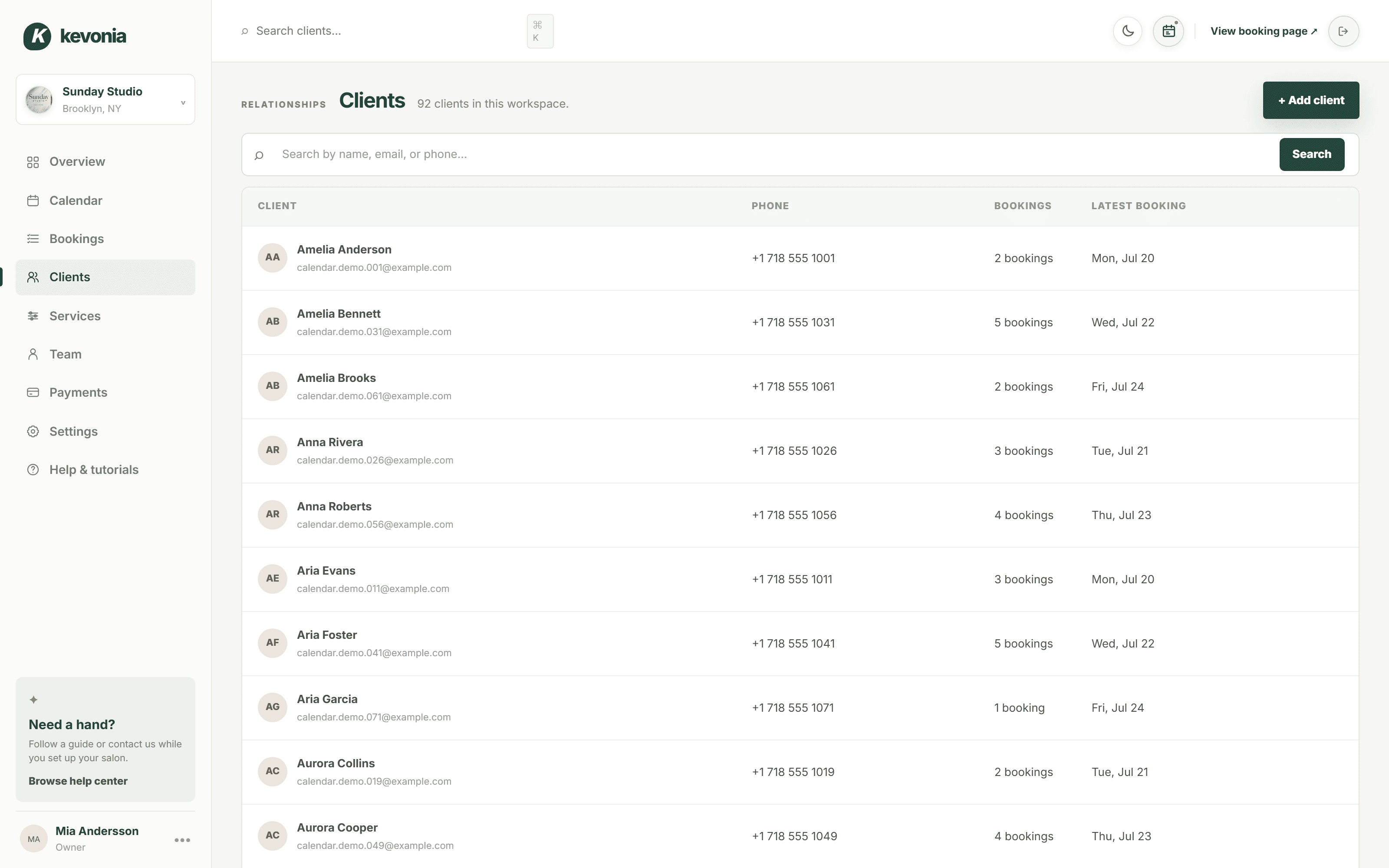
Kevonia is designed for owners who want a complete booking and scheduling workspace without moving into a multi-module salon operating system. Its single plan is US$49.99 per month, with unlimited team members, bookings, clients, and services. There is no per-booking commission, and the 14-day trial does not require a credit card to start. You can cancel anytime before the trial ends and never be charged.
The practical difference is billing predictability. A salon with six or eight professionals does not move to a per-seat tier in Kevonia, and adding another service or client does not create a new software charge. Online card payments and deposits run through Stripe, with payouts going to the salon’s bank account. Stripe processing still applies as the payment processor’s cost; the relevant point is that Kevonia does not add a booking commission on top.
The comparison below is intentionally narrow. It does not claim that one product replaces every capability of the other. It shows the buying decision most owners are trying to make: whether they need Boulevard’s broader operating platform or a simpler system that covers the booking engine and core salon workflow.
Where Kevonia fits as a Boulevard alternative
Kevonia fits best when your main operational problem is controlling appointments rather than running retail inventory, marketing campaigns, or multiple locations from one account. A client can use your branded booking page to choose a service, professional, date, and time. Behind that page, your team can work from a week or day calendar, filter by professional, use color coding, and rely on double-booking protection that checks hours, breaks, time off, and existing appointments.
The service and availability setup is more detailed than a basic calendar. You can define service duration, cleanup or buffer time, price, optional deposit, and which professionals provide each service. Availability rules cover weekday opening hours, multiple breaks, staff time off, salon closures, the booking window, minimum notice, and time-slot intervals. That is the level of configuration a salon needs when a 30-minute haircut, a two-hour color service, and a treatment requiring cleanup cannot all be booked the same way.
Client management is also operational rather than promotional. Staff can search records by name, email, or phone, review visit history, and keep private notes. The salon can set booking statuses such as needs confirmation, awaiting payment, booked, checked in, completed, no-show, or cancelled. A client can be blocked from booking online with a reason and no-show history retained on the record. These controls are especially useful for a studio that is trying to reduce repeated no-shows without buying a larger platform.
For spas and treatment businesses, Kevonia supports deposits and card payments through Stripe, automatic email reminders the day before an appointment, and client self-service rescheduling or cancellation within the salon’s notice window. If an online payment needs to be refunded, the salon can issue the refund from the booking, see the Stripe processing fee on the refund, and trigger an automatic client email. That gives owners a clear payment trail without claiming to be a retail POS or inventory system.
Kevonia is not a replacement for every Boulevard use case. It does not currently offer multi-location management from one account, retail or inventory POS, marketing or SMS campaign tools beyond the booking reminder email, or a native mobile app. If you depend on memberships, sophisticated marketing automation, retail stock control, clinical workflows, or a multi-location reporting structure, those omissions should end the comparison before you migrate data.
The failure case that a price-only comparison misses
A lower subscription price does not automatically make a system the better Boulevard alternative. The switch can fail when an owner compares monthly software cost but does not map the daily workflow first. For example, a salon may save money on booking but lose the ability to manage retail inventory, send campaigns, or coordinate locations. Another salon may pay for a broad platform but still leave most of its staff using a separate calendar because the setup is too complicated.
Before you decide, write down one normal Tuesday and one difficult Tuesday. The normal version should include booking, checking the calendar, looking up a client, taking a deposit, sending a reminder, and closing out an appointment. The difficult version should include a last-minute cancellation, a staff absence, a blocked client, a double-booking attempt, a refund, and a service that needs cleanup time. Then test each platform against those exact events rather than relying on a demo that follows only the happy path.
- List every recurring service and assign its real duration, cleanup time, price, and qualified professionals.
- Recreate staff hours, breaks, time off, closures, minimum notice, and booking-window rules.
- Test a booking from the client side on a phone-sized screen, including deposit collection and cancellation.
- Create a test client, add a private note, change booking statuses, issue a refund, and confirm what the client receives by email.
- Ask what happens to your client records, deposits, future appointments, and cancellation history if you leave the platform.
This test also exposes the situation where the usual advice is wrong. A small med spa with clinical documentation needs different software from a two-chair hair salon, even if both search for an alternative to boulevard salon software. Conversely, a five-person salon that does not sell retail or run campaigns may be overbuying if it chooses an enterprise-style platform simply because it has the longest feature list.
How the booking and payment models differ
Boulevard’s official self-booking materials emphasize an on-brand booking experience that can work from a website and social channels. They also describe client appointment management, add-ons, gift cards, memberships, waitlists, and booking links from Google, Facebook, and Instagram. Its payment product includes card-on-file support, contactless checkout, disputes, tipping, buy-now-pay-later options, and hardware-oriented checkout capabilities. If those conversion and checkout tools are central to your operation, Boulevard deserves a serious demonstration.
Kevonia’s model is intentionally more focused. Clients book through a branded page that stays available 24/7, while the salon controls deposits, payment collection, notice windows, cancellation access, and service availability. Payments and deposits are processed through Stripe, and Kevonia charges 0% booking commission. This can be a strong fit when you want clients to book directly with your business rather than depend on a marketplace, but it is not meant to replace Boulevard’s retail checkout, marketing, or broader payment hardware story.
The distinction is not “modern versus outdated.” It is direct booking workflow versus broader customer-experience infrastructure. Owners searching for boulevard salon software competitors should decide whether the extra infrastructure will create measurable value or simply add settings, training, and a larger monthly bill.
A practical decision for different salon types
For a solo professional or small independent studio, Kevonia is usually easier to justify when the priority is a professional booking page, reliable availability rules, client history, deposits, reminders, and a fixed cost. Unlimited team members also means the same plan can support growth from one provider to a small team without a per-seat calculation. The 14-day trial gives you enough time to test real services and appointment rules without entering payment details.
For a salon with a busy front desk, substantial retail sales, memberships, automated campaigns, two-way texting, or a strong need for reports and POS, Boulevard may justify its higher starting price. Its official feature set is built around combining booking, client management, payments, communication, and growth tools. The mistake would be choosing Kevonia solely because it costs less when the capabilities you need are specifically outside its current scope.
For a day spa or esthetician studio, the deciding issue is often room, resource, and treatment complexity. Confirm how the system handles multiple professionals, treatment lengths, cleanup, deposits, late cancellations, and client notes. Kevonia can handle detailed service durations, buffers, professional assignments, and availability rules. If you also need inventory, clinical charts, or multi-location control, look beyond a simple booking comparison.
For a barbershop, tattoo studio, nail salon, massage practice, or lash studio, the choice usually comes down to whether the operation needs a focused booking workspace or a larger business platform. Kevonia supports these business types with booking, team scheduling, service setup, client records, reminders, and payment collection. Boulevard may be the stronger choice when the business is also building a larger retail, marketing, membership, or multi-location operation.
Questions to ask before you switch
A demo should answer operational questions, not just show attractive screens. Ask the vendor to demonstrate the exact booking rules you use, show the client-facing booking experience, and explain the financial details in writing. If the answer depends on a higher plan, add-on, payment product, hardware purchase, or professional limit, record that before comparing totals.
- What is the total monthly subscription for my number of locations and bookable professionals?
- Are deposits, refunds, card processing, hardware, and instant payouts priced separately?
- Can I set different durations, buffers, prices, and professional assignments for each service?
- What happens when a staff member takes time off after clients have already booked?
- Can clients reschedule or cancel themselves, and how does the notice window work?
- Can I export clients, visit history, future appointments, notes, and cancellation records if I leave?
- Which features are available now, rather than promised on a roadmap?
For owners evaluating Boulevard salon software competitors, the last question is particularly important. A feature list may say “marketing,” “payments,” or “reports,” but the workflow underneath can vary by plan and business type. Compare the action your receptionist must complete, not just the category name on a pricing page.
Bottom line: which Boulevard alternative should you choose?
Choose Boulevard when you want a broad salon and spa operating platform and are prepared to evaluate plan limits, payment costs, hardware, and add-ons. Its strengths are breadth, advanced client-facing tools, payments, marketing, messaging, memberships, forms, reporting, and operational features aimed at growing self-care businesses.
Choose Kevonia when you want a focused booking and management system with a single US$49.99-per-month plan, unlimited team members, bookings, clients, and services, and 0% booking commission. It gives you the core controls needed to run appointments properly—branded online booking, team calendars, double-booking protection, service and availability rules, client records, reminders, deposits, Stripe payments, refunds, and cancellation history—without claiming to cover retail POS, campaigns, native mobile apps, or multi-location management.
The best decision is the one that survives your difficult Tuesday test. If Boulevard’s wider system solves problems your team genuinely has, its higher cost may be reasonable. If your real need is dependable direct booking and appointment control without per-seat or per-booking charges, Kevonia is the more focused boulevard alternative.
FAQ
These are the questions owners usually need answered before replacing Boulevard, not just the questions that appear on a feature checklist.
Is Kevonia a cheaper alternative to Boulevard?
Yes, on subscription price. Kevonia has one plan at US$49.99 per month, with unlimited team members, bookings, clients, and services and no booking commission. Boulevard’s pricing page currently lists Essentials at $143 per month, with up to five bookable providers. Payment processing costs still need to be considered separately for either system.
Does Kevonia charge per booking or per team member?
No. Kevonia’s stated pricing includes unlimited team members, bookings, clients, and services, with 0% booking commission. Card payment processing is handled through Stripe, so Stripe’s processing costs remain relevant when you collect online payments.
Does Kevonia have the same features as Boulevard?
No. Kevonia covers booking, team calendars, client records, services, availability, reminders, deposits, Stripe payments, refunds, cancellation history, and booking controls. It does not currently offer multi-location management from one account, retail or inventory POS, marketing or SMS campaigns beyond the booking reminder email, or a native mobile app. Boulevard offers a broader set of official features, including payments, marketing, messaging, memberships, forms, reports, and integrations.
Can clients cancel and reschedule appointments in Kevonia?
Yes. Kevonia sends an automatic email reminder the day before an appointment, and clients can reschedule or cancel from that email within the salon’s notice window. The salon controls the minimum notice and related availability rules.
Is Kevonia suitable for a spa or med spa?
Kevonia is suitable for spas, med spas, esthetician and lash studios, massage therapists, and beauty clinics when their needs center on booking, scheduling, client records, service configuration, availability, deposits, and payments. A med spa that needs clinical records, inventory, advanced marketing, or multi-location management should confirm those requirements before choosing it.
What should I test before switching from Boulevard?
Recreate your real services, staff schedules, breaks, time off, buffers, deposits, notice periods, cancellations, refunds, and no-show process. Test both a normal booking and a complicated exception. Also confirm what data can be exported and whether the replacement handles the business features you currently rely on, rather than assuming a lower price means equivalent coverage.
Sources
Frequently asked questions
Is Kevonia a cheaper alternative to Boulevard?+
Yes, on subscription price. Kevonia has one plan at US$49.99 per month, while Boulevard currently lists Essentials at $143 per month. Kevonia also includes unlimited team members, bookings, clients, and services with 0% booking commission. Payment processing costs remain separate considerations.
Does Kevonia charge per booking or per team member?+
No. Kevonia’s stated plan includes unlimited team members, bookings, clients, and services, and Kevonia charges 0% booking commission. Stripe processing costs still apply to card payments.
Does Kevonia have the same features as Boulevard?+
No. Kevonia focuses on booking, scheduling, client records, availability controls, reminders, deposits, Stripe payments, refunds, and booking administration. It does not currently include multi-location management from one account, retail or inventory POS, marketing or SMS campaigns beyond the booking reminder email, or a native mobile app.
Can clients cancel and reschedule appointments in Kevonia?+
Yes. Clients can reschedule or cancel from the automatic day-before reminder email within the salon’s notice window. The salon controls the notice and availability rules.
Is Kevonia suitable for a spa or med spa?+
It can be a fit when the business mainly needs appointment booking, staff scheduling, service setup, client records, deposits, reminders, and payments. Med spas needing clinical records, retail inventory, advanced marketing, or multi-location operations should verify those requirements before switching.
What should I test before switching from Boulevard?+
Recreate your actual services, durations, buffers, staff hours, breaks, time off, deposits, notice periods, cancellations, refunds, and no-show process. Test a difficult exception as well as a normal booking, and confirm what client and appointment data can be exported.
More from the blog

Setmore Alternative: Compare Costs, Limits, and Salon Fit
Setmore is a capable low-cost scheduler, but salon owners often need more control over team calendars, deposits, client records, and predictable monthly costs. Here is how Kevonia compares.

Mangomint Alternative: When Kevonia Is the Better Fit
Looking for a Mangomint alternative? Compare Mangomint’s per-location, per-user model with Kevonia’s flat plan and decide which platform fits your salon or spa.

Treatwell Alternative: Compare the Real Trade-Offs
Treatwell can bring discovery bookings, but it is not the only way to run your calendar. Compare the marketplace model with Kevonia’s flat-cost, direct-booking approach.