Setmore Alternative: Compare Costs, Limits, and Salon Fit
Setmore is a capable low-cost scheduler, but salon owners often need more control over team calendars, deposits, client records, and predictable monthly costs. Here is how Kevonia compares.

Key takeaways
- Setmore remains a strong starting point for simple online booking, with a free plan that currently supports up to four users and unlimited appointments.
- The main reason to switch is usually not booking itself; it is the need for more salon-specific availability, client, payment, and no-show workflows.
- Kevonia costs US$49.99 per month with unlimited team members, bookings, clients, and services, plus 0% booking commission.
- The right choice depends on whether you need a basic booking page or one workspace for your salon’s daily operations.
| Tool | Starting price | Commission or booking fees | Standout features |
|---|---|---|---|
| Setmore | Free plan at US$0 per user/month; Pro listed at US$12 per user/month monthly or US$5 per user/month with annual billing | No extra Setmore transaction charge; payment-provider processing fees still apply | 24/7 booking page, up to four users on Free, unlimited appointments, payments, reminders, calendar sync, mobile apps |
| Kevonia | US$49.99/month for one plan | 0% booking commission; Stripe processing fees apply to card payments | Salon-focused availability rules, buffers, deposits, client records, cancellation history, no-show controls, unlimited team members |
What are you really looking for in a Setmore alternative?
If you searched for a setmore alternative, you probably do not need another generic calendar. You need to know whether switching will solve a specific problem: rising team costs, weak control over staff availability, complicated deposits, limited client history, or too much work happening outside the booking system.
Setmore is still a reasonable choice for a solo provider or small team that wants a booking page, reminders, payments, and a calendar without paying at the beginning. The more useful question is whether it continues to fit when your salon has several professionals, different service durations, cleanup buffers, staff time off, deposits, cancellations, and no-shows to manage every day.
Setmore’s current offer: what it does well
Setmore’s current pricing page lists a Free plan at US$0 per user per month with up to four users. It lists a Pro plan at US$12 per user per month when billed monthly, or US$5 per user per month with annual billing. The paid plan includes unlimited users, unlimited appointments, online payments, a branded booking page, text and email reminders, recurring appointments, two-way calendar sync, and mobile apps. The same page also shows that Setmore does not add its own transaction charge; payment-processing fees still come from the connected provider.
The important correction for anyone researching the setmore free plan limits is that Setmore’s current official pricing page says the Free plan includes unlimited appointments and up to four users. Several comparison articles still repeat a 200-appointment monthly limit, so do not make a buying decision from an older summary without checking Setmore’s own page.
For a basic service business, that is a solid foundation. Setmore provides a 24/7 booking page where clients can see services and availability, and its calendar supports staff schedules, time off, breaks, and color coding. It also supports online payments through connected providers, including Square, Stripe, and PayPal, although the exact payment options and processing rates depend on the provider and payment method.
- Good fit for a solo stylist, independent massage therapist, tutor, consultant, or small appointment-based team.
- Useful when your main requirement is letting clients choose a service, time, and provider online.
- Attractive if a free starting plan matters more than having a salon-specific operating workspace.
- Worth considering if you want mobile access and integrations with external calendars or payment providers.
Why salon owners start comparing alternatives
The usual advice is to compare headline price and booking-page features. That is not enough for a salon. A system can let clients book online and still create daily problems if it does not handle the way your team actually works: one provider may need a longer cleanup period, another may be off every Tuesday, a color service may require a deposit, and a new client may need to be blocked after repeated no-shows.
The practical failure case is a booking that looks available but is not operationally available. For example, a professional may be scheduled from 9:00 a.m. to 5:00 p.m., but a 90-minute service followed immediately by another appointment leaves no time to clean, reset, or move between rooms. If your booking software treats only the service duration as unavailable, the calendar can look full while the day becomes impossible to run.
Another failure case appears after the appointment. Many owners need more than a customer name and an old booking. They need private notes, visit history, cancellation history, no-show context, and a way to decide whether a client may book online again. These details affect revenue and staff time, but they are easy to overlook when comparing scheduling apps.
- You have more than four active professionals and the Free plan no longer covers the team.
- You need one predictable monthly cost instead of a price that rises with each user.
- Your services require buffers, deposits, professional assignments, or different availability rules.
- You want to review no-shows, refunds, cancellations, and client history from the same booking record.
- You are tired of piecing together a booking page, calendar, payment account, and client notes.
The cost question: free does not always mean cheaper
Setmore’s Free plan can be the cheapest way to test online booking, especially for a solo operator or a team of four or fewer. Once you need the paid plan, the published monthly price is US$12 per user, while annual billing lowers the listed rate to US$5 per user per month. That means a five-person team would be US$60 per month at the monthly Pro rate, before payment-processing costs; annual billing is listed at US$25 per month but requires annual billing. Confirm the billing terms before comparing the number with a flat-price product.
Kevonia takes a different approach: one plan at US$49.99 per month, with unlimited team members, bookings, clients, and services. There is no per-seat charge, no add-on pricing, and no booking commission. The trial is free for 14 days, no credit card is required to start, and you are never charged if you cancel anytime before the trial ends.
That creates a break-even question rather than a universal winner. A two-person team may pay less with Setmore Free. A larger salon may prefer Kevonia because adding professionals does not increase the subscription price. A growing studio should also include the cost of administrative work: manually checking buffers, chasing deposits, reconstructing client history, correcting mistaken availability, and deciding which no-shows should be blocked.
- Count every person who needs a calendar or login, not just the owner.
- Separate subscription fees from card-processing fees charged by your payment provider.
- Estimate how many appointments your team will manage in 12 months, not only this month.
- Include the cost of missed appointments, manual reminders, and time spent correcting booking errors.
- Check whether the product charges for features you will actually use, rather than paying for a larger package by default.
Where Kevonia fits differently
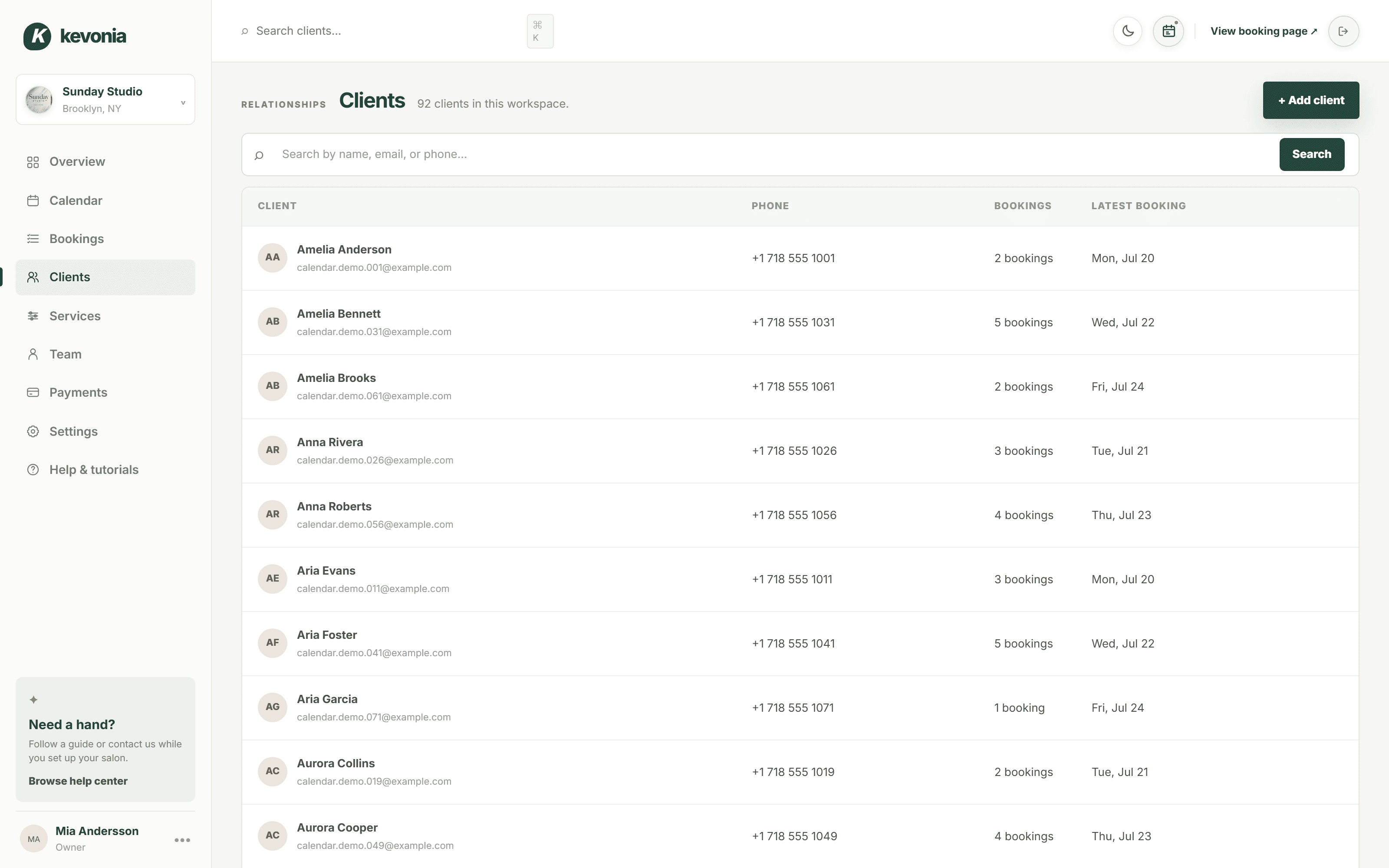
Kevonia is built for salons, spas, barbershops, tattoo studios, nail salons, med spas, esthetician and lash studios, beauty clinics, wellness and yoga studios, and massage therapists. Its customer-facing experience is a branded online booking page at kevonia.com/your-salon. Clients choose a service, professional, date, and time, while the workspace gives the owner a team calendar, client records, service menu, availability rules, and Stripe payments.
The operational difference is the level of control around a booking. Kevonia checks double-booking protection against working hours, breaks, time off, and existing appointments. Its service menu supports duration, cleanup or buffer time, price, optional deposit, and assignment to specific professionals. Availability rules can include weekday opening hours, multiple breaks, salon closures, staff time off, booking windows, minimum notice, and time-slot intervals.
That matters when the booking flow needs to reflect the real day. A nail technician can have a 15-minute cleanup buffer after a service. A massage therapist can block a lunch break and recurring time off. A med spa can require a deposit for selected treatments. The goal is not merely to show open slots; it is to show slots the business can deliver without creating a back-office correction later.
Kevonia also keeps more of the follow-up workflow attached to the appointment. The salon can see booking status, refund an online payment from the booking, view the Stripe processing fee on a refund, email the client automatically, restore cancellation history, and block a client from booking online with a reason and no-show history on the client record.
- Week and day team calendars with per-professional filters and color coding.
- Client search by name, email, or phone, with private notes and visit history.
- Automatic email reminders the day before an appointment.
- Client rescheduling and cancellation from the reminder email, within the salon’s notice window.
- Statuses including needs confirmation, awaiting payment, booked, checked in, completed, no-show, and cancelled.
- An overview screen showing today’s revenue against the same day last week, appointments, client totals, no-show percentage, and a 30-day revenue chart.
Setmore versus Kevonia for the daily salon workflow
Both products can support online appointment booking, team schedules, client self-service, reminders, and payments. The difference is what happens around those basic actions. Setmore is positioned as a broad scheduling platform that works across many appointment-based businesses, with a booking page, calendar, payment connections, reminders, mobile access, and integrations.
Kevonia is narrower by design. It does not currently offer multi-location management from one account, retail or inventory POS, marketing or SMS campaign tools beyond the booking reminder email, or a native mobile app. If those are essential requirements, Kevonia is not the correct replacement. If you want a salon-focused booking workspace without feature tiers, per-seat charges, or booking commission, its narrower scope can make the decision simpler.
A useful comparison is a cancellation on a busy Saturday. With any booking system, the client may cancel, the time may reopen, and the team may need to know what happened. Kevonia’s cancellation history and restore capability are designed for that record-keeping problem. If the client has repeated no-shows, the owner can block online booking and keep the reason with the client record. That is different from treating cancellation as only a calendar change.
Another comparison is payment handling. Setmore connects to payment providers and says it does not charge extra transaction fees beyond the provider’s fees. Kevonia uses Stripe for card payments and deposits, with payouts going to the salon’s bank account. Kevonia also shows the Stripe processing fee when the salon refunds an online payment, so the owner can see the actual cost of the refund rather than treating the returned amount as the whole financial impact.
- Choose Setmore when free or low-cost general scheduling is the main priority.
- Choose Setmore when you specifically need its mobile apps, broad integrations, recurring appointments, or text reminders.
- Choose Kevonia when unlimited team members under one monthly price matters.
- Choose Kevonia when service buffers, deposits, staff assignments, no-show handling, and cancellation history are central to operations.
- Choose neither until you verify payment processing, calendar migration, client-data export, and reminder behavior for your exact workflow.
A five-minute test before you switch
Do not choose an alternative to Setmore from a feature checklist alone. Test one real service, one real professional, one real break, one deposit rule, and one cancellation scenario. A product that looks similar in a comparison table may behave very differently when a service has cleanup time or when two professionals share a room.
Use the following test with your most complicated normal appointment, not your easiest haircut. If the system handles the complicated case correctly, simple bookings are usually easier. If it fails there, you have found the problem before moving client data or changing the link in your social profiles.
- Create a service with a realistic duration, price, cleanup buffer, and deposit requirement.
- Assign it only to the professionals who actually perform it.
- Add opening hours, two breaks, a day off, minimum notice, and a booking window.
- Book the appointment as a client and confirm that the available time is operationally realistic.
- Cancel it, reschedule it, issue or refund payment if applicable, and inspect the resulting history.
- Search for the client by email or phone and verify that notes, visits, no-shows, and booking status are easy to find.
- Repeat the test with another professional at the same time to check for double-booking protection.
The test also exposes migration risks. Before switching, list every link clients use to book, every reminder message you rely on, every payment or deposit rule, and every recurring client whose next appointment must not be lost. Keep the old system available until you have confirmed upcoming appointments and communicated the new booking page clearly.
The bottom line for salon and spa owners
Setmore is not automatically a problem to escape. Its Free plan is currently generous for a small team, and its paid plan adds capabilities that many general scheduling tools lack. If your business needs a simple booking page, reminders, payments, and a mobile-accessible calendar, staying with Setmore may be the sensible decision.
Kevonia becomes more compelling when the issue is not whether clients can book, but whether your team can run the day accurately after they book. Its flat US$49.99 monthly price, unlimited team members, 0% booking commission, salon-specific availability controls, client records, booking statuses, deposits, refunds, and no-show controls are aimed at that operational layer.
The best Setmore alternative is therefore different for a four-person independent studio than for a growing salon with multiple professionals and complex service rules. Compare the actual workflow, not just the free badge. Count seats, model your busiest week, test a deposit and refund, and see whether the system prevents the mistakes that currently cost you time or appointments.
Sources
Frequently asked questions
Is Setmore still free for salons?+
Yes. Setmore’s current official pricing page lists a Free plan at US$0 per user per month with up to four users and unlimited appointments. It includes core booking, payment, reminder, and booking-page capabilities, while some advanced features are associated with paid plans.
What are the current Setmore free plan limits?+
The current official pricing page lists up to four users on the Free plan and says appointments are unlimited. Older comparison pages may mention a 200-appointment limit, so verify the live Setmore pricing page before relying on that figure.
Does Setmore charge a booking commission?+
Setmore says it does not add its own transaction charge beyond the fees charged by the connected payment provider. You should still budget for payment-processing fees and check the provider, payment method, and country-specific rates.
Is Kevonia cheaper than Setmore?+
Not in every situation. Setmore Free may cost less for a solo owner or team of up to four users. Kevonia costs US$49.99 per month, but that price includes unlimited team members, bookings, clients, and services, with no per-seat charge, add-on pricing, or booking commission. A larger team may find the flat price easier to budget.
Which is better for salon deposits and no-shows?+
Both platforms support online payment workflows, but Kevonia is designed around salon operations and includes optional deposits, booking statuses, cancellation history with restore, client no-show history, and the ability to block a client from booking online with a reason. Those controls are useful when no-shows are an ongoing management issue rather than an occasional inconvenience.
What does Kevonia not offer?+
Kevonia does not currently offer multi-location management from one account, retail or inventory POS, marketing or SMS campaign tools beyond the booking reminder email, or a native mobile app. If you need one of those capabilities, confirm whether you can operate without it before switching.
More from the blog

Mangomint Alternative: When Kevonia Is the Better Fit
Looking for a Mangomint alternative? Compare Mangomint’s per-location, per-user model with Kevonia’s flat plan and decide which platform fits your salon or spa.

Timely Alternative: Flat-Cost Booking Software for Salons
Timely is capable salon software, but its per-staff pricing and broader feature set are not right for every business. Compare Timely with Kevonia before you switch.

StyleSeat Alternative: Keep Your Clients and Control Booking Costs
StyleSeat can help professionals get discovered, but its marketplace model is not right for every salon. Compare the fees, workflow, and client-control tradeoffs before switching.