Salon Ultimate Alternative: Compare Booking Control and Total Cost
Looking for a Salon Ultimate alternative? Compare the published pricing, operating model, booking controls, and trade-offs before moving your salon or spa.

Key takeaways
- Salon Ultimate is the broader operations platform, while Kevonia is the simpler flat-cost choice for booking, calendars, client records, and payments.
- Kevonia costs US$49.99 per month with 0% per-booking commission and unlimited team members, bookings, clients, and services.
- Salon Ultimate publishes a US$69 per-location entry plan, while its higher published plans are aimed at single-store and multi-location businesses.
- The right choice depends less on the feature checklist than on whether you need POS, inventory, marketing, walk-ins, and multi-location management.
- Before switching, test your real booking rules, payment flow, reminders, cancellation process, and client records—not just the demo calendar.
| Tool | Starting price | Commission or booking fees | Standout feature | Best fit |
|---|---|---|---|---|
| Kevonia | US$49.99/month | 0% per-booking commission; no per-seat charge | Branded 24/7 booking page with detailed availability rules, deposits, Stripe payments, reminders, and client records | Single-location salons, spas, barbershops, and independent teams focused on booking control |
| Salon Ultimate | US$69/location/month for BookedBy on Clover | Booking commission not clearly published on the vendor pricing page; confirm payment and messaging costs | Broader salon operations including online booking, check-in/check-out, employee scheduling, inventory maintenance, reporting, and email/SMS marketing | Businesses needing POS/inventory-oriented operations, walk-in workflows, or multi-location support |
What is the best Salon Ultimate alternative?
If you searched for a salon ultimate alternative, you probably do not need another generic list of salon software. You need to know whether Salon Ultimate is still the right level of system for your business—and what you would give up or simplify by moving elsewhere.
The short answer: Kevonia is the better fit when your priority is a predictable booking system for a salon, spa, barbershop, tattoo studio, beauty clinic, or independent professional. It gives you a branded booking page, team calendar, client records, service menu, availability controls, Stripe payments, reminders, and operational reporting for US$49.99 per month, with 0% per-booking commission. Salon Ultimate is the stronger fit when you specifically need a broader platform with inventory, point-of-sale operations, walk-in and queue workflows, marketing tools, or multi-location support.
That distinction matters more than a long feature checklist. A solo stylist with one location can overbuy a platform built for complex operations. A growing multi-location salon can also underbuy a booking-first tool and discover later that inventory, POS, or consolidated reporting is missing.
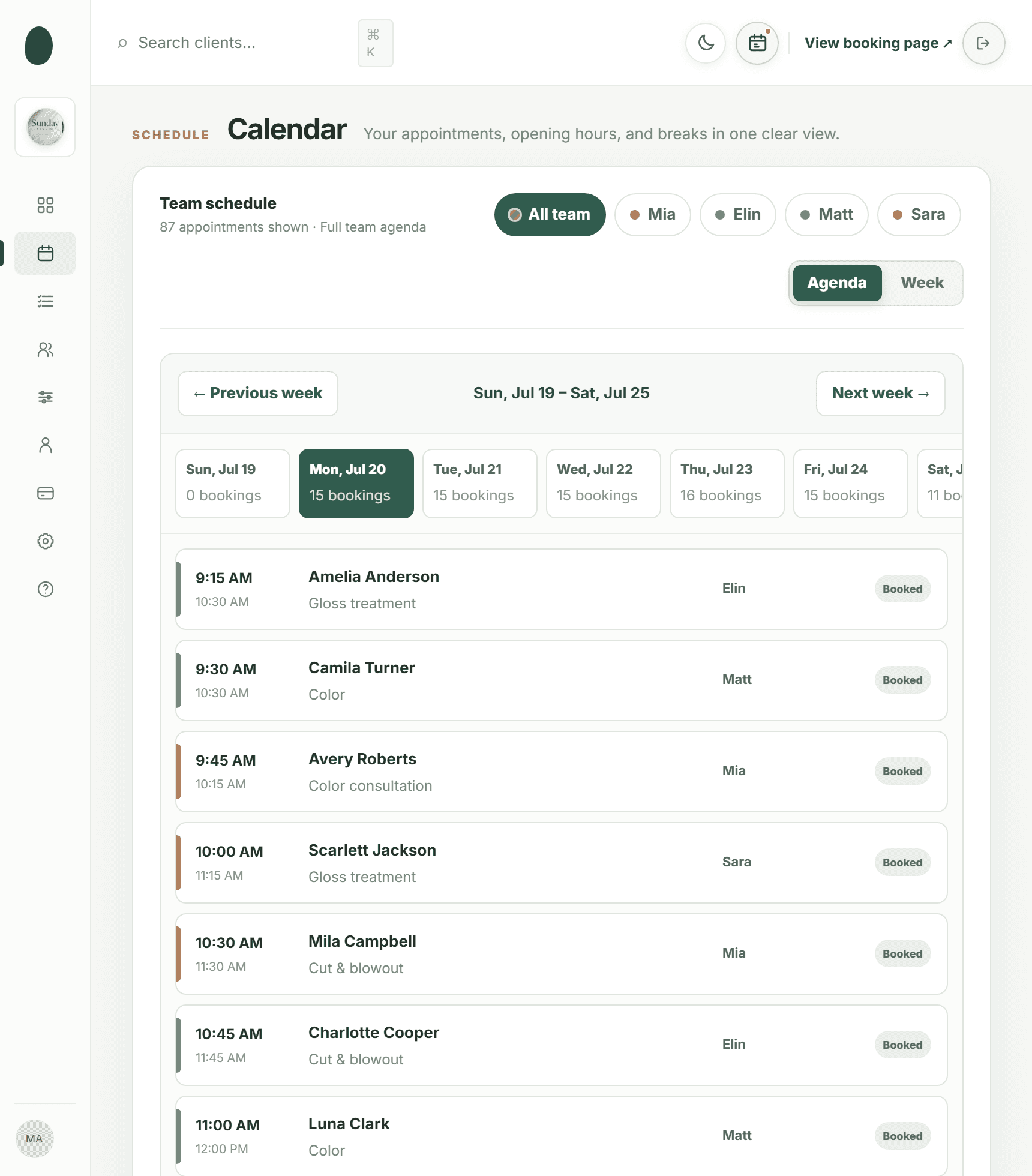
Salon Ultimate vs. Kevonia at a glance
Salon Ultimate’s official appointments page describes an all-in-one salon platform with online booking, check-in and check-out, employee scheduling, customer management, service and pricing management, inventory maintenance, standard reporting, email and SMS marketing, and support and training. Its published plans include BookedBy on Clover at US$69 per location per month, SalonUltimate Single Store at US$159 per location per month, and SalonUltimate Multi-Store at US$199 per location per month. The same page does not state a booking commission, so treat payment and messaging costs as items to confirm during a sales conversation rather than assuming they are included. Supporting details are available from official appointments and pricing page.
Kevonia takes a narrower, more transparent approach: one plan at US$49.99 per month, no feature tiers, no add-on pricing, no per-booking commission, and no per-seat charge. The plan includes unlimited team members, bookings, clients, and services. Its online booking page lets clients choose a service, professional, date, and time; the workspace covers calendars, client records, service setup, availability rules, and Stripe card payments.
The practical difference is not simply that one product costs less. It is that Kevonia makes the booking workflow the center of the product, while Salon Ultimate bundles booking with a wider operating stack. Independent comparisons also list Salon Ultimate’s entry pricing at US$69 per month and its higher published plans at US$159 and US$199, but the vendor’s own page should be the final check before you commit because pricing and plan packaging can change. Supporting details are available from independent pricing comparison.
Where Kevonia fits—and where it does not
Kevonia fits a business that wants to control its own booking experience without paying a commission on every appointment. The booking page is branded to your salon and available 24/7. Clients can select a service, professional, date, and time, while your team works from a week or day calendar with per-professional filters and color coding. That makes it relevant for a single-location salon, barbershop, spa, nail studio, massage practice, esthetician, lash studio, or wellness business that mainly needs scheduling and client operations. For more detail, see Kevonia's salon reservation software.
The useful detail many comparisons skip is how booking rules behave in real life. Kevonia checks for double bookings against business hours, breaks, time off, and existing appointments. You can set multiple breaks, salon closures, booking windows, minimum notice, and time-slot intervals. Services can include duration, cleanup or buffer time, price, optional deposit, and professional assignment. Those settings matter when a 30-minute haircut, a 90-minute color service, and a treatment requiring cleanup all share the same calendar.
Kevonia is not a full replacement for every part of Salon Ultimate. It does not currently provide multi-location management from one account, retail or inventory POS, marketing or SMS campaign tools beyond the automatic booking reminder email, or a native mobile app. If your business depends on product stock, checkout workflows, walk-in queues, marketing campaigns, or consolidated multi-location administration, Salon Ultimate may be the more appropriate category of system.
This is also where the usual advice can be wrong. A smaller salon is not automatically better off with the leaner system if it sells retail, runs frequent walk-ins, or needs inventory accuracy. Conversely, a salon with five professionals may not need an enterprise-style platform if all it needs is online booking, reliable availability rules, client history, deposits, reminders, and a shared calendar.
The differences that affect your day-to-day work
Compare the systems by the problems your front desk and professionals actually face, not by the number of items on a feature page.
- Booking control: Kevonia lets you define hours, breaks, time off, closures, notice periods, booking windows, buffers, and time-slot intervals. Salon Ultimate is positioned as a broader scheduling platform that also supports client flow and walk-in operations.
- Payments: Kevonia accepts card payments and deposits through Stripe, sends payouts to the salon’s bank account, and lets the salon refund an online payment from the booking. The Stripe processing fee on a refund is shown so the real cost is visible.
- Client handling: Kevonia stores searchable client records by name, email, or phone, with private notes and visit history. You can also block a client from online booking and retain the reason and no-show history on the record.
- Reminders and changes: Kevonia automatically emails a reminder the day before the appointment. Clients can reschedule or cancel from that email within the salon’s notice window.
- Team operations: Kevonia includes unlimited team members and per-professional calendar filtering. Salon Ultimate’s published feature set adds employee scheduling, inventory maintenance, check-in and check-out, and email and SMS marketing.
- Reporting: Kevonia’s overview shows today’s revenue against the same day last week, appointment and client counts, no-shows as a percentage of the last 30 days’ bookings, and a 30-day revenue chart. Revenue figures can be hidden for front-desk use.
For salon owners comparing salon ultimate competitors, the deciding question is often whether these broader tools are used every week. Paying for inventory and marketing capability that nobody maintains does not create value. But manually tracking retail stock or walk-in demand because the cheaper tool cannot handle it creates a different kind of cost.
If you are also evaluating a bookedby alternative, separate the booking engine from the operating model. A platform may look inexpensive at its entry tier but become a different purchase once you need a full single-store setup, marketing, inventory, or multiple locations. Compare the exact plan your business would use—not the lowest number shown in a search result.
A switching test that prevents expensive surprises
Do not choose a salon and spa ultimate alternative by watching a five-minute calendar demo. Before moving client data or publishing a new booking link, run a short test using the services and exceptions that cause the most mistakes in your current system.
- Create your busiest service with its true duration, cleanup or buffer time, price, deposit rule, and professional assignments.
- Add one normal workday, one break, staff time off, a salon closure, and a minimum-notice rule. Try booking directly before and after each restriction.
- Test two professionals with overlapping availability. Confirm that the system prevents a double booking without blocking unrelated professionals.
- Create a sample client, add a private note, record a booking, cancel it, restore the cancellation if needed, and check the visit history.
- Send a reminder and test the client’s reschedule and cancellation path. Confirm that the notice window behaves as your policy requires.
- Make a test payment, issue a refund from the booking, and verify that the displayed Stripe processing fee is understandable to the person handling refunds.
- Ask who will use the overview screen and whether revenue should be hidden at the front desk. Configure the workflow before importing everyone.
The failure case to watch is not a missing headline feature. It is a rule that looks correct in setup but produces the wrong available times. Buffer time, minimum notice, staff time off, and salon closures interact. Test those together, especially if you offer long services or multiple professionals with different schedules.
For a broader comparison of how to judge a booking platform by control and complexity rather than brand familiarity, the discussion of an Acuity Scheduling alternative is useful background. The same principle applies here: test the edge cases that affect real appointments before you migrate.
Which system should you choose?
Choose Kevonia if you want one flat monthly price, no booking commission, unlimited team members, and a focused system for online booking, calendars, client records, services, availability, reminders, deposits, payments, and salon-level reporting. The seven-day free trial requires no credit card to start; if you cancel before the trial ends, you are never charged.
Choose Salon Ultimate if you need the wider operational package described on its published feature page: inventory maintenance, check-in and check-out, employee scheduling, email and SMS marketing, walk-in or queue-oriented workflows, or multi-location support. Its higher published plans are designed for businesses whose needs extend beyond appointment booking.
The right salon ultimate alternative is therefore not automatically the cheapest tool. It is the one that covers your actual operating model without forcing you to pay for—and manage—capabilities you will not use. Write down your must-have workflows, run the switching test, and compare the plan you would genuinely buy rather than comparing entry prices alone.
Sources
- Salon Ultimate official appointments, features, and pricing page
- Capterra SalonUltimate profile and pricing information
- Kevonia home page
- Kevonia hair salon booking software
- Kevonia salon booking program
- Kevonia salon reservation software
- Kevonia spa booking software
- Kevonia beauty salon booking software
- Kevonia article on evaluating an Acuity Scheduling alternative
Frequently asked questions
Is Kevonia cheaper than Salon Ultimate?+
At the published starting prices, yes. Kevonia has one plan at US$49.99 per month. Salon Ultimate’s official page lists BookedBy on Clover at US$69 per location per month, with higher published plans at US$159 and US$199 per location per month. Compare the plan you actually need, because the lowest Salon Ultimate price may not include the operating capabilities that drive your decision.
Does Kevonia charge a fee for each booking?+
No. Kevonia charges 0% per-booking commission. Its pricing is one US$49.99 monthly plan, with unlimited team members, bookings, clients, and services and no per-seat charge. Stripe payment processing still applies when you accept card payments, as it does with card payment providers generally.
Is Salon Ultimate better for a multi-location salon?+
It may be. Salon Ultimate’s published plans include a Multi-Store option and its feature information describes multi-location support. Kevonia does not currently offer multi-location management from one account, so a salon that needs centralized administration across locations should treat that as a decisive limitation.
What does Kevonia lack compared with Salon Ultimate?+
Kevonia does not currently offer multi-location management, retail or inventory POS, marketing or SMS campaign tools beyond its booking reminder email, or a native mobile app. It is designed around booking, calendars, client records, services, availability, payments, reminders, and related salon operations rather than a full retail and marketing stack.
Can Kevonia handle deposits, cancellations, and refunds?+
Yes. You can add optional deposits to services, accept card payments through Stripe, and let clients reschedule or cancel from the day-before reminder email within your notice window. The salon can refund an online payment from the booking itself; the Stripe processing fee on the refund is shown, and the client is emailed automatically.
What should I test before switching from Salon Ultimate?+
Test your busiest services, professional assignments, cleanup buffers, breaks, time off, closures, minimum notice, deposits, reminders, cancellations, refunds, and client history. Also test a double-booking scenario and decide whether the team needs inventory, POS, walk-in, SMS marketing, or multi-location workflows. Those checks reveal fit more reliably than a feature checklist.
More from the blog

StyleSeat Alternative: Keep Your Clients and Control Booking Costs
StyleSeat can help professionals get discovered, but its marketplace model is not right for every salon. Compare the fees, workflow, and client-control tradeoffs before switching.

Setmore Alternative: Compare Costs, Limits, and Salon Fit
Setmore is a capable low-cost scheduler, but salon owners often need more control over team calendars, deposits, client records, and predictable monthly costs. Here is how Kevonia compares.

Treatwell Alternative: Compare the Real Trade-Offs
Treatwell can bring discovery bookings, but it is not the only way to run your calendar. Compare the marketplace model with Kevonia’s flat-cost, direct-booking approach.