Dermatologist patient scheduling software
Dermatologist Patient Scheduling
Patients book their own consultations and treatments, procedures are offered only by the providers trained to deliver them, and every room is held for the whole appointment — treatment, recovery and reset included.
- Patients booking themselves, at the hour they actually think of it
- A procedure only appears for providers qualified to perform it
- Room time held for the full window, not just the treatment
- Deposits taken before a consultation slot is committed
Free for 7 daysNo credit card todayThen US$49.99/month, cancel anytime






Skin and aesthetic clinics already running their diary on Kevonia. See what they say
Everyroom held properly,
every provider matched
every provider matched
Live Kevonia walkthrough
The diary is openPatients booking themselves in
Cosmetic dermatology Med spas Laser clinics Skin clinic reception Injectable clinics Acne programmes Pigmentation clinics Hair restoration clinics Laser hair removal Aesthetic nurse practices Body contouring rooms Consultation-led clinics Single-provider clinics
NOT A SCREENSHOT
Try before you buy — no signup required.
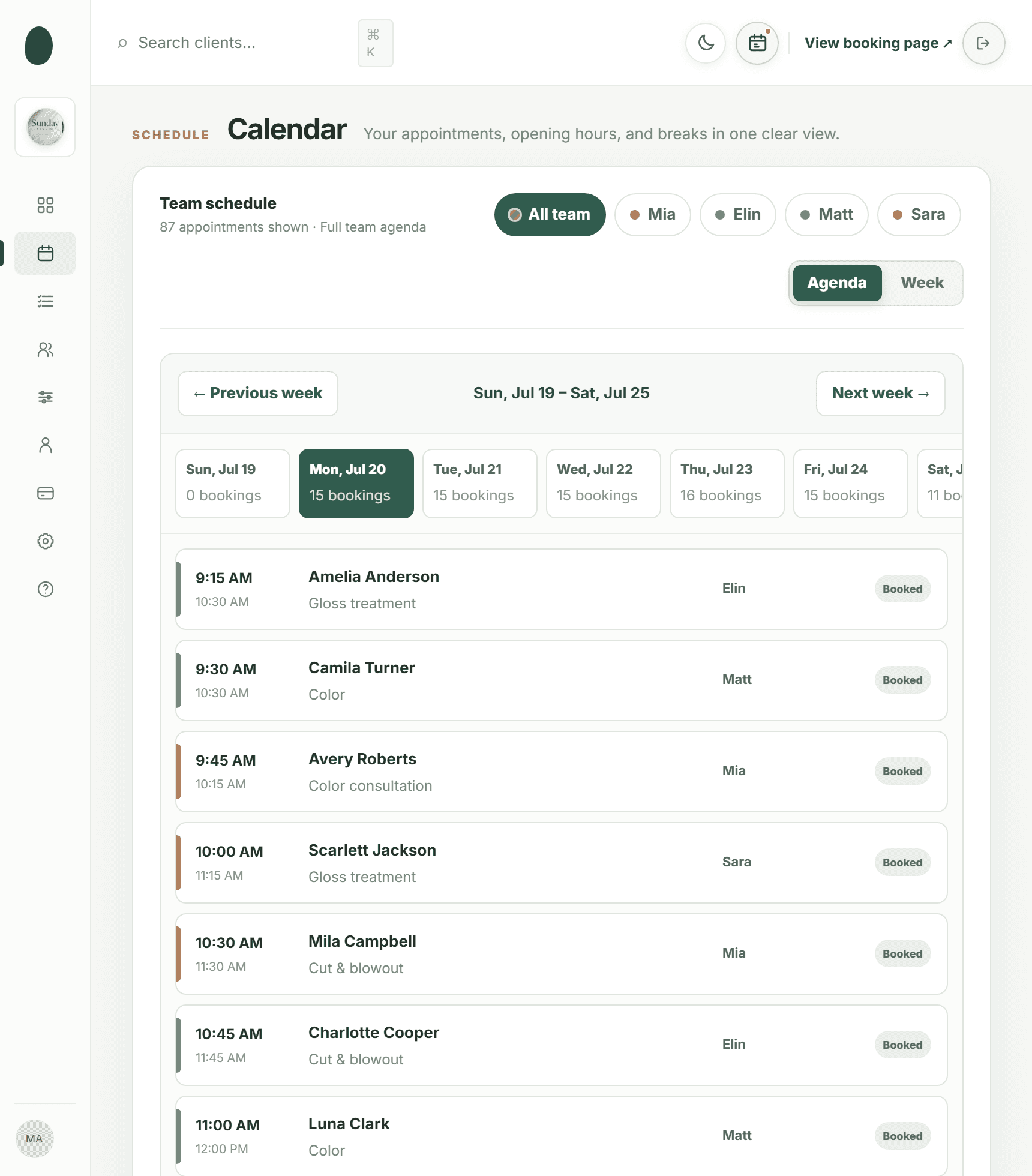
The calendar, the client list, the service menu, the payouts — the same screens a salon owner opens every morning, filled with Sunday Studio's day. On a computer, the menu switches between them.
Open the full demo workspace →kevonia.com/dashboardCLICK THE MENU TO EXPLORELIVE PREVIEW
K kevonia

Sunday StudioBrooklyn, NY
✦Need help?
Follow a guide or contact us while you set up your salon.
Browse help centerMA
Mia AnderssonOwner
•••Sunday Studio demo · Explore every section with protected example data.Create your own workspace →
MONDAY, JULY 20
Good afternoon, Sunday Studio
Here's what's happening at your salon today.kevonia.com/sunday-studioShare booking URL+ New booking
Today's revenue
↗Appointments
▣Total clients
♟No-shows
◷Revenue, last 30 days$31,670 collected across 25 trading days
BEST DAY
$2,070Jul 3- Jun 24 · $496.80
- Jun 25 · $1076.40
- Jun 26 · $621.00
- Jun 27 · $1614.60
- Jun 28 · $1159.20
- Jun 30 · $1179.90
- Jul 1 · $372.60
- Jul 2 · $1097.10
- Jul 3 · $683.10
- Jul 4 · $1138.50
- Jul 6 · $1283.40
- Jul 7 · $558.90
- Jul 8 · $910.80
- Jul 9 · $641.70
- Jul 10 · $1573.20
- Jul 11 · $1200.60
- Jul 13 · $1242.00
- Jul 14 · $538.20
- Jul 15 · $1055.70
- Jul 16 · $434.70
- Jul 17 · $1697.40
- Jul 18 · $1635.30
- Jul 19 · $931.50
- Jul 20 · $331.20
Today's schedule14 appointments · 4 team members
- AAAmelia AndersonGloss treatment · 75 min
WITHElin
Confirmed••• - CTCamila TurnerColor · 60 min
WITHMatt
Confirmed••• - ARAvery RobertsColor consultation · 30 min
WITHMia
Confirmed••• - SJScarlett JacksonGloss treatment · 75 min
WITHSara
Confirmed••• - MCMila CampbellCut & blowout · 60 min
WITHMia
Confirmed•••
Team todayLive schedule
- Mia3 appointments
- Elin4 appointments
- Matt4 appointments
- Sara3 appointments




PAYMENTSPayments are activeClient payments are ready.
THE SAME SALON, FROM THE OTHER SIDE
And this is what your clients see.
The page Sunday Studio shares from its Instagram bio, live on this one. Every salon gets the same one at kevonia.com/your-salon, with its own name, photo, service menu and team — and clients book from it without an account.
Open the booking page →This is your own salon, fifteen minutes from now.Free for 7 days. No credit card, and no commission on your bookings.
Start free for 7 days →THE PHONE IS NOT A SCHEDULING SYSTEM.
Dermatologist patient scheduling software built for the self-pay side of a skin clinic.
Consultations, lasers, peels, injectables and follow-ups are appointments before they are anything else — a room, a trained provider, a length that has to be honest, and usually a fee paid on the day. Kevonia takes that half of the clinic off the telephone and puts it on a page patients can use at eleven at night. It is not a medical record system and it does not touch insurance: it schedules the appointment and takes the payment.
THE CLINIC, ON FILM
From an empty diary to patients booking their own consultations.
Half a minute inside the workspace: the clinic's week, one provider's list, a treatment being defined, and a patient choosing their own appointment.
Walk through the demo clinic →An aesthetic clinic on Kevonia28 SEC
FILMED IN THE WORKSPACE
01
THE WEEK · 10 SEC
The clinic's week
Every provider, every room, and what has been paid for.
02
THE LIST · 11 SEC
One provider's list
Narrow the whole clinic down to a single pair of hands.
03
TREATMENTS · 09 SEC
Define a procedure
Its room time, its fee, and who is trained to deliver it.
04
A PATIENT · 11 SEC
A patient books in
Procedure, provider, and a slot the room can genuinely take.
Want the clinic's week laid out like this?Seven days with everything unlocked, no card taken.
Open your clinic free →THE CLINIC AT A GLANCE
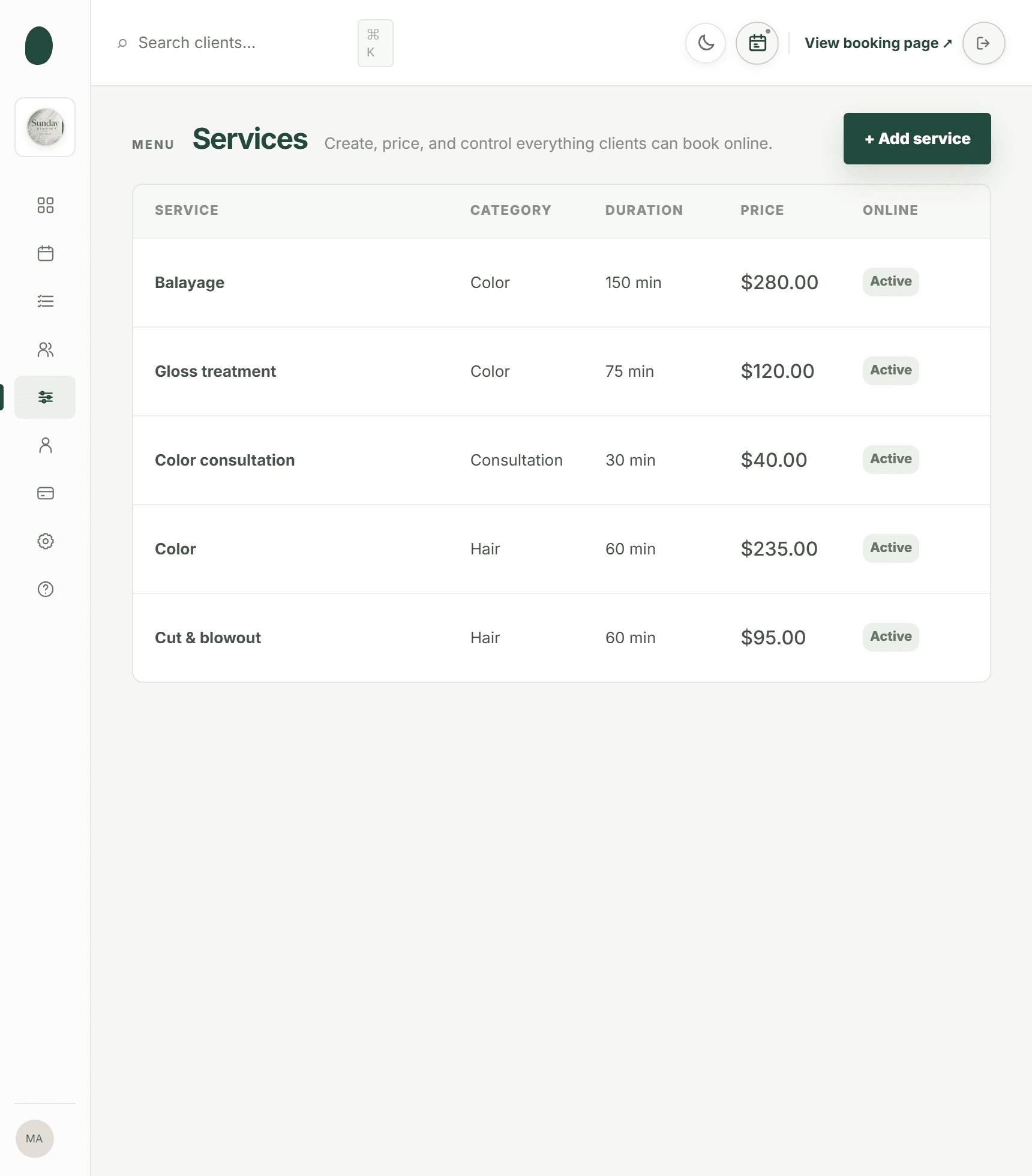
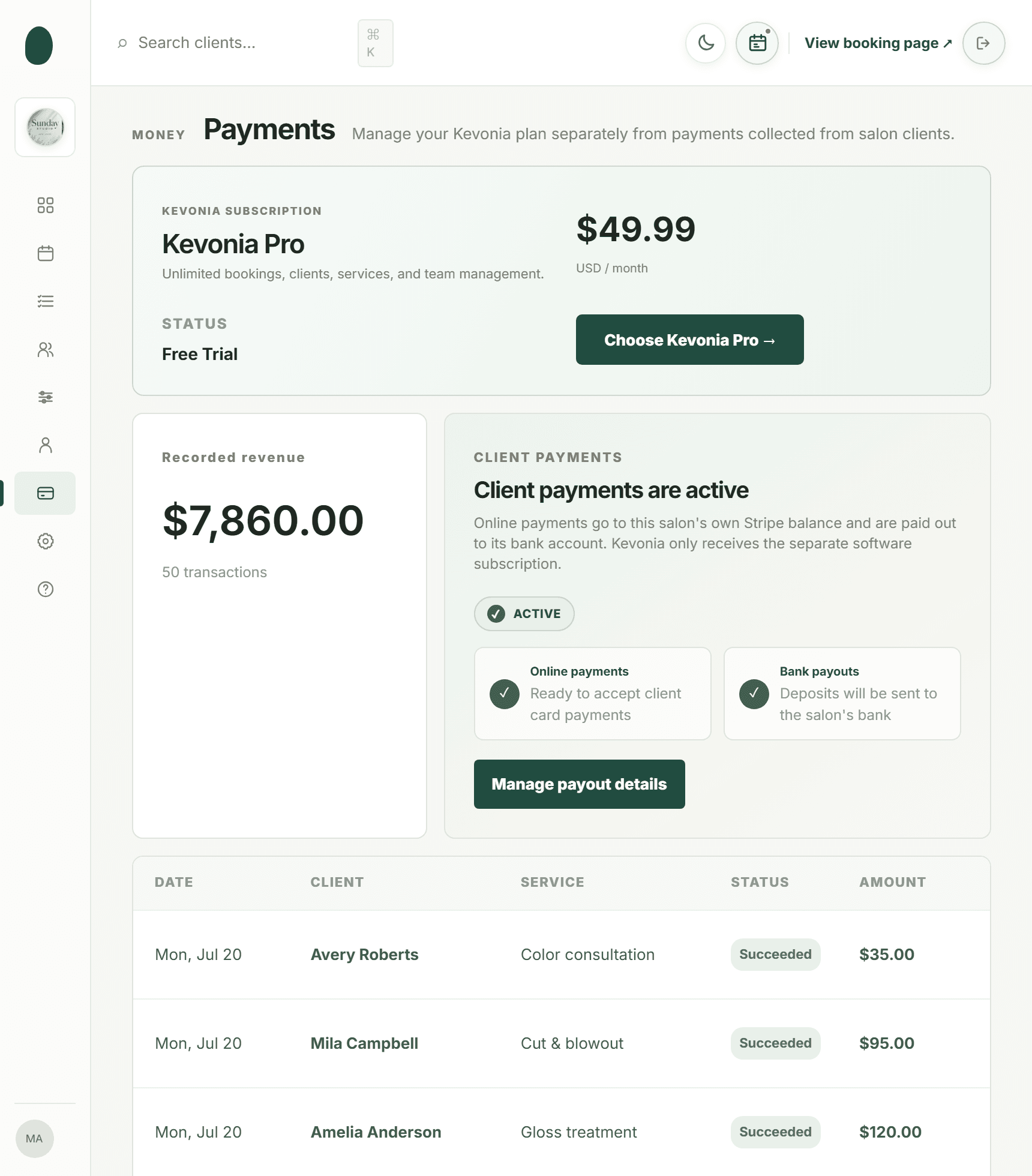
Four screens that cover the working day.
Who is in, what is booked, what each procedure costs, and what has reached the clinic's account.
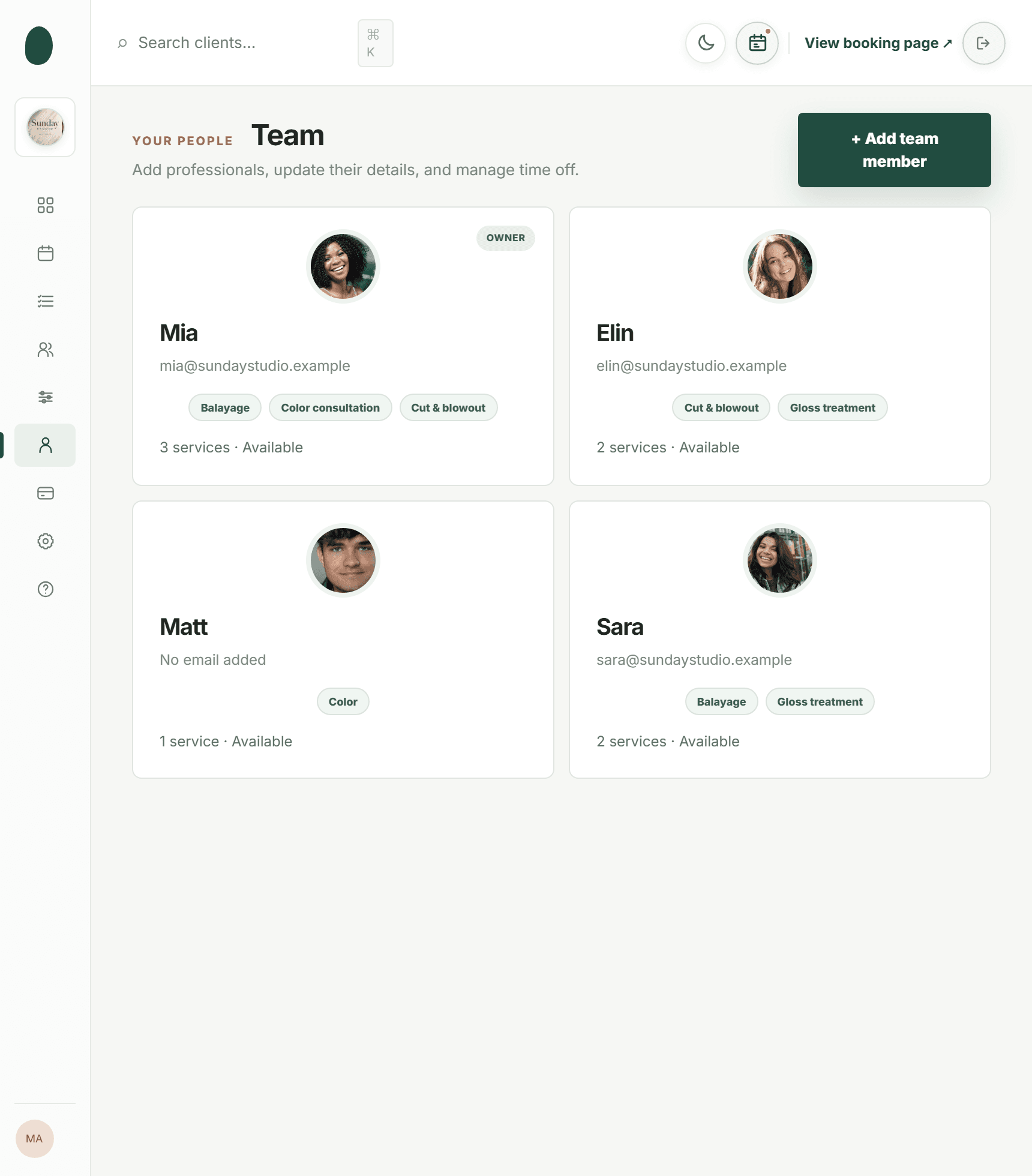
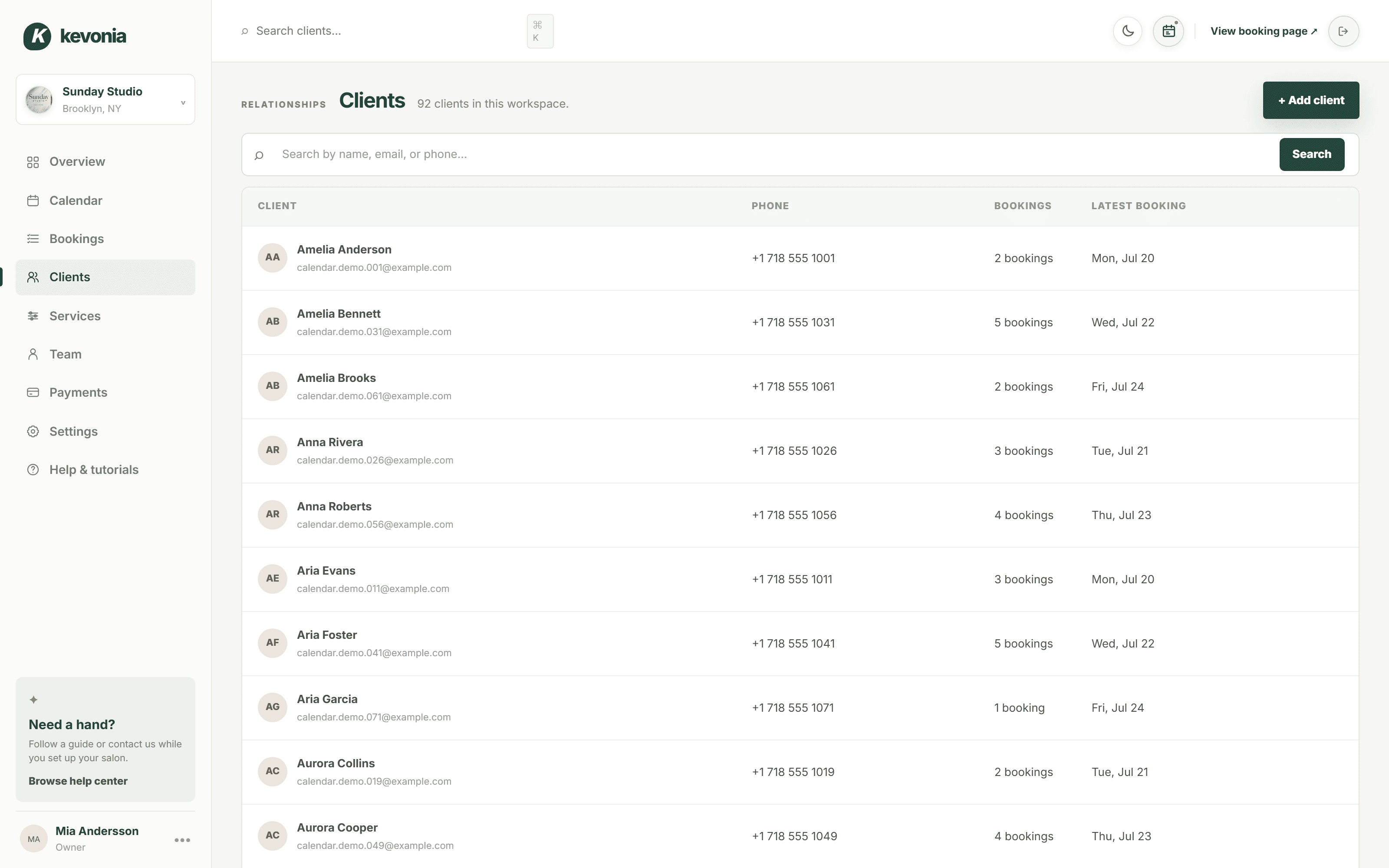
01 · THE PATIENT LIST
Who has been in, how often, and what reception needs to know.
Every patient has a card with their contact details, how many appointments they have attended, when they were last in, and a private note only the clinic can read. Enough to recognise somebody the moment they ring, without pretending to be the system your clinical records live in.
- Find anyone by part of a name, an email or a number
- Attendance count and last appointment shown up front
- Private notes stay with the patient across providers
app.kevonia.com
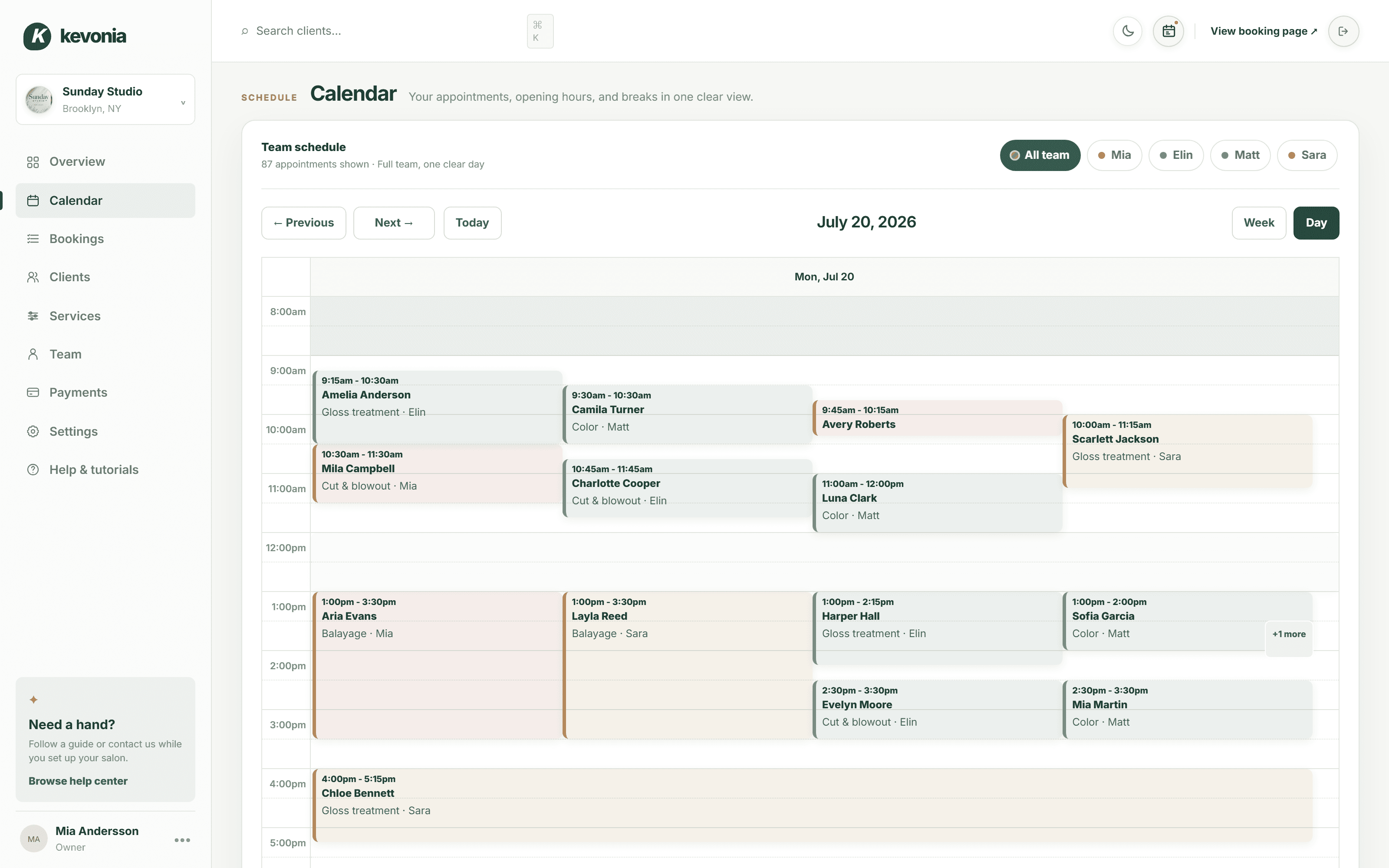
02 · PROCEDURES AND ROOM TIME
Forty minutes of laser is not a forty-minute appointment.
Each procedure carries its own treatment time, its own turnaround for numbing, cooling and resetting the room, its own fee and its own list of trained providers. Set how far ahead the diary opens and how much notice a change needs, and the booking page obeys both.
- Treatment time and turnaround set per procedure
- Only trained providers can be booked for it
- Booking horizon and notice period under clinic control
app.kevonia.com
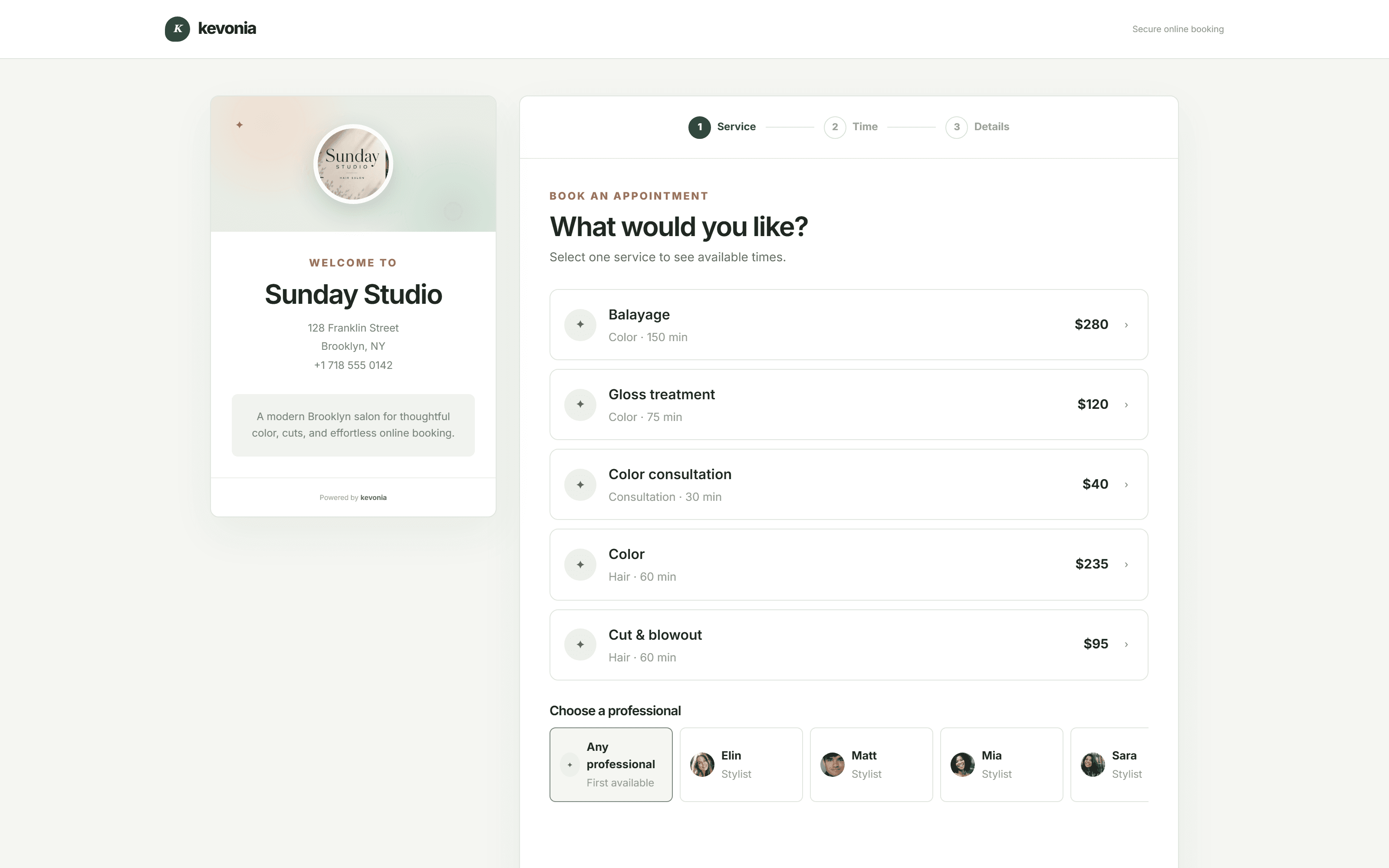
03 · PATIENTS BOOKING THEMSELVES
The consultation nobody was free to answer the phone for.
One link on the clinic site, the Google listing or an Instagram bio. Patients choose a procedure and a provider, and see only the times the room and the rota can genuinely take. It appears in the diary the second they confirm.
- Only providers trained for the procedure are offered
- A slot too short for the room never appears
- Take a deposit before the appointment is held
app.kevonia.com
WHAT THE SOFTWARE HOLDS
Strict about the diary. Quiet about everything else.
A dermatology scheduling system has to be exact about the rota, the rooms and the money. Nothing else should need thinking about.
One diary, every provider
The clinic's whole week on a screen, or narrowed to a single provider's list when that is all you need.
Procedures timed honestly
Treatment time plus the turnaround the room actually needs, so the afternoon does not quietly compress.
Training respected
A procedure belongs to the providers qualified for it, so it can never be booked with somebody who is not.
Paid before the chair is held
A deposit on consultations and longer procedures, taken through Stripe when the appointment is made.
Booking outside clinic hours
Most self-booked appointments arrive in the evening, which is precisely when nobody is on reception.
One appointment per slot
Hours, breaks, leave, closures and existing bookings are all checked before a booking is allowed through.
Reminders on the slots that matter
A day-before email with links to move or cancel, so a ninety-minute laser slot released overnight can still be filled.
ONE FEE, NOTHING HELD BACK
What Kevonia Business covers for a skin clinic.
No tiers, no per-provider charge, no cut of what the clinic takes. Everything listed here works from the first minute of the trial.
The diary
Where the clinic's week lives.
- Seven days at once, or a single day up close
- Filter down to one provider's list
- Each provider carries their own colour
- Book, move, reassign or release straight in the grid
- Every save re-checks the room is still free
- Notes kept on the appointment itself
The booking page
The clinic, at its own address.
- kevonia.com/your-clinic is the address you hand out
- A photo, a description, the address and the hours
- Procedure, provider, day, then time
- Unavailable times are never shown at all
- Built to be used on a phone first
- Switch online booking off whenever you need to
Patient cards
Enough to recognise whoever is ringing.
- However many patients the clinic sees
- Search on any fragment of a name, email or number
- Appointments attended, and the last date in
- Private notes only the clinic can read
- Still fast with years of appointments behind it
- Details carried onto every booking automatically
The procedure list
Described the way the clinic runs them.
- As many procedures as the clinic offers
- Treatment time plus the room's turnaround
- A fee each, and a deposit where it makes sense
- Limit a procedure to the providers trained for it
- Keep a procedure off the public booking page
- The description a patient reads before choosing
Providers and rotas
The right hands, on the days they are in.
- Every provider included in the one fee
- A clinic portrait, a colour, an email, a number
- A list of what each person is trained to deliver
- Separate hours for each day of the week
- Every break in the day, named and blocked
- Leave, public holidays and full clinic closures
Self-pay payments
Taken online, settled to the clinic.
- Card payments run through Stripe
- Deposits on consultations and longer procedures
- Payment status visible on every appointment
- A full record of everything taken
- Paid out to an account in the clinic's own name
- Stripe connected from inside the workspace
Rules and limits
The clinic sets the terms.
- How far into the future the diary opens
- The notice a patient must give to change or cancel
- The interval the booking grid runs on
- Country, currency and the clinic's own details
- Cancelled appointments kept and reinstatable
- A light theme and a dark one
Patient emails
Sent without anyone remembering to.
- Confirmation the moment the booking is made
- A reminder the day before the appointment
- Patients move an appointment from the email
- Patients cancel within the clinic's notice window
- The clinic is told the instant either happens
- Refunds confirmed without you writing
Opening up
Never a blank screen to stare at.
- A checklist waiting at the first sign-in
- A help centre and short reference guides
- Sign in with Google, or with an email address
- A fully stocked demo clinic to explore first
- Nothing locked away during the seven days
- No contract to sign and no call to sit through
THE PHONE DIARY VERSUS THIS
Where a skin clinic loses hours it never invoiced.
Almost never in the treatment room. Nearly always at the desk, on hold, or working out by hand whether the laser room is free on the fourteenth.
At the clinicPhone and paper diaryWith Kevonia
Booking a consultationA voicemail somebody returns tomorrowPatients book an open slot themselves, any hour
Is the laser room freeCounted back through the paper diaryOnly genuinely free times are ever offered
Numbing and reset timeTaken out of the next patient's appointmentBuilt into every procedure as turnaround
Who may perform thisAssumed, and occasionally wrongOnly trained providers can be booked for it
A no-show consultationAn hour of a provider's day, unpaidA deposit taken before the slot is held
A cancellation at nine at nightHeard about the following morningBack on the page immediately, and you are notified
Two people writing in the diaryThe same slot promised twiceThe second booking is refused as it saves
ONE CONSULTATION
A month costs less than one paid consultation.
A single no-show prevented by a deposit, or one laser slot filled on a quiet Tuesday, and the month has paid for itself. Nothing further is taken from what the clinic earns.
SKIN CLINICS ARE NOT ALL ONE SHAPE
A single treatment room and a four-provider clinic need the same diary, not the same rules.
Set your own procedures, room times, turnaround, fees, deposits, training lists, rotas and notice periods. Kevonia arranges itself around how the clinic already works instead of handing it somebody else's protocol.
Set the clinic's rules01Cosmetic dermatology↗02Med spas↗03Laser clinics↗04Skin clinic reception↗05Injectable clinics↗06Acne programmes↗07Pigmentation clinics↗08Hair restoration clinics↗09Laser hair removal↗10Aesthetic nurse practices↗11Body contouring rooms↗12Consultation-led clinics↗13Single-provider clinics↗
THREE STEPS TO OPEN
Dermatologist patient scheduling, open to patients by the end of the day.
Get the procedure list in first — deposits and notice periods can be tuned once you see how patients actually book.
Describe the clinic
Name, photo, address, time zone, currency, and how far ahead patients may book.
Add procedures and providers
Each procedure with its room time, turnaround and fee, then your providers and what each is trained to deliver.
Publish the link
Clinic website, Google Business Profile, Instagram bio — wherever patients already look for you.
CLINICS ALREADY ON KEVONIA
The phone stops being the only way in.
Fewer calls returned between patients, fewer rooms idle at three o'clock, and a diary the whole clinic can read at once.
We've been using Kevonia for several months and it has completely changed how we manage appointments. Our clients love how easy it is to book online, and we save hours every single week.
Emily Carter
By far the best salon booking software we've used. It saves us time every day, and the online booking process has increased the number of appointments we get.
David Thompson
The automatic reminders have significantly reduced our no-shows, and scheduling has never been easier. It's simple, reliable, and our clients constantly compliment the booking experience.
Ashley Brooks
I was surprised by how easy it was to get started. Within a single day our entire salon was set up and running smoothly. The interface is clean, modern and genuinely easy to use.
Jessica Miller
Managing multiple stylists used to be a challenge, but this keeps everyone's schedule organised. It helps us stay more efficient while giving our clients a better experience.
Michael Johnson
Excellent software with outstanding support. Our clients appreciate being able to book anytime, and we appreciate having everything in one place. I'd recommend it to any salon owner.
James Wilson
Open your seven daysNo credit card today · US$49.99/month after · Cancel anytime
ONE PLAN, ONE PRICE.
A week free. Then only if the diary is better for it.
Everything is unlocked for seven days with no card taken. If the clinic is not running more smoothly by the end of them, walk away and nothing is charged.
- No card at the start of the trial
- Nothing to install, no contract, no notice period
- The clinic keeps every penny of every appointment
KEVONIA BUSINESSUS$49.99/month
7 DAYS FREE- Unlimited appointments, patients and procedures
- Unlimited providers
- A booking page under the clinic's own name
- Week and day view of the clinic diary
- Patient cards with private clinic notes
- Card payments and deposits, through Stripe
- Breaks, leave and days the clinic is closed
- Booking horizon and the notice required
- Cancelled appointments kept and reinstatable
- Reference guides and a dark theme
No credit card today. Cancel before your trial ends and you are never charged.
Nothing risked
No card is taken to start. If it does not suit the clinic, leave it alone and the trial closes itself.
Live the same day
Procedures, providers and rotas are the whole of the setup, and none of it needs anybody technical.
The clinic's data stays the clinic's
Patient details and notes belong to your clinic, and card details are handled entirely by Stripe.
THE SAME DIARY, NEIGHBOURING TRADES
More than skin under the clinic's roof?
Clinics that also run facials, massage or a med-spa treatment list keep the whole lot in this one diary. These pages describe the same software in each of those trades' own words.
Or open the demo clinicCOMMON QUESTIONS
What skin clinics ask before they move the diary.
Would rather see it working? Open the live demo workspace and run a full clinic week through it.
What makes this dermatologist patient scheduling software rather than a general calendar?+
The rules a skin clinic actually runs on are built in: a procedure belongs to the providers trained for it, room turnaround sits on top of the treatment time so numbing and resetting are not stolen from the next patient, deposits can be required before a slot is held, and the public booking page will only ever show times the room and the rota can genuinely take.
Can patients schedule themselves?+
Yes. Patient self-scheduling is the point of the booking page: the patient picks a consultation or treatment, sees only the providers trained to deliver it, and takes a time the room is genuinely free for. The clinic can switch self-scheduling off at any point without losing the diary.
Is Kevonia a medical record system or an EHR?+
No, and we would rather say so plainly. Kevonia schedules appointments and takes self-pay payments. Patient cards hold contact details, appointment history and a private note the clinic can read — they are not clinical records, and your medical documentation should stay in the system you already use for it.
Does it handle insurance claims or medical billing?+
No. Payments run through Stripe as self-pay card payments and deposits, which suits the cosmetic and aesthetic side of a clinic. Anything billed to an insurer or a public health service has to be handled by your existing billing system.
Can I stop a laser being booked with a provider who is not trained on it?+
Yes. Every procedure is assigned to specific people. Patients booking online are only ever offered the providers on that list, and the appointment cannot be handed to somebody who is not on it.
Can I hold the room for longer than the treatment itself?+
Yes. Each procedure has a turnaround period on top of the treatment time, and the booking page counts it in. Numbing, cooling, cleaning down and resetting the room are protected instead of being borrowed from the next patient's appointment.
Can I take a deposit before a consultation?+
Yes. Connect Stripe and set a deposit on any procedure. Most clinics leave short follow-ups free to book and ask for money up front on consultations, lasers and anything over an hour, which is where no-shows cost the most.
Where do patient notes go?+
In a private note on the patient card, beside the appointment history. Only your team can see it, and it stays with the patient whichever provider takes the next appointment. Keep it to what reception and the provider need on the day rather than clinical detail.
Does it work for a clinic with one provider?+
Yes. A single provider runs one rota and one procedure list; a larger clinic runs several side by side in the same diary. Nothing about the setup changes except how many people you add.
Is there a charge per provider?+
No. One flat price covers every provider, appointment, patient and procedure, so adding somebody to the rota costs nothing in software.
How much work is the setup?+
Most clinics are live the same day. Clinic details, the procedure list, the providers, the opening hours — then share the link. A checklist inside the app walks through it step by step.
What happens when the week ends?+
Nothing is charged during the seven days and no card is needed to begin. Afterwards it is US$49.99 a month, and you can cancel from your billing settings at any point.
Can I see it before signing up?+
Yes. The demo workspace is a fully populated business with appointments, staff, treatments and takings already in it, so you can use the diary properly before creating an account.
From the blog
Running a salon, written down

Comparison
DaySmart Salon Alternative: Compare Cost, Control, and Fit
DaySmart Salon is capable, but its tiered pricing and broad feature set are not right for every salon. Compare the practical trade-offs before switching.
·12 min read

Comparison
PocketSuite Alternative: The Better Fit for Salon Teams
Looking for a PocketSuite alternative? Compare PocketSuite and Kevonia on pricing, payment fees, salon workflows, team scheduling, and booking limits.
·11 min read

Comparison
Using Google Calendar for Salon Bookings: Where It Works and Where It Breaks
Google Calendar can handle simple appointment scheduling, but salons often outgrow it when they need services, staff rules, deposits, reminders, and client records in one place.
·12 min read

Comparison
Schedulicity Alternative: A Better Fit for Growing Salons
Looking for a Schedulicity alternative? Compare the two systems by pricing clarity, booking control, team calendars, payments, client records, and switching risk.
·12 min read
THE DIARY, OFF THE TELEPHONE
Treat the patient.
Let the diary fill itself.
Seven days of the complete workspace, every feature open, no card taken, and nothing to cancel if you change your mind.
No charge today · US$49.99/month after your trial · Cancel anytime