Beauty Salon Software for iPad: What to Look For in 2026
Looking for beauty salon software for iPad? Learn which booking, calendar, payment, and staff-management features matter—and where Kevonia, Vagaro, Square Appointments, and Fresha fit.

Key takeaways
- The best iPad salon software should make booking, calendar management, payments, and staff availability easy without requiring a desktop.
- A browser-based system can work well on iPad, but confirm that every daily task is usable on a touch screen before committing.
- Vagaro, Square Appointments, and Fresha take different approaches to features, pricing, marketplaces, and payment processing.
- Kevonia is a straightforward option at US$49.99/month with unlimited team members, bookings, clients, and services and no per-booking commission.
- Test the booking flow, staff calendar, payment process, and cancellation rules using realistic salon scenarios—not just a product tour.
What are you really looking for in beauty salon software for iPad?
If you searched for beauty salon software for iPad, you probably do not need a list of generic business apps. You need to know whether an iPad can replace the front-desk computer for real salon work: taking bookings, checking the day, moving appointments, seeing staff availability, collecting deposits, and answering client questions quickly.
The important distinction is not whether software has an iPad icon in the App Store. It is whether the booking system is comfortable to use on an iPad, works reliably in a browser, and gives you enough control to avoid scheduling mistakes. This guide explains the practical checklist, compares Vagaro, Square Appointments, Fresha, and Kevonia, and shows which type of salon each option may suit.
What should iPad salon software actually handle?
An iPad is often used in the busiest part of the salon: at reception, beside a treatment room, or on a counter where clients can see the screen. That makes simple navigation more important than an impressive feature list. A useful system should let you complete common actions with a few obvious taps rather than forcing you through several desktop-style menus.
- Open the team calendar and switch between day and week views.
- Filter the schedule by professional when one stylist, therapist, or technician needs attention.
- Create or edit a service with its duration, price, cleanup time, and assigned professionals.
- Check whether a requested time is genuinely available before promising it to a client.
- Review a client’s contact details, visit history, and private notes.
- Take a card payment or deposit through the connected payment process.
- Let a client book, cancel, or reschedule without requiring a phone call.
- See time off, breaks, salon closures, and existing bookings when managing availability.
Touch-screen use also exposes weak scheduling logic. For example, a system may show an apparently open time even though the professional is on a break or the service needs cleanup time afterward. Look for software that checks operating hours, breaks, time off, existing appointments, and service duration together. That matters more than whether the interface looks modern. We cover this in more depth in prevent double-bookings.
The client-facing booking page matters too. A client using an iPhone should be able to choose a service, professional, date, and time without zooming or filling out an unnecessarily long form. In practice, the owner’s iPad and the client’s phone are two sides of the same booking process, so test both before choosing a system.
Browser-based system or native iPad app?
Many salon owners assume they need a native iPad application. That is not always true. A responsive browser-based system can be easier to maintain because you sign in from the iPad’s browser, use the current version of the software, and avoid depending on a separate app installation. It can also be used from a computer when you need a larger screen.
A native app can still be useful when the product has genuinely optimized its workflows for touch input. However, “has an app” does not automatically mean “works better for a salon.” Some apps focus mainly on letting clients book or helping a solo provider view appointments, while the owner needs deeper controls for services, staff schedules, breaks, deposits, and cancellation rules.
- Ask whether the system is designed for iPad screen sizes, not merely accessible through a browser.
- Check whether calendar scrolling, tapping, editing, and filtering work without a mouse.
- Test the system in portrait and landscape orientation if your reception setup uses both.
- Confirm what happens if Wi-Fi drops or the iPad goes to sleep during a booking or payment.
- Check whether staff can sign in securely without sharing one password.
- Test the client booking page on an iPhone, because an owner-facing iPad experience does not guarantee a mobile-friendly client experience.
Kevonia currently does not offer a native mobile app. Its salon and spa management workspace is accessed through the web, so the relevant question is whether the browser experience fits your front-desk routine. The system includes a live demo workspace, which gives you a practical way to inspect the workflow before deciding.
The features that matter most for salon scheduling on an iPad
A salon calendar is more than a list of appointments. It is a set of rules about who can perform each service, when each person works, how long a service occupies a slot, and what buffer is needed before the next client. The iPad interface should make those rules visible enough that reception staff do not have to remember them manually.
Start with the service menu. Each service should have a duration, price, and, where relevant, cleanup or buffer time. It should also be possible to assign a service to the professionals who can perform it. That prevents a client from booking a treatment with someone who is not trained or not intended to provide it.
Next, inspect availability controls. Useful controls include weekday opening hours, multiple breaks, staff time off, salon closures, the booking window, minimum notice, and the interval used for available time slots. These settings handle common edge cases, such as a stylist who works late on Thursdays, a technician who takes two breaks, or a spa that closes for a private event.
Payment handling is another major consideration. If you require deposits for high-value services or appointments that frequently produce no-shows, the software should explain when the deposit is collected and where the money goes. A vague payment workflow can create disputes at the front desk, especially when clients book from their phones and later change the appointment. We cover this in more depth in taking deposits for salon appointments.
- Calendar: day and week views, staff filters, and clear appointment details.
- Booking rules: service duration, buffers, qualified professionals, notice periods, and booking windows.
- Client records: searchable contact information, visit history, and notes that help staff prepare.
- Payments: card payments, deposits, and clear payout handling.
- Reminders: automatic messages that reduce forgotten appointments and explain rescheduling or cancellation options.
- Recovery tools: cancellation history or another way to restore an appointment after a mistake.
How Vagaro, Square Appointments, and Fresha compare
The three named competitors are not identical products. Each can support appointment-based businesses, but they emphasize different parts of the operating model. Treat them as alternatives with different trade-offs rather than assuming the cheapest headline price is the lowest total cost.
Vagaro is a broad salon, spa, and fitness platform. Its official US pricing page describes calendar and resource management, online booking across Vagaro and social channels, customer waitlists, memberships, packages, gift certificates, reporting, client data, inventory tracking, and reminders. Vagaro’s support documentation says its base subscription can scale by the number of employees or bookable calendars, with additional employee calendar licenses charged separately. Because the subscription and optional features can vary by setup, review the current account-specific configuration before comparing it with a flat-price tool. Supporting details are available from Vagaro pricing and plans. Supporting details are available from Vagaro base subscription details.
Square Appointments is a strong fit for businesses already using Square payments or wanting appointment booking connected to a wider Square ecosystem. Square’s official pricing page lists a free plan with no monthly subscription cost and payment processing fees when a payment is taken. It also lists booking websites, unlimited calendars, custom scheduling, deposits, cancellation and no-show controls, reminders, multi-location management on higher plans, and payment options such as digital wallets. The exact processing fee depends on the plan and payment method, so check the current US pricing page rather than relying on an old comparison article. Supporting details are available from Square Appointments pricing.
Fresha takes a marketplace-led approach alongside direct booking tools. Its pricing page describes direct booking links and says that a one-time commission applies when a brand-new client discovers the business through the Fresha marketplace. The page lists a 20% one-time commission with a minimum fee of US$6 per marketplace-acquired client. That distinction is important: a salon should separate clients who arrive through its own booking link from new clients acquired through a third-party marketplace when estimating costs. Supporting details are available from Fresha pricing and marketplace fees.
- Choose Vagaro if you want a broad business platform with marketplace exposure, memberships, inventory, reporting, and other operational tools, and you are comfortable reviewing add-ons and calendar-based pricing.
- Choose Square Appointments if integrated Square payments, a free entry plan, digital wallets, or a larger payments and commerce ecosystem are important to your business.
- Choose Fresha if marketplace discovery is part of your growth strategy and you understand when marketplace commissions apply.
- Look beyond the word “free”: compare payment processing, marketplace fees, additional calendars, optional modules, and the cost of features you actually need.
Where Kevonia fits for an iPad-based salon
Kevonia fits salons and spas that want the core booking and scheduling workflow without feature tiers or per-seat charges. It provides a branded online booking page at kevonia.com/your-salon, plus a workspace with a team calendar, client records, a service menu, availability rules, and Stripe payments. The booking page is open 24/7, and clients choose a service, professional, date, and time.
For an owner using an iPad at reception, the practical differences are in the scheduling controls. Kevonia offers day and week team-calendar views, per-professional filters, and color coding. Its double-booking protection checks hours, breaks, time off, and existing bookings. The service menu supports duration, cleanup or buffer time, price, optional deposits, and professional assignment. Availability rules cover weekday opening hours, multiple breaks, staff time off, closures, booking windows, minimum notice, and time-slot intervals.
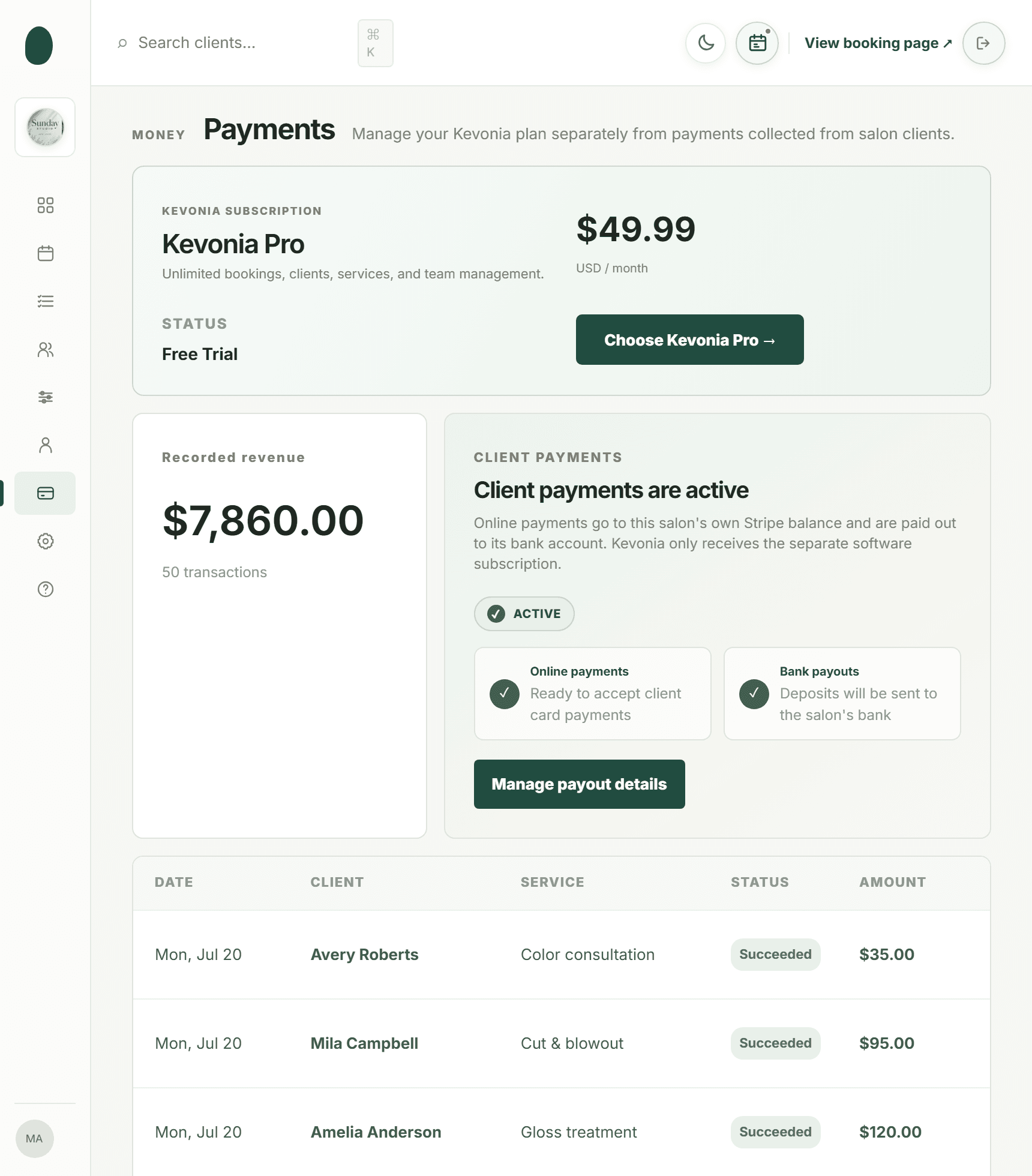
Kevonia also keeps the client record connected to the appointment workflow. Staff can search by name, email, or phone and view private notes and visit history. Card payments and deposits are handled through Stripe, with payouts sent to the salon’s bank account. The automatic email reminder is sent the day before an appointment, and clients can reschedule or cancel from that email within the salon’s notice window. Cancellation history includes a restore option.
The pricing model is one plan at US$49.99 per month. There are unlimited team members, bookings, clients, and services, with no per-seat charge and no per-booking commission. The trial is free for 14 days, no credit card is required to start, and you can cancel anytime before the trial ends without being charged. Those terms make the cost easier to estimate for a small team that does not want calendar licenses or booking commissions to change the monthly bill.
There are boundaries to understand before choosing it. Kevonia does not currently provide multi-location management from one account, retail or inventory POS, marketing or SMS campaign tools beyond the booking reminder email, or a native mobile app. If your business needs those functions, a broader platform may be a better fit. If your priority is a branded booking page, staff calendar, client records, service rules, availability controls, reminders, and Stripe payments, Kevonia is more focused.
A practical iPad test before you choose software
Do not evaluate salon software only from a feature page. Run a short test using the same situations that create problems in your business. An iPad can make a system look convenient during a demonstration, but the important question is whether reception staff can complete the entire task without workarounds.
- Create three professionals with different working hours. Add a break, a day off, and a closure to confirm that unavailable times disappear from online booking.
- Create a long service with cleanup time and assign it to only the professionals who perform it.
- Book an appointment from the client-facing page using an iPhone or another device, then confirm that it appears correctly on the iPad calendar.
- Filter the calendar to one professional, switch from day to week view, and edit the appointment without losing the service or client details.
- Add a private client note and check whether staff can find the record using the client’s phone number or email address.
- Test a deposit or card payment and identify the exact confirmation the client receives.
- Cancel an appointment, review the cancellation history, and restore it if the system supports restoration.
- Trigger the reminder workflow and verify what clients can do from the reminder, including the notice-window rules.
- Repeat the key steps with the iPad in landscape mode and with the browser zoom at its normal setting.
Also test the system at the pace of a busy day. Ask a staff member who did not attend the product demonstration to find a client, check tomorrow’s appointments, and create a booking. If that person needs repeated instructions for basic tasks, the system may create more front-desk work than it removes.
Common mistakes when buying salon software for iPad
The most common mistake is buying for the device instead of buying for the workflow. An iPad is only the screen. The software still needs accurate service rules, reliable availability, client records, payment handling, and clear communications.
- Choosing an app because it is listed for iPad without testing the owner and client workflows.
- Comparing monthly subscriptions while ignoring per-booking commissions, payment processing, calendar charges, or marketplace fees.
- Setting every professional to the same hours even though staff have different schedules or breaks.
- Leaving cleanup time out of service duration and then creating impossible back-to-back appointments.
- Allowing every professional to perform every service when qualifications or equipment limit who should be bookable.
- Turning on deposits without explaining the cancellation and refund policy to clients.
- Assuming automatic reminders include the wording or channels your salon needs.
- Migrating client records without deciding which notes are appropriate to retain and who should access them.
- Buying a system with inventory, marketing, or marketplace features that your salon will not use while overlooking calendar controls you need every day.
A related mistake is treating a free plan as risk-free. A free subscription can still involve payment-processing costs, marketplace commissions, limits on staff or locations, or paid upgrades for controls such as deposits and no-show protection. Write down your monthly booking volume, number of professionals, average online payment amount, and need for add-ons before comparing plans. We cover this in more depth in salon scheduling software options.
Finally, check what the system does not do. For a single-location salon, the absence of multi-location management may not matter. For a salon selling retail products, the absence of inventory POS may be decisive. A clear limitation is easier to plan around than an unclear promise.
Which option is right for your salon?
The right choice depends on whether you need a focused booking system or a broader business platform. If you operate one location, want clients to book online, and mainly need a reliable schedule, client records, service rules, availability controls, reminders, and payments, keep the evaluation narrow. Extra modules are not automatically valuable if they complicate the daily workflow or make the bill harder to predict.
- For a feature-rich salon or spa operation: investigate Vagaro and confirm the total cost for your number of calendars and selected add-ons.
- For a Square-centered business: evaluate Square Appointments alongside your existing payment, commerce, and reporting workflow.
- For marketplace-led client acquisition: evaluate Fresha carefully, separating direct bookings from marketplace bookings and their associated fees.
- For a focused single-location workflow with predictable pricing: evaluate Kevonia on the iPad and test its booking, calendar, availability, client, reminder, and Stripe payment flows.
- For any option: verify the current official pricing and feature page before signing up, because plans and fees can change.
If your search began with the phrase beauty salon software for iPad, use that as a device-compatibility question, not as your whole buying criterion. The strongest choice is the one that lets your team manage real salon exceptions quickly: late arrivals, breaks, service buffers, staff time off, deposits, cancellations, and clients who need help booking from a phone. We cover this in more depth in online booking system for salons.
Kevonia’s 14-day free trial can be evaluated without a credit card. Before the trial ends, test the actual setup you expect to use; if you cancel before the trial ends, you are never charged. That makes the decision more useful than judging the interface from screenshots alone.
Sources
- Vagaro US Pricing
- Vagaro Plans, Pricing, and Premium Features
- Square Appointments Pricing and Plans
- Fresha Pricing
- Kevonia
- Kevonia Beauty Salon Booking Software
- Kevonia Live Demo
- Kevonia: How to Prevent Double Bookings in a Salon
- Kevonia: How to Set Staff Availability for a Salon Calendar
- Kevonia: How to Take Deposits for Salon Appointments
- Kevonia: Salon Scheduling Software Options
- Kevonia: Online Booking System for Salons
- Kevonia Salon Reservation Software
Frequently asked questions
Can I use beauty salon software for iPad without a native iPad app?+
Yes. A responsive web-based system can be used through the iPad browser. The important test is whether calendar scrolling, appointment editing, staff filtering, service setup, client records, and payments work comfortably with touch input. Kevonia currently does not offer a native mobile app, but its workspace and branded booking page are accessed through the web.
What is the difference between a salon appointment app for iPad and salon software?+
An appointment app may focus on viewing or creating bookings. Salon software usually covers the connected operating workflow: online booking, staff calendars, service durations, cleanup buffers, availability rules, client records, payments, deposits, reminders, and cancellation handling. If you run a team, evaluate the complete workflow rather than the app label.
Is Square Appointments free for a salon?+
Square’s official US pricing page lists a free plan with no monthly subscription cost, but payment processing fees apply when you take a payment. Other plans and features can add costs, and the processing fee depends on the payment method and plan. Confirm the current official pricing for your business before comparing it with subscription-only software.
Does Fresha charge a fee for every salon booking?+
Not every booking is described the same way. Fresha’s pricing page distinguishes direct booking links from new clients who discover the business through the Fresha marketplace. It lists a one-time 20% commission for a brand-new marketplace client, with a minimum fee of US$6 per client. Track the source of bookings when estimating the cost.
How does Vagaro price salon software?+
Vagaro describes pricing based on the business setup, including the number of employees or bookable calendars, with optional premium features available. Its official US materials list tools such as online booking, calendar and resource management, memberships, inventory, reporting, and reminders. Ask for the current total for your number of calendars and the features you need rather than relying on a generic starting price.
What does Kevonia cost for a salon using an iPad?+
Kevonia has one plan at US$49.99 per month. It includes unlimited team members, bookings, clients, and services, with no per-seat charge and no per-booking commission. The trial is free for 14 days, no credit card is required to start, and you are never charged if you cancel anytime before the trial ends.
More from the blog

Timely Alternative: Flat-Cost Booking Software for Salons
Timely is capable salon software, but its per-staff pricing and broader feature set are not right for every business. Compare Timely with Kevonia before you switch.

9 Best Salon Scheduling Software Options for 2026
Compare the best salon scheduling software for 2026, including Vagaro, Acuity Scheduling, Square Appointments, Fresha, and Kevonia. See which platform fits your team, budget, and booking workflow.

Best Salon Booking Software: 5 Top Picks for 2026
A practical, no-fluff comparison of the best salon booking software options — pricing, fees, and features — so you can pick the right one for your business.