Online Booking System for Salons: 2026 Setup Guide
A practical, no-fluff guide to choosing and setting up an online booking system for salons — what it should do, how to configure it, and mistakes to avoid.

Key takeaways
- A real online booking system for salons needs availability rules, double-booking protection, client records, and payments — not just a calendar widget.
- Getting availability rules (hours, breaks, buffers, notice windows) right on day one prevents most scheduling headaches later.
- Reminder emails and deposits reduce no-shows more reliably than phone confirmations ever did.
- Switching from phone bookings to online booking works best when you migrate gradually and train staff on the new workflow first.
- Kevonia offers a single $49.99/month plan with a branded booking page, team calendar, and Stripe payments, with a 14-day free trial and no per-seat charges.
What You're Actually Trying to Solve
If you're searching for an online booking system for salons, you're probably not looking for a feature list — you're trying to stop losing time to phone tag, double-booked chairs, and no-shows that leave a stylist standing around for 45 minutes. Maybe you're running a one-chair barbershop and answering calls mid-cut, or you manage a six-person team and your group text for scheduling has become unmanageable. Either way, the underlying question is the same: which system will actually reduce the daily friction of running a salon, not just add another app to check.
This guide walks through what a real hair salon online booking system needs to do, how to set it up so it doesn't create new problems, and where a tool like Kevonia fits versus building your own process from spreadsheets and sticky notes. For more detail, see Kevonia's hair salon booking software.
What an Online Booking System for Salons Should Actually Do
A lot of software calls itself "booking software" but only handles the calendar. For a salon, that's not enough — you're managing professionals with different schedules, services with different durations, and clients who need to be reminded, rescheduled, or refunded. A functional salon online booking software setup should cover:
- A booking page clients can use anytime — not just during business hours — to pick a service, a professional, and a time
- A team calendar that shows every professional's day or week at a glance, ideally color-coded so you can spot gaps or overlaps fast
- Protection against double-booking that checks hours, breaks, time off, and existing appointments before confirming a slot
- A service menu with durations, cleanup or buffer time, and pricing built in, not tracked separately in a notebook
- Client records with history and notes, so any staff member can see who's coming in and what they had done last time
- A way to collect payment or a deposit online, especially for services where no-shows are costly
- Automatic reminders that cut down on missed appointments without you having to call every client the day before
If a system is missing more than one of these, you'll end up running a hybrid process — booking online for some things and by phone for others — which usually creates more confusion than it solves.
Availability Rules: The Setup Step Most Salons Get Wrong
The single biggest cause of bad experiences with online salon scheduling software isn't the software — it's incomplete setup. Owners rush through availability settings and then wonder why clients are booking during lunch breaks or showing up five minutes before closing for a 90-minute color service.
Before you open bookings to the public, walk through every rule the system offers, not just the obvious ones.
Opening hours and breaks, per weekday
Most salons don't run the same hours every day, and staff often have different breaks even on the same day. Set opening hours per weekday, and add every break — lunch, a shorter afternoon break, whatever applies — rather than assuming one lunch window covers the whole team. A system that only allows one blanket schedule for everyone will force you to manually block time later, which defeats the purpose.
Booking window and minimum notice
Decide how far in advance clients can book (two weeks out? three months?) and how much minimum notice you require for a same-day appointment. Too short a booking window frustrates clients trying to plan ahead; too little minimum notice means someone books a color appointment 20 minutes before you close. Match this to how your salon actually operates, not to a default setting.
Time-slot intervals and buffer time
If your services run in odd increments — a 50-minute massage, a 35-minute beard trim — your time-slot interval should match, not default to a flat 30 or 60 minutes. Also set cleanup or buffer time on services that need it (tattoo stations, treatment rooms) so the system doesn't stack a new client the moment the last one leaves the chair.
Preventing Double-Bookings and No-Shows
Double-bookings usually happen for one of two reasons: the system isn't checking against real-time availability, or staff are still taking phone bookings outside the software and forgetting to log them. If you're serious about running your scheduling through one system, commit to entering every booking there — including walk-ins and phone requests — or the protection is meaningless.
No-shows are a separate problem, and reminders alone don't eliminate them, but they cut down the number significantly. A reminder sent the day before, with a clear way to reschedule or cancel within your notice window, gives clients an easy out that doesn't involve calling you — which means more of them actually take it instead of just not showing up.
- Require a deposit for high-cost or high-demand services where a no-show is expensive
- Set your cancellation notice window realistically — 24 hours is common, but tighten it for services that are hard to rebook
- Keep a record of cancellation history so you can spot repeat no-shows and decide whether to require prepayment from that client going forward
- Double-check that breaks and time off are actually blocking the calendar, not just displayed as a note
Client Records and Service Menus: The Backend That Actually Matters
The booking page is what clients see, but the client records and service menu are what make the system useful day to day. Being able to search a client by name, email, or phone and instantly see their visit history and any private notes (allergy warnings, preferred stylist, last formula used) saves real time and prevents mistakes, especially when a client sees a different professional than usual.
On the service side, build your menu with actual operational detail, not just a name and a price. Assign services to the specific professionals qualified to perform them, set accurate durations, and add buffer time where a chair or room needs to be reset. A vague service menu is one of the quieter reasons a hair salon online booking system ends up under-booking or over-booking certain staff.
Payments, Deposits, and Getting Paid
Online payment isn't just a convenience feature — it's what makes deposits enforceable. If a client can book without paying anything, a deposit requirement is just a suggestion. Look for a system that processes card payments and deposits directly (commonly through Stripe) and pays out to your salon's bank account, rather than routing money through a third-party wallet you have to manage separately.
A deposit that's actually collected at the time of booking changes client behavior in a way a deposit that's only "requested" never does.
When you're comparing online salon software on payments specifically, ask three things: does it support deposits (not just full payment), can you set the deposit per service rather than a flat amount across the board, and does it charge you a per-booking commission on top of your subscription. That last one matters more than it looks — a small percentage fee adds up fast for a busy salon.
Where Kevonia Fits
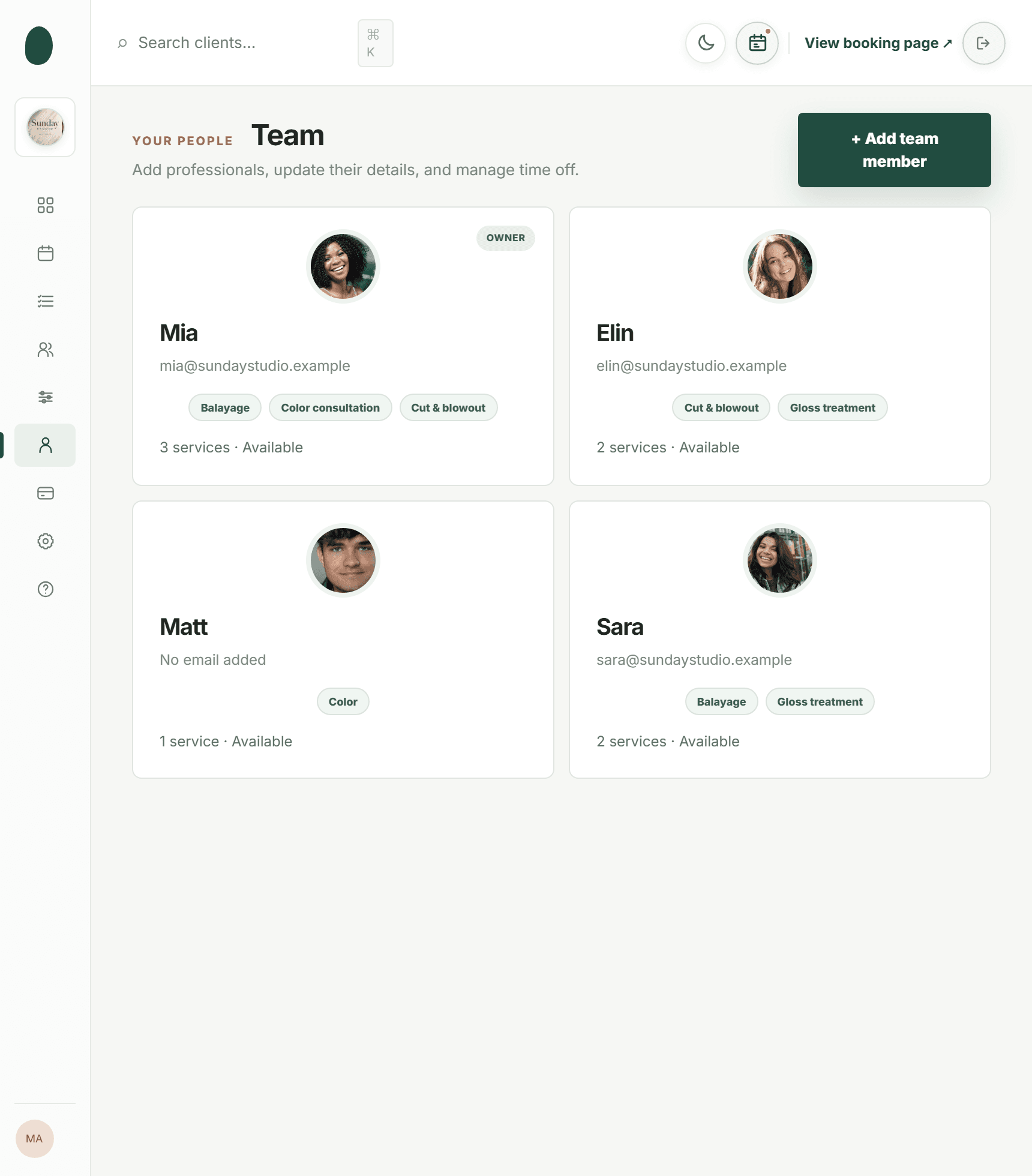
Kevonia is built specifically around the workflow described above: a branded booking page at kevonia.com/your-salon where clients pick a service, then a professional, then a date and time, open 24/7. Behind that page is a workspace with a week and day team calendar with per-professional filters and color coding, double-booking protection checked against hours, breaks, time off, and existing bookings, and a service menu that supports duration, cleanup or buffer time, price, optional deposits, and per-professional assignment.
Availability rules cover opening hours per weekday, multiple breaks, staff time off, salon closures, booking window, minimum notice, and time-slot interval — the same granular settings discussed above. Payments and deposits run through Stripe with payouts to the salon's own bank account. Clients get an automatic email reminder the day before their appointment and can reschedule or cancel from that email within your notice window, and every cancellation is logged in a history you can restore from if needed.
On pricing, Kevonia runs a single plan at $49.99 a month — no feature tiers, no per-seat charges, no per-booking commission, and unlimited team members, bookings, clients, and services. The free trial lasts 14 days, doesn't require a credit card to start, and you're not charged if you cancel before it ends. It's worth noting what it doesn't do: no multi-location management from one account, no retail or inventory point-of-sale, no marketing or SMS campaigns beyond the booking reminder, and no native mobile app. If any of those are must-haves for your business right now, factor that in before committing.
Common Mistakes When Switching From Phone Bookings to Online
Moving from a phone-and-notebook system to an online salon appointment software setup usually goes wrong in predictable ways. Most of these are fixable if you catch them early.
- Turning on online booking without finishing availability setup, so clients can book slots that don't actually work for staff
- Keeping the old phone-booking habit alive alongside the new system, which reintroduces the double-booking risk the software was supposed to fix
- Not training every staff member on how to check the calendar, add notes, or process a cancellation — leaving one person as the only one who understands the system
- Setting deposit amounts too low to matter or too high to convert, without testing what your actual client base will accept
- Ignoring the cancellation history and repeat no-show clients instead of adjusting deposit rules for them specifically
- Rolling out the new booking page with no announcement, so regular clients keep calling out of habit instead of switching over
A gradual rollout works better than a hard cutover. Run online booking alongside phone bookings for two to three weeks, actively point regular clients to the booking page, and only retire the phone-booking habit once staff are comfortable and the calendar is genuinely reflecting reality.
How to Choose the Right System for Your Salon
Not every business needs the same tool. A single-chair barbershop has different requirements than a ten-person day spa, and a tattoo studio's booking rhythm (long appointments, deposits, consultations) looks nothing like a nail salon's (short, frequent appointments, high volume). Before comparing specific products, get clear on what actually matters for your business.
- How many staff members need their own calendar, and does the pricing charge per seat or stay flat regardless of team size
- Do your services need deposits, and can the system set deposit amounts per service rather than one flat rule
- How far in advance do clients typically book, and does the system's booking window and notice settings match that pattern
- Do you need buffer time between appointments for cleaning or resetting a space
- Will you eventually need more than one location, and if so, does the system support that or will you outgrow it
- Is there a free trial you can actually test with real clients before paying, and does it require a credit card to start
Test any online booking system for salons with your real service menu and real staff schedules before committing — a demo with generic sample data won't reveal whether the buffer-time or multi-break settings actually fit how your salon runs day to day.
Frequently asked questions
Is an online booking system worth it for a one-person salon or barbershop?+
Yes, often more so than for larger teams — a solo operator answering calls mid-service loses income every time they stop to pick up the phone. A 24/7 booking page and automatic reminders handle that without adding staff.
How much should a salon online booking software cost?+
Pricing models vary — some charge per seat, some take a commission per booking, others use a flat monthly fee. Kevonia, for example, is a single $49.99/month plan with unlimited team members and no per-booking commission, which tends to work out cheaper than per-seat pricing once you have more than one or two staff.
Can clients cancel or reschedule without calling the salon?+
With a good system, yes. Reminder emails sent the day before an appointment typically include a link to reschedule or cancel within your set notice window, so clients can manage it themselves instead of calling during business hours.
Will online booking stop double-bookings completely?+
It will as long as every booking — including walk-ins and phone requests — is entered into the same system. Double-booking protection checks the calendar against hours, breaks, time off, and existing appointments, but it can only protect against bookings it knows about.
Do I need a credit card to try an online booking system?+
That depends on the provider. Kevonia's 14-day free trial doesn't require a credit card to start, and you won't be charged if you cancel before the trial ends.
What if I need to manage more than one salon location?+
Check this before committing to any online scheduling software — not all systems support multi-location management from a single account. If you plan to expand to a second location, confirm this is on the roadmap or already supported before you build your setup around one tool.
More from the blog

Salon Marketplace vs Your Own Booking System: The Real Trade-Off
A salon marketplace can bring discovery, but your own booking system gives you more control. Compare fees, client ownership, branding, and the practical choice for your salon or spa.
Why Clients Don’t Finish Booking Online: 9 Fixes
Clients may want the appointment but still abandon the booking page. Learn how to find the friction, fix the biggest problems, and recover more completed bookings.

Squire Alternative: When a Leaner Booking System Fits Better
SQUIRE is built for full barbershop operations. Kevonia is a simpler flat-cost alternative when your priority is branded booking, scheduling, payments, and client records without per-seat or per-booking charges.