9 Best Salon Scheduling Software Options for 2026
Compare the best salon scheduling software for 2026, including Vagaro, Acuity Scheduling, Square Appointments, Fresha, and Kevonia. See which platform fits your team, budget, and booking workflow.

Key takeaways
- The best salon scheduling software should prevent double bookings, handle staff availability, support online booking, and make fees easy to understand.
- Vagaro is a broad salon-management platform, Acuity Scheduling is flexible for appointment-based businesses, Square Appointments is strong for payment-centered businesses, and Fresha combines scheduling with a beauty marketplace.
- Kevonia is a focused option for salons and spas that want one plan, unlimited team members, 0% booking commission, branded booking, staff calendars, client records, availability rules, and Stripe payments.
- Before switching, test the complete client journey: service selection, professional selection, deposits, reminders, cancellations, rescheduling, and staff-calendar updates.
| Tool | Starting price | Commission or booking fees | Standout features |
|---|---|---|---|
| Kevonia | $49.99/month; one plan | 0% booking commission; Stripe payment processing applies | Branded 24/7 booking page, team calendar, double-booking protection, client records, availability rules, Stripe deposits and payments |
| Vagaro | $23.99/month listed offer for 1 bookable calendar; page also shows $30 reference price | No additional Vagaro Marketplace booking fee stated; payment-processing fees apply | Calendar and resource management, marketplace listing, reminders, memberships, packages, inventory, reporting |
| Acuity Scheduling | Paid plans only; no free appointment-scheduling plan | No booking commission stated; payment processing depends on connected processor | Online booking, multi-location calendar management, deposits, invoicing, automated notifications, mobile admin app |
| Square Appointments | $0/month Free; $49/month Plus; $149/month Premium, per location | No monthly subscription cost on Free; payment-processing fees apply and vary by plan or method | Unlimited calendars, deposits, no-show fees, multi-staff appointments, booking website, social and Google integrations |
| Fresha | $19.95/month Independent; $14.95 per bookable team member/month Team | Online payments listed at 2.79% + $0.20; one-time fee for new clients acquired through Marketplace | Beauty marketplace, mobile apps, team scheduling, online payments, client discovery |
What is the best salon scheduling software in 2026?
If you searched for the best salon scheduling software, you probably do not need another generic calendar. You need a system that lets clients book without calling, shows every professional’s real availability, protects against double bookings, stores client details, and makes deposits or payments predictable. The right choice depends less on the longest feature list and more on how closely the software matches the way your salon actually works.
This list compares four established options—Vagaro, Acuity Scheduling, Square Appointments, and Fresha—alongside Kevonia. The short answer is that there is no universal winner: Vagaro suits businesses wanting a wide salon-management toolkit, Acuity suits businesses that need flexible appointment scheduling, Square suits owners already using Square payments, Fresha suits businesses interested in marketplace discovery, and Kevonia suits salons that want a focused booking and calendar workspace with transparent pricing.
How to choose salon scheduling software
A booking page is only the visible part of the system. The important work happens behind it: translating services into realistic appointment times, assigning the right professional, accounting for breaks and cleanup, collecting payment when needed, and keeping the team’s calendar accurate. Evaluate each platform against the complete appointment lifecycle rather than judging it from the booking page alone.
- Online booking: Can a client choose a service, professional, date, and time without staff intervention?
- Availability controls: Can you set opening hours, breaks, time off, closures, minimum notice, booking windows, and service-specific buffers?
- Calendar reliability: Does the system prevent overlapping appointments and show multiple professionals clearly?
- Client information: Can staff find contact details, private notes, visit history, and appointment history quickly?
- Payments: Can you take deposits or card payments, and are processing fees separate from software fees?
- Client communication: Are confirmations, reminders, cancellation rules, and rescheduling handled automatically?
- Cost structure: Is the price per business, location, calendar, employee, booking, message, or payment transaction?
- Growth fit: Will the platform still make sense when you add professionals, services, or another location?
For a solo stylist, a free or low-cost calendar may be enough. For a team, the more important question is whether the price rises with every bookable professional. A platform that looks inexpensive at one calendar can become costly when you add six stylists, multiple locations, paid reminders, marketing tools, or premium reports. Write down your expected team size and monthly booking volume before comparing plans.
The best salon scheduling software compared
The table below gives a practical first pass. Prices and fees can change, promotions can be limited, and payment-processing costs may depend on the transaction method or plan, so confirm the live pricing page before signing a contract. The standout features summarize what each provider emphasizes on its current official pages.
A useful comparison should separate the subscription from payment fees. A $0 monthly plan is not the same as free payment processing, and a flat subscription is not automatically cheaper if it excludes features your team needs. Fresha, for example, lists subscription pricing for independent and team businesses, while also listing payment rates and a one-time fee for clients acquired through its marketplace. (fresha.com)
Vagaro: best for an all-in-one salon business toolkit
Vagaro is a strong option for owners who want scheduling connected to a broad set of salon-business tools. Its current US pricing page lists a one-bookable-calendar offer of $23.99 per month alongside a $30.00 reference price, with pricing scaling according to the number of bookable calendars. Because that page displays an offer, treat the amount as a current listed promotion rather than a timeless price promise. (vagaro.com)
The platform emphasizes calendar and resource management, online booking through Vagaro and social channels, client data, appointment reminders, waitlists, memberships, packages, gift certificates, reporting, inventory tracking, and a marketplace listing. That breadth can be valuable when your salon wants scheduling, client management, payments, marketing, and business operations in one ecosystem.
- Best fit: salons and spas that want more than appointment booking and are prepared to configure a larger system.
- Strengths: broad business-management coverage, multiple booking channels, reminders, client tracking, memberships, and reporting.
- Watch carefully: pricing depends on bookable calendars, payment processing has its own fees, and a large feature set may require more setup and training.
- Potential mismatch: a solo professional who wants a minimal calendar may pay for capabilities they will not use.
Vagaro also states that its marketplace does not add a booking fee for appointments obtained there. That does not mean payments are fee-free: the same pricing information lists payment-processing rates separately, so compare the cost of software and transactions as two different lines in your budget. (vagaro.com)
Acuity Scheduling: best for flexible appointment workflows
Acuity Scheduling is designed around appointment scheduling rather than being exclusively salon software. It is worth considering if you run a salon, studio, spa, wellness practice, or service business that needs a customizable booking experience, multiple calendars, client communication, payments, and integrations. Acuity’s official features page highlights online booking, multi-location calendar management, payments, deposits, invoicing, automated notifications, client management, availability controls, staff management, and a mobile admin app. (acuityscheduling.com)
Acuity does not offer a free appointment-scheduling plan, although it offers a free trial and says no credit card is required for that trial. Its pricing page presents Starter, Standard, and Premium plans, with differences in calendar capacity and advanced capabilities. Because the page’s plan prices are presented dynamically, check the current official pricing page for the amount that applies to your billing frequency and location. (acuityscheduling.com)
- Best fit: owners who value flexible appointment types, forms, payments, integrations, and a polished booking experience.
- Strengths: multi-location calendar management, recurring appointments, client intake options, deposits, invoices, and automated notifications.
- Watch carefully: it is a general scheduling platform, so you may need to configure salon-specific workflows yourself.
- Potential mismatch: a salon wanting built-in, highly specialized retail, inventory, or salon-operations workflows may need additional tools.
Acuity is often a good answer to the question, “What is the best salon appointment software if I need customization?” It can support complicated appointment menus and different calendars, but the tradeoff is that owners must spend time modeling their services, forms, availability, and payment rules. That setup work is worthwhile when your booking logic is unusual; it is less attractive when your main need is a straightforward salon calendar.
Square Appointments: best for salons already using Square payments
Square Appointments makes the most sense when your salon already relies on Square for payments or wants scheduling closely connected to a payment ecosystem. Square’s current appointment pricing page lists Free at $0 per location, Plus at $49 per location, and Premium at $149 per location. It also states that the Free plan has no monthly subscription cost but that payment processing fees apply when you take a payment. (squareup.com)
Square highlights unlimited calendars, online booking websites and integrations, deposits, prepayments, cancellation and no-show fees, processing time, multi-staff appointments, Google Calendar sync, and booking connections for Instagram, Facebook, and Google Business Profile. These are practical features for a team that wants online booking tied to checkout and payment operations.
- Best fit: salons that already use Square or want a scheduling platform with strong payment and point-of-sale connections.
- Strengths: free entry plan, unlimited calendars, deposits, no-show controls, booking integrations, and payment tools.
- Watch carefully: Plus and Premium are priced per location, while processing fees vary by plan and payment method.
- Potential mismatch: a business seeking a salon-only workspace without broader payment-product complexity may prefer a more focused system.
Square is particularly useful for a salon that wants the booking flow and payment flow managed by the same provider. Before choosing it, test whether your preferred deposit policy, cancellation window, service duration, cleanup time, and multi-professional appointment flow work exactly as expected. A feature listed on a pricing page is not the same as a workflow that feels simple for your front desk and clients.
Fresha: best for marketplace discovery and mobile access
Fresha combines salon and spa scheduling with a consumer marketplace. Its pricing page currently lists an Independent plan at $19.95 per month and a Team plan at $14.95 per bookable team member per month. It also lists online payment processing at 2.79% plus $0.20 per transaction, in-person payments at 2.29% plus $0.20 per transaction, and a one-time fee when a new client discovers the business through the Fresha Marketplace. (fresha.com)
The marketplace can be useful if your priority is reaching people who are actively searching for beauty and wellness services. Fresha also promotes business and customer mobile apps, which may appeal to owners and professionals who manage appointments away from a desktop. The tradeoff is that you need to understand the difference between clients you bring yourself and clients acquired through the marketplace.
- Best fit: salons, spas, tattoo studios, massage practices, and other businesses that want scheduling plus marketplace exposure.
- Strengths: consumer discovery, business mobile access, team pricing, online booking, payment tools, and beauty-focused positioning.
- Watch carefully: per-team-member subscription costs can grow with staff, and marketplace-acquisition fees affect the economics of new-client bookings.
- Potential mismatch: an established salon that gets most bookings from its own website, Google profile, or social channels may value direct branded booking more than marketplace exposure.
Fresha can be a compelling choice when filling empty appointment slots is more important than keeping every booking inside your own branded funnel. If you already have steady demand, compare the value of marketplace discovery against the subscription and acquisition fees. Ask whether the platform helps you build a direct repeat-booking habit or mainly helps you acquire the first visit.
Where Kevonia fits
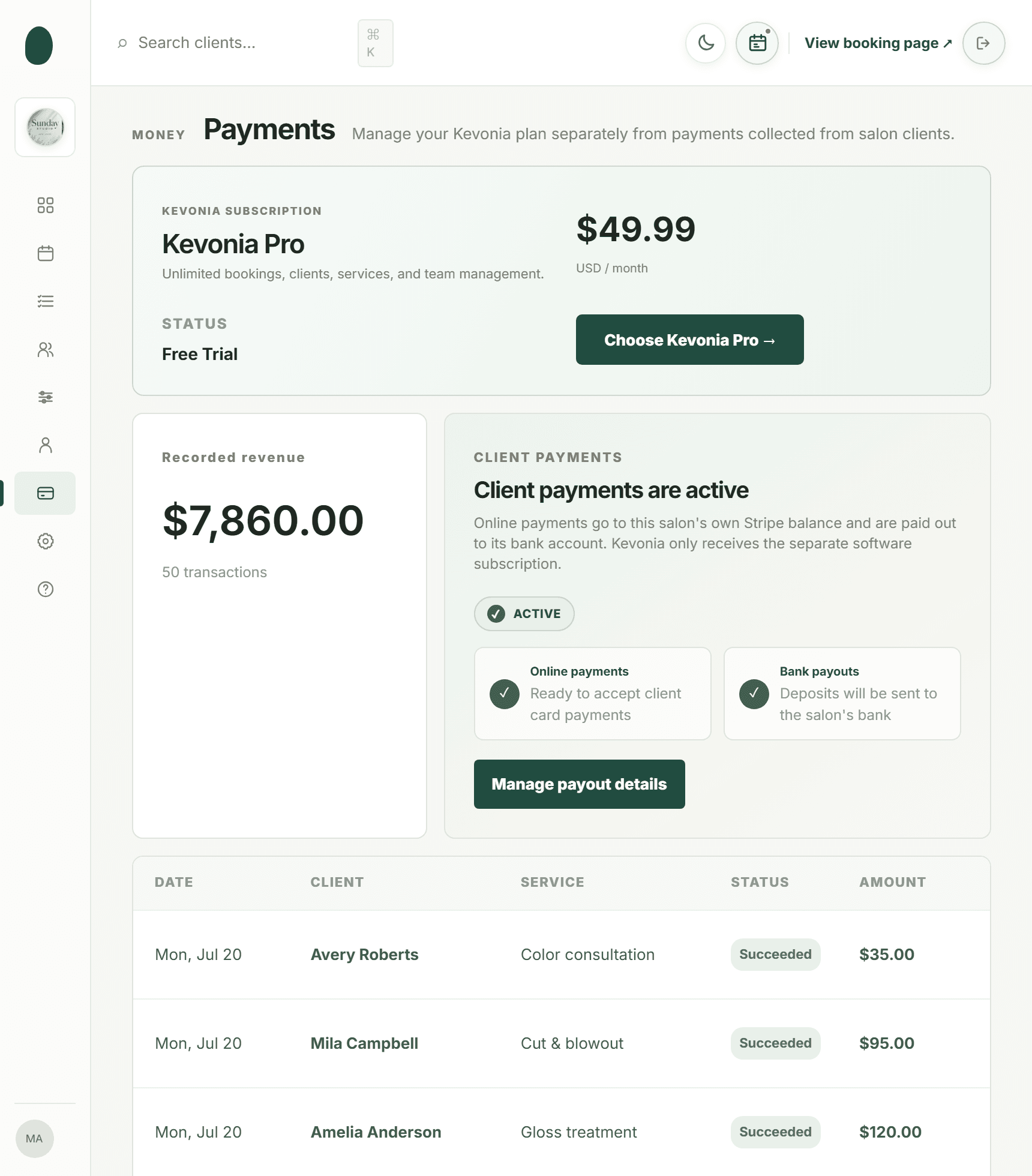
Kevonia fits salons and spas that want focused salon scheduling software and a management workspace without separate feature tiers or per-seat charges. It provides a branded online booking page at kevonia.com/your-salon, where clients choose a service, professional, date, and time, plus a workspace with a team calendar, client records, a service menu, availability rules, and Stripe payments. It is built for hair salons, barbershops, tattoo studios, nail salons, day spas, med spas, esthetician and lash studios, beauty clinics, wellness and yoga studios, massage therapists, and similar appointment-based businesses.
Kevonia has one plan at $49.99 per month. The plan includes unlimited team members, bookings, clients, and services, with no per-booking commission and no per-seat charge. New businesses can use it free for 14 days without a credit card, and they are never charged if they cancel before the trial ends. The predictable structure is most relevant to a salon that expects several professionals or a large number of bookings and does not want the software bill to rise with every appointment.
Its strongest difference is operational clarity. Availability rules can include weekday opening hours, multiple breaks, staff time off, salon closures, booking windows, minimum notice, and time-slot intervals. Double-booking protection checks hours, breaks, time off, and existing bookings. Service settings include duration, cleanup or buffer time, price, optional deposits, and professional assignments. Those details matter when a 60-minute color service needs more calendar space than a 30-minute trim.
The client side is equally direct: the booking page is open 24/7, clients receive an automatic email reminder the day before, and they can reschedule or cancel from that email within the salon’s notice window. Staff can search client records by name, email, or phone, add private notes, and review visit history. Stripe handles card payments and deposits, with payouts going to the salon’s bank account. For more detail, see Kevonia's hair salon booking software.
Kevonia is not a fit for every operation. It does not currently provide multi-location management from one account, retail or inventory POS, marketing or SMS campaign tools beyond the booking reminder email, or a native mobile app. It is better suited to owners who want the core booking, calendar, client, service, availability, and payment workflow handled cleanly than to businesses looking for an expansive marketing or retail suite.
A practical buying process for your salon
The safest way to choose software is to test real scenarios before moving every appointment. Do not rely only on a sales call or a polished demo. Build a small test account with your actual service durations, staff schedules, breaks, time-off rules, deposits, cancellation notice, and booking window. Then ask a staff member and a client who have not seen the system to complete the booking flow.
- List your non-negotiables. Examples include branded booking, multiple staff calendars, deposits, reminders, client notes, service buffers, or payment processing.
- Calculate the real monthly cost. Include per-calendar, per-team-member, location, message, marketplace, payment-processing, add-on, and hardware fees where applicable.
- Recreate your busiest service. Test long appointments, cleanup time, multiple professionals, overlapping resources, and a same-day booking request.
- Test exceptions. Try staff time off, a closure, a late cancellation, a reschedule, a restored cancellation, and a client booking outside your notice window.
- Check the client experience on a phone. A client should understand what they are booking, who will perform it, how long it takes, and what they pay.
- Plan the migration. Decide how you will import or recreate clients, services, prices, staff availability, future appointments, and cancellation policies.
- Run a short parallel period. Keep your existing process available while you verify reminders, payments, calendar updates, and staff adoption.
Common buying mistakes include choosing the cheapest monthly plan without calculating transaction costs, assuming every calendar feature is included at every tier, ignoring staff time-off rules, and selecting software because it has more tools rather than because the team will use them. Another mistake is failing to decide who owns the account, payment settings, client data, and cancellation policies. Put those responsibilities in writing before launch.
Which option should you choose?
Choose Vagaro if you want a broad salon-business platform with marketplace exposure, marketing-oriented tools, memberships, inventory, reporting, and a wide set of operational features. Choose Acuity Scheduling if your appointment workflows need customization, forms, recurring bookings, multiple calendars, or integrations and you are comfortable configuring a general scheduling system. Choose Square Appointments if Square payments and point-of-sale connections are central to how you run the business. Choose Fresha if marketplace discovery and mobile access are major priorities.
Choose Kevonia if your priority is a clear, salon-focused workflow: branded 24/7 booking, a team calendar, double-booking protection, detailed availability rules, client records, service settings, reminders, Stripe deposits and payments, and transparent pricing at $49.99 per month with unlimited team members, bookings, clients, and services. The best salon scheduling software is the one your clients can use easily and your team can trust on a busy Saturday—not the one with the longest feature list.
Sources
Frequently asked questions
What should salon scheduling software include?+
At minimum, look for online booking, staff calendars, service durations, availability rules, double-booking protection, client records, reminders, cancellation and rescheduling controls, and payment or deposit support. For a team salon, also check whether the price changes with every professional, location, message, or booking. A system that handles those operational details is more useful than a simple calendar with an attractive booking page.
What is the best salon appointment software for a small team?+
The answer depends on your workflow. Kevonia is a strong fit if you want one $49.99 monthly plan with unlimited team members, bookings, clients, and services, plus 0% booking commission. Vagaro is better if you want a larger salon-management toolkit. Square Appointments is practical if you already use Square payments. Fresha is worth considering if marketplace discovery matters, while Acuity is useful when you need flexible appointment configuration.
Is free salon scheduling software really free?+
Sometimes only the subscription is free. Square Appointments lists a Free plan with no monthly subscription cost, but payment-processing fees apply when you take a payment. Other platforms may charge per calendar, team member, location, message, marketplace-acquired client, or add-on feature. Compare your likely monthly booking and payment volume instead of comparing subscription prices alone.
Does Kevonia charge per booking or per team member?+
No. Kevonia has one plan at $49.99 per month, with unlimited team members, bookings, clients, and services. It does not charge a per-booking commission or a per-seat fee. Card payments and deposits are processed through Stripe, so Stripe payment-processing terms remain separate from Kevonia’s subscription.
Can salon scheduling software prevent double bookings?+
Good systems should check more than whether a calendar looks occupied. They should account for professional availability, breaks, time off, closures, existing appointments, service duration, and cleanup or buffer time. Kevonia’s double-booking protection checks hours, breaks, time off, and existing bookings. During a trial, test two staff members booking the same professional, a service with buffer time, and an appointment during staff time off.
How should I switch salon booking systems without losing appointments?+
First export or record future appointments, client contact details, service definitions, prices, deposits, staff schedules, and cancellation policies. Rebuild the service menu and availability rules before sending clients to the new booking page. Keep the old system available during a short verification period, test reminders and payments, and tell clients exactly which booking link to use. Do not switch on your busiest week or cancel the old account before confirming that every future appointment is visible.
More from the blog

7 Best Hair Salon Scheduling Apps for 2026
Compare seven practical options for salon scheduling, from marketplace platforms to straightforward booking software. See pricing, fees, features, and which tool fits your team.

Acuity Scheduling Alternative: What Salon Owners Should Compare
Looking for an Acuity Scheduling alternative? Compare Acuity with Kevonia on pricing, booking fees, salon workflows, team scheduling, payments, and switching risks.

Best Salon Booking Software: 5 Top Picks for 2026
A practical, no-fluff comparison of the best salon booking software options — pricing, fees, and features — so you can pick the right one for your business.