7 Best Hair Salon Scheduling Apps for 2026
Compare seven practical options for salon scheduling, from marketplace platforms to straightforward booking software. See pricing, fees, features, and which tool fits your team.

Key takeaways
- The right scheduling software should prevent double bookings, handle real salon availability, and make it easy for clients to book without calling.
- Vagaro, GlossGenius, Booksy, and Square Appointments are broad platforms with different approaches to pricing, payments, marketing, and marketplace discovery.
- Kevonia is a focused option for salons that want a branded booking page, team calendar, client records, availability controls, and Stripe payments without per-seat or per-booking charges.
- Compare the total operating cost, not just the advertised monthly subscription: payment processing, additional staff calendars, marketplace commissions, and add-ons can change the real price.
| Tool | Starting price | Commission or booking fees | Standout scheduling and business features |
|---|---|---|---|
| Kevonia | $49.99/month; one plan | 0% per-booking commission; Stripe payment processing applies | Branded 24/7 booking page, team calendar, double-booking protection, availability rules, client records, deposits, reminders; unlimited team members, bookings, clients, and services |
| Vagaro | $23.99/month US base price for a limited time; one employee calendar included | Additional employee calendars are $10/month each for up to seven licenses; other optional features and payment costs may apply | Online booking, staff calendars, broader salon-management platform, optional premium features and branded app |
| GlossGenius | Standard starts at $24/month; Gold $48/month; Platinum $148/month, with annual-billing discounts shown | Official pricing page lists a flat 2.6% payment-processing rate; no booking commission stated on the pricing page | 24/7 login-free booking, customizable website, deposits, card-on-file rules, marketing and growth tools |
| Booksy | $29.99/month plus tax; additional users $20/month each | No ordinary booking commission; optional Boost charges a one-time 30% commission on a Boost client’s first visit; payment-processing fees apply | Marketplace listing, online booking, calendar and client management, marketing, waitlists, memberships, gift cards, and no-show tools |
| Square Appointments | Free, Plus, and Premium plans; Plus and Premium pricing varies by plan and location | No booking commission listed; payment-processing fees apply, including online rates shown on the pricing page | Unlimited calendars, deposits, waitlists, cancellation tools, multi-location management, payments, retail, and broader Square commerce tools |
What salon owners actually need from scheduling software
If you searched for hair salon scheduling apps, you probably are not looking for another generic calendar. You want to know which system will keep stylists’ schedules accurate, let clients book while you are working, reduce no-shows, and avoid surprise fees as your team grows.
The best choice depends on your operating model. A solo stylist may prioritize a simple booking page and low monthly cost. A multi-stylist salon may need staff calendars, service-specific durations, cleanup buffers, deposits, time-off rules, client history, and payment handling. The list below compares well-known options and explains where each one is strongest before showing where Kevonia fits.
How to evaluate hair salon scheduling apps
A polished booking page is useful, but it is only the client-facing part of the problem. Before choosing a platform, test whether it understands the way your salon really operates: different hours by professional, lunch breaks, vacation, color processing time, cleanup time, deposits, late-cancellation rules, and services that only certain team members perform.
- Booking logic: Can clients choose the service, professional, date, and time without creating an impossible appointment?
- Team scheduling: Can you see the whole week, filter by professional, and quickly identify gaps or overlaps?
- Availability controls: Can you set opening hours, breaks, time off, closures, booking windows, minimum notice, and slot intervals?
- Service setup: Can each service have its own duration, price, buffer, deposit, and professional assignment?
- Client management: Are appointment history, contact information, notes, and cancellation history available when the client returns?
- Payments: Can you accept deposits or card payments, and are payment-processing fees clearly separate from software fees?
- Growth costs: Does the price change when you add staff, bookings, locations, marketing messages, or premium features?
For a deeper checklist, compare the requirements for a hairdressing booking system with your current workflow. If a platform cannot represent your real availability, your team will still spend time correcting the calendar manually.
1. Kevonia: a focused option for independent salons and growing teams
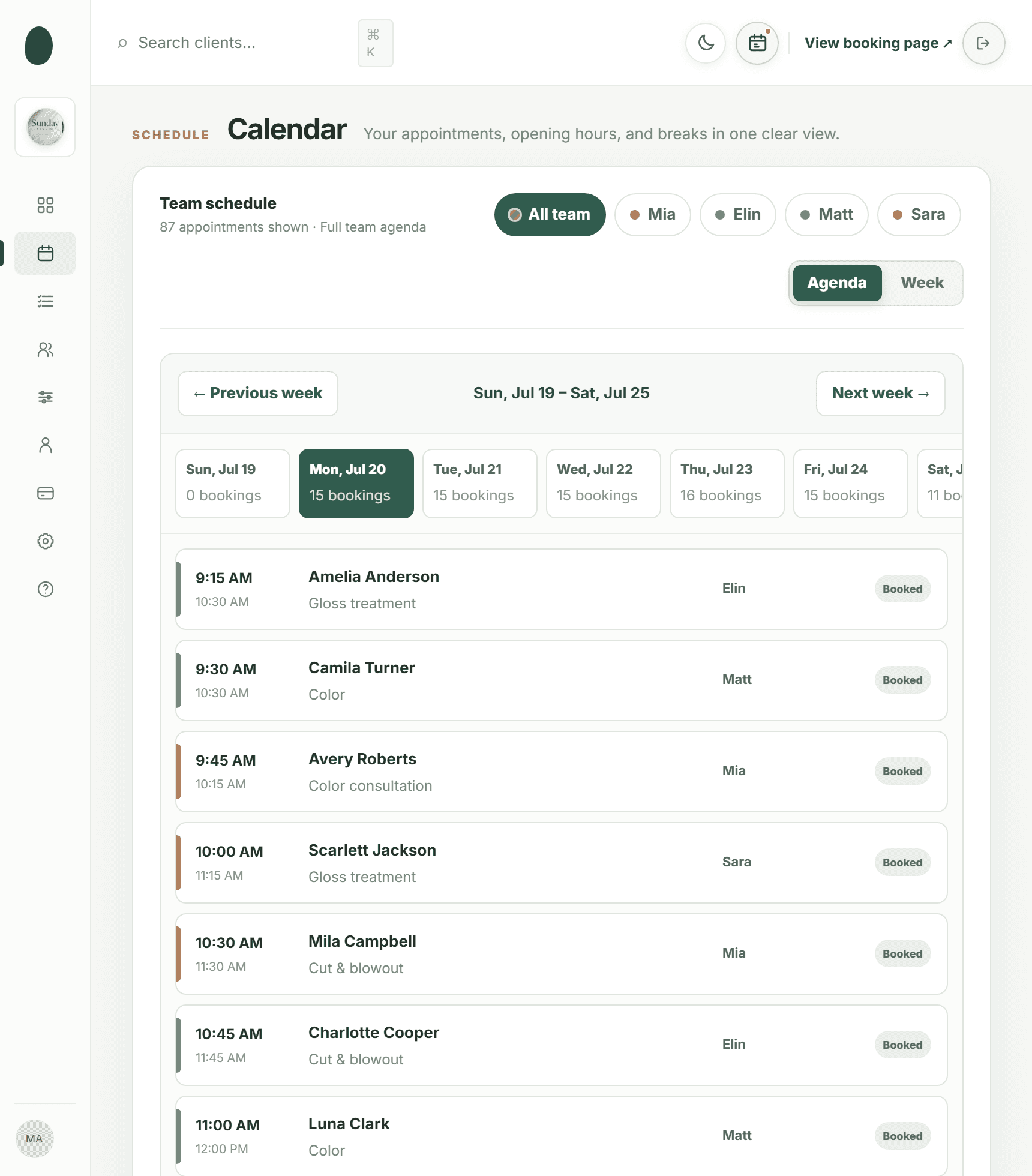
Kevonia is designed for salons and service businesses that want hair salon booking software and day-to-day scheduling in one workspace without building a larger marketing or retail operation around it. Each salon gets a branded booking page at kevonia.com/your-salon, where clients can choose a service, professional, date, and time. The workspace includes a week and day team calendar, per-professional filters, color coding, client records, a service menu, availability rules, and Stripe payments.
The practical difference is control over the scheduling rules. Kevonia checks potential double bookings against working hours, breaks, time off, and existing appointments. You can also add cleanup or buffer time to a service, restrict services to particular professionals, set minimum notice, define a booking window, and configure multiple breaks or salon closures. Those details matter when a color appointment cannot simply be treated like a 30-minute trim.
- Best fit: Hair salons, barbershops, beauty businesses, spas, and other appointment-based teams that want a clear operating calendar.
- Included client tools: Searchable client records by name, email, or phone, private notes, visit history, cancellation history, and restore.
- Included payment tools: Card payments and deposits through Stripe, with payouts to the salon’s bank account.
- Included communication: An automatic email reminder the day before an appointment; clients can reschedule or cancel from that email within the salon’s notice window.
- Team economics: One plan at $49.99 per month with unlimited team members, bookings, clients, and services; there is no per-seat charge, add-on pricing, or per-booking commission.
- Trial terms: A free 14-day trial with no credit card required to start; cancel before the trial ends and you are never charged.
Kevonia is not trying to be everything for every retail-heavy operation. It does not currently provide multi-location management from one account, retail or inventory POS, marketing or SMS campaigns beyond the booking reminder email, or a native mobile app. That makes the fit clearer: choose it when reliable booking, scheduling, client records, service setup, availability, and payments matter more than a broad marketplace or full retail suite.
2. Vagaro: broad salon software with scalable add-ons
Vagaro is a broad salon and wellness platform aimed at businesses that may need more than appointment booking. Its official pricing information says the US base subscription is $23.99 per month for a limited time, with one employee calendar included and additional employee calendars priced at $10 per month, up to seven licenses. Because the price depends on setup and optional premium features, the advertised base figure should not be treated as the likely total cost for a staffed salon. (support.vagaro.com)
Vagaro makes sense for an owner who wants a platform that can expand into additional business functions and is comfortable reviewing a more configurable pricing structure. The company’s support documentation describes online booking among the base features and lists premium options such as a branded app and other extensions. (support.vagaro.com)
- Consider Vagaro if you expect to need a broader business-management platform rather than a scheduling-first tool.
- Pay close attention to how many staff calendars you need and which premium features you would actually activate.
- Ask for a complete monthly estimate before switching, including additional calendars, payment processing, and optional tools.
- It may be less attractive if your main goal is a predictable flat price with unlimited team members.
3. GlossGenius: polished booking with built-in business tools
GlossGenius positions itself around beauty and wellness businesses that want booking, payments, a website experience, and growth tools in one product. Its current official pricing page lists Standard starting at $24 per month, Gold starting at $48 per month, and Platinum starting at $148 per month, with lower displayed prices when billed annually. The page also describes a flat 2.6% payment-processing rate and 24/7 online booking. (glossgenius.com)
The platform is worth considering if presentation, client-facing booking, marketing, and payment tools are as important to you as the calendar itself. GlossGenius also describes login-free booking, so a new client can schedule without downloading an app or creating an account. (glossgenius.com)
- Best fit: Beauty professionals and salons that want a polished client experience plus marketing and business-growth features.
- Potential advantage: Multiple plan levels let a business add more advanced capabilities as its needs change.
- Potential trade-off: The lowest advertised monthly plan may not include every feature a growing team expects, so compare plan contents rather than choosing by headline price.
- Check payment economics carefully if your salon processes a high volume of card payments; a flat processing rate is still a cost even when there is no booking commission.
4. Booksy: marketplace discovery plus salon operations
Booksy combines business scheduling with a consumer marketplace. Its official US pricing page lists a $29.99 monthly subscription plus tax, with additional users at $20 per month each. The subscription includes online booking, client and calendar management, integrated payments, marketing tools, reporting, a marketplace listing, and unlimited bookings. Booksy also states that ordinary bookings do not carry a commission, while its optional Boost feature charges a one-time 30% commission on the first visit from a Boost client. (biz.booksy.com)
Booksy can be a strong match when getting discovered by people searching a marketplace is part of your acquisition strategy. It is also useful for owners who want marketing messages, waitlists, gift cards, memberships, and no-show tools in the same ecosystem. However, the cost calculation changes if you add staff or turn on Boost, so distinguish bookings generated through your own profile from marketplace acquisition.
- Best fit: Solo providers and salons that value marketplace visibility as well as scheduling.
- Budget question: How many additional users will need access, and will the team cost more than a flat team-inclusive plan?
- Commission question: Will you use Boost, and if so, are you comfortable paying for a new client’s first visit?
- Payment question: If you use Booksy Payments, compare the transaction method and payout options with your existing processor.
5. Square Appointments: scheduling connected to the Square ecosystem
Square Appointments is a practical option for salons already using Square for payments, point-of-sale, customer records, or retail. Square’s current appointments pricing page presents Free, Plus, and Premium plan levels, with custom pricing available for businesses processing more than $250,000 per year. The same page lists online booking, unlimited calendars, deposits, cancellation and no-show tools, multi-location management, waitlists, and client communication features across its plan comparison. (squareup.com)
Square’s main advantage is the connection between appointments and a wider payments and commerce system. It can be a sensible choice for a salon that sells retail products, needs in-person checkout, or wants scheduling and payment activity in the same account. The trade-off is that you may be evaluating a larger ecosystem than you need if your only problem is online booking and a team calendar.
- Best fit: Salons that already use Square or want scheduling tied closely to payments and retail operations.
- Strong operational tools: Deposits, prepayments, cancellation policies, waitlists, resource management, and multi-location options are available within the broader product.
- Cost to inspect: Monthly plan fees vary by level and location, while payment-processing fees apply when clients pay through Square.
- Implementation question: Decide whether your team wants one connected commerce system or a more focused scheduling workspace.
Comparison table: which scheduling app fits your salon?
The table summarizes the most important differences for a salon owner comparing subscription cost, booking economics, and operational scope. Prices and fees can change, so confirm the final offer for your location and configuration before signing a contract.
How to choose the right option for your salon
The best scheduling app for hairstylist teams is not automatically the one with the lowest starting price. A $24 or $30 subscription can become more expensive when you add staff calendars, premium features, marketing messages, payment processing, or marketplace commissions. Conversely, a higher monthly plan may be worthwhile if it replaces several other tools your salon already pays for.
- Write down your current appointment rules. Include service durations, processing time, cleanup, breaks, staff availability, time off, closures, deposits, and cancellation notice.
- Count the people who need calendar access now and within the next 12 months. Do not compare a solo price with a team price.
- Separate booking fees from payment-processing fees. A platform can advertise no booking commission while still charging payment fees or optional marketplace acquisition fees.
- Test the booking flow on a phone. Ask a friend to book a haircut, color service, or multi-step appointment and look for confusing choices.
- Check the cancellation path. Find out whether clients can reschedule themselves, whether late cancellations are recorded, and whether the salon can restore a canceled appointment.
- Review the exit process. Confirm whether you can export client data, cancel monthly billing, and preserve access to information during a transition.
For a small salon that mainly needs booking, team scheduling, client records, service setup, availability controls, and card deposits, a focused hair salon booking software product may be easier to run than a platform built around a marketplace, retail catalog, or extensive marketing stack.
Common mistakes when buying a hair appointment scheduling app
Many salon owners compare only the monthly subscription and miss the operational details that determine whether the software saves time. A system can look inexpensive until the salon adds five professionals, starts taking deposits, sends marketing texts, or needs a second location.
- Choosing by price alone: A low entry plan may exclude the staff, reminders, reports, or booking controls you actually need.
- Ignoring buffers: If color, extensions, or chemical services need cleanup time, leaving buffers out will create late-running schedules.
- Allowing unrestricted booking: Without minimum notice, booking windows, and time-off rules, clients may select times the salon cannot honor.
- Confusing reminders with marketing: Appointment reminders help reduce missed visits; marketing campaigns are a separate product capability and cost consideration.
- Forgetting the front desk workflow: Test how quickly a receptionist can find a client, review notes, move an appointment, and see each professional’s day.
- Overlooking the client experience: A booking flow that requires unnecessary logins or unclear service names can cause abandoned appointments.
- Failing to calculate team growth: A tool that works for one stylist may be a poor fit once every professional needs a separate calendar.
If your priority is a straightforward beauty salon booking software workflow rather than a full retail or marketing platform, keep the evaluation focused on the calendar, availability, client records, payments, reminders, and the actual rules your team follows.
Frequently asked questions
These are the questions salon owners should answer before moving appointments into a new system.
Sources
Frequently asked questions
What is the best scheduling app for a solo hairstylist?+
A solo stylist should compare booking simplicity, payment costs, client records, reminders, and whether the system can grow into a team. Booksy may suit a stylist who wants marketplace discovery, GlossGenius may suit someone who wants a polished booking and marketing experience, and Kevonia may suit someone who wants a focused branded booking page, service menu, availability controls, and Stripe payments at one $49.99 monthly price.
Do hair salon scheduling apps charge a fee for every appointment?+
Not always. Kevonia has no per-booking commission. Booksy says ordinary bookings do not carry a commission, but its optional Boost feature charges a one-time commission for eligible new clients. Payment-processing fees are separate from booking commissions and may apply when a client pays by card.
Can scheduling software prevent double bookings?+
It can if the platform checks more than the visible calendar. Look for rules covering working hours, breaks, time off, closures, existing bookings, service duration, and cleanup or processing time. Kevonia’s double-booking protection checks potential bookings against hours, breaks, time off, and existing appointments.
Should a salon choose marketplace software or a branded booking page?+
Choose marketplace software when discovery by people searching the marketplace is an important source of new clients. Choose a branded booking page when you already generate demand through referrals, search, social media, or your own website and want clients to book directly. Some salons may value both, but marketplace commissions and staff pricing should be included in the comparison.
What features matter most for a multi-stylist salon?+
Prioritize separate professional calendars, per-professional service assignment, color-coded week and day views, staff availability, time-off rules, breaks, service buffers, deposits, client history, reminders, and an easy way to reschedule or cancel. Also check whether adding staff increases the monthly price.
Is a salon scheduling app the same as salon management software?+
Not necessarily. A scheduling app may focus on appointments and reminders. Salon management software can also include client records, payments, service menus, staff controls, marketing, retail, inventory, reporting, or multiple locations. Decide which parts your salon will actually use before paying for a larger platform.
More from the blog

Goldie App Alternative: When a Flat Salon System Wins
Goldie is a capable starting point for appointment scheduling, but growing salons may need a clearer team workflow and predictable cost. Compare Goldie with Kevonia before switching.

9 Best Salon Scheduling Software Options for 2026
Compare the best salon scheduling software for 2026, including Vagaro, Acuity Scheduling, Square Appointments, Fresha, and Kevonia. See which platform fits your team, budget, and booking workflow.

Acuity Scheduling Alternative: What Salon Owners Should Compare
Looking for an Acuity Scheduling alternative? Compare Acuity with Kevonia on pricing, booking fees, salon workflows, team scheduling, payments, and switching risks.