Goldie App Alternative: When a Flat Salon System Wins
Goldie is a capable starting point for appointment scheduling, but growing salons may need a clearer team workflow and predictable cost. Compare Goldie with Kevonia before switching.

Key takeaways
- Goldie is strongest for solo beauty professionals who want a mobile-first scheduler with a free entry plan and optional growth tools.
- Kevonia is built around one $49.99 monthly plan with unlimited team members, bookings, clients, and services and no booking commission.
- The right choice depends less on the number of features and more on whether you need solo simplicity, team controls, deposits, payment workflows, and predictable costs.
- Before switching, test your real booking rules, deposits, staff calendars, cancellation process, and client records—not just the marketing checklist.
| Tool | Starting price | Commission or booking fees | Standout features |
|---|---|---|---|
| Goldie | Starter: free | No new-client fee is stated in Goldie’s public app listing; payment-processing and message costs should be reviewed separately | Mobile appointment scheduling, online booking, client management, reminders, paid payments and deposits, and higher-tier team tools |
| Kevonia | US$49.99/month | 0% booking commission; Stripe payment-processing costs apply | Branded 24/7 booking page, team calendar, detailed availability rules, client records, service-level deposits, Stripe payments, and unlimited team members, bookings, clients, and services |
The real question behind a Goldie app alternative
If you searched for a goldie app alternative, you probably are not looking for another calendar. You are trying to decide whether Goldie still fits the way your salon operates: how clients book, how staff availability is controlled, how deposits are collected, and what the software costs as appointments and team members increase.
Goldie remains a sensible option for a solo stylist, barber, esthetician, or beauty professional who wants to start with a free scheduling tool. Kevonia becomes more compelling when your business needs a shared salon workspace, detailed availability rules, Stripe payments, and one predictable monthly price rather than a product that expands through multiple subscription levels.
Goldie and Kevonia solve different operating problems
Goldie is designed as a mobile-first appointment scheduler for independent professionals and growing teams. Its official materials describe online booking, client management, reminders, payments, deposits, reports, and team tools across its Starter, Pro, and Pro Plus plans. Goldie also identifies itself as formerly Appointfix, so an appointfix alternative is often simply a search for a newer way to evaluate the same product family. Supporting details are available from Goldie’s official pricing page.
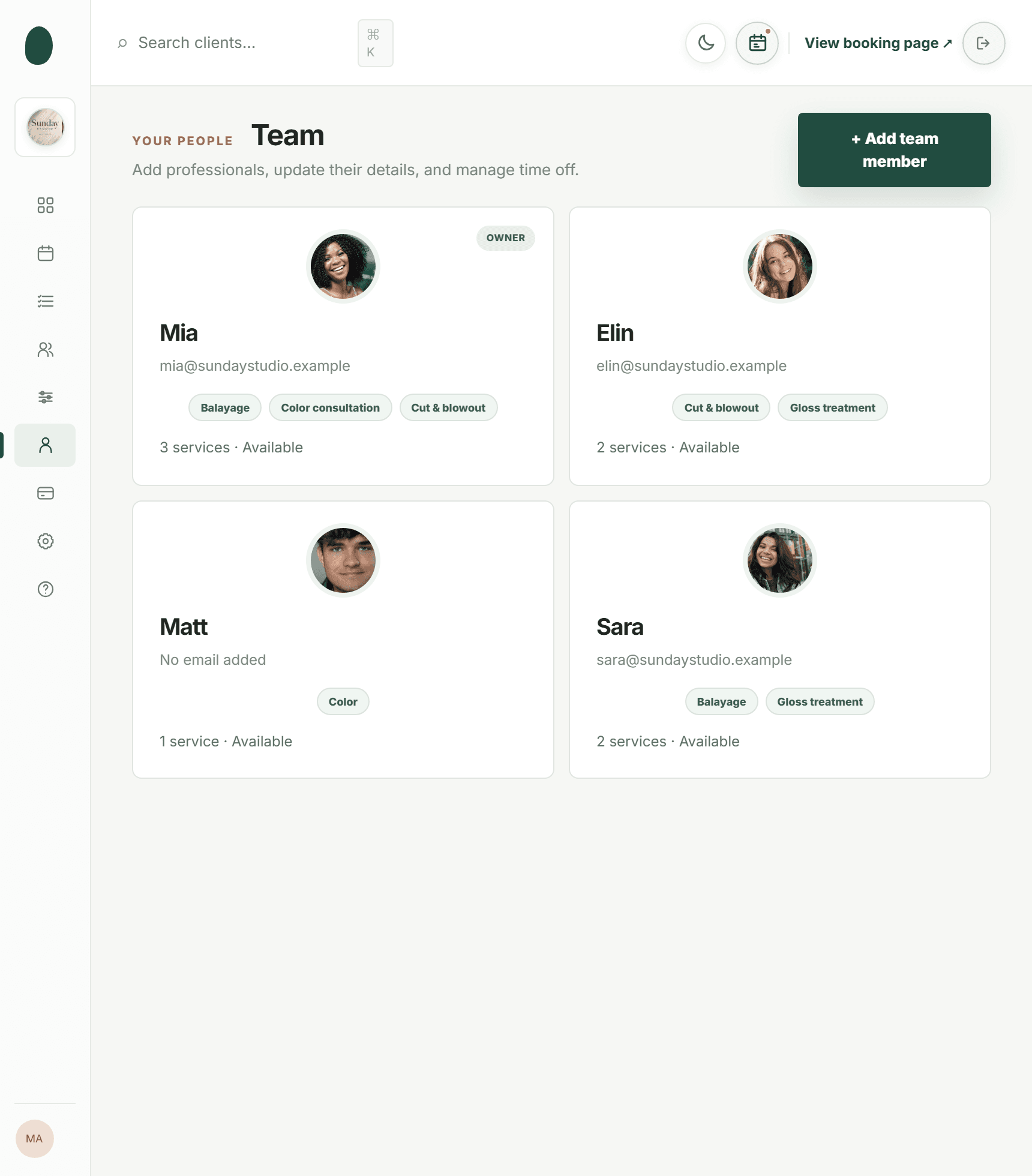
Kevonia takes a more structured salon-and-spa approach. It combines a branded booking page at kevonia.com/your-salon with a workspace for a team calendar, client records, a service menu, availability rules, and Stripe payments. That distinction matters: the choice is not just Goldie versus another appointment app. It is a choice between a flexible individual scheduler and a centralized operating system for a service business. For more detail, see Kevonia's salon and spa management software.
- Choose Goldie if you primarily need fast scheduling, a booking page, reminders, and client management with a free starting option.
- Choose Kevonia if you want your staff, services, availability, booking rules, payments, and client history managed in one salon workspace.
- Compare the cost of your actual setup, not only the advertised entry price. A free plan can be economical for a low-volume solo business and restrictive for a busy team.
- Test the booking journey from the client’s perspective before migrating. A feature that exists but is difficult for clients or staff to use is not a practical advantage.
What Goldie does well—and where the decision gets harder
Goldie’s biggest advantage is a low-friction starting point. The official Goldie Help Center says its free version includes appointment scheduling, an online booking site, reminder templates, client management, and up to 20 appointments per month. The Goldie pricing page also presents Starter as a free plan, while Pro and Pro Plus unlock additional capabilities. That makes Goldie attractive for a new solo provider who is validating demand before taking on a software bill.
Goldie’s paid tiers add the functions that become important once the business grows. Goldie’s current help documentation describes automated text messages, payment collection, deposits, reports, team tools, and priority support as paid-plan capabilities. Its getting-started documentation also lists newer tools such as a waitlist, no-show protection, dynamic pricing, loyalty, Buy Now, Pay Later, an AI Receptionist, and social-post assistance. These may be valuable if you want a broader marketing and communication toolkit inside the same app.
The harder question is what happens when your salon is no longer a one-person operation. Goldie’s public plan structure separates free, Pro, and Pro Plus capabilities, with team management and multiple calendars associated with the higher tier in the product comparison. That can still be the right model, but you should map every required capability to the plan you would actually need rather than comparing Kevonia’s single plan against Goldie Starter.
- Goldie is a strong fit when your priority is quick setup on a phone or tablet.
- Goldie is a strong fit when a free plan with a limited monthly appointment allowance is enough for your current volume.
- Goldie becomes less straightforward when you need several calendars, staff permissions, automated client communication, deposits, payment processing, or team reporting together.
- Goldie may be more than you need if you only want a simple manual calendar and do not plan to use online booking or payments.
Where Kevonia fits for salons, spas, and growing teams
Kevonia is designed for businesses that need more than an individual appointment list. Its single plan costs US$49.99 per month and includes unlimited team members, bookings, clients, and services. There is no per-booking commission and no per-seat charge. The 14-day trial requires no credit card to start, and if you cancel before the trial ends, you are never charged. For more detail, see Kevonia's team booking workspace.
The practical difference is the way Kevonia handles booking logic. Clients use a branded page that stays open 24/7 and select a service, professional, date, and time. The system checks double-booking risk against working hours, breaks, time off, and existing bookings. You can also set weekday opening hours, multiple breaks, salon closures, staff time off, a booking window, minimum notice, and time-slot intervals.
That matters in situations that simpler comparisons often skip. Imagine a stylist who works late on Tuesday, takes a break between color services, and is away the following Friday. A booking system that only knows the stylist’s general working hours can expose slots that should not exist. Kevonia’s availability rules and double-booking protection are intended for that more detailed scheduling reality.
Kevonia also keeps the client record connected to the appointment workflow. You can search by name, email, or phone, add private notes, and review visit history. Booking statuses include needs confirmation, awaiting payment, booked, checked in, completed, no-show, and cancelled. Cancellation history can be restored, and a salon can block a client from booking online while recording the reason and the client’s no-show history.
- Best fit: hair salons, barbershops, tattoo studios, nail salons, day spas, med spas, esthetician and lash studios, beauty clinics, wellness and yoga studios, and massage therapists.
- Best fit: teams that need a shared calendar with per-professional filters and color coding.
- Best fit: owners who want a flat subscription instead of a per-seat or per-booking cost model.
- Not the best fit if you specifically need multi-location management, retail or inventory POS, marketing or SMS campaigns beyond the booking reminder email, or a native mobile app.
Pricing is only useful when you model your booking volume
Kevonia’s cost is straightforward: US$49.99 per month for the single plan, with unlimited team members, bookings, clients, and services and 0% booking commission. That makes the monthly software cost easy to forecast. The separate payment-processing cost is handled through Stripe, and Kevonia shows the Stripe processing fee on refunds so the salon can see the real refund cost.
Goldie’s pricing is more tiered. Goldie Starter is free, while Goldie’s official materials place paid capabilities in Pro and Pro Plus. The exact plan you need depends on whether you require unlimited appointments, automated messages, payments, deposits, advanced reports, team management, or other premium tools. Goldie also explains that some reminder messages use your device and carrier on Starter, while system-sent messages on paid plans include a monthly allowance and may require extra purchases after that allowance is used.
A useful comparison is not “free versus $49.99.” It is “what will this business pay to operate the workflow it actually needs?” For example, a solo provider with fewer than 20 appointments in a month may reasonably prefer Goldie Starter. A four-person salon should price the Goldie tier that provides the required team calendars and then account for any message or payment costs. Kevonia’s flat plan may be easier to justify when several professionals share the same booking operation.
- Count active professionals, not just owner accounts.
- Estimate monthly bookings in a busy month, not an unusually quiet month.
- List every paid requirement: automated reminders, deposits, payment collection, staff calendars, reports, and client communication.
- Separate software subscription costs from card-processing costs. They are different expenses.
- Calculate the cost of one no-show or one double-booking. A cheaper plan is not cheaper if it creates avoidable scheduling problems.
The failure cases that should decide your choice
The usual Goldie salon app competitors comparison focuses on plan price and headline features. That is useful, but it leaves out the failure cases that create the most operational pain. Before choosing a Goldie app alternative, test what happens when a client books a service with cleanup time, a professional has a partial day off, a deposit is unpaid, or a late cancellation needs to be documented.
For a salon with complex services, service duration alone is not enough. A 60-minute treatment may require a 15-minute cleanup buffer, may only be offered by one professional, and may require a deposit. Kevonia’s service menu supports duration, cleanup or buffer time, price, optional deposit, and per-professional assignment. Its availability rules then provide the surrounding scheduling controls.
Payments are another edge case. Kevonia lets the salon collect card payments and deposits through Stripe, receive payouts to the salon’s bank account, refund an online payment from the booking itself, and automatically email the client about the refund. The visible Stripe refund fee is especially relevant when an owner is comparing software based only on subscription price; payment reversals can create real costs that are easy to overlook.
Client communication also deserves a realistic test. Kevonia automatically emails a reminder the day before an appointment, and clients can reschedule or cancel from that email within the salon’s notice window. That is narrower than a full SMS marketing platform, but it may be exactly enough for a salon that wants appointment reminders without adding a campaign system. If your growth plan depends on text marketing, loyalty automation, or AI communication, confirm that the product you choose supports those needs before signing up.
- Test a service with a buffer and a deposit.
- Create overlapping staff availability and confirm that the system prevents an invalid booking.
- Book, reschedule, cancel, refund, and restore a cancellation.
- Check what the front desk can see and whether revenue figures can be hidden from that view.
- Review the client record after a no-show and after an online booking block.
- Ask whether your required communication is email-only, SMS, or a broader marketing workflow.
A practical migration test before you switch
Do not migrate by importing a client list and hoping the booking page works. Run a short parallel test with the services and rules that cause the most mistakes. This is the step many alternative guides omit, and it is where you discover whether the replacement actually matches your salon’s daily work.
Start with five services: one short service, one long service, one service with a buffer, one service offered by only some professionals, and one service that requires a deposit. Add real opening hours, breaks, staff time off, closure dates, minimum notice, and the booking window. Then ask two people who do not know the setup to book from the client-facing page. Their confusion is more valuable than an owner’s quick test because clients will not understand internal shorthand.
Next, test the exceptions. Make one booking, move it, cancel it, refund it, mark a no-show, restore the cancellation, and block the client from future online booking. If you are comparing an alternative to Goldie because of team growth, have every professional check the calendar and filter to their own appointments. If the owner cannot explain the workflow to the front desk in a few minutes, the software may create more work than it removes.
Finally, decide what must be migrated and what should be rebuilt. Client names, contact details, notes, and visit history may be worth preserving. Old services with inconsistent durations or prices may be better recreated from a clean menu. Do not copy every old rule simply because it exists; migration is a chance to remove duplicate services, outdated policies, and unavailable professionals.
- Export or document your current clients, services, prices, durations, deposits, and staff availability.
- Build the five-service test setup before importing everything.
- Complete client-side and staff-side booking tests.
- Run cancellation, refund, no-show, restore, and blocking scenarios.
- Compare the real monthly cost at your expected volume.
- Move clients only after the booking rules behave correctly.
Goldie or Kevonia: the short answer
Goldie is the better starting point when you are a solo professional, need a mobile-friendly scheduler, want to begin with a free plan, and value optional tools for reminders, payments, marketing, and growth. Its Starter plan can be enough for a very small operation, while Pro and Pro Plus provide a path toward more advanced capabilities.
Kevonia is the better fit when your salon or spa needs a shared booking operation with detailed availability controls, per-professional service assignments, client records, Stripe deposits and payments, cancellation history, and a team calendar. The single US$49.99 monthly plan, unlimited team members, unlimited bookings, unlimited clients, unlimited services, and 0% booking commission make the cost easier to predict as the team grows.
The honest answer is that neither product is automatically better for every business. A solo lash artist with a small appointment volume may not need Kevonia’s broader salon workspace. A multi-professional salon that has outgrown individual scheduling may not want to assemble its workflow around a free entry plan. If you are evaluating a goldie app alternative, make the decision using your busiest month, your hardest availability rule, and your most expensive booking mistake—not the first screen you see after creating an account.
Sources
- Goldie pricing plans
- Goldie Help Center: Is Goldie free?
- Goldie Help Center: Pro and Pro Plus features
- Goldie Help Center: Getting started and additional features
- Goldie App Store listing
- Kevonia salon and spa management software
- Kevonia salon booking program
- Kevonia salon reservation software
- Kevonia beauty salon booking software
- Kevonia spa booking software
- Kevonia hair salon booking software
- Kevonia barber shop appointment software
- Kevonia live demo
Frequently asked questions
Is Goldie free for salon owners?+
Goldie has a free Starter plan. Goldie’s Help Center says the free version includes appointment scheduling, an online booking site, reminder templates, client management, and up to 20 appointments per month. Paid plans add capabilities such as unlimited appointments, automated messages, payments, deposits, reports, and team tools, so a growing salon should compare the paid tier it would actually use.
What is the closest alternative to Goldie for a small salon team?+
Kevonia is a strong alternative when the business needs a shared team calendar rather than only an individual scheduling app. It provides a branded booking page, per-professional calendar filters, client records, a service menu, availability rules, Stripe payments and deposits, and booking controls for cancellations and no-shows. It is less suitable if you specifically need a native mobile app, retail POS, multi-location management, or SMS marketing campaigns.
Does Kevonia charge a booking commission?+
No. Kevonia has a single plan at US$49.99 per month and does not charge a per-booking commission. Stripe payment-processing costs are separate from the software subscription. Kevonia also does not charge per seat, so the plan includes unlimited team members.
Which is better for a solo stylist: Goldie or Kevonia?+
Goldie may be the better choice if you have a small appointment volume and want to start with its free Starter plan. Kevonia may be the better choice if you want a more structured service menu, deposits, detailed availability rules, a branded booking page, and a predictable flat subscription from the beginning. Compare your busiest month rather than your current quiet month.
Can Kevonia handle deposits, refunds, and no-shows?+
Yes. Kevonia’s service menu allows an optional deposit, and card payments and deposits are handled through Stripe. A salon can refund an online payment from the booking itself; the Stripe processing fee on the refund is shown, and the client is emailed automatically. The system also records cancellation history, supports no-show statuses, and lets the salon block a client from booking online with a reason and no-show history.
What should I test before moving from Goldie?+
Test the complete booking lifecycle with your hardest services: create a service with a buffer and deposit, assign it to the right professionals, add breaks and time off, book it online, reschedule it, cancel it, refund it, mark a no-show, and review the client record. Also test the front-desk view, staff calendar filters, client-facing instructions, and the total cost at your expected booking volume.
More from the blog

Squire Alternative: When a Leaner Booking System Fits Better
SQUIRE is built for full barbershop operations. Kevonia is a simpler flat-cost alternative when your priority is branded booking, scheduling, payments, and client records without per-seat or per-booking charges.

Mangomint Alternative: When Kevonia Is the Better Fit
Looking for a Mangomint alternative? Compare Mangomint’s per-location, per-user model with Kevonia’s flat plan and decide which platform fits your salon or spa.

Treatwell Alternative: Compare the Real Trade-Offs
Treatwell can bring discovery bookings, but it is not the only way to run your calendar. Compare the marketplace model with Kevonia’s flat-cost, direct-booking approach.