How to Organize Client Records for a Salon in 2026
A practical system for organizing salon client records, from the fields to collect and note-taking rules to privacy, access, retention, and software.
Key takeaways
- Use one consistent client record structure for contact details, services, preferences, notes, and visit history.
- Collect only information your salon genuinely needs, then limit access and remove outdated records on a defined schedule.
- Write objective, useful notes that help the next professional deliver a safe and consistent service.
- A salon management system can connect client records to appointments, professionals, services, availability, and payments.
- Review your process monthly so duplicate profiles, incomplete notes, and insecure paper records do not accumulate.
What salon owners actually need from organized client records
If you searched for how to organize client records for a salon, you probably do not need a complicated filing theory. You need to find the right client quickly, understand what happened at the last visit, protect private information, and give every professional enough context to deliver a consistent service.
The best system is simple enough that your team will use it after every appointment. It should also make the difference between essential information and interesting but unnecessary details. Start with one standard record format, one place to store it, and a short routine for creating, updating, reviewing, and eventually removing records.
1. Decide what belongs in every client record
Before moving information from notebooks or spreadsheets, decide what a complete record means at your salon. A consistent structure prevents one stylist from recording useful information while another leaves only a first name and a vague reminder.
- Basic identification: the client’s preferred name, email address, phone number, and preferred contact method.
- Appointment context: the date, service, professional, duration, price, deposit or payment status, and whether the client canceled or rescheduled.
- Service history: what was performed, the products or techniques used when relevant, and the result or follow-up recommended.
- Preferences: preferred professional, usual service timing, communication preferences, and practical details such as sensitivity to fragrance or a preference for quiet appointments.
- Technical notes: color formulas, lash or nail details, hair goals, skin observations, sizing information, or other service-specific details your team truly needs.
- Administrative details: consent or waiver status when applicable, outstanding balance, and any follow-up that has been promised.
Keep the core fields consistent, but allow service-specific notes. A barber may need clipper settings and beard preferences; a nail technician may need shape, length, and product information; a massage therapist may need pressure preferences and areas to avoid. The record should support the service without becoming a biography.
If your current process is a paper card, begin by designing these fields on one page. If you are moving to digital client cards for salons, use the same structure rather than importing every historical detail without review. A digital record is only useful when the information is accurate, searchable, and easy to interpret.
2. Create one record per client and prevent duplicates
Duplicate profiles are one of the most common causes of incomplete client history. A client may appear as “Katie Smith,” “Katherine Smith,” and “Katie S.” with visits split between three records. Before creating a new profile, search by at least two identifiers, such as name plus phone number or email address.
- Ask for the client’s preferred name, then keep the legal or billing name separate when it is genuinely required.
- Use one standard phone format and one email address field instead of placing alternate details in free-text notes.
- If a client has changed their email or phone number, update the existing record rather than creating a new one.
- Merge duplicate profiles carefully and preserve the complete visit history, relevant notes, and appointment information.
- Do not create a new record simply because the client books with a different professional or returns after a long gap.
At the front desk, make duplicate prevention part of the booking script: “I found a profile under Katie Smith with a phone number ending in 4821. Is that still the best record to use?” This takes seconds and avoids a much longer cleanup later. A searchable client record system should let staff find profiles by name, email, or phone before adding a new one.
For a small salon, a weekly duplicate check is usually enough. Filter for records created during the week, compare similar names and contact details, and merge or correct them while the appointment context is still fresh.
3. Use a note-taking standard your whole team can follow
Private notes should help the next professional make a better decision. They should not become a place for speculation, personal opinions, jokes, or comments that could embarrass a client if read later. Write notes as if another trained professional will rely on them at the next appointment.
A practical note format is: date, service, what was done, result, client feedback, and next-step recommendation. For example: “August 10, 2026 — partial highlights and trim. Used formula recorded in color section; client liked the brightness but requested less warmth next visit. Schedule gloss consultation if brassiness returns.” This is more useful than “client liked it” or “be careful next time.”
- Record observable facts and the client’s stated preference, not assumptions about personality or behavior.
- Use clear terms that a qualified teammate will understand; avoid unexplained abbreviations.
- Separate a service result from a future recommendation so the next professional can see what actually happened.
- Record corrections, complaints, or incidents neutrally and include the action taken.
- Do not put payment-card numbers, passwords, Social Security numbers, or unrelated personal information in client notes.
- Update the record promptly after the visit instead of relying on memory at the end of the week.
For services involving allergies, medical conditions, medications, pregnancy, skin reactions, or contraindications, record only what is necessary for the service and follow your professional and local requirements. A salon record is not a substitute for medical advice. When a situation is outside your training, pause the service and follow your escalation policy.
These salon client management best practices matter most when a client changes professionals. The goal is not to make every team member write identical sentences; it is to make the important information predictable, readable, and safe to use.
4. Connect records to appointments, services, and staff schedules
A client record becomes much more valuable when it is connected to the appointment that produced the information. You should be able to see who performed the service, which service was booked, when the client is returning, and what the professional needs to know before the visit.
This is especially important when several professionals share clients. A week and day team calendar with professional filters and color coding can make ownership and workload easier to see, while the client profile provides the history behind the booking. The record and calendar should support each other rather than forcing staff to compare separate notebooks, text messages, and spreadsheets.
Keep service names standardized. “Balayage,” “balayage,” and “BLG” should not represent three different services unless they genuinely have different durations, prices, or requirements. Define the service duration, cleanup or buffer time, price, optional deposit, and professionals who can perform it. Consistent service data makes the visit history easier to understand and reduces scheduling mistakes.
Availability is part of record accuracy, even though it does not live inside the client profile. If a service is booked against the wrong professional or an unavailable time, the team may create rushed notes, move the client manually, or lose the context of what was actually performed. Set opening hours, breaks, time off, closures, booking windows, minimum notice, and time-slot intervals before relying on appointment history.
If your salon is still using separate tools, document the handoff. For example, the receptionist confirms contact details, the professional records service notes, and the owner reviews exceptions. Do not ask every employee to maintain a second unofficial record in their phone or personal notebook; that creates information silos and makes departures harder to manage.
5. Protect private information without making the process impossible
Client records usually contain personal information even when they do not include medical details. Names, phone numbers, emails, appointment patterns, photos, payment information, and service notes deserve controlled handling. The Federal Trade Commission recommends that businesses take stock of the information they hold, keep only what they need, protect what they retain, dispose of what is no longer needed, and plan for incidents. Apply those principles to both paper and digital salon records.
- Limit access by role. A professional may need service history and relevant notes; not every employee needs every administrative detail.
- Use individual logins rather than a shared front-desk password so access can be removed when someone leaves.
- Require strong, unique passwords and multi-factor authentication wherever the system supports them.
- Lock the reception computer and tablets when unattended, and keep paper cards in a locked cabinet away from public areas.
- Do not send sensitive client details through personal texting apps or leave printed schedules where visitors can see them.
- Train staff to recognize phishing messages, suspicious payment requests, and attempts to obtain client information.
The FTC also advises businesses to review vendors that can access customer information, including how those vendors use, share, retain, and delete data. Before choosing a system, ask where records are stored, who can access them, how accounts are secured, what happens when a staff member leaves, and how you can retrieve or remove information when appropriate.
Do not assume that moving from paper to software automatically solves privacy problems. Digital records reduce some physical risks but introduce account, device, and vendor risks. A basic written policy is useful: who may view records, who may edit them, what may be recorded, how incidents are reported, and when records are reviewed.
6. Keep payment information separate from service notes
A client profile may show that a deposit or payment was made, but it should not be a storage place for full card numbers, security codes, or copied payment details. Do not write card information in a paper client card, spreadsheet, email, or private note just because a client wants to reserve a future appointment.
The Payment Card Industry Security Standards Council says small merchants should understand where payment data is stored and consider whether they need to store it at all. It also notes that outsourcing payment processing does not eliminate every merchant responsibility, so confirm your obligations with your payment provider or acquiring bank rather than assuming a system is automatically compliant.
A safer record usually contains the transaction status, amount, date, refund or cancellation outcome, and a reference supplied by the payment system—not the underlying card number. Keep receipts and reports according to your accountant’s and payment provider’s requirements, and securely destroy paper containing card data when it is no longer needed.
Kevonia connects card payments and deposits through Stripe while keeping the client record focused on contact information, private notes, and visit history. That separation helps staff see what they need for the appointment without turning service notes into an informal payment database.
7. Where Kevonia fits in a salon record system
Kevonia is designed for salons and spas that want booking and client information in one workspace rather than spread across paper cards, calendars, and separate payment messages. Its branded online booking page lets clients choose a service, professional, date, and time, while the workspace includes a team calendar, service menu, availability rules, client records, and Stripe payments.
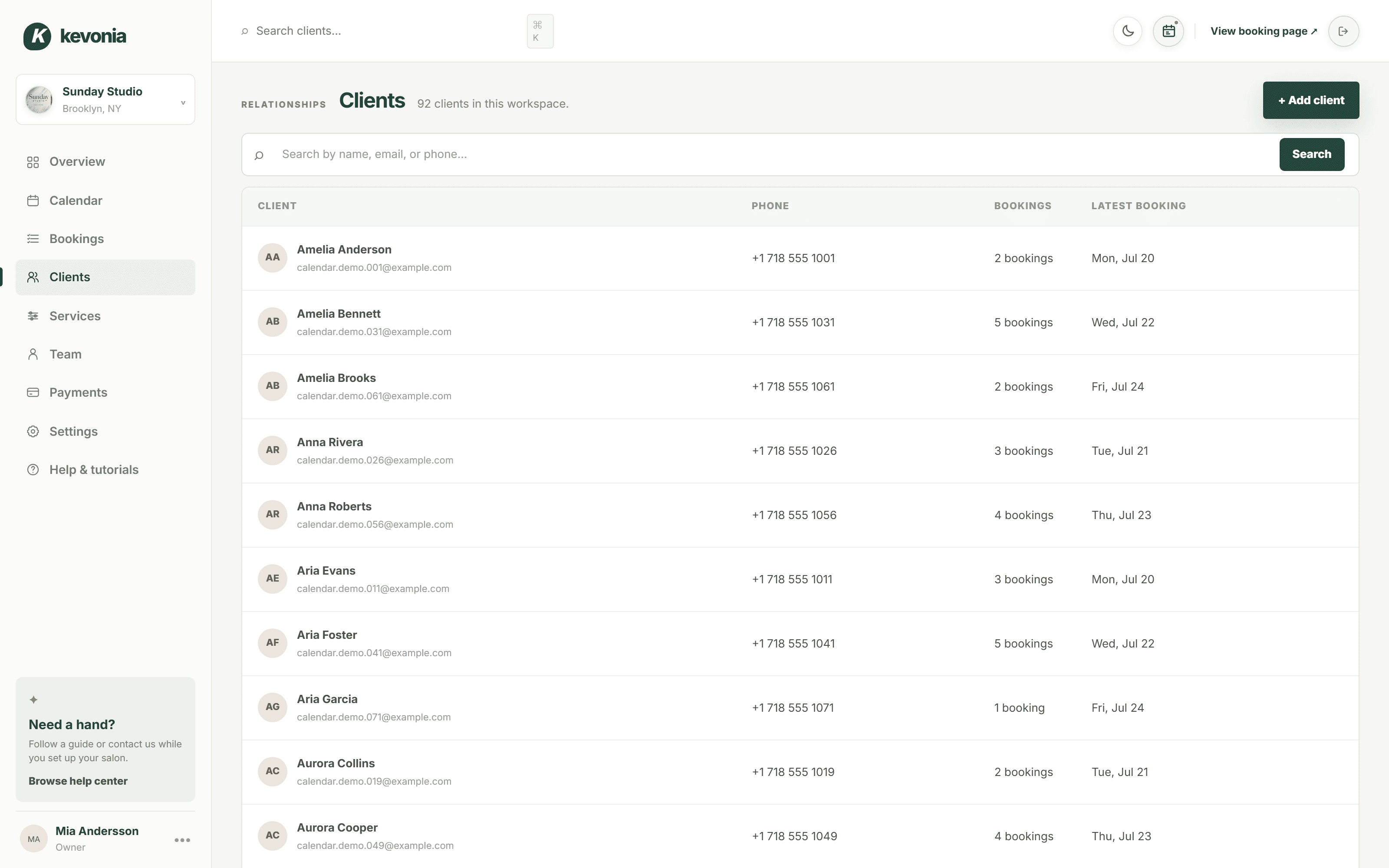
For record organization specifically, Kevonia lets your team search client records by name, email, or phone, add private notes, and review visit history. That is different from a basic calendar that only tells you when someone is booked. The appointment context remains connected to the client profile, so a professional can prepare before the next visit instead of searching through messages or asking the client to repeat everything.
Kevonia also addresses the scheduling conditions that affect record accuracy. Double-booking protection checks hours, breaks, time off, and existing bookings. The service menu stores duration, cleanup or buffer time, price, optional deposit, and professional assignment. Availability rules cover weekday opening hours, multiple breaks, staff time off, closures, booking window, minimum notice, and time-slot interval.
The system includes a branded booking page open 24/7, automatic email reminders the day before an appointment, and client rescheduling or cancellation from that email within the salon’s notice window. It also keeps cancellation history with restore. These functions do not replace your note-taking policy, but they reduce the number of manual updates that can leave a client history incomplete.
Kevonia has one plan at $49.99 per month with unlimited team members, bookings, clients, and services, and no per-booking commission. The free trial lasts 14 days, requires no credit card to start, and you are never charged if you cancel before the trial ends. If you need a system that also handles retail inventory, marketing campaigns, SMS tools, multiple locations from one account, or a native mobile app, verify those requirements separately because they are not currently part of Kevonia.
If you want to inspect the workflow before importing records, the live demo workspace can show how the calendar, service setup, booking page, and client records fit together.
8. Set a retention, review, and cleanup routine
An organized record system needs an ending point. Keeping every note forever creates clutter and increases the amount of information you must protect. The FTC’s guidance emphasizes keeping information only while there is a legitimate business reason and disposing of it securely when that reason ends. Your actual retention period may depend on state law, professional rules, tax requirements, insurance, disputes, and the type of service, so get legal or accounting advice for your situation.
- Write down what categories of records you keep and why.
- Define who approves corrections, merges, exports, and deletions.
- Review inactive records on a regular schedule instead of deleting randomly.
- Securely shred paper records and follow the software provider’s process for removing digital information.
- Keep legally required business records separately from routine service notes when possible.
- Document a response plan for a lost device, compromised account, accidental disclosure, or suspected breach.
A monthly 20-minute review can catch most operational problems. Look for duplicate profiles, missing phone or email details, notes that are too vague to use, records containing inappropriate comments, appointments assigned to the wrong professional, and paper forms waiting to be entered. Assign one person to correct the problem and one owner or manager to review the result.
For a new salon, create the policy before the record count becomes difficult to manage. For an established salon, do not wait for a perfect migration. Start with active clients and upcoming appointments, standardize the fields, mark uncertain information for review, and archive old paper records according to your retention policy.
A practical weekly workflow for salon owners
The following routine is enough for many small salons and spas. Adjust the timing for your team size, service risk, and record volume, but keep ownership clear so record maintenance does not become everyone’s job and therefore nobody’s job.
- At booking: search for an existing profile before creating one; confirm the preferred name, phone, email, and service details.
- Before the appointment: review the last relevant service note, current preferences, deposits, and any follow-up promised.
- During the service: record only useful, objective information that another qualified professional may need.
- After the service: update the visit history while the details are fresh; include what was done, client feedback, and next steps.
- At closing: check that paper forms are secured, devices are locked, and no payment-card information has been copied into notes.
- Weekly: review new profiles, possible duplicates, incomplete records, canceled appointments, and notes needing clarification.
- Monthly: audit staff access, remove access for former team members, review retention needs, and update the written procedure.
This workflow answers how to organize client records for a salon in operational terms: standardize the information, connect it to the correct appointment, secure access, and review the system repeatedly. The software matters, but the habit matters more. A simple process used consistently will outperform a sophisticated system that staff bypass.
Sources
- Federal Trade Commission — Protecting Personal Information: A Guide for Business
- Federal Trade Commission — Cybersecurity for Small Business
- Payment Card Industry Security Standards Council — Merchant Resources
- Kevonia — Salon management software
- Kevonia — Salon booking program
- Kevonia — Beauty salon booking software
- Kevonia — Salon reservation software
- Kevonia — Live demo
- Kevonia Blog — How to Set Staff Availability for a Salon Calendar
Frequently asked questions
Should a salon use paper or digital client records?+
Digital records are usually easier to search, update, connect to appointments, and share with authorized team members. Paper can work for a very small salon if cards are standardized, locked away, backed up where appropriate, and entered into a reliable system when needed. Avoid keeping the same information in several unofficial places.
What information should a salon never put in a client record?+
Do not store information that the salon does not need, including full payment-card numbers, card security codes, passwords, Social Security numbers, or unrelated personal details. Do not write insulting, speculative, or discriminatory comments. For health-related information, collect only what is necessary for the service and follow applicable professional and legal requirements.
How often should salon client records be updated?+
Update the record immediately after each appointment, while the service details and client feedback are fresh. Update contact information whenever the client confirms a change. Review the overall database weekly for duplicates and incomplete profiles, then perform a deeper access and retention review monthly.
How can a salon prevent duplicate client profiles?+
Search by name plus phone number or email before creating a profile. Use a consistent phone and email format, keep preferred names separate from billing details when needed, and merge duplicate profiles carefully so the complete visit history and relevant notes remain available.
Who should have access to salon client records?+
Give each employee access only to the information needed for their role. Professionals may need service history and relevant private notes; reception staff may need contact and booking details; owners or managers may need broader administrative access. Use individual logins, remove access promptly when someone leaves, and avoid shared passwords.
Can salon software organize records automatically?+
Software can centralize profiles, connect records to appointments, make visit history searchable, and reduce manual calendar and payment updates. It cannot decide what your team should record or replace privacy rules. You still need a note standard, access policy, retention schedule, and regular cleanup routine.
More from the blog

Going Independent as a Hairstylist: A Practical 2026 Guide
A step-by-step 2026 guide to going independent as a hairstylist, from choosing your business model and pricing services to moving clients, managing bookings, and staying organized.

Using Google Calendar for Salon Bookings: Where It Works and Where It Breaks
Google Calendar can handle simple appointment scheduling, but salons often outgrow it when they need services, staff rules, deposits, reminders, and client records in one place.
Schedulicity Alternative: A Better Fit for Growing Salons
Looking for a Schedulicity alternative? Compare the two systems by pricing clarity, booking control, team calendars, payments, client records, and switching risk.