Google Business Profile for Salons: A Practical 2026 Guide
A complete guide to setting up and improving your salon’s Google Business Profile, from verification and services to reviews, photos, bookings, and tracking results.
Key takeaways
- Claim and verify your profile, then keep your salon’s name, address, phone number, hours, and booking link accurate.
- Use specific services, realistic photos, and helpful review replies to answer the questions clients ask before booking.
- Send Google searchers to a booking page that reflects real staff availability, service duration, deposits, and notice rules.
- Kevonia can provide the booking workflow behind your profile without charging per seat, booking, client, or service.
- Review profile actions and booking results monthly instead of changing everything at once.
What salon owners actually need from Google Business Profile
If you searched for a google business profile for salons, you probably do not need another generic explanation of local marketing. You need to know how to make your salon appear when someone searches for a haircut, color service, facial, lash appointment, massage, or spa treatment nearby—and how to turn that visibility into a real appointment. Your Business Profile is the listing that can show your salon on Google Search and Google Maps with your name, category, address or service area, hours, photos, reviews, services, phone number, and booking options. Google says businesses can add or claim a profile at no charge, but you must verify it before you can fully manage the listing. (support.google.com)
The goal is not to fill every field with keywords. The goal is to give a nearby person enough accurate information to choose you over another salon: what you specialize in, where you are, when you are open, what an appointment costs or includes, what the space looks like, and how to reserve a time. A strong profile reduces uncertainty. A weak one creates friction through outdated hours, vague service names, unanswered reviews, poor photos, or a booking link that leads to a dead end.
How to create or claim your salon’s profile
Start by searching Google Maps and Google Search for your salon name and city. If an unverified listing already exists, claim it rather than creating a duplicate. If no listing exists, use Google’s Business Profile setup process to add the business. Google’s current instructions direct owners to business.google.com/add for a new profile, while an unverified listing can be claimed from Google Maps. You will then be asked to choose an available verification method and follow the instructions shown for your business. (support.google.com)
Before you begin, gather the information you will need so the profile is consistent from the first submission. Use the real-world salon name customers see on your storefront, receipts, website, and social profiles. Have your public phone number, website, address, business hours, holiday hours, primary category, and a short description ready. If you work from a private home, rent a chair, visit clients, or operate as a service-area business, review Google’s eligibility and address rules before publishing an address. Do not create separate listings for every stylist who works at the same salon unless each business is genuinely eligible for its own profile.
- Search your salon name and city on Google Maps to check for an existing listing.
- Claim the correct unverified listing or add a new business if none exists.
- Choose the most accurate primary category, such as hair salon, nail salon, day spa, barber shop, or beauty salon.
- Complete verification using the method Google offers for your business.
- Log in afterward and confirm that the owner account—not only a former employee or agency—has management access.
Ownership access matters when a manager leaves, a marketing provider changes, or you move locations. Keep at least one current owner-controlled Google account connected to the profile. If another person created the listing, request ownership rather than starting over. Duplicates can split reviews and confuse clients, so resolve ownership and duplicate-profile problems before investing time in photos or posts.
Complete the profile with information a client can act on
Once verified, complete the profile as if you were a first-time client comparing three salons from your phone. Google recommends providing complete business information, including the full address where customers can visit, hours, business category, and relevant attributes. Complete information helps people understand what you do, where you are, and when they can come in; it also gives Google clearer information to use in local results. (support.google.com)
- Business name: Use the name customers recognize, without adding a city, service, or marketing phrase that is not part of the real name.
- Primary category: Choose the category that best describes the main business, then add relevant secondary categories only when they accurately apply.
- Address: Enter the real customer-facing location and confirm the map pin. Add suite information when it helps clients find you.
- Phone and website: Use a number that is answered or monitored and a website page that loads correctly on mobile.
- Hours: Add regular hours, appointment-only details where appropriate, and special hours for holidays or closures.
- Attributes: Include useful details such as accessibility, parking, payment methods, or amenities when those options are available in your profile.
- Description: Explain who you serve, your main services, your location, and what makes the experience useful or distinctive.
Write the description for people, not for an algorithm. For example, a color-focused salon could explain that it offers dimensional blonding, lived-in color, cuts, and consultations near a recognizable neighborhood. A day spa could explain its massage, facial, and body-treatment options and whether appointments are required. Mention the service types and area naturally, but do not repeat the city or service name unnaturally. Your profile should match the wording and facts on your website so clients do not see conflicting information.
If you change hours, move rooms, add a phone number, or stop offering a service, update Google promptly. A profile that says “open” when the salon is closed can create calls, negative reviews, and missed appointment opportunities. Assign one person to check the profile whenever the schedule, service menu, or front-desk process changes.
Build a salon Google Business Profile that answers booking questions
A profile becomes more useful when its services reflect the choices clients actually make. Add clear service names such as haircut and blowout, partial highlight, gel manicure, Brazilian wax, deep-tissue massage, or hydrating facial. Include the duration and price information that Google allows you to show, but do not use a service entry as a keyword list. If a service requires a consultation, corrective-color assessment, patch test, or custom quote, explain that in the service details and make the next step obvious.
Use real photos to show the exterior, interior, team, work in progress, and representative results. Google recommends category-specific photos and says images should be in focus, well lit, and representative of reality. Its guidance also recommends at least three strong exterior and interior photos, plus photos showing the kinds of services your team provides. (support.google.com)
- Exterior: Show the entrance, storefront, signage, and the approach from the street or parking area.
- Interior: Show the reception area, styling stations, treatment rooms, manicure tables, or other spaces a new client will use.
- Team: Add approachable, current photos of the professionals clients can book.
- Work: Show representative results across your most important services, with client permission where required.
- Practical details: Include parking, accessibility, waiting areas, or a difficult-to-find entrance when those details reduce arrival anxiety.
Reviews are another decision-making tool. Ask satisfied clients for honest feedback after a completed service, using Google’s review link or QR code rather than offering a reward for a positive review. Reply to reviews professionally and specifically: thank the client, reference the service when appropriate, and address concerns without discussing private details. Google states that a verified business can reply to reviews and that replies are public, so treat every response as communication with future clients as well as the original reviewer. (support.google.com)
Connect Google searchers to a booking experience that works
The profile earns attention, but your booking path earns the appointment. Add the most direct booking link you can maintain. Test it on a phone while signed out, choose a real service, check a professional’s availability, and confirm that the next step is clear. A link that sends someone to a generic home page, a login screen, or an unavailable service creates avoidable drop-off. This is the practical answer to how to get more salon clients from google: remove the steps between discovery and a confirmed appointment.
Your booking page should reflect how the salon actually operates. If a haircut takes 45 minutes and a color service needs processing and cleanup time, the calendar must protect that time. If one stylist does not offer a particular service, clients should not be able to select that combination. If you require a deposit or minimum notice, state it before the client submits the appointment rather than surprising them afterward.
- Use a descriptive booking-link label or call to action that tells clients what happens next.
- Send each service to the correct duration, price, professional, and availability rules.
- Make the cancellation and rescheduling policy visible before payment or confirmation.
- Check the booking link after every major website, profile, or software change.
- Track whether Google-generated inquiries become booked appointments—not only calls or profile views.
For a salon that wants to share one reliable reservation destination across Google, its website, social profiles, and email, a branded booking page can simplify the client journey. Kevonia provides a branded online booking page at kevonia.com/your-salon where clients choose a service, professional, date, and time. Its availability rules can account for opening hours, breaks, staff time off, salon closures, booking windows, minimum notice, and time-slot intervals, helping the online calendar show times the team can actually honor.
Where Kevonia fits for salons and spas
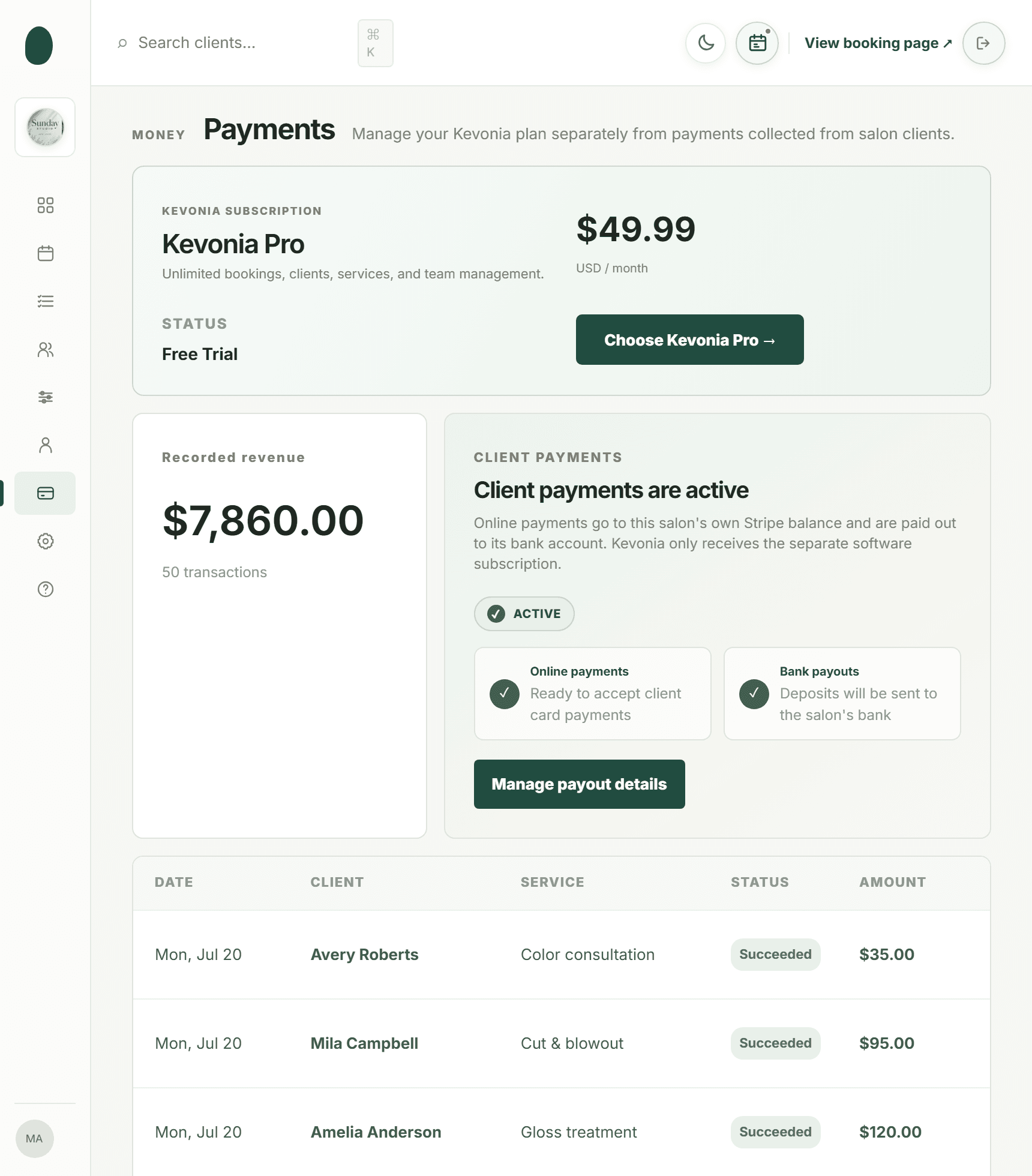
Google Business Profile is the discovery layer; Kevonia is an option for the scheduling and payment layer behind it. Kevonia includes a branded booking page, a week and day team calendar, client records, a service menu, availability rules, and Stripe card payments. That makes it relevant when your problem is not simply being found, but handling several professionals, different service lengths, deposits, time off, and online reservations without relying on manual back-and-forth.
For a hair salon, the workflow can support separate services and professional assignments while double-booking protection checks hours, breaks, time off, and existing bookings. For a spa or beauty studio, the service menu can hold duration, cleanup or buffer time, price, optional deposit, and the professionals assigned to each service. The client record stores searchable contact information, private notes, and visit history, so the team can prepare for a returning client without keeping scattered notes in text messages or paper files.
Kevonia also includes an automatic email reminder the day before an appointment. Within the salon’s notice window, clients can reschedule or cancel from that email. The workspace records booking statuses such as needs confirmation, awaiting payment, booked, checked in, completed, no-show, and cancelled. If a client pays online and later needs a refund, the salon can refund from the booking itself, see the Stripe processing fee on the refund, and have the client emailed automatically.
The plan is US$49.99 per month with unlimited team members, bookings, clients, and services, no per-booking commission, and no per-seat charge. The trial is free for 14 days with no credit card required to start; cancel any time before it ends and you are never charged. That structure may suit an independent salon or growing team that wants predictable software costs rather than a booking system that charges as every appointment is completed.
Measure whether your profile is producing appointments
Do not judge your profile only by its position in a local search. Rankings vary by the searcher’s location, wording, device, and other context. Instead, track the actions that matter to the business: calls, website visits, direction requests, booking-link visits, completed online bookings, new clients, cancellations, and no-shows. Compare those numbers with your available appointment capacity and revenue, because a profile can generate activity without generating profitable or suitable appointments.
Use a simple monthly review. Record the profile’s available performance data, export or note bookings that came through your Google link when your booking system allows it, and compare the result with the previous month. Look for patterns: more searches for a service you do not describe clearly, many calls outside business hours, high interest but few completed bookings, or a sudden increase in visits after adding current photos. Change one or two things at a time so you can learn what helped.
- Discovery: Are people finding the profile for the services and neighborhoods you actually want to serve?
- Trust: Do recent photos, service details, and review replies answer common objections?
- Action: Are people calling, requesting directions, visiting your website, or opening the booking link?
- Conversion: How many profile-driven visitors become confirmed appointments?
- Quality: Do those appointments match your pricing, availability, service mix, and ideal client?
For deeper website measurement, connect the official salon website to Google Search Console and use consistent page titles, contact details, and local-business information. Google explains that Search Console verifies website ownership and helps owners understand how Google displays the site; it also recommends using relevant structured data to clarify business details. Structured data can help Google understand information such as hours and business type, but it does not guarantee a special search appearance. (developers.google.com)
Common mistakes and a 30-day maintenance plan
The most damaging profile mistakes are usually operational, not technical. A salon claims a listing but never verifies it, adds an inaccurate address, stuffs the name with services, uses stock images, leaves old holiday hours in place, or sends clients to a booking page that does not show real availability. Another common mistake is asking every client for a review at once and then ignoring the responses. Consistent, accurate maintenance is more useful than a one-time burst of profile activity.
- Week 1: Claim or verify the profile, confirm ownership, correct the name, category, address, phone, website, and regular hours.
- Week 2: Add current exterior, interior, team, and service photos; rewrite the description for a local client; add your main services.
- Week 3: Test the phone number and booking link on mobile; check service durations, professional assignments, deposits, notice rules, and cancellation details.
- Week 4: Request honest reviews from recent clients, reply to existing reviews, and record baseline profile actions and bookings.
- Every month: Check special hours, new photos, review replies, service availability, booking conversion, cancellations, and no-shows.
If you operate multiple brands, rent chairs, or share a building with other providers, be especially careful about identity and location. A profile should represent an eligible business with a customer-facing presence, not a marketing page for every individual service or keyword. If you are unsure whether a listing structure complies with Google’s rules, resolve that question before creating additional profiles. One accurate listing with a working booking path is safer than several confusing listings that compete with one another.
The best google business profile for salons is not the one with the most words. It is the one that accurately represents the business, gives a potential client confidence, and moves that client to an appointment without unnecessary friction. Keep the profile and booking calendar aligned, use photos and reviews as proof of the experience, and improve the process based on completed bookings rather than vanity metrics.
Sources
- Google Business Profile Help: Add or claim your Business Profile
- Google Search Central: Establish your business details with Google
- Google Business Profile Help: Tips to improve your local ranking on Google
- Google Business Profile Help: Manage customer reviews
- Google Business Profile Help: Tips for business-specific photos
- Google Search Central: LocalBusiness structured data
- Google Search Central: General structured data guidelines
- Kevonia: Salon reservation software
- Kevonia: Salon booking program
- Kevonia: Hair salon booking software
- Kevonia: Spa booking software
- Kevonia home page
- Kevonia blog: Salon KPIs
Frequently asked questions
Is Google Business Profile free for a salon?+
Yes. Google’s official Business Profile instructions say businesses can add or claim a profile at no charge. You still need to verify the business and keep the information accurate. Any separate cost usually comes from tools you connect to the profile, such as a booking or payment system, not from creating the Google listing itself.
What category should a salon choose on Google?+
Choose the primary category that most accurately describes the main business, such as hair salon, barber shop, nail salon, beauty salon, or day spa. Add secondary categories only when they describe real services or business activities. Do not choose categories solely because they contain a popular search term.
Can I add a booking link to my salon’s Google profile?+
Yes. Add the most direct booking destination you can maintain and test it regularly on a mobile device. The page should show current services, professionals, appointment durations, prices or deposits where relevant, and real availability. A branded booking page such as Kevonia’s can give Google searchers a direct path from discovery to service, professional, date, and time selection.
How often should a salon update its Google Business Profile?+
Check it at least monthly and update it immediately when hours, holiday closures, phone numbers, services, staff availability, address details, or booking links change. Add current photos periodically and reply to reviews consistently. The important standard is accuracy, not posting on a fixed schedule just to create activity.
Will a Google Business Profile guarantee that my salon ranks first?+
No. A complete profile can help Google and potential clients understand your business, but no profile setup guarantees a ranking or a particular search appearance. Local visibility also depends on relevance, distance, prominence, competition, and the quality and consistency of information available about the business.
Do I need salon booking software if I already have a Google Business Profile?+
Not necessarily, but the profile and booking system solve different problems. Google helps people discover and evaluate the salon. Booking software handles services, staff schedules, time-off rules, deposits, reminders, client records, cancellations, and appointment status. If your team is managing reservations manually or losing clients between the profile and confirmation, a connected booking workflow may be worthwhile.
More from the blog

Using Google Calendar for Salon Bookings: Where It Works and Where It Breaks
Google Calendar can handle simple appointment scheduling, but salons often outgrow it when they need services, staff rules, deposits, reminders, and client records in one place.

Google Ads for Salons: A Practical 2026 Guide
A practical guide to Google Ads for salons: campaign setup, local targeting, keywords, budgets, landing pages, conversion tracking, and the numbers that decide whether your ads are profitable.

Timely Alternative: Flat-Cost Booking Software for Salons
Timely is capable salon software, but its per-staff pricing and broader feature set are not right for every business. Compare Timely with Kevonia before you switch.