Google Ads for Salons: A Practical 2026 Guide
A practical guide to Google Ads for salons: campaign setup, local targeting, keywords, budgets, landing pages, conversion tracking, and the numbers that decide whether your ads are profitable.

Key takeaways
- Start with high-intent local searches and a small, tightly controlled service campaign.
- Send every ad to a booking-ready page with clear pricing, availability, and one obvious next step.
- Measure booked appointments and revenue, not clicks alone.
- Pause keywords and locations that spend money without producing profitable bookings.
- Kevonia can provide the booking page and scheduling workflow needed after someone clicks your ad.
What salon owners actually want to know about Google Ads
If you searched for google ads for salons, you probably do not need a generic explanation of online advertising. You want to know whether paid search can fill appointments, how much to spend, which keywords to use, and how to avoid paying for clicks from people who will never visit your salon.
The short answer is that Google Ads can work for a salon when the campaign targets people who are already looking for a service nearby and the click leads directly to an easy booking experience. It is not a substitute for a strong Google Business Profile, good reviews, a clear service menu, or a booking process that works on a phone. Treat ads as a way to capture existing demand, then measure the complete path from search to appointment to revenue.
When Google Ads make sense for a salon
Paid search is usually most useful when you have open capacity, a service with enough profit to absorb acquisition costs, and a realistic service area. A salon with empty weekday afternoons may use ads to promote a specific opening, while a fully booked stylist may be better served by improving retention or advertising another professional with availability.
Search ads are especially suitable for high-intent searches such as “haircut near me,” “ balayage in [city],” “bridal makeup [city],” or “same-day facial near me.” The person is not merely browsing inspiration; they may be comparing providers and trying to decide where to book. That makes the campaign more measurable than broad awareness advertising, but it does not make every click valuable.
Ask are google ads worth it for a salon by working backward from your economics. If an average first appointment produces US$120 in revenue and US$70 in gross profit after the provider’s compensation and service costs, a campaign that regularly costs US$90 to acquire a first-time client is not healthy unless that client returns often enough to make the lifetime value work. Use contribution margin, not top-line sales, when setting your ceiling.
- You have appointment availability that you genuinely want to fill.
- You can answer calls or messages promptly when a prospect does not book immediately.
- Your service prices, address, hours, and policies are current online.
- You can identify which bookings came from ads.
- Your booking page works smoothly on a mobile phone.
- You can afford to test for several weeks without judging the campaign after one slow day.
Build the campaign around one service and one area
Do not begin with one campaign for every service, neighborhood, and audience. Start with a narrow offer that you can explain clearly. For example, a color-focused campaign might promote dimensional color, include a starting price or consultation requirement, and target the neighborhoods from which your clients can reasonably travel. A separate campaign can later promote cuts, extensions, nails, massage, or skin services.
Google Ads lets you target cities, postal areas, and radiuses around a location. Google also explains that location targeting uses signals such as device and account information and is not perfectly accurate, so inspect geographic performance rather than assuming every impression came from the right area. For a neighborhood salon, begin with a practical radius or a carefully selected set of nearby areas, then exclude locations that generate irrelevant traffic. (support.google.com) Supporting details are available from target cities postal areas and radiuses.
Keep the campaign’s language and landing page consistent. If the ad says “Chicago curly haircut,” the page should confirm that you serve Chicago, explain the service, show the relevant professional or service options, and make booking possible without hunting through your entire website. A generic homepage can work, but a focused booking page usually gives the visitor fewer opportunities to get distracted.
- Choose one service category with available capacity and a clear margin.
- Choose the actual service area, not an entire state or country unless clients travel that far.
- Create one campaign and a small number of tightly related ad groups.
- Write ads that name the service, location, and next step.
- Send each ad to the most relevant service or booking destination.
- Review search terms, locations, calls, bookings, and spend every week.
Choose keywords that show buying intent
Keyword research should begin with the words a customer uses immediately before booking. Combine the service with the location, such as “hair extensions Austin,” “nail salon near me,” “men’s haircut downtown,” or “lash lift [neighborhood].” Add variations that describe urgency or appointment intent, but avoid building a huge list before you know which searches convert.
Google’s Keyword Planner can provide historical search information and forecasts based on factors such as bid, budget, seasonality, and ad quality. Treat those numbers as planning estimates rather than promises. Search volume does not tell you whether the person can afford your service, whether they are inside your service area, or whether your calendar has a suitable opening. (support.google.com)
For salon ppc advertising, separate high-intent terms from research terms. “Book a keratin treatment near me” is closer to a transaction than “best keratin treatment,” “hair color ideas,” or “how long does balayage take.” Research searches may have value for content marketing, but they can waste a small appointment-focused budget if included too early.
Use negative keywords to remove searches that do not fit your business. Review the actual search terms report because customers often use unexpected wording. A barber may want to exclude “school,” “jobs,” “free,” and “training.” A premium spa may exclude “DIY,” “kit,” “cheap,” or “wholesale.” Do not automatically exclude every unfamiliar term; first decide whether it could plausibly produce a profitable appointment.
- Core service terms: the exact services you sell.
- Local modifiers: city, neighborhood, nearby landmarks, and “near me.”
- Booking modifiers: book, appointment, availability, open today, and same day when accurate.
- Brand terms: your salon name and common misspellings, if needed.
- Negative terms: jobs, classes, training, free, DIY, wholesale, and services you do not offer.
Write ads that pre-qualify the click
A good salon ad does more than say “Book now.” It tells the right person what you offer, where you are, and what happens after the click. Include the service name, location, a credible differentiator, and a direct action. If pricing starts at a certain amount, say so when it prevents mismatched expectations. If a consultation is required, say that before the visitor spends time trying to book an unavailable service.
Examples of useful angles include “Balayage Appointments in North Austin,” “Evening Haircuts Near Downtown,” “Facials With Online Booking,” or “Book a Lash Fill With Your Preferred Artist.” Avoid claims you cannot substantiate, such as guaranteed results, permanent availability, or being the city’s best salon. Match the ad to the page; sending a person searching for a senior stylist to a page that only shows a general contact form creates friction and weakens measurement.
- Headline: name the service and local area.
- Description: explain the benefit, price expectation, or booking condition.
- Call to action: book online, view availability, request a consultation, or call.
- Trust details: mention an established neighborhood, specialties, or transparent policies only when accurate.
- Pre-qualification: state starting prices, appointment length, or consultation requirements when relevant.
Make the landing page convert the appointment
The click is not the result. The booked appointment is the result. Your destination should answer the visitor’s immediate questions: What service is offered? How much does it cost or start at? Where is the salon? Who performs it? How long does it take? What times are available? What happens if the client needs to cancel? If the answer requires a phone call, make the phone number prominent, but do not force every visitor to call when online booking is possible.
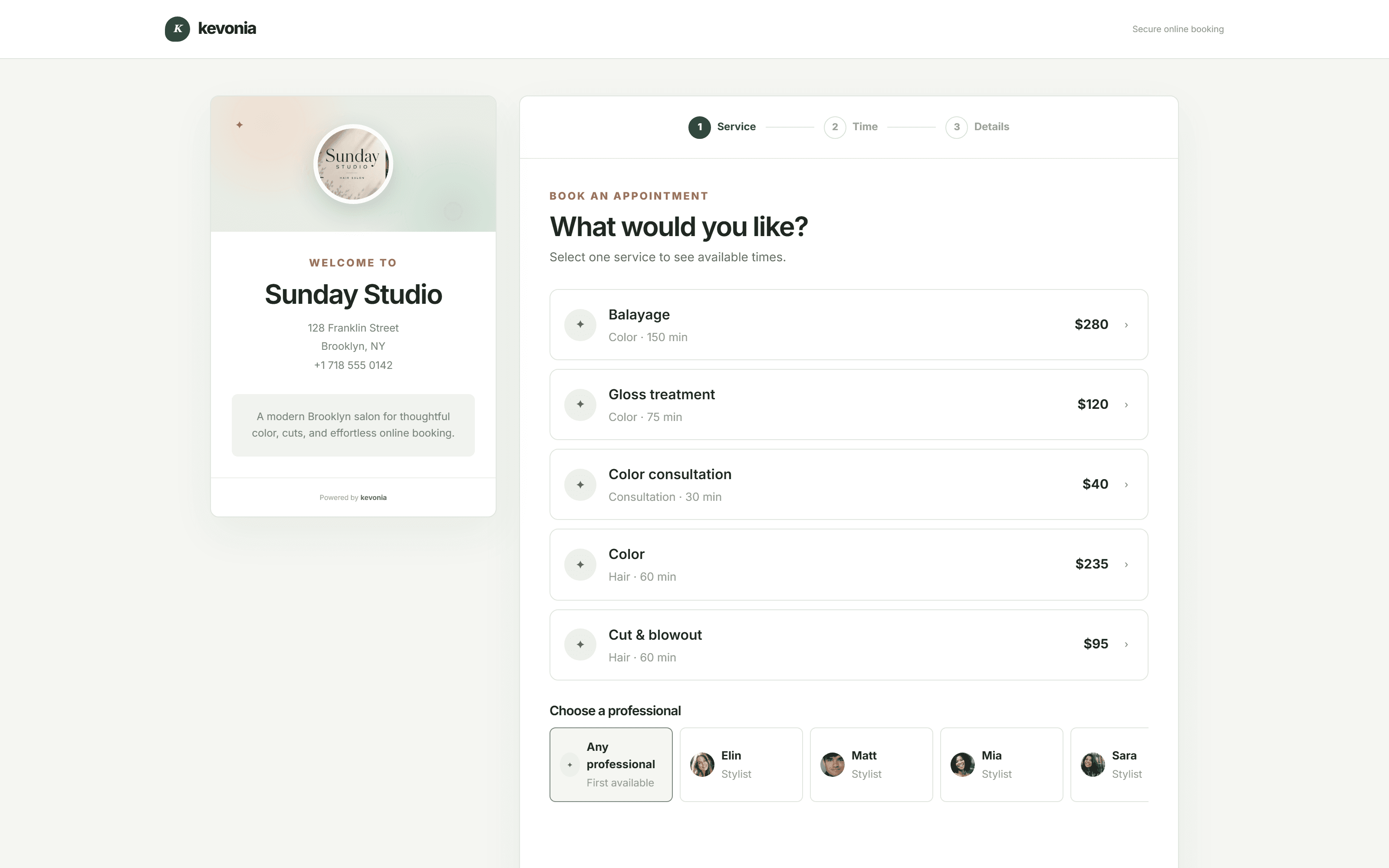
A branded online booking page can be a practical destination for paid traffic because it gives the client a defined path: choose the service, choose a professional, choose a date, and choose a time. Kevonia provides that booking page at kevonia.com/your-salon, along with service durations, prices, optional deposits, professional assignments, and availability rules. That is particularly useful when an ad promotes one service but the salon has several professionals or schedules.
The page should also handle edge cases before they become front-desk problems. If your campaign promotes a 90-minute color service, make sure cleanup time, breaks, time off, salon closures, minimum notice, and the booking window are reflected in availability. Kevonia’s scheduling workspace checks bookings against those rules and existing appointments, helping prevent an ad-generated booking from creating a double booking.
Do not hide the next action below a wall of text. Put the booking option near the top, keep the service name consistent with the ad, and test the complete process on an iPhone and Android phone. If a visitor has to zoom, create an account before seeing times, or repeat information unnecessarily, expect the conversion rate to suffer. For more detail on friction during checkout, see the blog’s guide to why clients don’t finish booking online.
- Load the page on a phone using mobile data, not only salon Wi-Fi.
- Confirm that the advertised service, duration, price, and professional are visible.
- Try booking during a real unavailable period and a real available period.
- Check that deposits or card payments behave as expected.
- Read the confirmation and reminder messages as a client would.
- Test cancellation and rescheduling rules before sending paid traffic.
Set a budget and decide what a booking can cost
There is no universal “right” salon ad budget. Start with a test budget that is large enough to generate meaningful data but small enough that a poor first result does not damage cash flow. A useful planning model is: monthly ad budget divided by target cost per booked appointment equals the number of bookings required. If you can spend US$600 and your maximum acceptable acquisition cost is US$40, you need about 15 booked appointments for the test to meet that target.
Your maximum acceptable cost per booking should reflect profit, not revenue. Suppose a first visit produces US$100 in sales, but service labor, supplies, payment processing, and other variable costs leave US$45 before advertising. A US$35 acquisition cost may be workable if repeat visits are strong; a US$50 acquisition cost may not be. Calculate separate limits for low-margin services, premium services, consultations, and deposits.
Do not increase the budget simply because impressions and clicks are rising. Increase it when profitable bookings are available and the salon can serve them. Conversely, do not pause a campaign after one expensive click. Give it enough time to reveal search terms and booking behavior, then make controlled changes rather than changing the budget, keywords, ads, landing page, and service offer all at once.
- Set a daily budget based on the monthly amount you can tolerate losing during testing.
- Choose a target cost per booked appointment before launch.
- Track first-visit revenue and estimated contribution margin separately.
- Reserve a portion of the budget for the services or time slots you most need to fill.
- Scale only when the calendar and follow-up process can handle more demand.
Track bookings, not just clicks
A click tells you that an ad attracted attention. It does not tell you whether the person booked, showed up, paid a deposit, or became a repeat client. Google describes conversion tracking as a way to connect ad interactions with meaningful actions such as purchases, leads, phone calls, and website actions. For a salon, your primary conversion should be a completed booking or a qualified call, not a page view. (support.google.com)
If your booking system cannot send a completed-booking signal directly into Google Ads, begin with the strongest practical measurement available: track booking-button clicks, phone calls, contact-form submissions, or a confirmation-page visit. Google provides separate methods for tracking website clicks and phone interactions. Then compare those actions with actual appointments in your booking records so you can estimate the percentage that became real bookings.
Keep a simple weekly report with campaign, keyword or search term, cost, clicks, calls, booking starts, completed bookings, cancellations, no-shows, revenue, and estimated profit. Kevonia can help you inspect appointment statuses, payment details, cancellations, no-shows, and revenue trends in the scheduling workspace. That does not replace ad-platform attribution, but it gives you the operational record needed to judge whether paid traffic produced useful appointments rather than empty leads.
- Primary conversion: completed online appointment or qualified phone booking.
- Secondary conversion: booking-page start, click-to-call, consultation request, or deposit payment.
- Business outcome: attended appointment, revenue, contribution margin, repeat visit, and client value.
- Diagnostic metrics: impressions, click-through rate, cost per click, search terms, and landing-page engagement.
Common mistakes that make salon campaigns expensive
Most wasted spend comes from a mismatch between the search, the ad, the destination, and the salon’s actual capacity. A campaign can have a respectable click-through rate and still fail because it attracts the wrong services, targets a wide area, or sends visitors to a slow page with no visible appointment times.
- Targeting an entire metro area when clients rarely travel more than a few miles.
- Using broad service words such as “beauty” without reviewing the search terms they attract.
- Advertising a service that is fully booked while another professional has open availability.
- Sending every ad to the homepage instead of a relevant service or booking destination.
- Counting contact-form submissions as bookings without checking whether they became appointments.
- Ignoring calls because only online bookings are measured.
- Showing a starting price that does not explain add-ons, consultations, length, or stylist level.
- Failing to exclude job seekers, students, DIY researchers, and people looking for services you do not provide.
- Running ads during a temporary closure or when the promoted professional is unavailable.
- Changing several campaign variables at once, making it impossible to learn what helped.
A special warning applies to hair salon google ads: service names can hide major differences in time and price. “Color,” “highlights,” “corrective color,” and “balayage” are not interchangeable offers. Use separate services, accurate durations, and clear consultation rules so the person who clicks understands what can actually be booked.
Where Kevonia fits after the ad click
Kevonia is not an ad agency and does not replace Google Ads campaign management. Its role is the operational step after a prospect decides to book: a branded booking page, service menu, availability rules, team calendar, client records, and Stripe card payments in one workspace. For a salon that wants paid traffic to lead directly to available appointments rather than a generic inquiry form, that workflow can reduce the gap between click and booking. For more detail, see Kevonia's salon and spa management software.
The booking page stays open 24/7, and clients choose a service, professional, date, and time. The salon controls opening hours, breaks, staff time off, closures, booking windows, minimum notice, and time-slot intervals. Services can include duration, cleanup or buffer time, price, optional deposits, and professional assignments. Those details matter in advertising because a campaign is only useful when the calendar shows times the salon can actually honor.
After booking, Kevonia supports the follow-through that paid traffic needs: an automatic email reminder the day before, client rescheduling or cancellation within the salon’s notice window, payment and deposit handling through Stripe, booking statuses, cancellation history, and client records with visit history and private notes. Owners can also review recent revenue, appointments, new and total clients, no-show percentage, and a 30-day revenue chart. Use those operational numbers alongside Google Ads data when deciding whether to keep, narrow, or expand a campaign.
Kevonia has one plan at US$49.99 per month, with unlimited team members, bookings, clients, and services and no per-booking commission. The trial is free for 7 days, requires no credit card to start, and can be canceled any time before it ends without a charge. Consider that software cost separately from the advertising budget; the right comparison is the total cost of acquiring and serving profitable appointments, not the ad spend alone.
A practical 30-day launch plan
A controlled launch gives you enough structure to learn without turning the campaign into a permanent experiment. Begin with one service, one local area, one booking destination, and one primary conversion. Keep the first month focused on evidence: which searches occur, which locations respond, which ads earn qualified clicks, and which clicks become appointments.
- Days 1–3: Choose the service, available professionals, service area, target cost per booking, and monthly test budget.
- Days 4–7: Build or verify the booking page, service details, prices, duration, availability, deposit rules, and cancellation policy.
- Week 2: Launch a tightly themed Search campaign with local keywords, negative keywords, location targeting, and conversion tracking.
- Week 3: Review search terms, calls, locations, devices, booking starts, completed appointments, and any missed inquiries.
- Week 4: Pause clearly irrelevant terms, improve weak ad-to-page matches, shift budget toward profitable services or locations, and calculate cost per attended booking.
- After 30 days: Decide whether to keep the campaign, narrow it, change the offer, improve the booking experience, or test another service.
The best campaign is not necessarily the one with the most traffic. It is the one that produces appointments your team can serve at a cost that leaves room for wages, supplies, rent, payment fees, software, and profit. Start narrow, measure honestly, and let the calendar and profit numbers—not vanity metrics—decide what happens next.
Sources
- Google Ads Help: About Keyword Planner forecasts
- Google Ads Help: Location targeting
- Google Ads Help: Target ads to geographic locations
- Google Ads Help: Conversion tracking definition
- Google Ads Help: Different ways to track conversions
- Kevonia
- Kevonia salon reservation software
- Kevonia salon booking program
- Kevonia beauty salon booking software
- Kevonia spa booking software
- Kevonia Google Business Profile guide
- Kevonia online booking friction guide
Frequently asked questions
How much should a salon spend on Google Ads?+
Start with an amount you can test without putting payroll or essential expenses at risk. Set a target cost per booked appointment first, then divide the available monthly budget by that target to estimate the bookings required. Increase spend only when the campaign produces profitable appointments and your team has capacity to serve them.
What keywords should a salon use in Google Ads?+
Begin with high-intent combinations of service plus location, such as “haircut near me,” “balayage in [city],” or “lash lift [neighborhood].” Add booking language such as book, appointment, availability, or same day only when accurate. Review actual search terms and add negatives for jobs, classes, DIY, free services, and offerings you do not provide.
Should salon ads send people to the homepage or a booking page?+
Usually, send them to the most relevant booking or service page. The destination should confirm the service, location, price expectation, duration, professional options, availability, and policies. A homepage is acceptable only if the booking action is immediately visible and the visitor can reach the correct service without unnecessary steps.
How do I know whether my salon ads are profitable?+
Track completed or attended appointments, not clicks alone. Record ad cost, booked appointments, cancellations, no-shows, revenue, variable service costs, and repeat visits. Calculate cost per attended booking and compare it with the contribution margin from the first visit and the expected value of future visits.
Can I use Google Ads for a salon with several stylists?+
Yes, but structure the offer around real availability. Ads can promote a service while the booking flow lets the client choose an eligible professional. Keep each professional’s schedule, time off, breaks, service assignments, and buffer time accurate so paid traffic does not create bookings the salon cannot fulfill.
Where does Kevonia fit with Google Ads?+
Kevonia handles the booking and scheduling workflow after someone clicks: a branded 24/7 booking page, service menu, professional selection, availability rules, team calendar, client records, Stripe payments, reminders, and booking statuses. It does not manage your Google Ads campaigns, so you would still set up targeting, keywords, ads, budgets, and conversion measurement in Google Ads.
More from the blog

Using Google Calendar for Salon Bookings: Where It Works and Where It Breaks
Google Calendar can handle simple appointment scheduling, but salons often outgrow it when they need services, staff rules, deposits, reminders, and client records in one place.
Google Business Profile for Salons: A Practical 2026 Guide
A complete guide to setting up and improving your salon’s Google Business Profile, from verification and services to reviews, photos, bookings, and tracking results.

How Much Does It Cost to Run a Salon? Build Your Real Monthly Budget
A salon may cost a few thousand dollars a month as a solo suite or tens of thousands with employees. Here is how to calculate your own number instead of relying on a generic average.