How to Stop Fake Salon Bookings in 2026
Fake appointments waste time and create empty slots. Use this practical 2026 guide to reduce spam bookings without making genuine clients jump through hoops.
Key takeaways
- Require a small, clearly explained deposit for services most likely to attract no-shows.
- Add minimum notice, booking-window, availability, and cancellation controls before blocking clients manually.
- Use a simple verification process for suspicious requests and document repeat offenders.
- Choose booking software that connects appointments, deposits, client records, and calendar rules in one workflow.
What salon owners really mean by fake bookings
If several unfamiliar names reserve prime appointments and never arrive, or someone repeatedly books under different contact details, you are dealing with more than an ordinary no-show. Fake bookings can be deliberate pranks, automated spam, competitors trying to disrupt your schedule, or people testing stolen payment details. The practical question is not only how to stop fake salon bookings. It is how to protect your revenue and staff time while keeping the booking process easy for real clients.
The best response is layered: make abuse less attractive, collect enough information to identify patterns, require financial commitment where the risk is highest, and give your team a consistent rule for reviewing questionable appointments. Do not begin by rejecting every new client or demanding excessive personal information. That can drive away legitimate customers and create unnecessary privacy risk.
1. Identify the pattern before changing your booking system
Start by reviewing the last 30 to 60 days of appointments. Look for repeated signals rather than treating one unusual booking as proof of fraud. A genuine first-time client may have a new email address, book late at night, or choose a popular stylist. A fake booking usually becomes clearer when several signals appear together.
- Multiple appointments are created within minutes for different names, especially in high-demand time slots.
- The same phone number, email pattern, device, or payment details appear across different client names.
- The client selects long, expensive, or time-sensitive services and provides little usable contact information.
- The person cancels immediately after receiving a confirmation, then repeats the process later.
- A caller insists that you hold several appointments before deciding, asks staff to ignore your policy, or sends confusing payment instructions.
- Bookings cluster around closed hours, weekends, or the same professional’s most valuable openings.
Separate three problems that often get mixed together: fake bookings, ordinary no-shows, and payment fraud. A client who forgets one appointment needs a reminder and a clear cancellation policy. A person who repeatedly occupies appointments with false information needs stronger controls. A payment that appears unauthorized should be handled through your payment provider’s dispute and fraud process, not through an accusation made to the client.
Create a short incident log with the booking date, service, professional, contact details, payment status, cancellation history, and what happened. Keep it factual. This helps you spot repeat behavior and gives your team a defensible reason for future review without relying on memory or assumptions.
2. Put financial commitment behind high-risk appointments
The most effective operational change for many salons is requiring a deposit for appointments that consume a large amount of time or are difficult to refill. Examples include color corrections, extensions, bridal services, multi-hour tattoo sessions, first-time appointments with a senior professional, and appointments booked during your busiest hours. A deposit does not eliminate abuse, but it makes mass reservations and casual prank bookings less attractive.
- Choose the services or situations that need a deposit. Avoid applying the strictest rule to every short appointment if your data shows the problem is concentrated elsewhere.
- Set an amount that reflects the slot’s value and your cancellation risk. A deposit should be meaningful without being so high that it discourages good clients.
- Explain the deposit before the client confirms. State whether it is applied to the service, refundable, transferable, or forfeited after late cancellation, subject to applicable law and your written policy.
- Make the payment step part of the booking flow rather than asking an unfamiliar client to send money through a separate link or personal account.
- Review deposit failures and abandoned checkouts weekly. A failed payment is a reason to pause the booking, not a reason to manually keep the slot open indefinitely.
Your policy must be easy to understand and applied consistently. Do not quietly add a fee after someone has selected a service. The Federal Trade Commission’s payment guidance says businesses must take steps to ensure charges are authorized, and its fee guidance emphasizes clear disclosure of required charges before payment. The FTC fee rule is directed at live-event tickets and short-term lodging rather than salon appointments, so do not treat it as a salon-specific rule; the broader lesson about honest, upfront pricing still matters for trust and compliance.
Kevonia can support this workflow through its service menu, where you can assign a price, duration, cleanup or buffer time, optional deposit, and eligible professionals to each service. That lets you use a deposit selectively instead of making every client follow the same high-friction process. Kevonia uses Stripe for card payments and deposits, with payouts going to the salon’s bank account.
3. Tighten the booking rules that fake clients exploit
A booking page that accepts any appointment at any time creates opportunities for both genuine mistakes and abuse. Before adding aggressive screening, check whether your scheduling rules are giving suspicious users too much room to reserve inventory. The goal is to make the calendar accurately reflect when appointments can be created, changed, or canceled.
- Set a minimum notice period so a new online booking cannot take a slot your team cannot realistically prepare for.
- Limit how far ahead clients can book. A shorter booking window reduces the amount of valuable calendar inventory one person can hold for weeks.
- Use a sensible time-slot interval so the page does not expose unnecessary appointment combinations.
- Add staff breaks, time off, salon closures, and service-specific buffer time. Otherwise, a fake booking may not be the only problem; the system may also be selling times your team cannot deliver.
- Set a cancellation and rescheduling window. After that point, direct the client to call the salon or apply the written deposit policy.
- Review whether long services can be booked by every professional. Restricting a service to trained or properly equipped team members reduces both operational errors and suspicious overbooking.
Do not confuse fake bookings with double bookings. A calendar conflict can come from overlapping service durations, an unrecorded break, time off entered in the wrong place, or a team member accepting a request through another channel. A fake appointment is about the intent or identity behind the reservation. You need different remedies for each issue; tightening the wrong control may reduce legitimate bookings without solving the original problem.
Kevonia’s availability rules let you define opening hours by weekday, multiple breaks, staff time off, closures, booking window, minimum notice, and time-slot interval. Its double-booking protection checks appointments against hours, breaks, time off, and existing bookings. These controls do not identify a prankster by themselves, but they reduce the amount of usable calendar space that can be misrepresented or accidentally exposed.
4. Add a calm verification step for suspicious requests
If a booking triggers several warning signs, do not immediately label the person a scammer. Place the appointment into a short manual-review process. The purpose is to confirm that the request is real, not to interrogate every new client. A consistent script also helps front-desk staff avoid making different decisions for similar cases.
- Check whether the requested service, professional, date, and duration make sense together.
- Confirm that the email and phone number are usable. Send a neutral message asking the client to confirm the appointment and review the deposit or cancellation policy.
- If the service is high value or unusually long, require the deposit through your normal secure checkout before holding the slot.
- If the client has booked several appointments, ask them to keep one and release the others by a stated deadline.
- If the client cannot confirm, the payment fails, or the information conflicts across attempts, release the appointments and record the reason internally.
- If the same pattern returns, block or manually review future requests according to your written policy.
A useful message is: “We received your appointment request. Because this service reserves a longer time slot, please confirm your contact details and complete the deposit by [time]. The appointment is not held until payment is completed.” It is direct without making an allegation. Avoid asking for a photo of a driver’s license, Social Security number, or other sensitive information just to book a routine service. Collect only what you need to schedule, contact, charge, and deliver the appointment.
Stripe’s checkout documentation supports collecting information such as a customer name, phone number, and billing address when it is needed for the transaction, while cautioning against using custom fields for sensitive or legally restricted data. Use that principle in your own forms: every required field should have a clear operational purpose.
5. Use payment signals without rejecting good clients automatically
Payment information can help you decide whether to approve, review, or decline a booking, but it should not be your only test. A real client can have a billing address different from the salon’s area, use a mobile wallet, or make a legitimate booking while traveling. Conversely, a fraudulent card can sometimes pass a basic authorization check.
- Treat repeated failed cards, rapid card changes, and mismatched names as review signals rather than automatic proof.
- Be cautious when one person tries several cards for multiple appointments in a short period.
- Do not accept screenshots as proof that a payment succeeded. Verify the payment in the payment dashboard or booking system.
- Keep the service, deposit, cancellation terms, and client identity connected to the transaction record.
- Refund or release suspicious payments through the proper payment workflow; do not move the conversation to an informal payment app because someone asks you to.
Stripe explains that its Radar tools can use risk signals and rules to block or review payments, and that review rules may be preferable when a rule could also reject legitimate customers. If you use Stripe directly, examine the available settings with your account and risk tolerance in mind. If your booking software handles the payment flow, ask what information is visible to you and which decisions remain under your control.
For a salon, the practical rule is simple: use automation to reduce obvious abuse, then reserve human review for edge cases. A blanket rule such as “reject every prepaid card” or “reject every out-of-state client” may remove legitimate revenue while doing little against determined abusers. Start with the smallest rule that addresses the pattern you have actually observed.
6. Make reminders and cancellation history part of prevention
Some appointments that look fake are actually forgotten, misunderstood, or booked by a client who never saw the confirmation. Clear reminders reduce avoidable no-shows and give genuine clients a chance to correct an error. They also create a useful record of whether the client had an opportunity to reschedule or cancel within your policy window.
- Send the appointment date, time, professional, service, location, deposit status, and cancellation deadline in plain language.
- Keep the reminder timing predictable. A day-before reminder is useful, but it cannot replace a clear confirmation immediately after booking.
- Give clients one straightforward way to reschedule or cancel. Multiple disconnected channels make it harder to determine what actually happened.
- Review cancellation history before approving a new high-value appointment, especially when the same contact has repeatedly canceled late.
- Release unused appointments quickly when a client confirms they cannot attend. A vacant slot is easier to market or fill when it returns to the calendar early.
Kevonia automatically emails a reminder the day before an appointment, and clients can reschedule or cancel from that email within the salon’s notice window. It also keeps cancellation history with a restore option. That combination helps distinguish a client who used the proper cancellation process from a pattern of repeated bookings that disappear without a meaningful interaction. For more detail, see Kevonia's automatic reminder.
If you operate a barbershop, the same approach applies to recurring short appointments, popular evening slots, and clients who repeatedly reserve several openings. A dedicated barbershop booking software workflow can make the policy visible at booking instead of leaving staff to manage every request through text messages.
7. Where Kevonia fits in your anti-booking-abuse process
Kevonia is not a promise that every fake appointment will be detected automatically. It is a way to put the controls that matter for prevention into one salon or spa booking workflow: a branded online booking page, a team calendar, client records, a service menu, availability rules, and Stripe payments. That matters because fake bookings are easier to investigate when the appointment, contact details, service, payment, and calendar history are not scattered across separate tools.
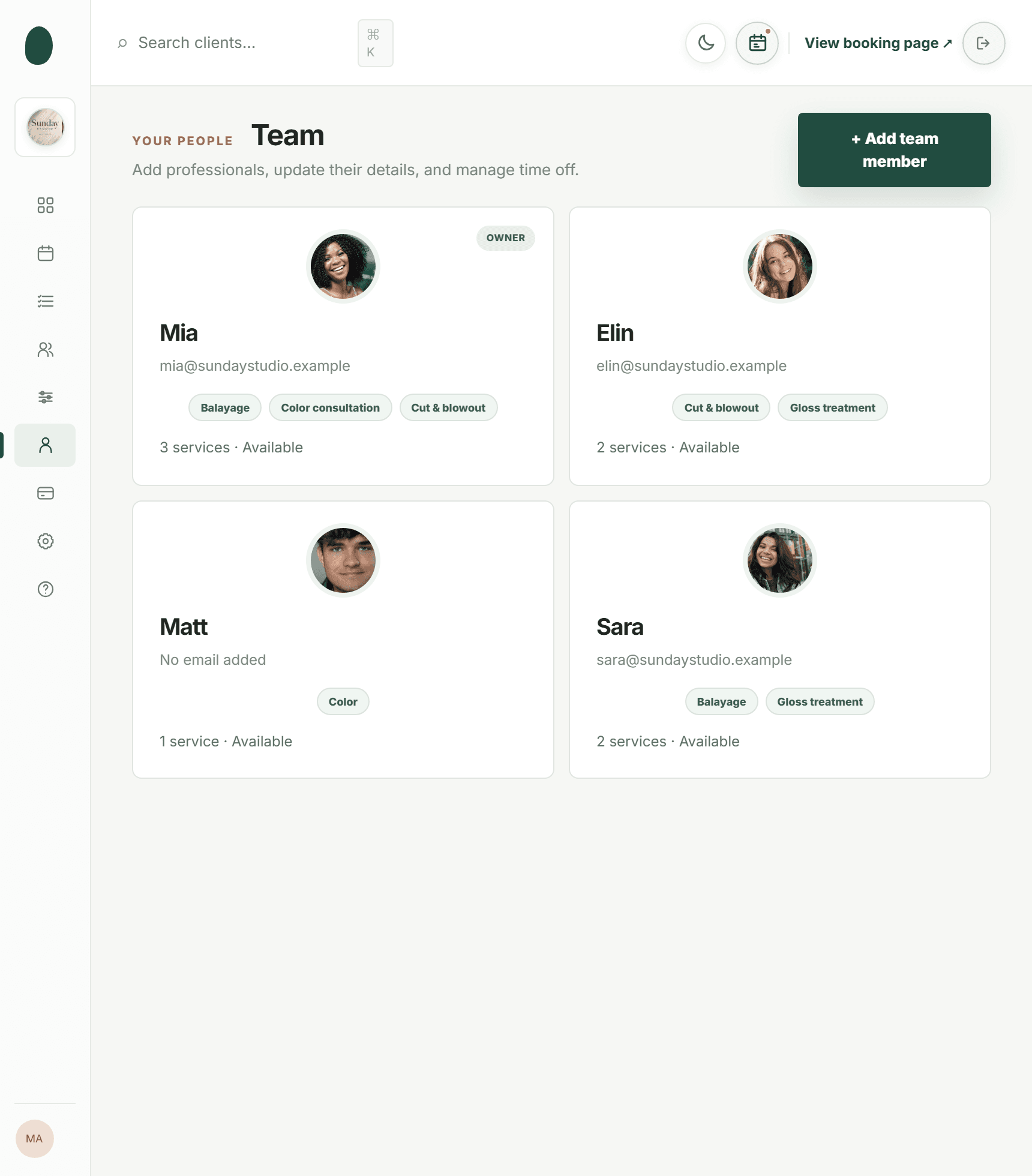
On the booking page, clients choose a service, professional, date, and time. In the workspace, your team can filter the week or day calendar by professional, use color coding, search client records by name, email, or phone, and review private notes and visit history. You can use those records to document a repeated pattern and decide whether a future booking needs a deposit or manual confirmation.
Kevonia’s service settings support duration, cleanup or buffer time, price, optional deposits, and per-professional assignment. Its availability settings support opening hours, multiple breaks, time off, closures, booking windows, minimum notice, and time-slot intervals. Together, those settings address two common sources of wasted capacity: suspicious reservations and calendar rules that are too loose to reflect how the salon actually operates.
The commercial model is also straightforward for a growing team: Kevonia has one plan at US$49.99 per month, with unlimited team members, bookings, clients, and services, and no per-booking commission. It includes a free 14-day trial with no credit card required to start; if you cancel before the trial ends, you are never charged. Those terms may be relevant if you are replacing a patchwork of calendar, form, and payment tools, but choose the workflow based on the controls your salon actually needs.
8. Build a 15-minute daily review and a weekly policy check
Prevention works best when it becomes routine rather than a crisis response. Assign one person to review new deposits, unusual appointment clusters, failed confirmations, and recent cancellations. The review can be brief if the booking page and calendar already enforce your basic rules.
- At opening: scan new appointments for duplicate contact details, unusually long services, multiple reservations, and incomplete deposits.
- Before peak hours: confirm that any appointment under review is either verified, paid according to policy, or released.
- After a missed appointment: record what happened, whether the client contacted you, and whether the slot could have been refilled.
- At the end of the week: compare fake bookings, no-shows, late cancellations, and payment failures. They are different metrics and should not be combined.
- Once a month: adjust one control at a time, such as the deposit requirement or minimum notice period, and watch whether legitimate booking completion changes.
Create a short internal policy with four outcomes: approve, approve with deposit, hold for confirmation, or decline. Include examples so staff know what to do when a client books three appointments, uses a different email after a cancellation, or asks to pay outside the normal checkout. Review the policy whenever your services, team, hours, or cancellation terms change.
Avoid public accusations and avoid posting client details in staff group chats that are not designed for private records. If you believe a payment or account is fraudulent, preserve the relevant records and follow your processor’s process. Stripe notes that dispute notifications have response deadlines, so do not leave a payment issue sitting in an inbox while the appointment team handles the day’s schedule.
Common mistakes that make fake bookings worse
When owners search for how to stop fake salon bookings, they are often tempted by a single aggressive fix. The following mistakes can reduce bookings, frustrate clients, or leave the underlying pattern untouched.
- Requiring a deposit for every service without explaining the policy or making the amount visible before payment.
- Blocking entire neighborhoods, area codes, countries, or email providers based on one incident.
- Collecting excessive identity information that your team does not need and cannot securely manage.
- Keeping suspicious appointments on the calendar while waiting indefinitely for a reply.
- Treating every no-show as intentional fraud instead of checking reminders, cancellation history, and prior client behavior.
- Using a separate payment link with no appointment reference, making it difficult to match the money to the service.
- Changing several rules at once, so you cannot tell which change reduced abuse or caused legitimate clients to abandon booking.
A good test is whether a normal first-time client can understand the process in less than a minute: choose a service, select a professional and time, see the total and deposit terms, pay securely if required, and receive a confirmation with a clear way to change the appointment. If the process is much harder than that, simplify it before adding another barrier.
Sources
Frequently asked questions
What is the fastest way to stop fake salon bookings?+
Require a deposit for the services and time slots that are most expensive to lose, then set minimum notice and a booking window. Add a short confirmation step for appointments with duplicate contact details, multiple reservations, failed payments, or unusual service combinations. This combination usually works better than blocking every new client.
Should my salon require a deposit from every new client?+
Not necessarily. Start with services that take a long time, require special preparation, or have a high no-show cost. You can also require deposits during peak hours or for clients with a documented pattern of late cancellations. Explain the amount, whether it applies to the service, and the cancellation deadline before the client pays, and apply the rule consistently.
How can I tell fake bookings apart from ordinary no-shows?+
Look for repeated behavior and multiple signals. Ordinary no-shows often involve a real client with a usable contact history who may respond to a reminder. Fake bookings are more likely to involve duplicate reservations, changing names or emails, repeated failed payments, unusually large blocks of time, and no meaningful response to confirmation requests. Keep the categories separate in your records.
Can I block a client who repeatedly makes prank bookings?+
You can create a written internal rule for declining future requests, but base it on documented booking behavior rather than a protected characteristic or an unsupported assumption. Keep notes factual, avoid public accusations, and give staff a consistent outcome such as manual review or deposit-required booking. If a payment appears fraudulent, follow your payment provider’s process instead of confronting the client as if fraud were proven.
Does Kevonia automatically detect fake salon bookings?+
Do not treat Kevonia as an automatic fake-booking detector. Kevonia provides the operational controls that help you prevent and investigate them: a branded booking page, service-level optional deposits through Stripe, availability rules, double-booking protection, client records, cancellation history, and a team calendar. Your salon still decides which appointments require review, confirmation, or a deposit.
What should I do after a fake booking has already taken a prime appointment?+
Record the appointment details and release the slot as soon as your policy allows. Check whether the client paid a deposit, whether the payment succeeded, and whether the same contact details appear in other appointments. Contact the payment provider about suspicious transactions, preserve confirmation and cancellation records, and review which rule failed: no deposit, excessive booking window, missing minimum notice, or lack of verification. Then change one control and measure the result.
More from the blog
Why Clients Don’t Finish Booking Online: 9 Fixes
Clients may want the appointment but still abandon the booking page. Learn how to find the friction, fix the biggest problems, and recover more completed bookings.

Where to Share Your Salon Booking Link in 2026
Your booking link only works when clients can find it at the moment they decide to book. Here are the best places to share it and how to prioritize them.

Squire Alternative: When a Leaner Booking System Fits Better
SQUIRE is built for full barbershop operations. Kevonia is a simpler flat-cost alternative when your priority is branded booking, scheduling, payments, and client records without per-seat or per-booking charges.