Does My Salon Need a Website? A Practical 2026 Guide
A salon website is not automatically necessary, but most established salons benefit from having one reliable place for services, policies, location, and booking.

Key takeaways
- You may not need a large, expensive website, but you do need a reliable online destination customers can trust.
- A website is especially valuable when clients compare salons, search for services, or need details before booking.
- Instagram and Google Business Profile can attract attention, but they should point customers to accurate booking and business information.
- Start with a simple mobile-friendly site or branded booking page before investing in advanced design or SEO.
- Kevonia can provide a branded 24/7 booking page and salon operations workspace without requiring you to build a full marketing website.
The short answer: probably, but not necessarily a big one
If you searched “does my salon need a website,” you probably want a practical answer, not a lecture about branding. Here it is: most salons should have a dependable online home, but that does not mean you need a large custom website with dozens of pages.
For many salons, the minimum useful setup is a clear business profile on Google, an accurate service and policy page, strong photos, and a simple way to book. A full website becomes more important as your salon grows, adds professionals, serves multiple customer types, or relies on new clients finding you through search.
When a salon website is worth the effort
A website is worth considering when it solves a real customer or operational problem. The question is not whether every salon needs the same type of site. The question is whether customers are losing confidence, abandoning inquiries, or calling your team for information that could be answered online.
- You want more clients who do not already know you. Searchers often need to compare services, prices, location, photos, policies, and availability before choosing a salon.
- Your service menu is complicated. A website can explain the difference between a haircut, transformation color, corrective color, extensions consultation, and maintenance appointment.
- Several professionals work under one brand. Customers need to understand who offers each service and how to choose the right person.
- You receive repeated questions about parking, deposits, cancellations, hours, accessibility, or what clients should do before an appointment.
- You want your salon to look established. A consistent website, business email, service menu, and booking experience can reduce uncertainty for a first-time visitor.
- You are building a specialty. A site gives you room to explain bridal styling, textured hair, vivid color, medical aesthetics, scalp treatments, or another focus in more detail than a social post allows.
- You run promotions, events, education, or seasonal services that need a stable page customers can revisit and share.
A website also gives Google a clearer official source for your business details. Google recommends establishing your official website and business information so people can recognize the business and reach the information you provide in Search and Maps. That does not guarantee rankings, but it can make your online presence easier to understand and maintain.
When you may not need a full website yet
A full marketing website may be unnecessary if you are a solo stylist with a small repeat-client base, you are still testing your business idea, or nearly all of your appointments come from referrals. In those cases, spending weeks choosing fonts and writing ten pages may not improve your business as much as fixing availability, pricing, follow-up, or the booking process.
A booking page can be enough as a first step if it clearly shows your salon name, services, professionals, prices, appointment lengths, and available times. It should also work on a phone and be easy to send from your Google listing, social profiles, email signature, and text messages. This is the difference between having no online destination and delaying a full website until you have a clear reason to build one.
- You have fewer than a handful of core services and no complicated consultation process.
- Your schedule is already full and you are not trying to attract more new clients.
- You have one location and one primary booking link.
- You are comfortable answering a small number of questions personally.
- You can keep your hours, services, pricing, policies, photos, and contact details accurate in the places customers search.
Even in this situation, do not let your online presence become a collection of outdated profiles. If your hours differ between Instagram, Google, and your booking link, customers may assume the salon is unreliable or may call to verify basic information. A small, accurate setup is better than a polished site that has not been updated since opening.
Salon website vs booking page: what is the difference?
The distinction matters because a website and a booking page do different jobs. A website is usually a marketing and information hub. It can introduce the brand, show work, explain services, answer questions, publish policies, and help people discover the salon. A booking page is primarily a conversion tool: it helps a customer select a service, professional, date, and time.
- Choose a simple booking page when your immediate problem is missed calls, appointment requests, or manual scheduling.
- Choose a fuller website when your immediate problem is low visibility, unclear positioning, weak first impressions, or customers needing more education before booking.
- Use both when you have enough demand to justify content and enough appointment volume for online scheduling to save meaningful staff time.
A booking page should not pretend to be a complete website. It may not explain your neighborhood, parking, team philosophy, portfolio, gift cards, or detailed aftercare. Conversely, a beautiful website without a reliable booking path can create a frustrating final step. The best setup gives customers useful information and then makes booking obvious.
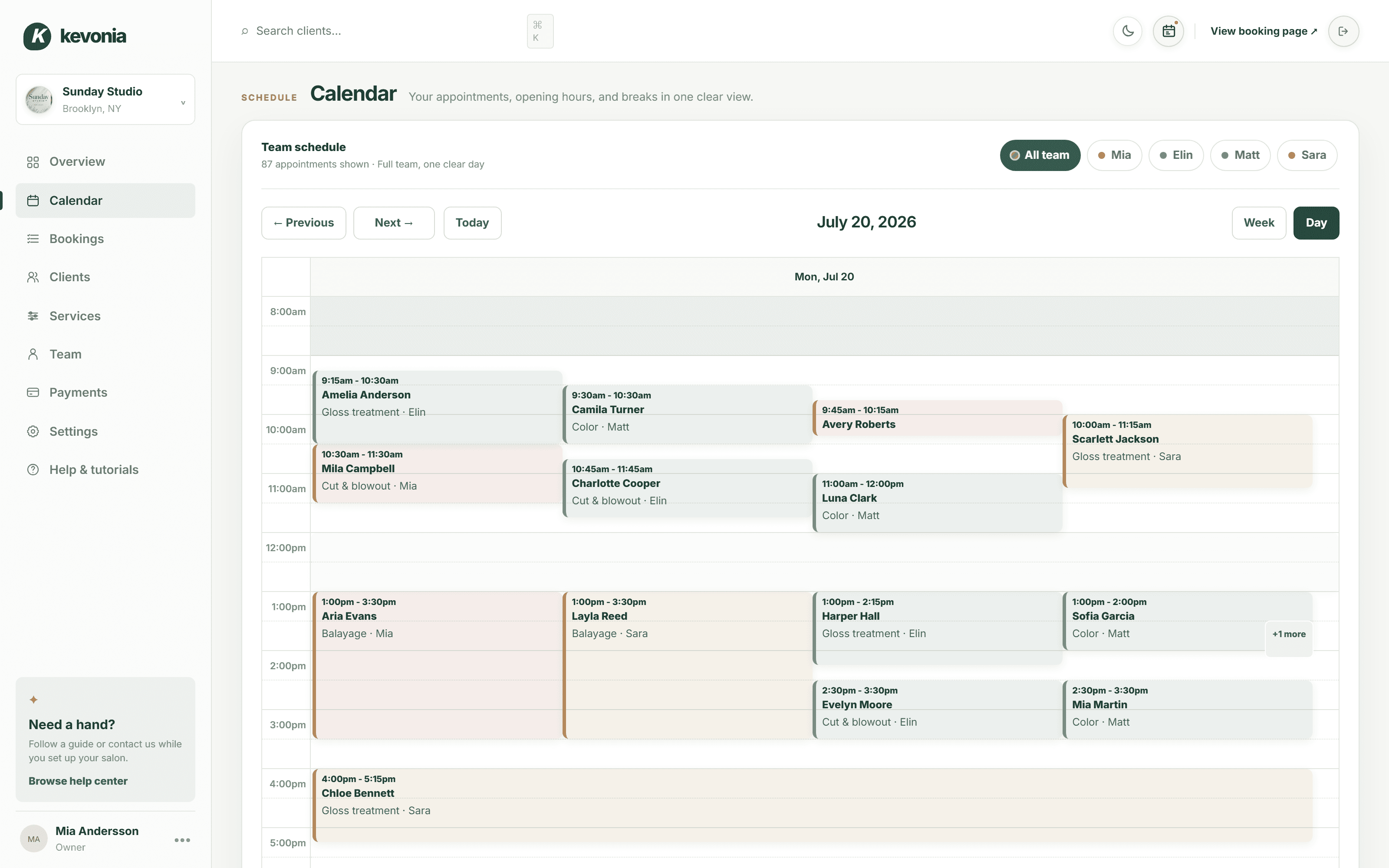
If your main concern is scheduling rather than marketing, Kevonia fits this lighter approach. Its branded online booking page is open 24/7, and clients choose a service, professional, date, and time. The same workspace includes a team calendar, client records, service menu, availability rules, and Stripe payments, so you are not adding a separate website project just to make appointments available online.
Salon website or Instagram: which one should you prioritize?
Instagram is useful for showing your work, personality, transformations, and current activity. It is often where potential clients first notice a stylist or salon. But it is not a complete replacement for a website because customers may still need stable information about pricing, policies, location, service suitability, and how to book.
Think of Instagram as an attention channel and your website or booking page as the place where the decision gets completed. A customer may discover a balayage result in a post, visit your profile, check your hours in Google, review services on your site, and then book. Each step should lead to the next one without requiring the customer to send a direct message and wait.
- Keep your profile link pointed to one current destination rather than several confusing options.
- Use captions and profile text to explain who the service is for, not only what the finished look resembles.
- Do not publish prices or appointment lengths in social posts if those details frequently change unless you also update the booking destination.
- Add a direct booking path to your Google Business Profile where available. Google allows businesses to add booking links or connect eligible booking providers.
- Use your website for durable information and Instagram for fresh work, announcements, and visual proof.
If you are deciding between the two, do not frame it as an either-or choice. Set up the simplest reliable booking destination first, then use Instagram to send interested people there. Once you know which questions and services generate demand, build website content around those patterns.
What a salon website actually needs in 2026
Most salon owners do not need a complex website at launch. They need a site that answers the questions a new client has before spending money or traveling to the appointment. Start with the following core pages or sections.
- Home: State the salon name, location, specialty, primary services, and the next action you want visitors to take.
- Services and pricing: Show enough detail for customers to choose correctly. Include starting prices only if you explain what can change the final price.
- Team: Introduce each professional, the services they perform, and any useful specialties or experience.
- Booking: Put the booking button near the top and repeat it after service information. Do not make customers hunt for it.
- Policies: Explain deposits, late arrivals, cancellations, no-shows, children or guest rules, consultations, and refunds in plain language.
- Location and contact: Include the address, parking instructions, hours, phone number, and the fastest way to ask a question.
- Portfolio: Use clear, current photos with permission. Organize them by service if your work covers very different categories.
- Accessibility and privacy information: Make the site usable on a phone, readable with sufficient contrast, and clear about how customer information is handled.
The site should load well on a phone because many appointment decisions happen between errands, during a commute, or after seeing a social post. Use descriptive page titles, clear headings, readable text, and useful image descriptions. Google’s guidance emphasizes that websites should be understandable to users and search engines, useful rather than stuffed with repeated keywords, and maintained as information changes.
Do not wait for perfect photography or a long brand story. A clean page with accurate service information, a working booking button, and clear policies is more useful than a visually impressive site with missing prices or broken links.
How Kevonia fits if you need booking more than marketing
Kevonia is a practical option for a salon that needs a professional booking destination and organized appointment operations, but does not want to build a separate full marketing website first. It provides a branded page at kevonia.com/your-salon where clients can book online at any time. The flow asks them to choose the service, professional, date, and time based on the rules you set.
The difference is that Kevonia is not only a public booking link. Behind it is a workspace with a week and day team calendar, per-professional filters and color coding, client records, a service menu, availability rules, and Stripe card payments. You can set service durations, cleanup or buffer time, prices, optional deposits, professional assignments, breaks, time off, salon closures, minimum notice, booking windows, and time-slot intervals.
That matters when the reason you are considering a website is really scheduling friction. For example, a three-person salon may not need a ten-page site yet, but it does need protection against two clients selecting the same stylist at the same time. Kevonia checks availability against hours, breaks, time off, and existing bookings before allowing a booking. Client records also keep private notes and visit history searchable by name, email, or phone.
Kevonia has one plan at US$49.99 per month with unlimited team members, bookings, clients, and services, plus 0% per-booking commission. The trial is free for 14 days, no credit card is required to start, and you can cancel anytime before the trial ends without being charged. This makes it a way to test the booking side of your online presence without committing to a large website build.
It is important to be precise about the fit. Kevonia does not currently replace every type of salon website or business system: it does not offer multi-location management from one account, retail or inventory POS, marketing or SMS campaign tools beyond the booking reminder email, or a native mobile app. You may still want a separate website for brand storytelling, search-focused service pages, e-commerce, detailed portfolios, or location-specific content.
A simple decision process for your salon
Use this process to decide what to build now instead of buying the most elaborate option available.
- Write down the top five questions new clients ask before booking. If most are about services, pricing, location, policies, or team specialties, a website will help. If most are about available times, prioritize booking software.
- Count how many appointment requests arrive outside business hours. If customers regularly ask to book at night or on weekends, a 24/7 online booking page can address a direct revenue and convenience problem.
- Review your current online information. Search your salon name and compare Google, Instagram, your booking link, and any directory listings. Note conflicting hours, missing services, old prices, or outdated staff information.
- Estimate the value of one additional appointment per month. Compare that with the monthly cost and maintenance time of the website or booking system you are considering.
- Choose the smallest setup that solves the biggest problem. Do not pay for a large site if your immediate need is reliable scheduling, and do not expect a booking page alone to build a specialty brand.
- Set a review date. After 30 to 60 days, look at inquiries, bookings, no-shows, frequently viewed services, and questions customers still ask.
For a new independent stylist, the answer may be different from the answer for a growing salon. A solo operator may begin with a branded booking page, Google Business Profile, and social portfolio. A salon hiring several professionals may need both a website and a booking system because clients need education while the team needs shared availability and consistent rules.
Common website mistakes salon owners should avoid
A website can help, but only if it reduces uncertainty and effort. These mistakes make a site expensive without making it useful.
- Making the homepage a slideshow with no clear service, location, or booking information.
- Hiding prices completely when customers need at least a starting point to decide whether the salon fits their budget.
- Listing every service in one long menu without explaining duration, maintenance, consultation requirements, or who should choose it.
- Using a booking form that allows requests but does not clearly show whether the appointment is confirmed.
- Publishing policies in vague language that creates disputes about deposits, cancellations, late arrivals, or refunds.
- Using old team photos, former employee biographies, expired promotions, or unavailable services.
- Sending visitors to a different platform for every action: one link for services, another for booking, another for policies, and a direct message for questions.
- Assuming a website automatically creates search traffic. Search visibility takes useful content, accurate business information, technical accessibility, and ongoing maintenance; no page is guaranteed a top position.
- Building for desktop first and discovering later that the booking button, service menu, or checkout is difficult to use on a phone.
Your website should also support the front desk rather than create another source of truth. If a service is unavailable, a professional changes hours, or a policy changes, update the information everywhere customers can find it. A booking system with controlled services and availability can reduce some of this maintenance, but it does not eliminate the need to review your public information.
What should you do first?
If you currently have no online booking destination, start there. Create or claim your Google Business Profile, confirm your address and hours, add current photos, and connect customers to one accurate booking path. Google allows eligible businesses to add booking links or use a booking provider, which can reduce the number of steps between discovery and appointment selection.
If you already have booking but little information about your salon, build a one-page website around the questions that stop people from booking. Add your service categories, starting prices or pricing guidance, team specialties, location details, policies, and a prominent booking button. You can expand later into separate pages for high-value services. For more detail, see Kevonia's salon reservation software.
If your current problem is missed calls, double bookings, manual reminders, or deposits handled inconsistently, solve the operational problem before investing in design. Kevonia can centralize the booking page and calendar, send an automatic email reminder the day before an appointment, allow clients to reschedule or cancel within your notice window, and process card payments or deposits through Stripe.
The practical answer to “does my salon need a website” is therefore conditional: you need a trustworthy online destination, but you can choose the format based on your current bottleneck. Start with accurate information and an easy booking path. Add a fuller website when search visibility, education, differentiation, or client confidence justifies the extra content and maintenance.
Sources
- Google Business Profile Help: Get started with Google Business Profile
- Google Business Profile Help: Set up bookings through a provider
- Google Search Central: Establish your business details with Google
- Google Search Central: SEO Starter Guide
- Kevonia
- Kevonia beauty salon booking software
- Kevonia salon booking program
- Kevonia salon reservation software
- Kevonia spa booking software
- Going Independent as a Hairstylist: A Practical 2026 Guide
Frequently asked questions
Do I need a website for my salon if I already use Instagram?+
Not always, but Instagram should not be your only source of important information. Keep your services, prices or pricing guidance, policies, location, hours, and booking path somewhere stable. Instagram is excellent for showing current work and attracting attention; a website or branded booking page is better for information customers need to revisit.
Can a booking page replace a salon website?+
It can replace a full website temporarily if your main need is appointment scheduling. A good booking page can show services, professionals, prices, durations, availability, and booking rules. It will not necessarily replace content about your brand, portfolio, specialties, parking, detailed aftercare, or search-focused service pages. Use a booking page first when operations are the urgent problem, then add a website when marketing and education become more important.
What should be on a salon website before I launch it?+
At minimum, include the salon name and location, hours, contact method, core services, pricing or starting-price guidance, team information, booking instructions, cancellation and deposit policies, and current photos. Test every page on a phone. Have someone unfamiliar with the salon try to find the booking button and understand what appointment to choose.
Will having a website make my salon rank first on Google?+
No. A website makes it possible to publish useful, search-readable information, but it does not guarantee a ranking. Google recommends clear, useful, well-organized, up-to-date content and accurate business details. Local visibility also depends on your Business Profile, relevance, prominence, customer experience, and competition in your area.
Is Kevonia a website builder for salons?+
Kevonia provides a branded online booking page plus a salon and spa management workspace. It is designed for booking and appointment operations, with a team calendar, client records, service menu, availability rules, Stripe payments, reminders, and related booking controls. It is not a general-purpose marketing website builder, so you may still want a separate site for extensive brand content, portfolios, SEO pages, or e-commerce.
How much should a small salon spend on its online presence?+
There is no universal number. Compare the cost with the problem you are solving and the value of one or two additional appointments, fewer no-shows, or less administrative work. Start small, keep the information accurate, and avoid paying for features you will not use. Kevonia has one US$49.99-per-month plan, with a free 14-day trial that does not require a credit card to start.
More from the blog

Does a Salon Need a Receptionist? A Practical 2026 Guide
A salon does not automatically need a receptionist. Use this practical guide to decide whether front-desk help, shared duties, or online booking is the right fit for your business.

Using Google Calendar for Salon Bookings: Where It Works and Where It Breaks
Google Calendar can handle simple appointment scheduling, but salons often outgrow it when they need services, staff rules, deposits, reminders, and client records in one place.

Boulevard Alternative: Compare Cost, Complexity, and Fit
Boulevard is powerful, but its pricing and broader feature set may be more than a small salon needs. Compare it with Kevonia by cost, workflow, and operational fit.