How to Write an Appointment Reminder Email for Salons in 2026
A practical guide to writing salon appointment reminder emails with ready-to-use templates, timing advice, compliance tips, and automation options.
Key takeaways
- Send a short, useful reminder with the client’s service, professional, date, time, location, and next step.
- Use the reminder to make cancellation and rescheduling easy before the appointment window is lost.
- Keep appointment reminders separate from promotions, and follow email, privacy, and deliverability basics.
- Automate the day-before reminder so every client receives consistent information without adding front-desk work.
- Track missed appointments, late cancellations, and reschedules to improve your reminder process over time.
What should an appointment reminder email for salons say?
If you searched for an appointment reminder email for salons, you probably need two things: wording you can use immediately and a reliable way to send it without manually checking tomorrow’s calendar. The best reminder is not a sales email. It is a short operational message that helps a client remember the booking, arrive prepared, or tell you early that the appointment no longer works.
This guide explains what to include, when to send it, how to handle cancellations and deposits, and when automation makes more sense than copying and pasting emails. The examples work for hair salons, barbershops, nail salons, spas, esthetician studios, lash studios, tattoo studios, and similar appointment-based businesses.
Build the reminder around the details clients need
A client should be able to open the email and answer five questions immediately: What service did I book? Who am I seeing? When is it? Where do I go? What should I do if I cannot make it? Put those answers near the top instead of burying them beneath a greeting, policy paragraph, or promotion.
- Client’s first name, if your system has it
- Salon or studio name
- Service name, including important variations such as haircut and blowout or gel manicure removal
- Professional’s name, when the client selected a specific team member
- Appointment date and time, including the time zone if you serve travelers or operate near a time-zone boundary
- Salon address and any parking, entrance, or check-in instruction that prevents confusion
- Expected duration when it helps the client plan the rest of the day
- A clear way to reschedule or cancel before your notice deadline
- Deposit, preparation, or late-arrival information that applies to this booking
- A reply address or phone number for questions that cannot be handled through a booking link
Use plain language and the exact service name from the booking. “Your appointment” is less useful than “60-minute balayage with Jordan.” For a spa or med spa, do not add sensitive personal details that are unnecessary for attendance. Include only what the client needs to identify and manage the appointment.
A practical salon appointment reminder should also make the next action obvious. If the appointment is correct, the client may not need to do anything. If plans changed, the email should direct the client to reschedule or cancel rather than leaving them to search your website or call during a busy service.
Use this salon appointment reminder email template
The following template is deliberately compact. Replace the bracketed fields with booking information, then adjust the policy language to match your actual salon rules. Do not promise a refund, waived fee, or service change unless your policy allows it.
Subject: Reminder: [Service] with [Professional] on [Day, Date] at [Time]
Hi [First Name], This is a reminder of your appointment at [Salon Name]. Service: [Service Name] Professional: [Professional Name] Date: [Day, Date] Time: [Time] Location: [Salon Address] Please arrive [arrival instruction, such as ad 10 minutes early]. If you need to make a change, use the reschedule or cancel option below before [notice deadline]. [Reschedule appointment] [Cancel appointment] Questions? Reply to this email or call [phone number]. We look forward to seeing you, [Salon Name]
If your salon does not provide button-style links, use descriptive text such as “Reschedule your appointment” and “Cancel your appointment.” The important point is that the client can act without explaining the entire situation to a receptionist. A direct path to a legitimate change reduces avoidable back-and-forth and gives your team more time to refill an open slot.
For a shorter appointment reminder message for salon bookings, remove anything that does not help the client attend or manage the booking. A short message is especially appropriate for repeat clients who already know your address and arrival routine. Keep the full details available when the appointment is new, unusually long, high value, or dependent on preparation.
Choose the right timing and reminder schedule
For most salons, a day-before reminder is a strong default because it is close enough to prompt action but early enough for the client to cancel or reschedule within the salon’s notice window. It also gives you a realistic chance to contact a waitlist client or reopen the time for online booking. Supporting details are available from appointment reminder research.
Research on healthcare appointments is not identical to salon scheduling, so it should not be treated as a guaranteed salon result. However, systematic reviews consistently find that reminder systems can improve attendance, while also helping people cancel or reschedule unwanted appointments. That supports a practical salon principle: make the reminder useful, and make the change process easy. Supporting details are available from systematic review of reminder systems.
- At booking: Send or display a confirmation with the service, date, time, professional, location, and policy. This is not a substitute for the later reminder.
- Several days before: For long, expensive, first-time, or preparation-heavy services, consider an additional confirmation process if your staffing and software support it.
- The day before: Send the main reminder with the appointment details and reschedule or cancel instructions.
- After a late cancellation or no-show: Record what happened and follow your written policy consistently. Do not use the reminder email to shame the client.
- After the appointment: Send a separate follow-up or marketing email only if it is appropriate and permitted. Do not turn every transactional reminder into a promotion.
If you send more than one reminder, give each message a distinct job. The first confirms the booking. The second prompts attendance. A third message should be reserved for situations where the extra contact is justified, such as a first appointment with preparation requirements or a booking made far in advance. Repeating the same email too often can train clients to ignore it. Supporting details are available from reminder systems guidance.
Set the send time according to the appointment time and the client’s local time whenever possible. A reminder for a 7:00 a.m. appointment should not arrive at 1:00 a.m. If your system cannot handle time zones, use the salon’s local time and state the time zone clearly for clients who may be booking from elsewhere.
Separate reminders from promotions and policies
The primary purpose of a reminder is to facilitate an appointment that already exists. Avoid placing a “20% off retail” banner, referral offer, newsletter signup, or unrelated service promotion above the booking details. Promotional content can distract from the action the client needs to take and may change the compliance obligations for the message. Supporting details are available from FTC guidance on commercial email.
In the United States, the Federal Trade Commission distinguishes transactional or relationship content from commercial email based on the message’s primary purpose. A reminder that confirms or manages an agreed appointment is different from an email primarily advertising a service. If you combine the two, the promotional material can affect how the message is treated, so keeping them separate is the safer operational choice. Supporting details are available from CAN-SPAM compliance guide.
- Use an accurate sender name, such as “Oak Street Salon,” rather than a vague or misleading label.
- Write a subject line that describes the appointment instead of implying an unrelated conversation or urgent offer.
- Use the salon’s real reply address or provide another monitored contact method.
- Include your physical business address when the message is commercial or contains promotional material and your compliance setup requires it.
- Provide a clear opt-out method for marketing email. Do not assume that an existing client relationship eliminates marketing-email requirements.
- Keep the appointment details at the beginning when the message’s purpose is appointment management.
This is general business guidance, not legal advice. State laws, privacy obligations, and the details of your email provider can affect the right setup. If your reminder includes medical information, treatment information, or other sensitive data, get advice specific to your business and avoid putting unnecessary details in the subject line.
Improve delivery so the reminder reaches the inbox
A perfectly written reminder does not help if it lands in spam. Use a consistent sender identity, monitor replies and bounces, and test the message with Gmail, Outlook, and at least one mobile email app. Ask staff to report when clients say they never received the reminder, then check whether the address was entered incorrectly or the message was filtered.
Google’s current sender guidance recommends email authentication such as SPF or DKIM for domains sending to Gmail accounts. It also advises senders to maintain accurate technical records, use secure transmission, and avoid practices that generate spam complaints. If you send through a booking platform, confirm what domain sends the message and whether your salon domain needs DNS records configured. Supporting details are available from Google’s email sender guidelines.
- Use a recognizable From name and a monitored reply-to address.
- Keep the subject specific: “Reminder: haircut with Alex tomorrow at 2:00 PM.”
- Do not use excessive punctuation, all caps, or a subject line that hides the appointment purpose.
- Make the essential details readable without requiring images to load.
- Check every link on desktop and mobile before activating the workflow.
- Use your salon’s domain consistently when your email provider supports it.
- Review bounce and spam reports instead of repeatedly sending to addresses that fail.
For a small salon, deliverability problems often start with process problems: a receptionist types an address incorrectly, a client uses an old email, or a booking form accepts a typo without confirmation. Ask clients to verify their email at booking and give staff a simple way to correct contact details in the client record. We cover this in more depth in client records for a salon.
Handle cancellations, rescheduling, deposits, and edge cases
A reminder should protect the appointment without creating an argument. State the deadline plainly: “Changes made less than 24 hours before the appointment may be subject to our cancellation policy.” Use your real deadline, not a generic rule. If your policy differs by service, show the relevant rule for that booking or link to the complete policy.
When a client has paid a deposit, explain what happens if they cancel, reschedule, or do not attend. For example, you might say that the deposit is applied to the service when the appointment is completed, or that it is retained for changes made inside the notice window. Only include terms your business actually follows, and make sure the booking record shows the amount and condition clearly. We cover this in more depth in taking deposits for salon appointments.
- New client: Include the address, arrival time, parking or entry details, and any required preparation.
- Long service: Mention the approximate duration and whether the client should allow extra time afterward.
- Multiple services: List each service in order so the client does not arrive expecting only the first item.
- Specific professional: Name the professional and make clear whether another team member may be substituted.
- Child or guest policy: Include it only when it affects whether the appointment can proceed.
- Late arrival: Explain what may happen if the client arrives late, especially when the service has a fixed end time.
- Appointment made by staff: Send the same confirmation and reminder as an online booking so the process is consistent.
- Client asks to change by reply: Have a person monitor replies, or tell the client exactly how to reach the salon.
Do not treat a cancellation as a failure. A client who cancels with notice has given you useful information and may have created an opportunity to fill the slot. Your tone should make responsible changes easy while still making the consequences of a late cancellation understandable.
Where Kevonia fits into the reminder process
Kevonia is useful when the problem is not just writing the email but keeping the booking details, availability, and reminder workflow connected. It provides a branded online booking page at kevonia.com/your-salon, where clients choose a service, professional, date, and time, plus a workspace with a team calendar, client records, service menu, and availability rules.
For reminders specifically, Kevonia automatically sends an email reminder the day before an appointment. The client can reschedule or cancel from that email within the salon’s notice window. That is different from keeping a reusable template in a document: the message is connected to the booking rather than relying on staff to copy the correct date, service, and professional into an email.
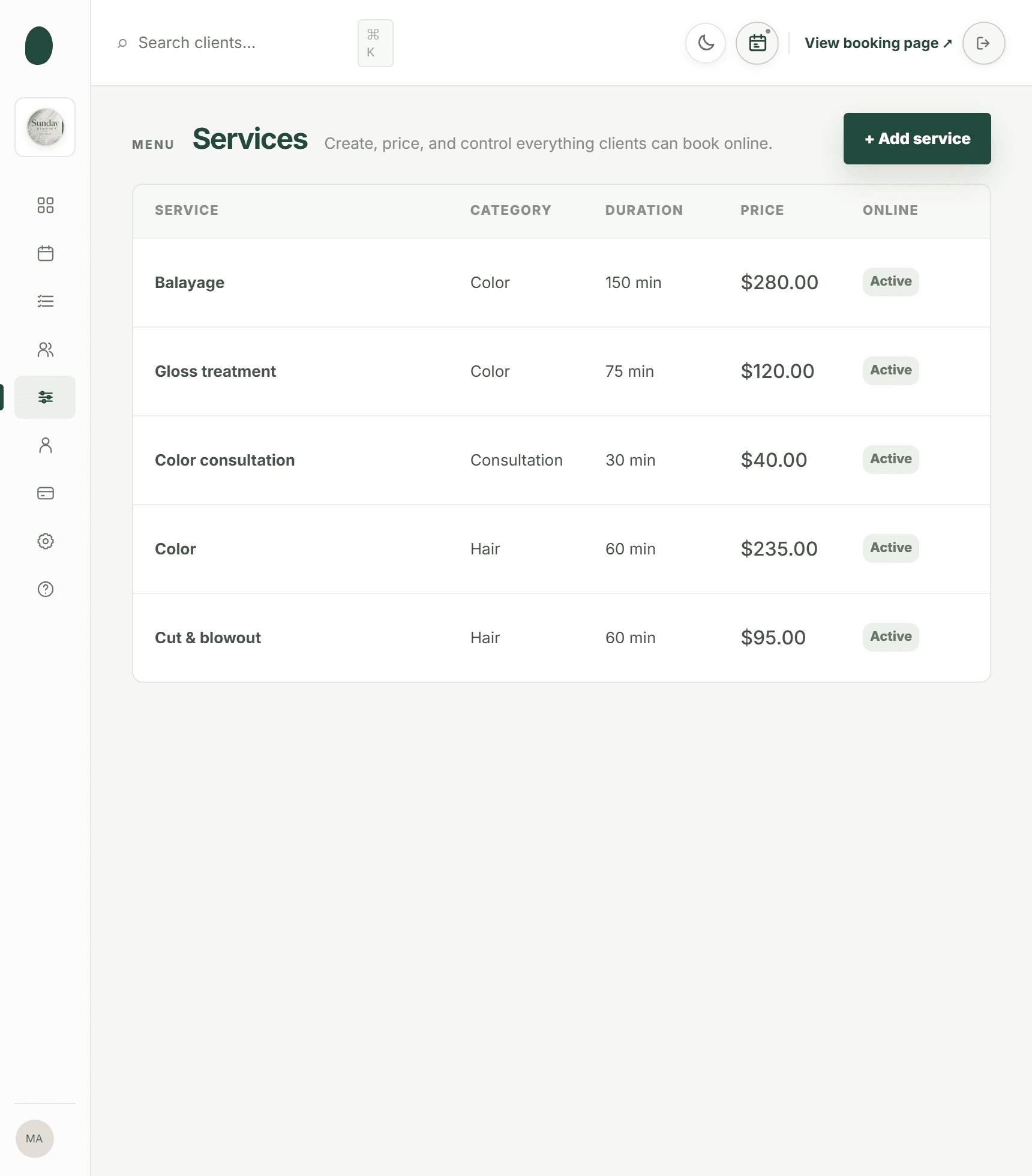
Kevonia also checks for double bookings against hours, breaks, time off, and existing bookings. Its service menu supports duration, cleanup or buffer time, price, optional deposits, and professional assignment. Those details matter because a reminder is only as trustworthy as the appointment behind it. If a service takes 90 minutes but the calendar treats it as 60, a clear reminder will not fix the scheduling problem. For more detail, see Kevonia's salon reservation software.
The product is intentionally specific about what it does. Kevonia offers email reminders for appointments, not SMS campaigns or general marketing automation. It also does not currently provide a native mobile app, retail or inventory POS, or multi-location management from one account. For a single salon, spa, barbershop, tattoo studio, or similar appointment-based business that wants online booking, team scheduling, client records, payments, and a day-before email reminder, that scope may be enough.
Kevonia has one plan at $49.99 per month with unlimited team members, bookings, clients, and services, with no per-booking commission. The free trial lasts 14 days, requires no credit card to start, and can be canceled anytime before the trial ends without being charged. Evaluate it against the actual workflow in this article: create a test booking, confirm the service and professional details, review the availability rules, and inspect the day-before email before moving clients onto the system.
Audit your reminder system every month
Do not judge reminders only by whether the email was sent. Review whether the right details were present, whether clients could act on the message, and whether the salon recovered time when plans changed. A monthly audit can reveal that your reminder is working technically but failing operationally.
- Review a sample of completed bookings and compare the reminder details with the calendar.
- Check whether service names, professional names, dates, times, and addresses are accurate.
- Look for cancellations and reschedules after the reminder. These are not automatically negative; they may represent appointments that would otherwise have become no-shows.
- Compare late cancellations and no-shows by service, professional, day of week, and booking lead time.
- Ask front-desk staff which questions clients still ask after reading the email.
- Test every reschedule and cancel path from a client’s perspective.
- Remove outdated policy language, parking instructions, holiday hours, and staff names.
- Check whether new clients need more preparation information than repeat clients.
- Review whether promotional content has crept into a message intended to manage an appointment.
Use the results to make one change at a time. You might improve the subject line, add a parking note, clarify the cancellation deadline, or correct the service duration. Then review the next month’s data before making another major change. This keeps the reminder process practical instead of turning it into a collection of guesses.
The goal is not to send the longest email or the most reminders. The goal is to give the client accurate information at the moment it can still change the outcome, while giving your salon enough visibility to protect its schedule.
Sources
Frequently asked questions
What is the best subject line for an appointment reminder email for salons?+
Use a subject line that states the purpose and the key appointment details, such as “Reminder: haircut with Alex tomorrow at 2:00 PM.” If the appointment is more than a day away, use the date instead of “tomorrow.” Avoid vague subjects such as “Important information” or promotional subjects that hide the booking details.
How far in advance should a salon send an appointment reminder email?+
A day-before reminder is a practical default for many salons because it is close enough to be useful and may still fall inside the cancellation or rescheduling notice window. For first-time, long, expensive, or preparation-heavy services, you may also send an earlier confirmation or reminder. Give each message a distinct purpose rather than repeating the same email.
How do I remind clients of appointments without sounding pushy?+
Write the message as a service, not a warning. State the booking details, provide arrival instructions, explain the change deadline, and offer a simple way to reschedule or cancel. Avoid guilt-inducing language, excessive exclamation points, and unrelated promotions. A client who gives notice has helped you protect the schedule.
Should a salon appointment reminder include the cancellation policy?+
Yes, but keep it brief and specific to the booking. State the deadline and the consequence that actually applies, such as a retained deposit or cancellation fee. Do not paste a long policy into every message if a concise explanation and a link to the full policy are clearer. Make sure your staff applies the stated policy consistently.
Can I include promotions in a salon appointment reminder email?+
It is usually better to keep the reminder focused on the existing appointment and send promotions separately. A promotional section can distract from the date, time, or rescheduling action and may change the message’s commercial purpose. If you do include marketing content, review your email compliance requirements and provide the required opt-out information.
Does Kevonia send appointment reminder emails automatically?+
Yes. Kevonia automatically sends an email reminder the day before an appointment. Clients can reschedule or cancel from that email within the salon’s notice window. Kevonia does not currently offer SMS campaigns or broader marketing tools beyond the booking reminder email, so it is best suited to salons that want an automated email reminder connected to their online booking and calendar workflow.
More from the blog
How to Write a Salon Booking Confirmation Email in 2026
A salon booking confirmation email should remove uncertainty, not create more work. Use this practical guide to write clear confirmations that clients can trust and act on.
How to Write Salon Service Descriptions That Get Booked
A practical guide to writing salon service descriptions that make clients feel confident, choose the right appointment, and book without calling your front desk.

How to Take Deposits for Salon Appointments in 2026
A practical guide to choosing deposit amounts, writing your policy, collecting payment online, and handling cancellations, refunds, and no-shows.