How to Close Your Salon for a Holiday Without Losing Clients
A holiday closure takes more than putting a note on the door. Use this practical checklist to protect appointments, payments, staff, and your first week back.

Key takeaways
- Choose exact closure and reopening dates before changing your booking calendar or public hours.
- Contact every affected client directly, especially anyone with a deposit, prepaid service, or time-sensitive appointment.
- Block online bookings across every channel, then verify the closure as a customer would see it.
- Plan payroll, refunds, deposits, security, cleaning, and the first week back before you lock the door.
- Use a booking system with closure dates, availability rules, client records, and payment details in one place.
The safest way to close your salon for a holiday
If you are searching for how to close your salon for a holiday, the real question is usually not whether you can take time off. It is how to stop new appointments, handle bookings that already exist, communicate the dates clearly, and return without a week of angry calls or empty gaps.
Treat the closure as a short operational project rather than a single social media announcement. Set the dates, audit the calendar, update every public channel, settle payment questions, and create a reopening plan before the last client leaves.
1. Decide exactly what the holiday closure means
Start by writing down four dates: the last day you will take clients, the first fully closed day, the last closed day, and the first day appointments resume. Do not describe the closure as “closed between Christmas and New Year” if the team will work a partial day on either side. Clients need specific dates and times.
Also decide whether the closure applies to the whole business or only to certain professionals. A salon may be closed for in-person services while the owner answers urgent messages, or the salon may remain open for one day for prepaid gift-card consultations. Those are different schedules and should not be represented as a full closure.
- Choose the final service date and the first date you will accept appointments again.
- Decide whether online booking should reopen immediately or only after the team returns.
- Set a realistic response policy for calls, email, social messages, and emergencies while you are away.
- Check lease, insurance, alarm, building-access, and local requirements if the premises will be unattended.
- Write one short closure statement using the exact dates, reopening date, booking instructions, and response expectations.
A common mistake is to close the front desk but leave the booking page open. That creates appointments nobody has agreed to service. If you are closing for more than a few days, make the closure visible in your booking system and on your public business listings instead of relying on clients to notice a post.
2. Audit every appointment before announcing the closure
Do not announce the dates until you know how many appointments will be affected. Search the calendar from the first closed day through the day before reopening. Include appointments marked booked, awaiting payment, needs confirmation, or any other status your team uses. A client who received a confirmation email still considers the appointment real, even if a staff member has not confirmed it manually.
- List each affected client, service, professional, appointment date, deposit, and amount already paid.
- Flag color appointments, extensions, chemical services, bridal work, and other bookings that may be difficult to move into a smaller schedule.
- Identify clients who have another appointment immediately before or after the closure.
- Check whether any appointment is tied to a special event, travel date, school break, or gift-card deadline.
- Create a priority order for rescheduling instead of contacting clients randomly.
Contact affected clients before deleting or moving their appointments. Give them two or three useful choices: move to an earlier opening, move to the first available week after reopening, or receive the refund or credit allowed by your policy. If you move an appointment without asking, the new time may conflict with work, childcare, travel, or another service.
The priority order matters when the first week back is already busy. Start with clients who paid a deposit, clients with time-sensitive services, and clients whose appointments were booked furthest in advance. Then work through routine appointments. Keep a record of every attempted contact so a missed phone call does not become a dispute later.
Many holiday-closure checklists stop after telling owners to post an announcement. The step that prevents the most avoidable damage is the appointment audit: compare the calendar with deposits, prepaid services, and client constraints before you change anything. That is especially important when your salon closed for holidays bookings could otherwise remain active online.
3. Tell clients in the places they actually look
Use a consistent message everywhere, but do not depend on one channel. A client may see your Google listing before your Instagram post, while an existing client may only read an email reminder. Your notice should state the last appointment date, closure dates, reopening date, whether online booking remains available, and how to handle an existing appointment.
- Email clients with appointments affected by the closure.
- Add a notice to your website and online booking page.
- Update your Google Business Profile with special hours.
- Post the dates on your primary social channels and pin the announcement where possible.
- Put a printed notice on the door and front window before the final service day.
- Update your voicemail greeting and automatic email reply.
- Tell neighboring businesses or building management if clients may arrive during the closure.
Google recommends using special hours when a business temporarily changes its schedule or closes for up to six consecutive days. For a closure of seven days or longer, Google says to use the temporarily closed option instead. Check the profile as a customer after saving; the owner view can look correct while Search or Maps still shows the old hours.
For a longer closure, publish one reminder shortly before the last service day and another message on the reopening day. Keep the wording practical rather than promotional. Clients mainly need to know whether they can book, when replies resume, and what happens to an appointment that falls inside the closure.
4. Stop new bookings without blocking the wrong dates
The booking calendar needs a deliberate closure entry, not a vague reduction in availability. Block every closed date for every professional who will be away. Include cleanup time, team meetings, travel days, and the first morning back if the salon will need time to restock and reset before accepting clients.
If only one professional is traveling, block that person’s availability rather than closing the entire salon. If the whole team is away, check the customer-facing booking page from an incognito window or a separate device. Try booking the last open day, each closed day, and the first reopening day. This catches date-range and time-zone mistakes that are easy to miss in the owner calendar.
- Add the closure dates to the salon’s availability or closure settings.
- Block individual staff time off if the closure does not apply to everyone.
- Check recurring appointments that might bypass the normal availability view.
- Review the booking window and minimum-notice settings for the first week back.
- Test the page as a client and confirm no closed-day slot can be selected.
- Make sure the first reopening day has the correct hours for every professional.
Do not simply hide the booking link unless you have a reason to stop all future bookings. Many salons want to remain bookable during the holiday while preventing appointments on the closed dates. A better setup is to block the closure and leave valid future availability visible, with a notice that replies may be delayed.
5. Handle deposits, prepaid services, and cancellations clearly
A closure does not automatically answer what happens to money already collected. Review every affected deposit and prepaid appointment individually. If the salon canceled the appointment because it will be closed, explain the available options before applying your normal late-cancellation policy. A policy written for a client-initiated cancellation may not fit a salon-initiated closure.
- Offer a new appointment date when the client wants to continue with the service.
- Apply the deposit to the replacement appointment only when the client agrees.
- Refund money when your policy or local requirements call for a refund.
- Explain whether a promotional price, gift card, or package deadline changes after rescheduling.
- Keep the original appointment and communication history rather than deleting the record.
If you use Stripe, refunds are sent back through the original payment method, and Stripe notes that customers commonly see card refunds after several business days depending on the bank. Stripe also explains that the original payment-processing fees may not be returned, so include that cost in your closure cash-flow plan rather than assuming every dollar collected will come back to the salon.
Do not promise an instant refund just because you initiated it. Send the client a written confirmation with the refund amount, date submitted, and any reference available. If a client disputes a charge instead of contacting the salon, the payment processor may debit the disputed amount while the case is reviewed, so preserve the booking confirmation, closure notice, refund record, and client messages.
6. Give your team a written closure plan
Staff should not have to guess whether the closure is paid time off, unpaid time off, vacation time, or a mixture. Put the arrangement in writing, including the last working shift, expected return time, payroll deadline, and who handles urgent client messages. If you have employees, confirm the plan against state and local rules, employment agreements, and your existing leave policy.
U.S. federal wage law generally does not require private employers to pay for time not worked, including holidays or vacations, but that does not replace your own written policy or state requirements. The U.S. Department of Labor also emphasizes accurate records of hours worked and wages paid. Treat pay decisions as an HR and payroll issue, not as an informal holiday favor.
- Confirm who is off and who, if anyone, is monitoring messages.
- Set the final payroll and commission-reporting deadline before the closure.
- Tell staff where to record rescheduled appointments and client credits.
- Assign responsibility for alarms, keys, mail, deliveries, plants, and building access.
- Record any equipment that must be powered down, cleaned, secured, or left running.
- Decide who can approve a refund or emergency response while the owner is away.
For a salon with independent contractors, document the closure notice and any calendar changes separately from employee instructions. The operating relationship may be different, but clients still need one consistent answer about dates, bookings, and payments.
7. Close the physical salon, not just the calendar
The final day should include a shutdown checklist. Closing the online calendar while leaving color, chemicals, cash, personal data, or expensive tools unsecured creates a different kind of holiday problem. Assign each task to a named person and require a photo or sign-off for anything that matters.
- Reconcile the register, card terminal, tips, deposits, refunds, and outstanding balances.
- Secure client records, consent forms, keys, cash, gift cards, and payment equipment.
- Check refrigerators, towel storage, laundry, water supplies, and chemical storage.
- Dispose of waste and remove anything perishable or likely to create odors.
- Clean stations, sinks, bathrooms, floors, and high-touch areas before locking up.
- Test the alarm, confirm cameras or security procedures, and photograph the final condition.
- Place the closure notice where it cannot be missed from outside.
If you are taking a longer break, schedule one mid-closure check for leaks, heating or cooling problems, deliveries, mail, and alarm notifications. The person checking the salon should know what they are authorized to do and whom to call if there is damage or a safety issue.
8. Reopen in a controlled way
The first day back should not be treated as a normal day if the team has been away for a week or more. Leave enough time to inspect the premises, restock, review messages, confirm the calendar, and resolve payment questions before the first client arrives. Opening the door on time is not the same as being ready to deliver services.
- Verify the booking page, Google hours, voicemail, website notice, and social announcement.
- Review cancellations, rescheduling requests, and new bookings received during the closure.
- Confirm every first-day appointment with the assigned professional and correct service length.
- Check supplies, equipment, water, HVAC, laundry, lighting, and sanitation areas.
- Send a short reopening message to clients who were waiting for a response.
- Protect breaks in the first week so the team is not overloaded by rescheduled demand.
- Review no-shows and late cancellations separately from appointments the salon moved.
If the first week back is full, do not solve the problem by removing every buffer or break. A crowded reopening schedule increases lateness, service overruns, and staff burnout. Keep the availability rules that protect service quality, then offer a waitlist or later date to clients who cannot be accommodated safely.
Where Kevonia fits into a holiday closure
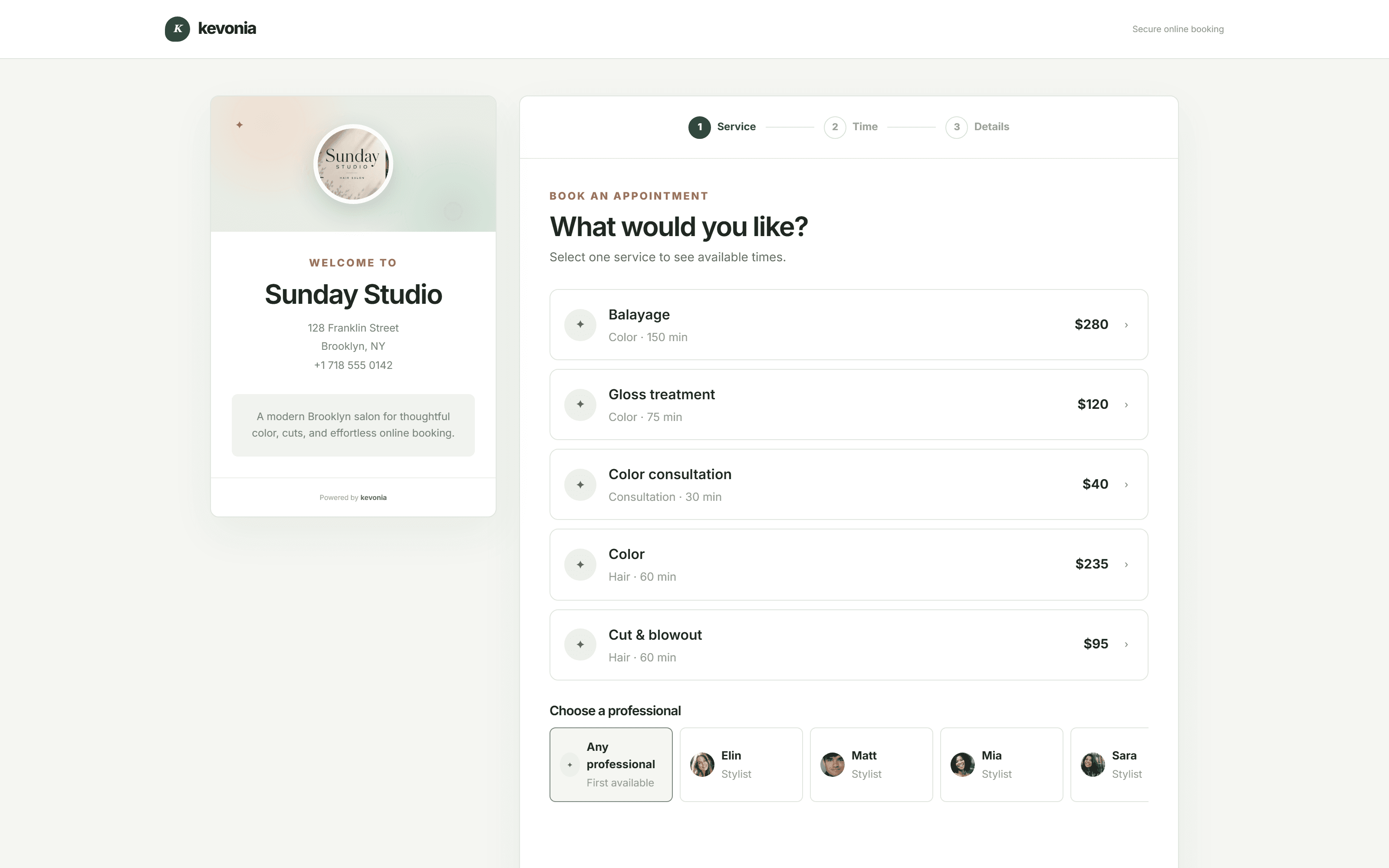
Kevonia is useful when you want the closure, appointments, staff availability, client records, and payments managed in one workspace. Its branded booking page stays open 24/7 for valid future availability, while the salon can set opening hours, breaks, staff time off, booking windows, minimum notice, time-slot intervals, and salon closures. The booking page lets clients choose a service, professional, date, and time.
For the closure itself, the important distinction is that you do not need to erase the calendar or manually answer every booking request. Add the closure dates, check the team calendar by professional, and test the public page. Kevonia’s double-booking protection checks hours, breaks, time off, and existing bookings, which helps prevent a closed-day or overlapping appointment from slipping through.
Kevonia also keeps client search, private notes, visit history, service details, deposits, and appointment statuses together. That makes it easier to identify who needs a personal message, see whether money was collected, and preserve the history when an appointment is moved. Online payments and deposits run through Stripe, and the salon can refund an online payment from the booking while seeing the Stripe processing fee shown on the refund.
The product is a single plan at US$49.99 per month with unlimited team members, bookings, clients, and services, and no per-booking commission. It includes a free 7-day trial with no credit card required to start; cancel anytime before the trial ends and you are never charged. For a small salon or spa, that can be a simpler fit than stitching together a calendar, client spreadsheet, payment screen, and separate booking page just for one holiday closure.
Sources
- Google Business Profile Help: How to set special hours
- Google Business Profile Help: Create and manage posts
- U.S. Department of Labor: FLSA FAQ
- Stripe Documentation: Refund and cancel payments
- Kevonia
- Kevonia spa booking software
- Kevonia salon booking program
- Kevonia salon reservation software
- Kevonia beauty salon booking software
- Kevonia hair salon booking software
Frequently asked questions
How far in advance should I announce a salon holiday closure?+
For a planned closure, announce the dates as soon as they are decided, then remind clients about two weeks before the final service day and again during the final week. Contact clients with affected appointments directly rather than expecting them to see a public post. If the closure is unexpected, contact booked clients first, update your booking page and Google listing, and explain whether you are rescheduling or refunding.
What should I do with appointments that fall during the closure?+
Do not silently delete them. Contact each client, offer an earlier appointment or a date after reopening, and explain what happens to any deposit or prepaid amount. Keep the original record and document the client’s choice. Give priority to clients with time-sensitive services, deposits, special events, or appointments booked furthest in advance.
Should I turn off online booking while the salon is closed?+
Usually, no. Block only the dates and staff who are unavailable, then leave valid future dates open if someone will not need to manually approve every booking. If no one can monitor bookings, add a clear delayed-response notice and confirm that the booking page cannot offer any closed-day slot. Test the page as a client before leaving.
How do I handle deposits when the salon cancels for a holiday?+
Offer to transfer the deposit to an agreed replacement appointment or refund it when your policy or applicable requirements call for a refund. Do not automatically apply a client-initiated cancellation rule to a salon-initiated closure. Tell the client the amount, method, and expected timing in writing, and keep the payment and communication record.
What should I put on my holiday closure notice?+
Include the last service date, every closed date, the reopening date, whether online booking remains available, when messages will be answered, and what clients with affected appointments should do. Avoid vague wording such as “closed for the holidays.” Exact dates reduce calls and prevent clients from arriving when the salon is unattended.
What is the difference between special hours and temporarily closed on Google?+
Google’s current guidance says special hours are for brief temporary changes or closures of up to six consecutive days. For a closure lasting seven days or longer, Google recommends marking the business temporarily closed. In either case, verify the public listing after saving because the customer-facing result is what matters.
More from the blog

How to Deal With a Difficult Salon Client in 2026
A practical 2026 guide to handling demanding, disrespectful, late, or nonpaying salon clients without losing control of the situation or your team’s trust.

Free Salon Consultation Appointments That Lead to Bookings
A free consultation should clarify the client’s goal, confirm what is safe and realistic, and make the next booking easy. Here is how to structure one without losing valuable appointment time.

Bring Lapsed Salon Clients Back Without Chasing Them
A practical plan for identifying genuinely lapsed clients, deciding who to contact, writing messages that feel personal, and turning one return visit into a new routine.